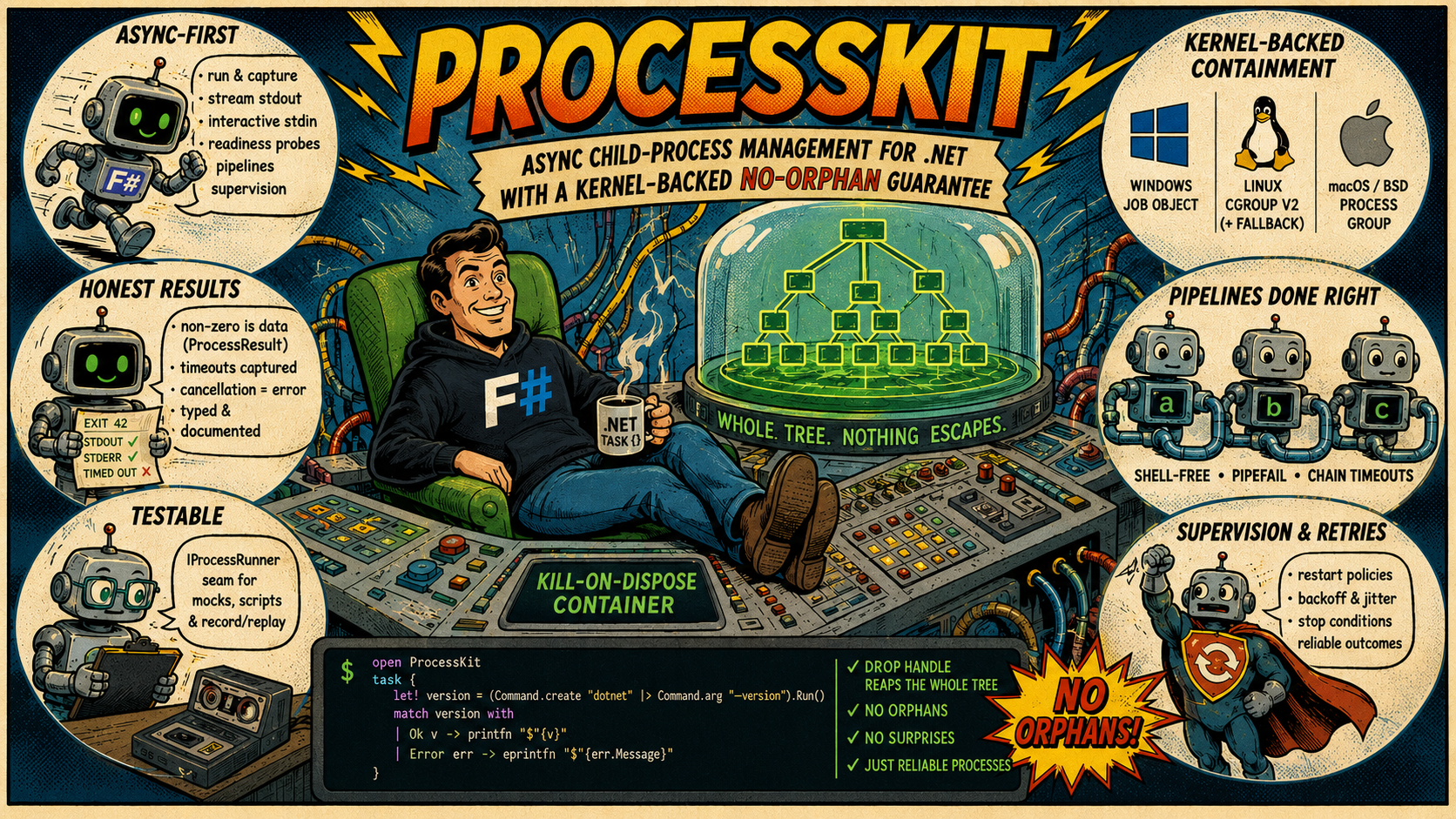



Async child-process management for .NET with a kernel-backed no-orphan guarantee: every
process you start — and everything it spawns — lives in a kill-on-dispose container (a
Windows Job Object, a Linux cgroup v2, the procctl(2) process reaper on FreeBSD, or a
POSIX process group), so no descendant ever outlives your program.
Beyond spawning a subprocess: run-and-capture, line streaming, interactive stdin, shell-free pipelines, readiness probes, timeouts & cancellation, supervision with restart/backoff, and a mockable runner seam for subprocess-free tests.
F#
task {
    match! (Command.create "dotnet" |> Command.arg "--version").RunAsync() with
    | Ok version -> printfn $"{version}"
    | Error err -> eprintfn $"{err.Message}"
}
C#
Console.WriteLine(await new Command("dotnet").Arg("--version").RunAsync() switch
{
    { IsOk: true, ResultValue: var version } => version,
    { IsOk: false, ErrorValue: var err }    => $"error: {err.Message}",
});
Why ProcessKit?
System.Diagnostics.Process reaches (at most) the direct child. The processes it spawned — a
build tool's compiler children, the real payload behind a wrapper (cmd /c …, sh -c …), a
test's helper servers — survive a timeout, an exception, or a dropped task, and keep running as
orphans.
ProcessKit spawns every child into the operating system's own containment primitive — a Job
Object on Windows, a cgroup v2 on Linux (with a process-group fallback), the procctl(2)
process reaper on FreeBSD, a POSIX process group on macOS and the other BSDs — so teardown is a
kernel operation over the whole tree, not a best-effort signal to one pid:
- Nothing escapes silently. Disposing the handle or group reaps every descendant,
grandchildren included. Where a mechanism has a genuine weakness (a
setsidchild escapes a POSIX process group), the activeMechanismis reported instead of pretending — never a silent downgrade. - Async-first. Run-and-capture, line streaming, interactive stdin, readiness probes,
shell-free pipelines, supervision — all return
Task<…>and stream asIAsyncEnumerable<…>. - Honest results. A non-zero exit is data (
ProcessResult) until you ask for success; a timeout is captured in the result; a cancellation is always an error; every platform divergence is typed or documented. - Testable. One interface seam (
IProcessRunner) swaps the real spawner for scripted doubles or record/replay cassettes — no subprocess in your tests.
OS-level containment mechanisms
ProcessKit uses the operating system's own kernel containment mechanism rather than app-level bookkeeping or best-effort signals to individual PIDs:
- Windows: a Job Object.
- Linux: cgroup v2 when resource limits are requested and available; otherwise a POSIX process group.
- FreeBSD: the
procctl(2)process reaper, falling back to a POSIX process group if reaper status cannot be acquired. - macOS and the other BSDs: a POSIX process group.
ProcessGroup.Mechanism reports which primitive was selected, so code can verify its containment
environment instead of assuming one. See Process groups and
Platform support for the mechanism details and platform caveats.
How it compares
The comparison is easier to scan as short capability cards than as a table that forces five columns onto a narrow screen:
System.Diagnostics.Processtracks only the direct child. It has no durable whole-tree containment, readiness probes, supervision, or injectable runner seam.- CliWrap has an excellent fluent pipeline API and tree-aware cancellation, but no persistent
ProcessGroupfor several commands, resource limits, readiness probes, supervision, or runner seam. - Medallion.Shell offers straightforward synchronous/async commands and pipelines, but does not provide whole-tree containment, typed errors, readiness probes, supervision, or a formal test seam.
- SimpleExec is intentionally minimal and exception-first: useful for build-script glue, but without streaming, pipelines, containment, supervision, or runner substitution.
- ProcessKit combines kernel-backed whole-tree containment with honest typed outcomes, async
streaming, readiness probes, shell-free pipelines, supervision, secret-safe observability, and
the
IProcessRunnerseam.
See the Comparison and migration guide for details and migration recipes.
Guides
New here? Start with the Cookbook — short task-to-snippet recipes for
everything the library does — then read Running commands end to end (it's the
vocabulary every other guide builds on). Reach for the rest as the need arises, and keep
Platform support handy before you ship: it collects every per-OS caveat in
one place. Deploying to Docker/Kubernetes? Running in containers collects the
container-specific consequences of that fine print — mechanism selection, PID 1, graceful
shutdown, and minimal images.
The repository also includes runnable sample projects for F# and C# users who want compiled examples instead of Markdown snippets.
| Guide | Covers |
|---|---|
| Comparison and migration guide | How ProcessKit compares to System.Diagnostics.Process, CliWrap, Medallion.Shell, and SimpleExec, plus "was → now" migration snippets |
| Coming from ProcessKit-rs | The Rust-to-.NET vocabulary map: verbs, ownership, errors, cancellation, packages, encoding, PTY, supervision, and testing seams |
| Cookbook | "I want to …" → working snippet, for every capability; each recipe links to its deep guide |
| Scripting with F# Interactive | Use ProcessKit from .fsx: NuGet loading, synchronous top-level boundaries, reusable CLI clients, shell-free pipelines, Ctrl+C cleanup, honest exit codes, and cross-platform tool resolution |
| Running commands | The Command builder end to end: args, env, stdin sources, encodings, buffer policies, line handlers, timeouts, retry — and every consuming verb (RunAsync, OutputStringAsync, ProbeAsync, …) with its error semantics |
| Process groups | Kill-on-dispose containment: creating groups, spawning, teardown verbs, whole-tree signals, suspend/resume, member listing, resource limits, stats sampling |
| Streaming & interactive I/O | StartAsync() and the live RunningProcess: line streaming, interactive stdin, readiness probes (WaitForLineAsync / WaitForPortAsync / WaitForAsync), racing children with WaitAnyAsync, per-run profiling |
| Pipelines | a → b → c without a shell: wiring, pipefail attribution, UncheckedInPipe stages for the … → head pattern, timeouts, stdin/stdout at the ends |
| Timeouts, retries & cancellation | How a deadline is captured vs when it errors, retry policies and their classifier, and cancellation: per-command tokens and client-level defaults via CliClient.WithDefaults |
| Supervision | Keeping a child alive: restart policies, backoff & jitter math, the failure-storm guard, stop conditions, outcomes, supervising inside a shared group |
| Testing your code | The IProcessRunner seam — bulk and streaming: ScriptedRunner (incl. scripted StartAsync() with canned lines), record/replay cassettes, and building hermetically-testable CLI wrappers with CliClient |
| Observability | Logging, tracing & metrics: the ILogger lifecycle events (EventIds + per-run correlation), the ProcessKit ActivitySource span, and the ProcessKit Meter instruments — all secret-safe and OpenTelemetry-ready |
| JSONL reports | The opt-in, AOT-safe ReportJson serializer: ProcessResult/Outcome, ProcessGroupStats/RunProfile, and MemberInfo as self-describing JSONL lines, with a stable "kind" per shape, null for unavailable metrics, and no captured stdout/stderr/argv/environment on the wire |
| Dependency injection | The ProcessKit.Extensions.DependencyInjection and ProcessKit.Extensions.Hosting packages: AddProcessKit (options / IConfiguration defaults), keyed per-tool CliClients, shared ProcessGroups, and supervised hosted processes |
| Platform support | The containment mechanisms, every per-capability support matrix in one place, and the platform caveats worth knowing before you ship |
| Running in containers | Which Mechanism you actually get inside Docker/Kubernetes, running as PID 1 (signals, reparenting, zombies), graceful shutdown on orchestrator SIGTERM, minimal/musl/shell-less images, and container-level limits vs ProcessGroupOptions limits |
The 60-second tour
F#
task {
    // One-shot: capture everything. A non-zero exit is data, not an Error.
    match! (Command.create "git" |> Command.args [ "rev-parse"; "HEAD" ]).OutputStringAsync() with
    | Ok head -> printfn $"HEAD = {head.Stdout.Trim()}"
    | Error err -> eprintfn $"{err.Message}"

    // Success-checking: a non-zero exit / timeout / signal-kill becomes a typed error.
    match! (Command.create "dotnet" |> Command.arg "--version").RunAsync() with
    | Ok version -> printfn $"{version}"
    | Error err -> eprintfn $"{err.Message}"

    // Stdin + timeout (streaming, pipelines, supervision … see the guides).
    let sort =
        Command.create "sort"
        |> Command.stdin (Stdin.FromString "b\na\n")
        |> Command.timeout (TimeSpan.FromSeconds 5.0)

    let! _ = sort.RunAsync()

    // Containment: anything spawned through a group dies with it.
    match ProcessGroup.Create() with
    | Ok group ->
        use group = group
        let! _server = group.StartAsync(Command.create "dev-server")
        () // disposing the group reaps the server — and everything it spawned
    | Error err -> eprintfn $"{err.Message}"
}
C#
// One-shot: capture everything. A non-zero exit is data, not an Error.
Console.WriteLine(await new Command("git").Args(["rev-parse", "HEAD"]).OutputStringAsync() switch
{
    { IsOk: true, ResultValue: var head } => $"HEAD = {head.Stdout.Trim()}",
    { IsOk: false, ErrorValue: var err } => err.Message,
});

// Success-checking: a non-zero exit / timeout / signal-kill becomes a typed error.
Console.WriteLine(await new Command("dotnet").Arg("--version").RunAsync() switch
{
    { IsOk: true, ResultValue: var version } => version,
    { IsOk: false, ErrorValue: var err }    => err.Message,
});

// Stdin + timeout (streaming, pipelines, supervision … see the guides).
await new Command("sort")
    .Stdin(Stdin.FromString("b\na\n"))
    .Timeout(TimeSpan.FromSeconds(5))
    .RunAsync();

// Containment: anything spawned through a group dies with it.
using var group = ProcessGroup.Create().GetValueOrThrow();
await group.StartAsync(new Command("dev-server"));
// disposing the group reaps the server — and everything it spawned
API reference
The XML documentation shipped in the package powers IntelliSense / quick-info in your IDE for every public type and member; these guides are the narrative layer on top — they explain how the pieces compose, with the platform fine print collected in Platform support. The same XML docs also power a browsable, generated API reference — published alongside these guides on the same site — reach for it when you want a member-by-member lookup instead of a task-oriented guide.