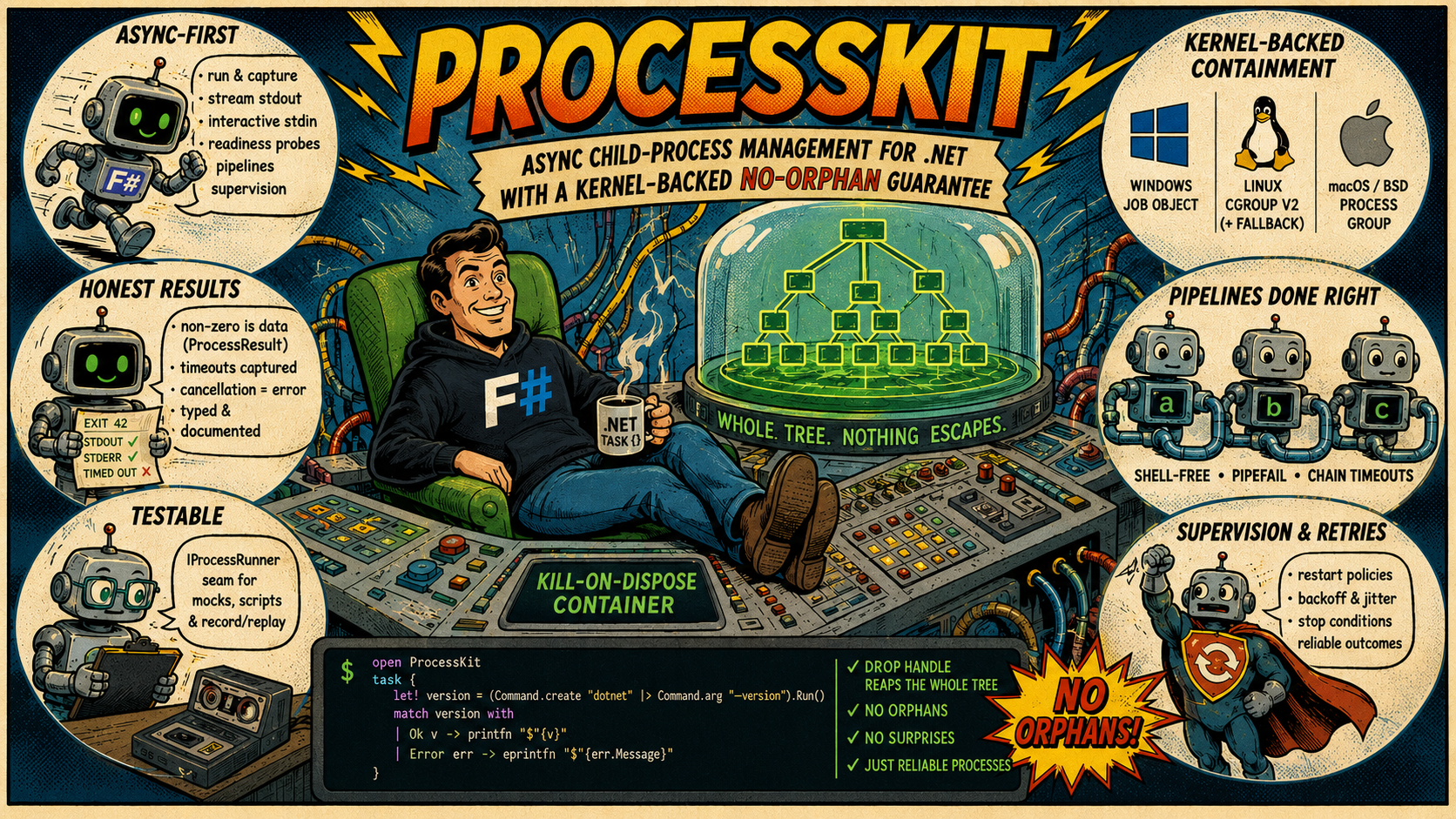



Async child-process management for .NET with a kernel-backed no-orphan guarantee: every
process you start — and everything it spawns — lives in a kill-on-dispose container (a
Windows Job Object, a Linux cgroup v2, the procctl(2) process reaper on FreeBSD, or a
POSIX process group), so no descendant ever outlives your program.
Beyond spawning a subprocess: run-and-capture, line streaming, interactive stdin, shell-free pipelines, readiness probes, timeouts & cancellation, supervision with restart/backoff, and a mockable runner seam for subprocess-free tests.
F#
task {
    match! (Command.create "dotnet" |> Command.arg "--version").RunAsync() with
    | Ok version -> printfn $"{version}"
    | Error err -> eprintfn $"{err.Message}"
}
C#
Console.WriteLine(await new Command("dotnet").Arg("--version").RunAsync() switch
{
    { IsOk: true, ResultValue: var version } => version,
    { IsOk: false, ErrorValue: var err }    => $"error: {err.Message}",
});
Why ProcessKit?
System.Diagnostics.Process reaches (at most) the direct child. The processes it spawned — a
build tool's compiler children, the real payload behind a wrapper (cmd /c …, sh -c …), a
test's helper servers — survive a timeout, an exception, or a dropped task, and keep running as
orphans.
ProcessKit spawns every child into the operating system's own containment primitive — a Job
Object on Windows, a cgroup v2 on Linux (with a process-group fallback), the procctl(2)
process reaper on FreeBSD, a POSIX process group on macOS and the other BSDs — so teardown is a
kernel operation over the whole tree, not a best-effort signal to one pid:
- Nothing escapes silently. Disposing the handle or group reaps every descendant,
grandchildren included. Where a mechanism has a genuine weakness (a
setsidchild escapes a POSIX process group), the activeMechanismis reported instead of pretending — never a silent downgrade. - Async-first. Run-and-capture, line streaming, interactive stdin, readiness probes,
shell-free pipelines, supervision — all return
Task<…>and stream asIAsyncEnumerable<…>. - Honest results. A non-zero exit is data (
ProcessResult) until you ask for success; a timeout is captured in the result; a cancellation is always an error; every platform divergence is typed or documented. - Testable. One interface seam (
IProcessRunner) swaps the real spawner for scripted doubles or record/replay cassettes — no subprocess in your tests.
OS-level containment mechanisms
ProcessKit uses the operating system's own kernel containment mechanism rather than app-level bookkeeping or best-effort signals to individual PIDs:
- Windows: a Job Object.
- Linux: cgroup v2 when resource limits are requested and available; otherwise a POSIX process group.
- FreeBSD: the
procctl(2)process reaper, falling back to a POSIX process group if reaper status cannot be acquired. - macOS and the other BSDs: a POSIX process group.
ProcessGroup.Mechanism reports which primitive was selected, so code can verify its containment
environment instead of assuming one. See Process groups and
Platform support for the mechanism details and platform caveats.
How it compares
The comparison is easier to scan as short capability cards than as a table that forces five columns onto a narrow screen:
System.Diagnostics.Processtracks only the direct child. It has no durable whole-tree containment, readiness probes, supervision, or injectable runner seam.- CliWrap has an excellent fluent pipeline API and tree-aware cancellation, but no persistent
ProcessGroupfor several commands, resource limits, readiness probes, supervision, or runner seam. - Medallion.Shell offers straightforward synchronous/async commands and pipelines, but does not provide whole-tree containment, typed errors, readiness probes, supervision, or a formal test seam.
- SimpleExec is intentionally minimal and exception-first: useful for build-script glue, but without streaming, pipelines, containment, supervision, or runner substitution.
- ProcessKit combines kernel-backed whole-tree containment with honest typed outcomes, async
streaming, readiness probes, shell-free pipelines, supervision, secret-safe observability, and
the
IProcessRunnerseam.
See the Comparison and migration guide for details and migration recipes.
Guides
New here? Start with the Cookbook — short task-to-snippet recipes for
everything the library does — then read Running commands end to end (it's the
vocabulary every other guide builds on). Reach for the rest as the need arises, and keep
Platform support handy before you ship: it collects every per-OS caveat in
one place. Deploying to Docker/Kubernetes? Running in containers collects the
container-specific consequences of that fine print — mechanism selection, PID 1, graceful
shutdown, and minimal images.
The repository also includes runnable sample projects for F# and C# users who want compiled examples instead of Markdown snippets.
| Guide | Covers |
|---|---|
| Comparison and migration guide | How ProcessKit compares to System.Diagnostics.Process, CliWrap, Medallion.Shell, and SimpleExec, plus "was → now" migration snippets |
| Coming from ProcessKit-rs | The Rust-to-.NET vocabulary map: verbs, ownership, errors, cancellation, packages, encoding, PTY, supervision, and testing seams |
| Cookbook | "I want to …" → working snippet, for every capability; each recipe links to its deep guide |
| Scripting with F# Interactive | Use ProcessKit from .fsx: NuGet loading, synchronous top-level boundaries, reusable CLI clients, shell-free pipelines, Ctrl+C cleanup, honest exit codes, and cross-platform tool resolution |
| Running commands | The Command builder end to end: args, env, stdin sources, encodings, buffer policies, line handlers, timeouts, retry — and every consuming verb (RunAsync, OutputStringAsync, ProbeAsync, …) with its error semantics |
| Process groups | Kill-on-dispose containment: creating groups, spawning, teardown verbs, whole-tree signals, suspend/resume, member listing, resource limits, stats sampling |
| Streaming & interactive I/O | StartAsync() and the live RunningProcess: line streaming, interactive stdin, readiness probes (WaitForLineAsync / WaitForPortAsync / WaitForAsync), racing children with WaitAnyAsync, per-run profiling |
| Pipelines | a → b → c without a shell: wiring, pipefail attribution, UncheckedInPipe stages for the … → head pattern, timeouts, stdin/stdout at the ends |
| Timeouts, retries & cancellation | How a deadline is captured vs when it errors, retry policies and their classifier, and cancellation: per-command tokens and client-level defaults via CliClient.WithDefaults |
| Supervision | Keeping a child alive: restart policies, backoff & jitter math, the failure-storm guard, stop conditions, outcomes, supervising inside a shared group |
| Testing your code | The IProcessRunner seam — bulk and streaming: ScriptedRunner (incl. scripted StartAsync() with canned lines), record/replay cassettes, and building hermetically-testable CLI wrappers with CliClient |
| Observability | Logging, tracing & metrics: the ILogger lifecycle events (EventIds + per-run correlation), the ProcessKit ActivitySource span, and the ProcessKit Meter instruments — all secret-safe and OpenTelemetry-ready |
| JSONL reports | The opt-in, AOT-safe ReportJson serializer: ProcessResult/Outcome, ProcessGroupStats/RunProfile, and MemberInfo as self-describing JSONL lines, with a stable "kind" per shape, null for unavailable metrics, and no captured stdout/stderr/argv/environment on the wire |
| Dependency injection | The ProcessKit.Extensions.DependencyInjection and ProcessKit.Extensions.Hosting packages: AddProcessKit (options / IConfiguration defaults), keyed per-tool CliClients, shared ProcessGroups, and supervised hosted processes |
| Platform support | The containment mechanisms, every per-capability support matrix in one place, and the platform caveats worth knowing before you ship |
| Running in containers | Which Mechanism you actually get inside Docker/Kubernetes, running as PID 1 (signals, reparenting, zombies), graceful shutdown on orchestrator SIGTERM, minimal/musl/shell-less images, and container-level limits vs ProcessGroupOptions limits |
The 60-second tour
F#
task {
    // One-shot: capture everything. A non-zero exit is data, not an Error.
    match! (Command.create "git" |> Command.args [ "rev-parse"; "HEAD" ]).OutputStringAsync() with
    | Ok head -> printfn $"HEAD = {head.Stdout.Trim()}"
    | Error err -> eprintfn $"{err.Message}"

    // Success-checking: a non-zero exit / timeout / signal-kill becomes a typed error.
    match! (Command.create "dotnet" |> Command.arg "--version").RunAsync() with
    | Ok version -> printfn $"{version}"
    | Error err -> eprintfn $"{err.Message}"

    // Stdin + timeout (streaming, pipelines, supervision … see the guides).
    let sort =
        Command.create "sort"
        |> Command.stdin (Stdin.FromString "b\na\n")
        |> Command.timeout (TimeSpan.FromSeconds 5.0)

    let! _ = sort.RunAsync()

    // Containment: anything spawned through a group dies with it.
    match ProcessGroup.Create() with
    | Ok group ->
        use group = group
        let! _server = group.StartAsync(Command.create "dev-server")
        () // disposing the group reaps the server — and everything it spawned
    | Error err -> eprintfn $"{err.Message}"
}
C#
// One-shot: capture everything. A non-zero exit is data, not an Error.
Console.WriteLine(await new Command("git").Args(["rev-parse", "HEAD"]).OutputStringAsync() switch
{
    { IsOk: true, ResultValue: var head } => $"HEAD = {head.Stdout.Trim()}",
    { IsOk: false, ErrorValue: var err } => err.Message,
});

// Success-checking: a non-zero exit / timeout / signal-kill becomes a typed error.
Console.WriteLine(await new Command("dotnet").Arg("--version").RunAsync() switch
{
    { IsOk: true, ResultValue: var version } => version,
    { IsOk: false, ErrorValue: var err }    => err.Message,
});

// Stdin + timeout (streaming, pipelines, supervision … see the guides).
await new Command("sort")
    .Stdin(Stdin.FromString("b\na\n"))
    .Timeout(TimeSpan.FromSeconds(5))
    .RunAsync();

// Containment: anything spawned through a group dies with it.
using var group = ProcessGroup.Create().GetValueOrThrow();
await group.StartAsync(new Command("dev-server"));
// disposing the group reaps the server — and everything it spawned
API reference
The XML documentation shipped in the package powers IntelliSense / quick-info in your IDE for every public type and member; these guides are the narrative layer on top — they explain how the pieces compose, with the platform fine print collected in Platform support. The same XML docs also power a browsable, generated API reference — published alongside these guides on the same site — reach for it when you want a member-by-member lookup instead of a task-oriented guide.
Next: Comparison and migration guide
Comparison and migration guide
How ProcessKit compares to System.Diagnostics.Process and three widely-used
third-party process-running libraries for .NET — CliWrap,
Medallion.Shell, and
SimpleExec — plus short "was → now" recipes for the
most common migration patterns.
This is not a "everyone else is bad" pitch: all three libraries are solid, widely used, and each has real strengths ProcessKit doesn't try to match (see each section below). The comparison below is scoped to the axes where ProcessKit makes a deliberate, load-bearing choice; if a library isn't mentioned on an axis, assume it does not attempt that particular guarantee, not that it is somehow deficient in general. All descriptions reflect the current, public API surface of the alternative libraries at the time of writing (2026) — if a library ships a newer capability after this guide was written, treat this page as possibly stale on that one row rather than authoritative.
At a glance
Choose the library by the guarantee you need, rather than trying to scan a six-column feature matrix:
System.Diagnostics.Process
- Best at: zero-dependency, low-level access to every
ProcessStartInfooption. - Compared with ProcessKit: it tracks only the direct child.
ExitCodeis available as data, but start failures throw and timeout/signal/non-zero cases are not one typed result. Its output callbacks require manual event lifecycle management; there are no built-in readiness probes, pipelines, supervision, runner seam, or observability.
CliWrap
- Best at: fluent command construction, shell-free pipelines, and streaming output.
- Compared with ProcessKit: cancellation can terminate the tree for one invocation, but there is no persistent disposable group shared by several commands. Non-zero exits throw by default unless validation is disabled, and it has no readiness probes, supervision, formal runner seam, or built-in secret-safe telemetry.
Medallion.Shell
- Best at: straightforward synchronous or asynchronous commands and shell-free pipelines.
- Compared with ProcessKit:
Command.ResultexposesExitCode/Successwithout throwing, but it does not provide whole-tree containment or a closed typed error model for start, timeout, and signal failures. Readiness probes, supervision, a runner seam, and observability are absent.
SimpleExec
- Best at: deliberately small build-script and CLI glue, with convenient console echoing.
- Compared with ProcessKit: it is exception-first for non-zero exits (unless
noThrowis set) and has no line streaming, pipeline model, whole-tree containment, readiness probes, supervision, runner substitution, or built-in telemetry. Disable command echo before passing sensitive arguments.
What ProcessKit combines: kernel-backed kill-on-dispose containment for the whole process tree, honest typed outcomes, async line streaming and readiness probes, shell-free pipelines, restart supervision, the
IProcessRunnertesting seam, and secret-safe logging, tracing, and metrics.
System.Diagnostics.Process
The BCL type every .NET process library — including ProcessKit — is ultimately built on. Its
strengths: zero extra dependency, full control over every ProcessStartInfo knob, and it is the
lowest common denominator every other library on this page eventually needs to escape hatch to for
something exotic.
Where ProcessKit differs: Process only ever tracks the one process it started directly. Anything
that process spawns — a build tool's compiler workers, the real payload behind cmd /c/sh -c,
a test's helper server — is invisible to Process and outlives a Process.Kill(), a timeout, or a
crashed test runner as an orphan. Getting Process to contain a whole tree requires hand-rolling a
Windows Job Object or a Linux cgroup/process-group yourself; ProcessKit does that unconditionally,
underneath every verb, as the default rather than an advanced technique.
CliWrap
A mature, widely-adopted, dependency-free library with a clean fluent builder
(Cli.Wrap("git").WithArguments(...)), first-class shell-free piping via the | operator, and a
PipeSource/PipeTarget abstraction that lets stdin/stdout attach to a Stream, a file, a
StringBuilder, or another command with the same syntax — genuinely nice API design, and a good
default choice for scripting scenarios that don't need tree containment or supervision.
Where ProcessKit differs: CliWrap's honest-by-default posture stops at this run's exit code —
by default a non-zero exit throws CommandExecutionException, and turning that off
(CommandResultValidation.None) still leaves the caller pattern-matching loosely-typed exceptions
for the timeout/cancellation/not-found cases rather than one closed, structured error type. There is
also no persistent container object: CliWrap's tree-aware cancellation kills what that invocation
spawned, but there is nothing to use/dispose across several related commands the way
ProcessGroup does, no readiness-probe helpers, no supervision, and no injectable runner interface
for hermetic unit tests (you mock PipeSource/PipeTarget streams instead of the process runner
itself).
Medallion.Shell
A small, pragmatic cross-platform wrapper with the same appealing | pipe operator as CliWrap, a
synchronous-and-async API (useful in non-async call sites), and a straightforward
Command.Run(...) entry point that reads naturally for simple "run this, get the result" call
sites.
Where ProcessKit differs: Medallion.Shell does not attempt whole-tree containment (only the
directly-spawned process is tracked/killed), does not have a typed error result — Command.Result
gives you ExitCode and Success, but timeouts, signals, and spawn failures aren't unified into
one pattern-matchable type — and, like CliWrap, has no readiness-probe helpers, no supervision, and
no formal mockable seam (tests either run the real process or wrap Command themselves).
SimpleExec
The simplest of the three: a couple of static methods (Command.Run, Command.ReadAsync) designed
for build scripts and CLI tooling glue (it shows up a lot in Cake/Nuke/custom build scripts). Its
minimalism is the point — no pipeline DSL, no event streams, just "run this and get stdout, or throw."
It also echoes the command line and output to the console by default, which is genuinely convenient
in CI logs for a build script.
Where ProcessKit differs: SimpleExec is exception-first (a non-zero exit throws
SimpleExec.ExitCodeException unless the caller passes noThrow: true — there's no separate
honest-result verb to opt into instead), has no line-by-line streaming API, no shell-free pipeline
concept, no whole-tree containment, and no runner seam to substitute in tests. Its console-echo
default is also worth flagging from a secrets standpoint: it prints the full command line (including
arguments) to the console by default, which is the opposite of ProcessKit's "argv and environment
values are never logged automatically" stance — fine for a build script's own trusted commands, but
worth turning off (echoCommand: false) before echoing anything derived from external input.
Measured comparison
The qualitative differences above are backed by a small BenchmarkDotNet suite
(benchmarks/ProcessKit.Benchmarks/ComparisonBenchmarks.fs) that runs the same three scenarios
against ProcessKit, raw System.Diagnostics.Process, and CliWrap:
- Single spawn + capture — start one short-lived shell child and capture its stdout.
- Streaming — read ~2000 lines of stdout from a child, line by line, without buffering the whole payload in memory.
- Concurrent batch — fan out
Nshort-lived children concurrently and capture each one's stdout.
MedallionShell and SimpleExec are not part of the numeric comparison — see their sections above for why (SimpleExec has no line-streaming API at all, so scenario 2 has nothing equivalent to measure; MedallionShell's async surface is shaped differently enough that a faithful three-scenario harness for it was judged not worth the added benchmark-project surface right now).
Measured: 2026-07-17, Windows 11 (10.0.22621), Intel Core i9-9880H, .NET SDK 10.0.301 / .NET 10.0.9 runtime, BenchmarkDotNet v0.15.8, in-process toolchain. Scenario 1 also ran BenchmarkDotNet's full statistically-rigorous default job; scenarios 2 and 3 used the reduced-iteration
Job.ShortRunconfiguration (the same one.github/workflows/benchmarks.ymluses). This machine had other concurrent builds running while measuring, so the absolute numbers are noisy (see the wideError/StdDevspread, especially the CliWrap FanOut=8 row below) — read this as an order-of-magnitude trend, not a lab-grade number; reproduce locally on a quiet machine for a tighter measurement viadotnet run -c Release --project benchmarks/ProcessKit.Benchmarks -- --filter "*ComparisonBenchmarks*"or a scenario-specific class name (SingleSpawnCaptureBenchmarks/StreamingBenchmarks/ConcurrentBatchBenchmarks).
Mean wall-clock time per operation:
| Scenario | RawProcess | ProcessKit | CliWrap |
|---|---|---|---|
| Single spawn + capture | 12.55 ms | 12.55 ms | 39.75 ms |
| Streaming ~2000 lines | 288.5 ms | 293.4 ms | 327.2 ms |
| Concurrent batch, FanOut=2 | 190.6 ms | 97.5 ms | 173.5 ms |
| Concurrent batch, FanOut=8 | 54.3 ms | 53.4 ms | 753.7 ms |
Allocated managed memory per operation (MemoryDiagnoser, same runs):
| Scenario | RawProcess | ProcessKit | CliWrap |
|---|---|---|---|
| Single spawn + capture | 15.14 KB | 65.86 KB | 48.17 KB |
| Streaming ~2000 lines | 1093.09 KB | 427.38 KB | 1123.25 KB |
| Concurrent batch, FanOut=2 | 30.71 KB | 133.11 KB | 96.69 KB |
| Concurrent batch, FanOut=8 | 121.39 KB | 526.31 KB | 382.81 KB |
Reading these: ProcessKit's per-call latency tracks the raw Process baseline closely across every
scenario, within this run's measurement noise (the concurrent-batch rows even show ProcessKit
faster than the baseline — plausibly noise from the shared machine rather than a generalizable
result, so don't read too much into that one comparison). Where ProcessKit consistently costs more is
allocated memory per call, which matches the trade-off described qualitatively above: the whole-tree
kill-on-drop container, the typed structured Result (rather than a bare exit code or a thrown
exception), and the streaming/backpressure plumbing all cost allocations that a bare Process call
— or CliWrap's thinner honest-by-default posture — doesn't pay for.
Migration recipes
Every snippet below assumes open ProcessKit (F#) / using ProcessKit; (C#), matching the rest of
the docs. See Running commands, Streaming & interactive I/O, and
Pipelines for the full picture of each verb used here.
Process.Start + manual stream reading → a verb
Before (F#, raw System.Diagnostics.Process)
task {
    let psi =
        ProcessStartInfo("git", "rev-parse HEAD", RedirectStandardOutput = true, UseShellExecute = false)

    use proc = Process.Start psi
    let! stdout = proc.StandardOutput.ReadToEndAsync()
    do! proc.WaitForExitAsync()

    if proc.ExitCode <> 0 then
        eprintfn $"git failed with {proc.ExitCode}"
    else
        printfn $"HEAD is {stdout.Trim()}"
}
After (F#, ProcessKit)
task {
    match! (Command.create "git" |> Command.args [ "rev-parse"; "HEAD" ]).OutputStringAsync() with
    | Ok result -> printfn $"HEAD is {result.Stdout.Trim()}"
    | Error err -> eprintfn $"{err.Message}"
}
Before (C#, raw System.Diagnostics.Process)
var psi = new ProcessStartInfo("git", "rev-parse HEAD")
{
    RedirectStandardOutput = true,
    UseShellExecute = false,
};

using var process = Process.Start(psi)!;
var stdout = await process.StandardOutput.ReadToEndAsync();
await process.WaitForExitAsync();

Console.WriteLine(process.ExitCode != 0
    ? $"git failed with {process.ExitCode}"
    : $"HEAD is {stdout.Trim()}");
After (C#, ProcessKit)
Console.WriteLine(await new Command("git").Args(["rev-parse", "HEAD"]).OutputStringAsync() switch
{
    { IsOk: true, ResultValue: var result } => $"HEAD is {result.Stdout.Trim()}",
    { IsOk: false, ErrorValue: var err }   => err.Message,
});
OutputStringAsync() captures stdout/stderr and reports the exit code as data — no manual
WaitForExitAsync + ReadToEndAsync ordering to get right, and the whole tree it spawns is
contained and reaped even if the task is abandoned mid-run.
A CliWrap pipeline → Pipeline
Before (C#, CliWrap)
var result = await (
    Cli.Wrap("git").WithArguments(["log", "--format=%an"])
    | Cli.Wrap("sort")
    | Cli.Wrap("uniq").WithArguments("-c")
).ExecuteBufferedAsync();

Console.WriteLine(result.StandardOutput);
After (C#, ProcessKit)
var pipeline = new Command("git").Args(["log", "--format=%an"])
    .Pipe(new Command("sort"))
    .Pipe(new Command("uniq").Arg("-c"));

Console.WriteLine(await pipeline.OutputStringAsync() switch
{
    { IsOk: true, ResultValue: var output } => output.Stdout,
    { IsOk: false, ErrorValue: var err }   => err.Message,
});
Before (F#, CliWrap) — CliWrap's | is a plain operator overload on .NET types, so it works
unchanged from F#:
task {
    let cmd =
        Cli.Wrap("git").WithArguments [ "log"; "--format=%an" ]
        |> fun git -> git | Cli.Wrap "sort" | Cli.Wrap("uniq").WithArguments "-c"

    let! result = cmd.ExecuteBufferedAsync()
    printfn $"{result.StandardOutput}"
}
After (F#, ProcessKit)
task {
    let pipeline =
        (Command.create "git" |> Command.args [ "log"; "--format=%an" ])
            .Pipe(Command.create "sort")
            .Pipe(Command.create "uniq" |> Command.arg "-c")

    match! pipeline.OutputStringAsync() with
    | Ok out -> printfn $"{out.Stdout}"
    | Error err -> eprintfn $"{err.Message}"
}
Pipeline reports pipefail semantics out of the box: the exit code, stderr, and the reported
failing program come from the first stage that didn't exit cleanly, not just the last one — the
same information CliWrap's ExecuteBufferedAsync() does not surface per-stage without extra
plumbing. See Pipelines for Command.uncheckedInPipe (the producer | head -1
case) and chain timeouts.
Event-based output subscription → line streaming
Before (C#, CliWrap's event stream)
await foreach (var cmdEvent in Cli.Wrap("dotnet").WithArguments(["build", "-c", "Release"]).ListenAsync())
{
    switch (cmdEvent)
    {
        case StandardOutputCommandEvent stdOut:
            Console.WriteLine(stdOut.Text);
            break;
        case StandardErrorCommandEvent stdErr:
            Console.Error.WriteLine(stdErr.Text);
            break;
        case ExitedCommandEvent exited:
            Console.WriteLine($"exited {exited.ExitCode}");
            break;
    }
}
After (C#, ProcessKit)
await using var proc = (await new Command("dotnet").Args(["build", "-c", "Release"]).StartAsync()).GetValueOrThrow();

await foreach (var line in proc.StdoutLinesAsync())
    Console.WriteLine(line);

var finished = (await proc.FinishAsync()).GetValueOrThrow();
Console.WriteLine($"exited {finished.Outcome}");
Before (F#, Process.OutputDataReceived)
let psi = ProcessStartInfo("dotnet", "build -c Release", RedirectStandardOutput = true, UseShellExecute = false)
use proc = new Process(StartInfo = psi)
proc.OutputDataReceived.Add(fun args -> if args.Data <> null then printfn $"{args.Data}")
proc.Start() |> ignore
proc.BeginOutputReadLine()
proc.WaitForExit()
After (F#, ProcessKit)
task {
    match! (Command.create "dotnet" |> Command.args [ "build"; "-c"; "Release" ]).StartAsync() with
    | Ok proc ->
        use _ = proc
        let e = proc.StdoutLinesAsync().GetAsyncEnumerator()

        try
            let mutable go = true

            while go do
                match! e.MoveNextAsync() with
                | true -> printfn $"{e.Current}"
                | false -> go <- false
        finally
            e.DisposeAsync().AsTask().Wait()

        match! proc.FinishAsync() with
        | Ok finished -> printfn $"exited {finished.Outcome}"
        | Error err -> eprintfn $"{err.Message}"
    | Error err -> eprintfn $"{err.Message}"
}
For a callback-style tee instead of consuming the async stream directly (logging/progress bars
alongside capture), see Command.onStdoutLine / .OnStdoutLine(...) in
Running commands → Line handlers and tees — the closest
equivalent to CliWrap's event-stream callback style, without giving up buffered capture.
See also
- Overview → Why ProcessKit? — the elevator pitch and the core differentiators.
- Running commands, Streaming & interactive I/O, Pipelines, Supervision, Testing your code — the full guide set each recipe above links into.
Next: Coming from ProcessKit-rs
Coming from ProcessKit-rs
Previous: Comparison and migration guide
ProcessKit for .NET and ProcessKit-rs share the same contract: async process
execution, typed failures, honest non-zero outcomes, whole-tree containment, and
an injectable runner seam. The spelling follows each ecosystem. This guide maps
the concepts without pretending that Rust ownership and .NET disposal are the
same mechanism.
Verb map
| ProcessKit-rs | ProcessKit for .NET | Result |
|---|---|---|
Command::run().await | Command.RunAsync() | accepted exit required; trimmed stdout |
Command::output_string().await | Command.OutputStringAsync() | full ProcessResult<string>; non-zero exit remains data |
Command::output_bytes().await | Command.OutputBytesAsync() | full ProcessResult<byte[]> |
Command::exit_code().await | Command.ExitCodeAsync() | exit code; a timeout or signal is an error |
Command::probe().await | Command.ProbeAsync() | 0 → true, 1 → false, any other outcome is an error |
Command::start().await | Command.StartAsync() | live process for streaming, stdin, and readiness waits |
The most important distinction survives the language change: output_string /
OutputStringAsync captures a non-zero exit in the result, while run /
RunAsync promotes an unaccepted exit to a typed error.
The Rust blocks on this page are non-compiled illustrations; the repository's snippet harness compiles every paired F# and C# block against the current .NET API.
#![allow(unused)]
fn main() {
let output = Command::new("git")
    .arg("status")
    .output_string()
    .await?;
println!("code={:?} {}", output.code(), output.stdout());
}
F#
task {
    let command = Command.create "git" |> Command.arg "status"

    match! command.OutputStringAsync() with
    | Ok output -> printfn $"code={output.Code} {output.Stdout}"
    | Error err -> eprintfn $"{err.Message}"
}
C#
var command = new Command("git").Arg("status");

Console.WriteLine(await command.OutputStringAsync() switch
{
    { IsOk: true, ResultValue: var output } => $"code={output.Code} {output.Stdout}",
    { IsOk: false, ErrorValue: var err }    => $"error: {err.Message}",
});
Ownership and teardown
Rust makes teardown visible through ownership: dropping a RunningProcess or
ProcessGroup reaps its contained tree. .NET cannot attach correctness to the GC
lifetime, so the same deterministic boundary is IDisposable /
IAsyncDisposable. Bind the live handle with use in F# or using /
await using in C#. F# use! is the corresponding spelling when an async
factory returns the disposable directly; ProcessKit's built-in StartAsync
returns an honest Result, so match it first and then bind the successful handle
with use, as below. Do not leave containment to a finalizer.
#![allow(unused)]
fn main() {
let process = Command::new("server").start().await?;
// Dropping `process` tears down its private contained tree.
}
F#
task {
    match! (Command.create "server").StartAsync() with
    | Error err -> eprintfn $"{err.Message}"
    | Ok process ->
        use process = process
        match! process.WaitForLineAsync((fun line -> line.Contains "ready"), TimeSpan.FromSeconds 10.0) with
        | Ok _ -> printfn "ready"
        | Error err -> eprintfn $"{err.Message}"
}
Errors and honest outcomes
| Rust vocabulary | .NET vocabulary |
|---|---|
Result<T, processkit::Error> | Task<Result<'T, ProcessError>> in F#; Task<FSharpResult<T, ProcessError>> in C# |
Error::reason() / ErrorReason | pattern-match the ProcessError discriminated union |
ProcessResult<T> | ProcessResult<'T> with Outcome, Code, Stdout, and Stderr |
ErrorReason::Unsupported | ProcessError.Unsupported |
ErrorReason::NotFound | ProcessError.NotFound |
ErrorReason::Cancelled | ProcessError.Cancelled |
Both libraries keep a non-zero exit as data for capture verbs and make
cancellation an error. Match the structured case; do not parse Message.
Cancellation
Rust's Command::cancel_on(CancellationToken) maps directly to
Command.CancelOn(CancellationToken) / Command.cancelOn. Every consuming .NET
verb also accepts a call-scoped CancellationToken; CancelOn is useful when a
preconfigured command or CliClient carries its own lifetime.
#![allow(unused)]
fn main() {
let output = Command::new("worker")
    .cancel_on(shutdown.child_token())
    .output_string()
    .await?;
}
F#
task {
    use shutdown = new CancellationTokenSource(TimeSpan.FromSeconds 30.0)

    let command =
        Command.create "worker"
        |> Command.cancelOn shutdown.Token

    let! result = command.OutputStringAsync()
    return result
}
Features become packages or always-available modules
Rust uses Cargo features to keep optional dependencies and platform surfaces out of a build. NuGet has no equivalent compile-time feature gate, so the core .NET package exposes production capabilities directly and isolates optional concerns in side packages.
| ProcessKit-rs feature/concept | ProcessKit for .NET |
|---|---|
default process control, stats, limits, record, pty | core modules are available without feature flags; record/replay lives in ProcessKit.Testing |
tracing | optional ILogger; ProcessKitDiagnostics.ActivitySource for traces |
metrics | ProcessKitDiagnostics.Meter |
mock / ProcessRunner | IProcessRunner plus ScriptedRunner, FakeProcess, and RecordReplayRunner in ProcessKit.Testing |
| application DI wiring | ProcessKit.Extensions.DependencyInjection |
| hosted supervision | ProcessKit.Extensions.Hosting |
The core remains DI-friendly rather than DI-coupled: production code can accept
the plain IProcessRunner interface without referencing a container package.
Encoding, PTY, and supervision
| Concern | Rust | .NET |
|---|---|---|
| Text encoding | per-stream encoding configuration, with raw byte capture when text is the wrong abstraction | Command.Encoding, StdoutEncoding, StderrEncoding, StdinEncoding, or OutputBytesAsync |
| PTY | Cargo pty feature plus Command::use_pty | Command.Pty(PtyConfig) and PtySession; unsupported platform details are typed |
| Streaming | RunningProcess streams and waits | RunningProcess exposes IAsyncEnumerable lines/events and readiness waits |
| Supervision | Supervisor restart/backoff policy | Supervisor in the core package; hosted lifetime wiring in ProcessKit.Extensions.Hosting |
| Observability | tracing and metrics feature adapters | ILogger, ActivitySource, and Meter, all secret-safe by contract |
The names differ, but the design test remains the same: select a capability explicitly, inspect a typed unsupported result when the platform cannot provide it, and keep the process tree owned by a deterministic lifetime.
Testing seam
Code that accepts Rust's &dyn ProcessRunner should usually accept .NET's
IProcessRunner. In tests, ScriptedRunner is the stable default on both sides;
the .NET version additionally provides FakeProcess for live streaming and
RecordReplayRunner for cassettes in the same ProcessKit.Testing package.
C#
IProcessRunner runner =
    new ScriptedRunner().On(["git", "status"], Reply.Ok("clean"));

var result = await runner.RunAsync(new Command("git").Arg("status"));
Console.WriteLine(result);
See Testing your code for structural invocation journals, streaming doubles, and cassette matching.
Next: Cookbook
ProcessKit cookbook
Previous: Coming from ProcessKit-rs
Task-oriented, idiomatic examples for every part of the public API. The run and capture
verbs return Task<Result<_, ProcessError>>, so the F# samples below run inside a task { }
block and use match! (a few RunningProcess members — WaitAsync, ProfileAsync — return their
value directly). Where a snippet writes let! r = cmd.Verb() for brevity, r is the
Result<_, ProcessError> you then match. From C# the same surface is await-able fluent
methods.
- Running a command
- Capturing output
- Error handling
- Exit codes and probing
- Accepting non-zero exits
- Parsing output
- Standard input
- Interactive password prompt through a PTY
- Pipelines
- Streaming and interactive I/O
- Readiness probes
- Timeouts, cancellation, retry
- Process groups and tree control
- Resource limits
- Stats and profiling
- Supervision
- CliClient
- Top-level Exec helpers
- Preflight: is a program installed?
- Logging, tracing & metrics
- Dependency injection
- Testing without subprocesses
Running a command
Build a Command (an immutable value), then call a verb. RunAsync requires a zero (or
accepted) exit and returns stdout with trailing whitespace trimmed.
F#
task {
    let cmd = Command.create "git" |> Command.args [ "rev-parse"; "HEAD" ]

    match! cmd.RunAsync() with
    | Ok sha -> printfn $"HEAD is {sha}"
    | Error err -> eprintfn $"git failed: {err.Message}"
}
C#
var cmd = new Command("git").Args(["rev-parse", "HEAD"]);

Console.WriteLine(await cmd.RunAsync() switch
{
    { IsOk: true, ResultValue: var sha }  => $"HEAD is {sha}",
    { IsOk: false, ErrorValue: var err } => $"git failed: {err.Message}",
});
The builder is fluent and immutable — each method returns a new Command:
F#
let cmd =
    Command.create "dotnet"
    |> Command.args [ "build"; "-c"; "Release" ]
    |> Command.currentDir "/repo"
    |> Command.env "DOTNET_NOLOGO" "1"
C#
var cmd = new Command("dotnet")
    .Args(["build", "-c", "Release"])
    .CurrentDir("/repo")
    .Env("DOTNET_NOLOGO", "1");
The same in method style (identical from C#):
F#
let cmd = (Command "dotnet").Args([ "build"; "-c"; "Release" ]).CurrentDir("/repo")
C#
var cmd = new Command("dotnet").Args(["build", "-c", "Release"]).CurrentDir("/repo");
Use RunUnitAsync when you only care that it succeeded:
F#
match! (Command.create "mkdir" |> Command.arg "out").RunUnitAsync() with
| Ok () -> ()
| Error err -> eprintfn $"{err.Message}"
C#
if (await new Command("mkdir").Arg("out").RunUnitAsync() is { IsOk: false, ErrorValue: var err })
    Console.Error.WriteLine(err.Message);
Capturing output
OutputStringAsync / OutputBytesAsync return a ProcessResult<_> — a non-zero exit is data here,
not an error. Inspect Stdout, Stderr, Code, IsSuccess, Duration, Outcome.
F#
match! (Command.create "ls" |> Command.arg "-la").OutputStringAsync() with
| Ok result ->
    printfn $"exit={result.Code} success={result.IsSuccess} in {result.Duration}"
    printfn $"{result.Stdout}"
| Error err -> eprintfn $"{err.Message}"
C#
switch (await new Command("ls").Arg("-la").OutputStringAsync())
{
    case { IsOk: true, ResultValue: var result }:
        Console.WriteLine($"exit={result.Code} success={result.IsSuccess} in {result.Duration}");
        Console.WriteLine(result.Stdout);
        break;
    case { IsOk: false, ErrorValue: var err }:
        Console.Error.WriteLine(err.Message);
        break;
}
OutputBytesAsync is the binary companion (ProcessResult<byte[]>), for non-text output.
Error handling
ProcessError is a discriminated union — pattern-match it, or use .Message for a short
description. The capture verbs only error on failure to run (spawn / not-found / I/O /
timeout / cancellation), never on a non-zero exit.
F#
match! (Command.create "definitely-not-a-program").OutputStringAsync() with
| Ok result -> printfn $"{result.Stdout}"
| Error(ProcessError.NotFound(program, _)) -> eprintfn $"not installed: {program}"
| Error(ProcessError.Timeout(program, timeout, _, _)) -> eprintfn $"{program} timed out after {timeout}"
| Error err -> eprintfn $"{err.Message}"
C#
Console.WriteLine(await new Command("definitely-not-a-program").OutputStringAsync() switch
{
    { IsOk: true, ResultValue: var result }                => result.Stdout,
    { IsOk: false, ErrorValue: ProcessError.NotFound n }  => $"not installed: {n.Program}",
    { IsOk: false, ErrorValue: ProcessError.Timeout t }   => $"{t.Program} timed out after {t.Timeout}",
    { IsOk: false, ErrorValue: var err }                  => err.Message,
});
Classifiers help with retry/diagnostic logic:
F#
match! cmd.RunAsync() with
| Ok _ -> ()
| Error err when ProcessError.isNotFound err -> installThenRetry ()
| Error err when ProcessError.isTransient err -> scheduleRetry ()   // spawn / I/O blips
| Error err -> fail err
C#
switch (await cmd.RunAsync())
{
    case { IsOk: true }:
        break;
    case { IsOk: false, ErrorValue: { IsNotFound: true } }:
        installThenRetry();
        break;
    case { IsOk: false, ErrorValue: { IsTransient: true } }:
        scheduleRetry();   // spawn / I/O blips
        break;
    case { IsOk: false, ErrorValue: var err }:
        fail(err);
        break;
}
The success-requiring verbs (RunAsync / RunUnitAsync) additionally turn a non-zero exit into
ProcessError.Exit(program, code, stdout, stderr).
Exit codes and probing
F#
let! code = (Command.create "grep" |> Command.args [ "pattern"; "file" ]).ExitCodeAsync()  // Ok 0 / Ok 1 / ...
let! found = (Command.create "which" |> Command.arg "git").ProbeAsync()                     // Ok true if exit 0
C#
var code = await new Command("grep").Args(["pattern", "file"]).ExitCodeAsync();  // Ok 0 / Ok 1 / ...
var found = await new Command("which").Arg("git").ProbeAsync();                  // Ok true if exit 0
ProbeAsync is true when the command runs and exits zero — handy for feature detection.
Accepting non-zero exits
Some tools use non-zero exits as information (e.g. grep returns 1 for "no match"). Tell
ProcessKit which codes count as success:
F#
let grep =
    Command.create "grep"
    |> Command.args [ "ERROR"; "app.log" ]
    |> Command.okCodes [ 0; 1 ]   // 1 ("no match") is not a failure

match! grep.RunAsync() with
| Ok output -> printfn $"matches:\n{output}"
| Error err -> eprintfn $"{err.Message}"   // a real failure (e.g. exit 2)
C#
var grep = new Command("grep")
    .Args(["ERROR", "app.log"])
    .OkCodes([0, 1]);   // 1 ("no match") is not a failure

Console.WriteLine(await grep.RunAsync() switch
{
    { IsOk: true, ResultValue: var output } => $"matches:\n{output}",
    { IsOk: false, ErrorValue: var err }   => err.Message,   // a real failure (e.g. exit 2)
});
OkCodes sets which exit codes ProcessResult.IsSuccess, RunAsync/RunUnitAsync, and supervisor crash
detection accept — the codes replace the default {0} (include 0 to keep it, as [ 0; 1 ] does
above).
Parsing output
ParseAsync maps stdout through a function (requires success); TryParseAsync uses the standard
.NET try-parse shape, so C# can pass int.TryParse (and friends) with an explicit type argument
(TryParseAsync<int>(int.TryParse) — needed because the BCL parsers are overloaded) and a false
return becomes ProcessError.Parse — F# reaches for the Result-returning Runner.tryParse instead;
OutputJsonAsync<'T> deserializes stdout as JSON via System.Text.Json (same explicit-type-argument
need, since there is no parser argument to infer 'T from — OutputJsonAsync<int>()), takes an
optional JsonSerializerOptions overload, and turns invalid JSON into ProcessError.Parse just like
a rejecting parser. For trimmed/NativeAOT applications, call the OutputJsonAsync(typeInfo) overload with
source-generated JsonTypeInfo<'T> metadata; from F#, use Runner.outputJsonTyped; FirstLineAsync returns
the first stdout line matching a predicate.
F#
let! version = (Command.create "node" |> Command.arg "--version").ParseAsync(fun s -> s.TrimStart('v'))
let! widget  = (Command.create "widget-cli" |> Command.arg "get").OutputJsonAsync<Widget>()
let! port    = (Command.create "myserver").FirstLineAsync(fun line -> line.StartsWith "Listening on ")
C#
var version = await new Command("node").Arg("--version").ParseAsync(s => s.TrimStart('v'));
var count = await new Command("git").Args(["rev-list", "--count", "HEAD"]).TryParseAsync<int>(int.TryParse);
var widget = await new Command("widget-cli").Arg("get").OutputJsonAsync<Widget>();
var port = await new Command("myserver").FirstLineAsync(line => line.StartsWith("Listening on "));
A plain F# record deserializes through STJ's constructor-based deserialization by default, matching
JSON keys to the record's field names case-sensitively; mark the record [<CLIMutable>] for the
classic default-constructor-plus-settable-properties shape, or pass options with
PropertyNameCaseInsensitive = true for case-insensitive matching.
Standard input
Feed input with a Stdin source:
F#
let cmd =
    Command.create "grep"
    |> Command.arg "needle"
    |> Command.stdin (Stdin.FromString "haystack\nneedle\nmore")
C#
var cmd = new Command("grep")
    .Arg("needle")
    .Stdin(Stdin.FromString("haystack\nneedle\nmore"));
Sources: Stdin.FromString, FromBytes, FromFile path, FromStream stream,
FromLines seq, FromAsyncLines asyncSeq, and Stdin.Empty. For interactive writing, see
streaming.
Interactive password prompt through a PTY
Some tools show a credential prompt only when stdin is a tty. Start them with a PTY, keep stdin open, write the credential, then close stdin so the prompt can complete. Without a PTY, the prompt may not appear at all or the tool may wait for a terminal it was never given.
This POSIX example uses a small shell prompt only to make the I/O flow visible; substitute the
credential tool you actually need. Echo = false prevents POSIX terminal echo from copying the
credential into the merged captured output. On Windows, the prompt program must suppress its own
console echo; ConPTY cannot force that setting.
F#
task {
    let command =
        (Command.create "/bin/sh" |> Command.args [ "-c"; "printf 'Password: '; IFS= read -r password; printf 'OK\\n'" ])
            .Pty({ PtyConfig.Default with Echo = false })
            .KeepStdinOpen()

    match! command.StartAsync() with
    | Error err -> eprintfn $"{err.Message}"
    | Ok process ->
        use process = process

        match process.TakeStdin() with
        | Some stdin ->
            do! stdin.WriteLineAsync "credential-from-a-secret-store"
            do! stdin.FinishAsync() // EOF lets the prompt finish.
        | None -> failwith "PTY stdin was not available"

        let enumerator = process.StdoutLinesAsync().GetAsyncEnumerator()

        try
            let mutable more = true

            while more do
                let! moved = enumerator.MoveNextAsync().AsTask()

                if moved then
                    printfn $"> {enumerator.Current}" // one merged PTY stream
                else
                    more <- false
        finally
            enumerator.DisposeAsync().AsTask().GetAwaiter().GetResult()
}
C#
var command = new Command("/bin/sh")
    .Args(["-c", "printf 'Password: '; IFS= read -r password; printf 'OK\\n'"])
    .Pty(new PtyConfig(80, 24, false))
    .KeepStdinOpen();

await using var process = (await command.StartAsync()).GetValueOrThrow();

if (process.TakeStdin() is { Value: var stdin })
{
    await stdin.WriteLineAsync("credential-from-a-secret-store");
    await stdin.FinishAsync(); // EOF lets the prompt finish.
}

await foreach (var line in process.StdoutLinesAsync())
    Console.WriteLine($"> {line}"); // one merged PTY stream
See the PTY guide for resize behaviour, platform support, and the output/secret-safety contract.
Pipelines
Pipe wires each stage's stdout into the next stage's stdin — no shell — and runs the whole
chain in one kill-on-dispose group. The exit status follows shell pipefail.
F#
let pipeline =
    (Command.create "cat" |> Command.arg "access.log")
        .Pipe(Command.create "grep" |> Command.arg "ERROR")
        .Pipe(Command.create "wc" |> Command.arg "-l")

match! pipeline.RunAsync() with
| Ok count -> printfn $"{count} error lines"
| Error err -> eprintfn $"{err.Message}"
C#
var pipeline = new Command("cat").Arg("access.log")
    .Pipe(new Command("grep").Arg("ERROR"))
    .Pipe(new Command("wc").Arg("-l"));

Console.WriteLine(await pipeline.RunAsync() switch
{
    { IsOk: true, ResultValue: var count } => $"{count} error lines",
    { IsOk: false, ErrorValue: var err }  => err.Message,
});
A pipeline supports the same verbs as a command (RunAsync/OutputStringAsync/ExitCodeAsync/…) plus
Timeout / CancelOn. Let a stage fail without failing the pipeline with
Command.uncheckedInPipe. The pipe-style module mirror is Pipeline.create / Pipeline.pipe.
Streaming and interactive I/O
StartAsync() returns a live RunningProcess. Stream stdout line by line as an
IAsyncEnumerable. (use ensures the tree is killed on scope exit.)
F#
task {
    match! (Command.create "dotnet" |> Command.arg "watch").StartAsync() with
    | Error err -> eprintfn $"{err.Message}"
    | Ok proc ->
        use _ = proc
        let lines = proc.StdoutLinesAsync()
        let e = lines.GetAsyncEnumerator()

        try
            let mutable go = true
            while go do
                match! e.MoveNextAsync() with
                | true -> printfn $"> {e.Current}"
                | false -> go <- false
        finally
            e.DisposeAsync().AsTask().Wait()
}
C#
await using var proc = (await new Command("dotnet").Arg("watch").StartAsync()).GetValueOrThrow();

await foreach (var line in proc.StdoutLinesAsync())
    Console.WriteLine($"> {line}");
From C# this is simply await foreach (var line in proc.StdoutLinesAsync()) { ... }.
OutputEventsAsync() interleaves stdout and stderr as OutputEvent values (IsStdout/IsStderr,
.Text). Write to a running process's stdin via TakeStdin():
F#
match proc.TakeStdin() with
| Some stdin ->
    do! stdin.WriteLineAsync "command one"
    do! stdin.FlushAsync()
    do! stdin.FinishAsync()   // close stdin (EOF)
| None -> ()
C#
if (proc.TakeStdin() is { Value: var stdin }) // Some(stdin); None is null and won't match
{
    await stdin.WriteLineAsync("command one");
    await stdin.FlushAsync();
    await stdin.FinishAsync();   // close stdin (EOF)
}
Race or await several started processes with RunningProcess.WaitAny / WaitAllAsync.
Readiness probes
Wait for a started process to become ready before proceeding:
F#
match! (Command.create "myserver").StartAsync() with
| Ok proc ->
    use _ = proc
    // Wait up to 10s for a log line, a TCP port, or a custom predicate.
    match! proc.WaitForLineAsync((fun l -> l.Contains "ready"), TimeSpan.FromSeconds 10.0) with
    | Ok _ -> printfn "server is up"
    | Error err -> eprintfn $"never became ready: {err.Message}"   // ProcessError.NotReady on timeout
| Error err -> eprintfn $"{err.Message}"
C#
await using var proc = (await new Command("myserver").StartAsync()).GetValueOrThrow();

// Wait up to 10s for a log line, a TCP port, or a custom predicate.
Console.WriteLine(await proc.WaitForLineAsync(l => l.Contains("ready"), TimeSpan.FromSeconds(10)) switch
{
    { IsOk: true }        => "server is up",
    { IsOk: false, ErrorValue: var err } => $"never became ready: {err.Message}",   // ProcessError.NotReady on timeout
});
Also WaitForPortAsync(endpoint, timeout) and WaitForAsync(predicateReturningTask, timeout).
Timeouts, cancellation, retry
F#
let cmd =
    Command.create "slow-job"
    |> Command.timeout (TimeSpan.FromSeconds 30.0)   // kill at the deadline -> Outcome.TimedOut
    |> Command.retry 3 (TimeSpan.FromMilliseconds 200.0) (fun err -> ProcessError.isTransient err)
C#
var cmd = new Command("slow-job")
    .Timeout(TimeSpan.FromSeconds(30))   // kill at the deadline -> Outcome.TimedOut
    .Retry(3, TimeSpan.FromMilliseconds(200), err => err.IsTransient);
TimeoutGrace sends SIGTERM, waits a grace window, then SIGKILL (atomic on Windows). Tie a
run to a CancellationToken with CancelOn, or pass a token to any verb's optional
token parameter (cmd.RunAsync(ct)). A cancelled run is always an Error (ProcessError.Cancelled).
Process groups and tree control
A ProcessGroup is a kill-on-dispose container for a whole process tree (Windows Job
Object / Linux cgroup v2 / FreeBSD procctl(2) process reaper / POSIX process group). It is
itself an IProcessRunner.
F#
task {
    match ProcessGroup.Create() with
    | Error err -> eprintfn $"{err.Message}"
    | Ok group ->
        use group = group   // disposes (and reaps the whole tree) on scope exit

        match! group.StartAsync(Command.create "build-everything") with
        | Ok _proc ->
            group.Signal Signal.Term |> ignore     // signal the whole tree
            group.Suspend() |> ignore              // freeze it
            group.Resume() |> ignore               // thaw it
            match group.Members() with
            | Ok pids -> printfn $"{pids.Count} processes in the tree"
            | Error _ -> ()
            do! group.ShutdownAsync(TimeSpan.FromSeconds 5.0)   // graceful: SIGTERM -> grace -> SIGKILL
        | Error err -> eprintfn $"{err.Message}"
}
C#
using var group = ProcessGroup.Create().GetValueOrThrow();   // disposes (and reaps the whole tree) on scope exit

await group.StartAsync(new Command("build-everything"));

group.Signal(Signal.Term);     // signal the whole tree
group.Suspend();               // freeze it
group.Resume();                // thaw it
if (group.Members() is { IsOk: true, ResultValue: var pids })
    Console.WriteLine($"{pids.Count} processes in the tree");
await group.ShutdownAsync(TimeSpan.FromSeconds(5));   // graceful: SIGTERM -> grace -> SIGKILL
Portable Signal values: Term, Kill, Int, Hup, Quit, Usr1, Usr2,
Signal.Other n. On Windows only Kill is delivered. Share one container across a fleet by
passing the group as the IProcessRunner (e.g. to a Supervisor).
Resource limits
Cap the whole tree's memory, process count, or CPU. Enforced by a Windows Job Object or a
Linux cgroup v2; where no limit-capable container exists, creation fails fast with
ProcessError.ResourceLimit rather than running unbounded.
F#
let options =
    ProcessGroupOptions()
        .WithMemoryMax(512L * 1024L * 1024L)   // 512 MiB
        .WithMaxProcesses(64)
        .WithCpuQuota(1.5)                      // 1.5 cores

match ProcessGroup.Create options with
| Ok group ->
    use group = group   // ... run within the limited group
    ()
| Error err -> eprintfn $"limits unavailable: {err.Message}"
C#
var options = new ProcessGroupOptions()
    .WithMemoryMax(512L * 1024L * 1024L)   // 512 MiB
    .WithMaxProcesses(64)
    .WithCpuQuota(1.5);                     // 1.5 cores

var created = ProcessGroup.Create(options);
if (created is { IsOk: false, ErrorValue: var err })
{
    Console.Error.WriteLine($"limits unavailable: {err.Message}");
    return;
}

using var group = created.GetValueOrThrow();   // ... run within the limited group
Stats and profiling
F#
match group.Stats() with
| Ok stats ->
    printfn $"active={stats.ActiveProcessCount} cpu={stats.TotalCpuTime} read={stats.IoReadBytes} write={stats.IoWriteBytes}"
| Error _ -> ()

// A periodic series (IAsyncEnumerable) for live dashboards:
let series = group.SampleStatsAsync(TimeSpan.FromSeconds 1.0)
C#
if (group.Stats() is { IsOk: true, ResultValue: var stats })
    Console.WriteLine($"active={stats.ActiveProcessCount} cpu={stats.TotalCpuTime} read={stats.IoReadBytes} write={stats.IoWriteBytes}");

// A periodic series (IAsyncEnumerable) for live dashboards:
var series = group.SampleStatsAsync(TimeSpan.FromSeconds(1));
Per-run profiling captures exit code, duration, CPU, peak memory, and private-tree I/O where available:
F#
match! (Command.create "heavy-job").StartAsync() with
| Ok proc ->
    use _ = proc
    let! profile = proc.ProfileAsync()
    printfn $"exit={profile.ExitCode} cpu={profile.CpuTime} peak={profile.PeakMemoryBytes} read={profile.IoReadBytes} write={profile.IoWriteBytes} samples={profile.Samples}"
| Error _ -> ()
C#
await using var proc = (await new Command("heavy-job").StartAsync()).GetValueOrThrow();
var profile = await proc.ProfileAsync();
Console.WriteLine($"exit={profile.ExitCode} cpu={profile.CpuTime} peak={profile.PeakMemoryBytes} read={profile.IoReadBytes} write={profile.IoWriteBytes} samples={profile.Samples}");
Supervision
Keep a command alive with policy-driven restarts, exponential backoff + jitter, and a failure-storm guard.
F#
let outcome =
    (Supervisor.create (Command.create "worker"))
        .Restart(RestartPolicy.OnCrash)
        .Backoff(TimeSpan.FromSeconds 1.0, 2.0)        // base delay, multiplier
        .MaxBackoff(TimeSpan.FromMinutes 1.0)
        .Jitter(true)
        .MaxRestarts(20)
        .StormPause(TimeSpan.FromMinutes 5.0)          // pause after a burst of failures
        .RunAsync()

match! outcome with
| Ok result -> printfn $"stopped: {result.Stopped} after {result.Restarts} restarts"
| Error err -> eprintfn $"{err.Message}"
C#
var outcome = new Supervisor(new Command("worker"))
    .Restart(RestartPolicy.OnCrash)
    .Backoff(TimeSpan.FromSeconds(1), 2.0)        // base delay, multiplier
    .MaxBackoff(TimeSpan.FromMinutes(1))
    .Jitter(true)
    .MaxRestarts(20)
    .StormPause(TimeSpan.FromMinutes(5))          // pause after a burst of failures
    .RunAsync();

Console.WriteLine(await outcome switch
{
    { IsOk: true, ResultValue: var result } => $"stopped: {result.Stopped} after {result.Restarts} restarts",
    { IsOk: false, ErrorValue: var err }   => err.Message,
});
Supervision runs through any IProcessRunner (WithRunner), so it is testable without
spawning processes, and it honours OkCodes when deciding what counts as a crash.
CliClient
A reusable handle to one program with shared defaults:
F#
let git =
    (CliClient.create "git")
        .WithDefaults(fun c -> c.CurrentDir("/repo").Timeout(TimeSpan.FromSeconds 30.0))

let! sha = git.RunAsync [ "rev-parse"; "HEAD" ]
let! log = git.OutputStringAsync [ "log"; "--oneline"; "-n"; "10" ]
C#
var git = new CliClient("git")
    .WithDefaults(c => c.CurrentDir("/repo").Timeout(TimeSpan.FromSeconds(30)));

var sha = await git.RunAsync(["rev-parse", "HEAD"]);
var log = await git.OutputStringAsync(["log", "--oneline", "-n", "10"]);
WithDefaults configures the shared defaults with the full Command builder; client.Command args
builds a configured Command without running it.
Top-level Exec helpers
For one-off runs without first building a Command:
F#
let! sha = Exec.run "git" [ "rev-parse"; "HEAD" ]
let! info = Exec.outputString "dotnet" [ "--info" ]
C#
var sha = await Exec.run("git", ["rev-parse", "HEAD"]);
var info = await Exec.outputString("dotnet", ["--info"]);
Run a batch with bounded concurrency, collecting every result in input order (never short-circuits):
F#
let runner = JobRunner() :> IProcessRunner
let commands = files |> List.map (fun f -> Command.create "gzip" |> Command.arg f)
let! results = Exec.outputAll 4 runner commands CancellationToken.None // at most 4 live at once
C#
var runner = new JobRunner();
var commands = files.Select(f => new Command("gzip").Arg(f));
var results = await Exec.outputAll(4, runner, commands, CancellationToken.None); // at most 4 live at once
Opt into fail-fast instead: on the FIRST command whose result is an Error, outputAllWithPolicy /
outputAllBytesWithPolicy stop starting any command still waiting for a concurrency slot and cancel
every command already running (the batch's own CancellationToken fires exactly the same way).
Every element still gets a Result in input order — a command that already finished keeps its own
outcome, a command still waiting for a concurrency slot when the trigger fires never starts and is
guaranteed to become ProcessError.Cancelled, and a command already running when the trigger fires
receives that same cancellation signal but keeps whatever result its own capture returns — cancelling
and finishing race like any other cancellation, so an already-running command is not guaranteed to
become Cancelled (see the BatchPolicy.FailFast doc comment for the full contract).
BatchPolicy.CollectAll behaves exactly like outputAll/outputAllBytes themselves; it is the
default when no policy is given a reason to differ.
F#
let runner = JobRunner() :> IProcessRunner
let commands = files |> List.map (fun f -> Command.create "gzip" |> Command.arg f)

let! results =
    Exec.outputAllWithPolicy 4 runner commands BatchPolicy.FailFast CancellationToken.None
C#
var runner = new JobRunner();
var commands = files.Select(f => new Command("gzip").Arg(f));

var results = await Exec.outputAllWithPolicy(4, runner, commands, BatchPolicy.FailFast, CancellationToken.None);
Each result as it lands
Exec.outputStream / Exec.outputStreamBytes run that same bounded fan-out but hand back an
IAsyncEnumerable of BatchItems in completion order, so a fast command never waits behind a
slow sibling. Each item carries its command's Index — its position in commands, which is how a
result stays traceable once arrival order stops matching input order — and that command's own
Result, with the same meaning as one element of outputAll (an Error is a genuine run failure; a
non-zero exit is Ok data). Nothing starts until you begin enumerating.
F#
task {
    let runner = JobRunner() :> IProcessRunner
    let commands = files |> List.map (fun f -> Command.create "gzip" |> Command.arg f)
    use e = (Exec.outputStream 4 runner commands CancellationToken.None).GetAsyncEnumerator()
    let mutable go = true

    while go do
        match! e.MoveNextAsync() with
        | true ->
            let item = e.Current

            match item.Result with
            | Ok result -> printfn $"#{item.Index} exited {result.Code}"
            | Error err -> printfn $"#{item.Index} failed: {err.Message}"
        | false -> go <- false
}
C#
var runner = new JobRunner();
var commands = files.Select(f => new Command("gzip").Arg(f));

await foreach (var item in Exec.outputStream(4, runner, commands, CancellationToken.None))
{
    if (item.Result.IsOk)
        Console.WriteLine($"#{item.Index} exited {item.Result.ResultValue.Code}");
    else
        Console.WriteLine($"#{item.Index} failed: {item.Result.ErrorValue.Message}");
}
Three contract details worth knowing before you reach for it:
- Cancellation is data, not an exception. The batch's
CancellationToken— and the one a consumer passes toWithCancellation/GetAsyncEnumerator, which is honoured identically — cancels every in-flight capture and stops any command still waiting for a concurrency slot from ever starting, but it does not truncate the stream: every command still yields exactly one item, and one that never started yieldsProcessError.Cancelled. Enumerate to the end to collect them. Items already handed over are yours, unlikeoutputAll's array, which materializes only once the whole batch is done. - Abandoning the stream is the teardown. Breaking out of the loop disposes the enumerator, which
cancels the in-flight captures (with a
JobRunner, that kills each live process tree) and leaves every still-queued command unstarted. Disposal waits for that teardown rather than detaching it. - No
BatchPolicyon the streaming verbs. They never short-circuit, and there is nopolicyparameter to pass rather than one quietly ignored — a consumer that wants to stop on the first failure just stops enumerating, and the bullet above does the rest. For the fail-fast contract with an input-ordered array, useoutputAllWithPolicy/outputAllBytesWithPolicy.
The hand-off is bounded at the same concurrency cap, and a finished command frees its slot only once
its item has been taken, so a slow consumer throttles the fan-out — once the buffer and the live
commands are full, nothing further starts — instead of letting it run the whole batch ahead into
memory.
Preflight: is a program installed?
Exec.which resolves a program to a full path without running it — a doctor check for an
install wizard or a wrapper app's startup, cheaper than probing availability by actually launching
the program. It shares the exact PATH/PATHEXT-aware lookup the spawn path itself falls back on,
so it never disagrees with an actual spawn of the same program name (see
commands.md → Preflight for the full contract,
including Windows PATHEXT semantics).
F#
match Exec.which "git" with
| Ok path -> printfn $"git found at {path}"
| Error err -> eprintfn $"git is not available: {err.Message}"
C#
Console.WriteLine(Exec.which("git") switch
{
    { IsOk: true, ResultValue: var path } => $"git found at {path}",
    { IsOk: false, ErrorValue: var err }  => $"git is not available: {err.Message}",
});
The same check on a CliClient resolves the client's own program, and is always a local host
check — never delegated to a runner injected via WithRunner (a ScriptedRunner used in the
wrapper's own tests has no bearing on it):
F#
match! git.EnsureAvailableAsync() with
| Ok path -> printfn $"git found at {path}"
| Error err -> eprintfn $"git is not available: {err.Message}"
C#
Console.WriteLine(await git.EnsureAvailableAsync() switch
{
    { IsOk: true, ResultValue: var path } => $"git found at {path}",
    { IsOk: false, ErrorValue: var err }  => $"git is not available: {err.Message}",
});
Logging, tracing & metrics
Opt in to structured lifecycle events (spawn, exit, timeout, retry, supervisor restart) — each with a
stable EventId and a per-run RunId that ties a run's lines together. argv and the environment are
never logged — only the program name and non-secret facts.
F#
let cmd = Command.create "deploy" |> Command.logger logger // any Microsoft.Extensions.Logging ILogger
C#
var cmd = new Command("deploy").Logger(logger); // any Microsoft.Extensions.Logging ILogger
No-op and free when no logger is set. ProcessKit also emits a System.Diagnostics trace span per run
(ActivitySource ProcessKitDiagnostics.ActivitySourceName) and metrics (Meter
ProcessKitDiagnostics.MeterName) — wire them into OpenTelemetry with AddSource(...) / AddMeter(...).
See the Observability guide for the full event/instrument taxonomy.
Dependency injection
The ProcessKit.Extensions.DependencyInjection package registers an IProcessRunner:
F#
services.AddProcessKit() |> ignore
// When the container also has an ILoggerFactory, runs emit ProcessKit's lifecycle events.

// Later, injected as IProcessRunner:
type Deployer(runner: IProcessRunner) =
    member _.Deploy() = Runner.run runner CancellationToken.None (Command.create "deploy")
C#
services.AddProcessKit();
// When the container also has an ILoggerFactory, runs emit ProcessKit's lifecycle events.

// Later, injected as IProcessRunner:
public class Deployer(IProcessRunner runner)
{
    public Task<FSharpResult<string, ProcessError>> Deploy() =>
        runner.RunAsync(new Command("deploy"), CancellationToken.None);
}
AddProcessKit uses TryAdd, so a pre-existing IProcessRunner registration is left intact.
AddProcessKit(configure) / AddProcessKit(configuration) set a default timeout / working directory;
AddProcessKitClient(name, program) registers keyed per-tool CliClients (the place for retry / encoding
defaults); and AddProcessKitGroup() backs the runner with a shared, container-managed ProcessGroup
(disposing the provider reaps the whole tree). See the Dependency injection guide.
Testing without subprocesses
ProcessKit.Testing provides subprocess-free IProcessRunners. ScriptedRunner returns
canned replies:
F#
let runner =
    (ScriptedRunner())
        .On([ "git"; "rev-parse"; "HEAD" ], Reply.Ok "abc123")
        .When((fun cmd -> cmd.Program = "flaky"), Reply.Fail(1, "boom"))
        .Fallback(Reply.Ok "")

// Inject `runner` wherever an IProcessRunner is expected — no real processes run.
let! sha = Runner.run runner CancellationToken.None (Command.create "git" |> Command.args [ "rev-parse"; "HEAD" ])
C#
var runner = new ScriptedRunner()
    .On(["git", "rev-parse", "HEAD"], Reply.Ok("abc123"))
    .When(cmd => cmd.Program == "flaky", Reply.Fail(1, "boom"))
    .Fallback(Reply.Ok(""));

// Inject `runner` wherever an IProcessRunner is expected — no real processes run.
var sha = await runner.RunAsync(new Command("git").Args(["rev-parse", "HEAD"]), CancellationToken.None);
RecordReplayRunner records real runs to a JSON cassette and replays them hermetically:
F#
// Record (wraps a real runner), then save:
let recorder = RecordReplayRunner.Record("fixture.json", JobRunner())
// ... drive recorder as an IProcessRunner ...
recorder.Save() |> ignore

// Replay later with no subprocess (an unmatched call is ProcessError.CassetteMiss):
match RecordReplayRunner.Replay "fixture.json" with
| Ok replay -> () // use `replay` as an IProcessRunner
| Error err -> eprintfn $"{err.Message}"
C#
// Record (wraps a real runner), then save:
var recorder = RecordReplayRunner.Record("fixture.json", new JobRunner());
// ... drive recorder as an IProcessRunner ...
recorder.Save();

// Replay later with no subprocess (an unmatched call is ProcessError.CassetteMiss):
var loaded = RecordReplayRunner.Replay("fixture.json");
if (loaded.IsOk)
{
    var replay = loaded.ResultValue; // use `replay` as an IProcessRunner
}
else
    Console.Error.WriteLine(loaded.ErrorValue.Message);
Cassettes also cover the byte[] capture and streaming (SpawnAsync) verbs,
RecordReplayRunner.Auto grows a cassette by recording on a miss, and
RecordReplayOptions adds arg-normalizer / redaction / file-content-stdin matching and a
projection of the stored command line (WithCommandProjection, for a secret that lives in argv) —
see testing.md → Record and replay.
Next: Scripting with F# Interactive
Scripting with F# Interactive
ProcessKit works well as the process layer in an .fsx script: you keep the quick edit-run loop of
shell scripting, but arguments, outcomes, cancellation, and pipelines remain typed. Commands are
launched directly rather than through a shell, and every ordinary run stays inside ProcessKit's
kill-on-dispose containment.
- Load the package
- Cross the asynchronous boundary once
- Use
Execfor one-off tools - Use
CliClientfor a tool you call repeatedly - Build pipelines without shell syntax
- Handle Ctrl+C without orphaning the run
- Return an honest exit code
- Resolve tools portably
- Cross-platform checklist
Load the package
Put the NuGet reference at the top of the script:
#r "nuget: ProcessKit"
For repeatable automation, pin the exact package version you have tested:
#r "nuget: ProcessKit, <version>". F# Interactive restores the package on the first run and reuses
the NuGet cache afterwards. Then import the namespaces your script needs:
open System
open System.Threading
open ProcessKit
Run the file with dotnet fsi build.fsx. Use -- before arguments intended for your script:
dotnet fsi build.fsx -- --configuration Release.
The #r line is shown as text because it is an FSI directive, not valid in a compiled .fs file.
Every executable fsharp block on this page is still extracted and compiled against the current
ProcessKit assemblies by scripts/verify-doc-snippets.ps1.
Cross the asynchronous boundary once
ProcessKit verbs return Task<Result<_, ProcessError>>. Keep composition asynchronous in functions,
then block once at the script's top level; repeated .Result calls inside the workflow make error
handling harder and can serialize work that should overlap.
let inspectRepository () =
    task {
        match! Exec.run "git" [ "rev-parse"; "--show-toplevel" ] with
        | Ok root ->
            printfn $"repository: {root}"
            return Ok()
        | Error error -> return Error error
    }

let inspection =
    inspectRepository().GetAwaiter().GetResult()

match inspection with
| Ok() -> ()
| Error error -> eprintfn $"inspection failed: {error.Message}"
GetAwaiter().GetResult() preserves the original exception if the script itself has a bug. Normal
process failures are not exceptions here: they remain the Error ProcessError value you match.
Use Exec for one-off tools
Exec is the shortest route for a command used once. Exec.run requires an accepted exit and returns
trimmed stdout; Exec.outputString returns the full ProcessResult<string>, where a non-zero exit is
data rather than an Error.
let version =
    Exec.run "dotnet" [ "--version" ]
    |> fun pending -> pending.GetAwaiter().GetResult()

match version with
| Ok value -> printfn $"SDK {value}"
| Error error -> eprintfn $"dotnet failed: {error.Message}"

let status =
    Exec.outputString "git" [ "status"; "--short" ]
    |> fun pending -> pending.GetAwaiter().GetResult()

match status with
| Ok result ->
    printf "%s" result.Stdout
    eprintf "%s" result.Stderr
| Error error -> eprintfn $"git could not be run: {error.Message}"
Arguments are separate strings. Do not pre-quote them or concatenate a command line: ProcessKit passes the argument list directly to the child.
Use CliClient for a tool you call repeatedly
A CliClient keeps one program name and shared Command defaults. It is useful for scripts that call
Git, dotnet, ffmpeg, or another CLI many times.
let git =
    (CliClient.create "git")
        .WithDefaults(fun command ->
            command
                .CurrentDir(Environment.CurrentDirectory)
                .Timeout(TimeSpan.FromSeconds 30.0))

let head =
    git.RunAsync [ "rev-parse"; "HEAD" ]
    |> fun pending -> pending.GetAwaiter().GetResult()

let recent =
    git.OutputStringAsync [ "log"; "--oneline"; "-n"; "5" ]
    |> fun pending -> pending.GetAwaiter().GetResult()

match head, recent with
| Ok sha, Ok log -> printfn $"HEAD {sha}\n{log.Stdout}"
| Error error, _
| _, Error error -> eprintfn $"git failed: {error.Message}"
Use client.Command args when one invocation needs an extra builder option; the returned immutable
Command keeps all client defaults.
Build pipelines without shell syntax
Command.Pipe connects stdout to stdin without invoking bash, cmd.exe, or PowerShell. There is no
shell quoting, word splitting, wildcard expansion, or injection surface, and ProcessKit contains the
whole chain in one process group.
let authors =
    (Command.create "git" |> Command.args [ "log"; "--format=%an" ])
        .Pipe(Command.create "sort")

match authors.OutputStringAsync().GetAwaiter().GetResult() with
| Ok result -> printf "%s" result.Stdout
| Error error -> eprintfn $"pipeline failed: {error.Message}"
Shell operators are not arguments: >, 2>&1, |, &&, $VAR, and *.fs have no special meaning.
Use the corresponding ProcessKit builder (Stdout, MergeStderr, Pipe, environment builders) or
expand files in F# before creating the command.
Handle Ctrl+C without orphaning the run
For a live handle, ForwardParentSignals installs and owns the signal handlers, suppresses the
parent's immediate termination, and forwards the first request into the run's graceful
StopSignal → grace → hard-kill path. It automatically unregisters when the child exits; disposing
the returned scope unregisters earlier.
let runWithCtrlC () =
    task {
        match! (Command.create "long-running-tool").StartAsync() with
        | Error error -> return Error error
        | Ok running ->
            use running = running
            use _signals = running.ForwardParentSignals(TimeSpan.FromSeconds 5.0)
            return! running.OutputStringAsync()
    }

let childExit = runWithCtrlC().GetAwaiter().GetResult()
var started = await new Command("long-running-tool").StartAsync();
if (started is { IsOk: true, ResultValue: var running })
{
    await using (running)
    using (running.ForwardParentSignals(TimeSpan.FromSeconds(5)))
        await running.OutputStringAsync();
}
On POSIX the scope handles SIGINT and SIGTERM. On Windows it handles Ctrl+C and Ctrl+Break,
but forwarding means the existing Windows StopAsync contract — best-effort WM_CLOSE, then atomic
Job termination after the grace window — not a guarantee that a windowless console child receives
the original Ctrl event. Repeated signals while the scope is active do not start duplicate teardown.
Do not call Environment.Exit: it bypasses the unwind the forwarding scope protects. A crash,
SIGKILL, or TerminateProcess cannot run
managed disposal; if sudden parent death is in scope, read
KillOnParentDeath
before opting in. Its honest scope is platform-specific: whole tree on Windows, direct child only on
Linux, and unavailable on macOS/BSD.
Completion verbs can instead receive a cancellation token for the whole run and return
ProcessError.Cancelled; ForwardParentSignals is specifically for a caller-owned live handle where
you want an honest graceful Outcome.
Return an honest exit code
ExitCodeAsync returns the child's real code. A timeout or signal is an error instead of a made-up
sentinel; cancellation can be mapped to the conventional 130. Set Environment.ExitCode only after
ProcessKit has finished cleanup.
let publishExitCode (childExit: Result<int, ProcessError>) =
    let scriptExitCode =
        match childExit with
        | Ok code -> code
        | Error(ProcessError.Cancelled _) -> 130
        | Error error ->
            eprintfn $"run failed: {error.Message}"
            1

    Environment.ExitCode <- scriptExitCode
Call publishExitCode childExit with the result from the previous section.
When you also need stdout and stderr, use OutputStringAsync: its Ok result carries Code,
Outcome, Stdout, and Stderr, including for a non-zero exit. Only failure to start or drive the
child is Error on that capture path.
Resolve tools portably
Choose the preflight that answers the question you actually have:
Exec.which "git"andCliClient.EnsureAvailableAsync()inspect the host process'sPATH.Command.ResolveProgram()resolves the command's effective childPATH, includingEnv,EnvClear, andPreferLocal.CliClient.ResolveProgram()does the same for the client's configured template.
let formatter =
    (CliClient.create "eslint")
        .WithDefaults(fun command -> command.PreferLocal("node_modules/.bin"))

match formatter.EnsureAvailableAsync().GetAwaiter().GetResult() with
| Ok path -> printfn $"installed on host: {path}"
| Error _ -> printfn "not on the host PATH"

match formatter.ResolveProgram() with
| Ok path -> printfn $"this client will launch: {path}"
| Error error -> eprintfn $"client cannot resolve its tool: {error.Message}"
The two answers may legitimately differ when a script supplies its own PATH or prefer-local
directory. Resolution is side-effect-free: it never launches the tool.
Cross-platform checklist
- Keep arguments separate and use
Pipelineinstead of shell strings. A shell built-in is not an executable; if you genuinely need shell syntax, invoke that shell explicitly and accept its quoting contract. - Use
System.IO.Pathrather than embedding/or\in paths you construct. - Windows executable lookup is
PATHEXT-aware, so bare tool names resolve consistently throughExec.which,ResolveProgram, and the real spawn path. - UTF-8 remains the default. For a legacy Windows console program that writes an OEM/console code page,
add
.ConsoleEncoding()to theCommand; it is an unchanged UTF-8 choice off Windows. PreferLocalpaths are resolved against the command's working directory when one is set, otherwise against the script process's current directory.- Treat
Resultexplicitly and setEnvironment.ExitCode; an unhandledProcessErrorprinted as text is not the same thing as a failing script.
Next: Running commands
Running commands
Previous: Scripting with F# Interactive
Command is the entry point of the runner layer: an immutable builder that
describes what to run and how, plus a family of consuming verbs that decide
what you get back. Every one-shot verb spawns the child into a fresh, private
kill-on-dispose process group, so an early return, an
exception, or a dropped task can never leak a process tree.
Two equivalent surfaces build the same value: the pipe-friendly module functions
(Command.create "git" |> Command.arg "log", camelCase) and the instance methods
((Command "git").Arg "log", PascalCase). They mirror each other one-for-one;
pick whichever reads better. The consuming verbs (RunAsync, OutputStringAsync, …) are
instance methods that return Task<Result<_, ProcessError>>, so the F# samples
below run inside a task { } block and use match!. Where a snippet writes
let! r = cmd.Verb(), r is the Result<_, ProcessError> you then match. From
C# the same surface is await-able fluent methods. Samples assume
open ProcessKit and open System.
- Program, arguments, working directory
- Environment
- Standard input
- Output handling
- Timeouts and retries
- Spawn flags
- Consuming verbs
- Results
- Errors
Program, arguments, working directory
F#
task {
    let cmd =
        Command.create "git"
        |> Command.arg "log" // one at a time…
        |> Command.args [ "--oneline"; "-n"; "10" ] // …or in bulk
        |> Command.currentDir "/path/to/repo" // run there

    match! cmd.RunAsync() with
    | Ok out -> printfn $"{out}"
    | Error err -> eprintfn $"{err.Message}"
}
C#
var cmd =
    new Command("git")
        .Arg("log") // one at a time…
        .Args(["--oneline", "-n", "10"]) // …or in bulk
        .CurrentDir("/path/to/repo"); // run there

Console.WriteLine(await cmd.RunAsync() switch
{
    { IsOk: true, ResultValue: var output } => output,
    { IsOk: false, ErrorValue: var err }   => err.Message,
});
The same chain in method style — identical from C#:
F#
let cmd =
    (Command "git")
        .Arg("log")
        .Args([ "--oneline"; "-n"; "10" ])
        .CurrentDir("/path/to/repo")
C#
var cmd =
    new Command("git")
        .Arg("log")
        .Args(["--oneline", "-n", "10"])
        .CurrentDir("/path/to/repo");
Arguments are passed as a list — there is no shell between you and the child,
so there is no quoting, no word-splitting, and no injection surface. (When you
actually want a | b | c, use a pipeline, which connects the
stages in-process instead of invoking a shell.)
Windows raw command-line fragments
WindowsRawArg is the deliberately loud exception for a Windows program whose
parser does not follow the normal MSVCRT argument rules. Each fragment is appended
to lpCommandLine verbatim, after every ordinary Arg/Args value; ordinary
arguments keep their standard quoting, raw fragments keep their own insertion
order. This is useful for a legacy parser such as msiexec, but it gives the
caller complete responsibility for quoting and token boundaries:
F#
let installer =
    Command.create "msiexec.exe"
    |> Command.args [ "/i"; "package.msi" ]
    |> Command.windowsRawArg "INSTALLDIR=\"C:\\Program Files\\Example\""
C#
var installer =
    new Command("msiexec.exe")
        .Args(["/i", "package.msi"])
        .WindowsRawArg("INSTALLDIR=\"C:\\Program Files\\Example\"");
Never interpolate user-controlled data into a raw fragment: ProcessKit performs
no escaping or validation beyond rejecting NUL. On POSIX, spawning such a command
returns ProcessError.Unsupported. An automatically resolved .cmd/.bat target
is also refused because its extra cmd.exe parser makes a safe raw-fragment
contract ambiguous; invoke cmd.exe explicitly when raw command-line control is
truly required. Test doubles and record/replay cassettes keep each raw fragment as
one opaque match token — they do not try to parse it — and DryRunRunner renders
that token verbatim after its ordinarily quoted arguments.
POSIX argv[0] override (Arg0)
Arg0 is the POSIX counterpart of WindowsRawArg above: a deliberately loud,
opt-in escape hatch, this time for overriding the child's argv[0]
independently of the program it actually runs. It supports multicall
binaries — BusyBox/Toybox and similar tools dispatch on their own argv[0]
— and the login-shell convention of a leading - (-bash).
F#
let busybox =
    Command.create "/bin/busybox"
    |> Command.arg0 "ls" // busybox dispatches to its built-in `ls` applet
    |> Command.args [ "-la" ]
C#
var busybox =
    new Command("/bin/busybox")
        .Arg0("ls") // busybox dispatches to its built-in `ls` applet
        .Args(["-la"]);
Only the argument vector the child observes changes: Program (/bin/busybox
above) alone still drives PATH/PreferLocal resolution, preflight, and spawn
diagnostics (ProcessError) — exactly as if Arg0 had never been called.
arg0 must be non-empty and must not contain an embedded NUL, rejected with
ArgumentException at the builder boundary.
Unix-only, with the same honest ProcessError.Unsupported on Windows as
every other Unix-only knob (CreateProcessW takes one raw command line, not an
argv array with an independent first element). It is refused with the same typed
error — at spawn time, on POSIX — when combined with a knob whose spawn path
re-execs the target by name through a helper that has no CLI seam of its
own for a distinct argv[0]: a Uid/Gid/Groups/KillOnParentDeath drop
(the setpriv helper, below), Pty (the setsid --ctty helper), a run under
ProcessGroup's Linux cgroup backend (the /bin/sh migration launcher), a
ResourceLimits.CpuTimeMax run on the POSIX process-group mechanism (the
/bin/sh RLIMIT_CPU shim — see Resource limits), or any
Command.Rlimit value (the util-linux
prlimit helper). Honouring the override there would mean either applying it to
the wrong process (the helper's own argv[0]) or inventing a new native shim —
refused loudly instead. A lone Setsid (no privilege drop) does not route through
any such helper, so it composes with Arg0 normally.
Test doubles and record/replay cassettes reflect the override wherever they
already reflect the program and its arguments: DryRunRunner renders it as
(argv0: <value>), RecordedInvocation.Arg0 (ScriptedRunner.Received) carries
it, and a RecordReplayRunner cassette entry's Arg0 field is part of the
replay match key — a recording made with one argv[0] never replays for a call
with a different one (or none), since a multicall binary can genuinely behave
differently depending on it.
The program name normally reaches the OS verbatim: a bare name is resolved on
PATH by the OS, and setting a working directory does not re-anchor a
relative program path against it (a relative path resolves against the current
platform's rules — on Windows the parent's directory may win). Pass an absolute
program path when you combine a relative tool with currentDir.
Windows PATHEXT shims (.cmd/.bat). The one exception is a Windows bare
name whose only PATH match carries a non-.exe extension — the .cmd/.bat
shims that npm, yarn, az, and many dotnet-tool wrappers ship. The OS's own
bare-name search appends only .exe, so it would report such a program as not
found even though Exec.which locates it (both use the same PATHEXT-aware
lookup). ProcessKit closes that gap: for a bare name it substitutes the resolved
absolute path into the launch, and routes a .cmd/.bat through cmd.exe /d /c
(a batch file is not a directly-launchable image). For a command that leaves the
child's PATH alone (see below), a .exe match, a path-form program, and a name
that resolves to nothing are all launched exactly as before — the OS's richer
bare-name search is never overridden. Arguments to a .cmd/.bat
wrapper are quoted for cmd.exe's own grammar (not just the ordinary argv rules),
so a metacharacter like &, |, <, >, or " in an argument is delivered as
a literal, never executed (the "BatBadBut" class, CVE-2024-24576). An argument
carrying a character cmd.exe cannot escape at all — a %, a !, or a line
break — is an honest ProcessError.Spawn refusal rather than an unsafe launch.
Windows: the launch searches the child's PATH, not the process's. Windows
resolves a bare program name in the parent's context — the OS searches the
current process's PATH, not the environment block the child is handed — so a
command that sets, removes, or clears the child's PATH (Env("PATH", …),
EnvRemove("PATH"), EnvClear) would otherwise launch whatever the process's
PATH happens to hold under that name. ProcessKit resolves such a command itself,
against its effective child PATH, and hands the OS the resolved absolute path,
so what runs is the executable ResolveProgram() names for the same command.
That swaps the child's PATH in for the process's; it does not narrow the search
down to it. The rest of the OS search order is reproduced around that PATH — the
application directory, the process's current directory (the command's
currentDir takes effect only after the image has been chosen), and the system
and Windows directories are all searched before it, exactly as
ResolveProgram() reports. So a name one of those directories holds
still comes from there whatever the child PATH says: setting a child PATH is
not a way to pin one particular image — pass an absolute program path, or use
PreferLocal (consulted before all of the above), when that is what you need. The
run fails NotFound — carrying the same Searched — before anything is spawned
only when that whole search, the child's PATH included, finds nothing. A command
that leaves the child's PATH alone is unaffected: the OS's own bare-name search
reads the very PATH the resolver walked, so it still applies in full.
POSIX: an explicit child PATH is resolved before spawn. posix_spawnp has the
same parent/child split: libc searches the launching process's PATH, while the
separate envp block becomes the selected image's environment. ProcessKit therefore
resolves a bare name itself whenever Env("PATH", …), EnvRemove("PATH"), or
EnvClear explicitly sets its PATH policy, even when the resulting string happens to
equal the process value. The ordinary and LaunchDetached paths receive the absolute
executable that ResolveProgram() reports; a miss returns its identical
ProcessError.NotFound / Searched before posix_spawnp runs. ProcessKit also resolves
an inherited absent or empty process PATH, because libc may otherwise apply a default
system path or search the current directory while ResolveProgram() intentionally
treats that PATH as empty.
Within a non-empty POSIX PATH, each empty component means the effective working
directory at that component's exact position: :tools checks the working directory
before tools, tools: checks it afterwards, and tools::other checks it between the
two named entries. Non-empty relative entries are anchored to the same directory. For
Command.ResolveProgram() and the corresponding launch, that directory is the command's
CurrentDir when set, otherwise the process's current directory; Exec.which uses the
process's current directory because it resolves the process PATH. A wholly empty or
absent PATH still contains no entries and does not imply a current-directory search.
Unlike Windows, POSIX adds no application/current/system directories around PATH: the
shared resolver checks PreferLocal, then the effective PATH. Only an untouched,
non-empty inherited child PATH keeps libc's native bare-name search; path-form programs,
CurrentDir, and Arg0 retain their existing behavior
(Platform support → Caveats).
Preferring a project-local tool (PreferLocal)
PreferLocal adds a directory to a priority search list consulted before
PATH when resolving a bare-name program — the way you reach for a
project-local tool (node_modules/.bin, .venv/bin, tools/, a binary next to
the solution) over a global one of the same name, without hand-building the path
and losing cross-platform executable resolution.
F#
let cmd =
    Command.create "eslint" // a bare name…
    |> Command.preferLocal "node_modules/.bin" // …looked up here first,
    |> Command.preferLocal "tools" // then here,
    |> Command.currentDir "/path/to/project" // then finally on PATH
C#
var cmd =
    new Command("eslint")
        .PreferLocal("node_modules/.bin")
        .PreferLocal("tools")
        .CurrentDir("/path/to/project");
The directories are searched in the order added, and only then the inherited
PATH. Each lookup uses the same PATHEXT-aware (Windows) / executable-bit
(POSIX) probe the PATH walk itself uses, so a Windows .cmd/.bat shim
resolves — and launches through cmd.exe /d /c — exactly as it would on PATH,
and a POSIX file without an executable bit is skipped just the same. A
prefer-local match is always handed to the OS as its resolved absolute
path, whatever its extension — the OS never searches these directories on its own.
A relative prefer-local directory resolves against the command's CurrentDir
when one is set (so a project-relative tools/ anchors to where the child will
actually run, not the parent's current directory); otherwise it resolves against
the process's current directory. Only a bare name is affected: a path-form
program (./tool, /usr/bin/tool, C:\tools\tool.exe) is launched directly and
ignores prefer-local, exactly as it ignores PATH. Exec.which is deliberately
unchanged — it answers "is this installed on the host", a preflight question,
whereas prefer-local is a per-command launch concern.
Preflight: is a program installed?
Exec.which resolves a program to a full path without running it — a
doctor/install-wizard check ("is git even installed?") that's cheaper and
side-effect-free next to probing availability by actually launching the program
(ProbeAsync, which needs a harmless invocation to make up). It reuses the exact
PATH/PATHEXT-aware lookup the spawn path itself falls back on to name the
directories it searched, so which and an actual spawn of the same program name
never disagree on found-vs-not-found.
F#
match Exec.which "git" with
| Ok path -> printfn $"found at {path}"
| Error(ProcessError.NotFound(program, Some searched)) -> eprintfn $"'{program}' not on PATH ({searched})"
| Error err -> eprintfn $"{err.Message}"
C#
Console.WriteLine(Exec.which("git") switch
{
    { IsOk: true, ResultValue: var path }                                       => $"found at {path}",
    { IsOk: false, ErrorValue: ProcessError.NotFound { Searched.Value: var searched } } => $"not on PATH ({searched})",
    { IsOk: false, ErrorValue: var err }                                       => err.Message,
});
CliClient.EnsureAvailableAsync() is the same check for a CliClient
wrapper, resolving the client's own program name. It is always a local check —
never delegated to the client's Runner — since availability is a fact about the
host's PATH/filesystem, not about how a command eventually runs; a test double
injected via WithRunner has no bearing on the result.
which (process PATH) vs ResolveProgram (the command's own PATH)
Exec.which and CliClient.EnsureAvailableAsync answer a host-wide question — is
this tool installed? — so they resolve against the current process's PATH,
with no prefer-local. That is the right check for a doctor step, but it is the
wrong answer for a command that carries a different environment: if you set
Command.Env("PATH", …) (or EnvClear then a fresh Env("PATH", …)), or lean on
PreferLocal, the child searches a PATH the process's own does not describe, so
which can say found where the run fails NotFound, or vice versa.
Command.ResolveProgram() (and CliClient.ResolveProgram() for the client's
template) closes that gap: it resolves against the effective child PATH — the
command's Env/EnvRemove/EnvClear applied, PreferLocal directories consulted
first — through the same resolver the real spawn uses. It never spawns and has no
side effects (a few stats), and on a miss it returns the identical
ProcessError.NotFound / Searched a real run of the same command would fail with.
Reach for which to ask "is it on the host"; reach for ResolveProgram to ask
"will this command, with its environment and prefer-local, find its program".
F#
let build =
    Command.create "eslint"
    |> Command.env "PATH" "/opt/project/node_modules/.bin" // the child's PATH, not the process's

match build.ResolveProgram() with
| Ok path -> printfn $"the run will launch {path}"
| Error(ProcessError.NotFound(program, searched)) -> eprintfn $"'{program}' not found (searched {searched})"
| Error err -> eprintfn $"{err.Message}"
C#
var build = new Command("eslint")
    .Env("PATH", "/opt/project/node_modules/.bin"); // the child's PATH, not the process's

Console.WriteLine(build.ResolveProgram() switch
{
    { IsOk: true, ResultValue: var path } => $"the run will launch {path}",
    { IsOk: false, ErrorValue: var err }  => err.Message,
});
For one-liners the top-level helpers skip the builder entirely:
F#
task {
    let! version = Exec.run "dotnet" [ "--version" ] // trimmed stdout, success required
    let! status = Exec.outputString "git" [ "status"; "-s" ] // full ProcessResult
    ()
}
C#
var version = await Exec.run("dotnet", ["--version"]); // trimmed stdout, success required
var status = await Exec.outputString("git", ["status", "-s"]); // full ProcessResult
Environment
Three builders compose and are applied at spawn:
F#
task {
    // Set one variable, unset one inherited variable.
    let! _ =
        (Command.create "worker"
         |> Command.env "DOTNET_ENVIRONMENT" "Production"
         |> Command.envRemove "GIT_DIR")
            .RunAsync()

    // Scorched earth: the child starts with an empty environment.
    let! _ = (Command.create "hermetic-tool" |> Command.envClear).RunAsync()
    ()
}
C#
// Set one variable, unset one inherited variable.
await new Command("worker")
    .Env("DOTNET_ENVIRONMENT", "Production")
    .EnvRemove("GIT_DIR")
    .RunAsync();

// Scorched earth: the child starts with an empty environment.
await new Command("hermetic-tool").EnvClear().RunAsync();
Env key valuesets a variable for the child.EnvRemove keydrops a variable the child would otherwise inherit.EnvClearstarts the child from an empty environment instead of inheriting the parent's; anyEnv/EnvRemoveyou add still apply on top.
There is no allow-list / inherit-subset mode. To run with a deliberately
minimal environment, EnvClear and then add back only what the child needs with
Env — that keeps the set explicit and visible at the call site. Environment
values are treated as secrets by the rest of the library: they are never logged,
and a record/replay cassette stores only the variable names plus a hashed
fingerprint of the effective environment. The one exception is a cassette that
records a NotFound failure: it keeps the search path that lookup walked — the
child's effective PATH, including one you set here with Env("PATH", …) —
verbatim, so scrub such a fixture with RecordReplayOptions.WithRedaction or
review it before committing it. A secret in the command line is a different
exposure: program and args are stored as invoked by default, and the opt-in
RecordReplayOptions.WithCommandProjection hook is what rewrites them on disk —
the cassette then keys on a hashed fingerprint of the invoked command line
instead, so scrubbing what is stored never changes what replays (see
record and replay and
Hardening → Secrets in logs, traces, metrics, and cassettes).
Standard input
By default a child gets no standard input — it reads end-of-file at once and
can never hang waiting for input. Everything else is opt-in via Stdin:
| Source | Reusable on re-run? | Use for |
|---|---|---|
Stdin.Empty | n/a (no input) | The default, made explicit |
Stdin.FromString "…" | yes | Text payloads (encoded with StdinEncoding; UTF-8 by default) |
Stdin.FromBytes bytes | yes | Binary payloads |
Stdin.FromFile path | yes (re-opened per run) | Large inputs streamed from disk |
Stdin.FromLines seq | one-shot | A sequence of lines, each \n-terminated and encoded with StdinEncoding |
Stdin.FromStream stream | one-shot | Any readable Stream — a socket, a decompressor, … |
Stdin.FromAsyncLines asyncSeq | one-shot | An IAsyncEnumerable<string> encoded line by line with StdinEncoding |
F#
task {
    let sorted =
        Command.create "sort"
        |> Command.stdin (Stdin.FromLines [ "banana"; "apple"; "cherry" ])

    match! sorted.RunAsync() with
    | Ok out -> printfn $"{out}" // apple / banana / cherry
    | Error err -> eprintfn $"{err.Message}"
}
C#
var sorted =
    new Command("sort")
        .Stdin(Stdin.FromLines(["banana", "apple", "cherry"]));

Console.WriteLine(await sorted.RunAsync() switch
{
    { IsOk: true, ResultValue: var output } => output, // apple / banana / cherry
    { IsOk: false, ErrorValue: var err }   => err.Message,
});
The payload is written on a background task — so a large input can't deadlock
against the child's own output — and the pipe is closed (EOF) once the source is
exhausted. KeepStdinOpen holds it open past the source instead,
for a live StartAsync handle whose caller takes the writer with
RunningProcess.TakeStdin — but only until the run reaches a verb that drives it
to completion: a verb that finds the writer still untaken ends the child's input
itself, so a child that reads stdin to EOF exits rather than hanging that verb.
Take the writer before you call such a verb — see
Who owns the kept-open writer for
the exact rule and the verbs it covers.
The two in-memory sources (FromString / FromBytes) and FromFile are
safe to send again: a retried command (or a record/replay match) re-sends the
identical bytes, and FromFile is re-opened each run. The three streaming
sources (FromLines / FromStream / FromAsyncLines) wrap a live stream or
sequence that the first run drains, so they are one-shot — prefer a reusable
source whenever a command may run more than once (under Retry
or record/replay).
One-shot stdin sources feed one incarnation
A one-shot source is owned by at most one incarnation, ever, and ProcessKit enforces that rather than leaving it to you:
- The boundary that actually creates a child takes the source before it
spawns, so a second consumer — a later run, one racing it, another verb, or
another runner — is refused with
ProcessError.Unsupportedwhile it still has no child of its own, instead of being started and then handed the exhausted remains (usually nothing at all). Two concurrent runs can no longer split one stream between two children. - Nothing about how the command is driven buys a second launch a free pass. A
retrying run holds the source for the whole of its run, but that hold is lent to
one launch at a time and never covers a payload a child has already read — so a
decorator that calls its inner runner twice with the same command, or a command a
runner hook kept and started later, is refused exactly like any other second
consumer, with or without a
Retrypolicy. - Every path that can drain the source is behind that boundary: the capture verbs
(
RunAsync/OutputStringAsync/OutputBytesAsync/ExitCodeAsync/ProbeAsync), a streamingStartAsynchandle, bothPipelinepaths through stage 0 — where the refusal starts no stage of the chain at all — a supervised incarnation's own spawn,JobRunner, and aProcessGroup, owned or shared. - A launch that produced no child (
NotFound, a failed spawn, an up-front capability refusal, a released group) hands the source back intact for the next attempt or run, and so does a runner that spawns nothing at all — aDryRunRunnerpreview neither reads the source nor keeps it, so the real run you preview still gets the whole payload. - A child that was started keeps the source spent even if its stdin feed then
fails (a
ProcessError.Stdin): that child did read it, so there is nothing intact to replay.
Repeatable sources (Stdin.FromString / FromBytes / FromFile / Stdin.Empty)
and InheritStdin are never
involved in this: they feed every run, as often as you like. Sharing one stream or
sequence across runs is therefore a typed error you are told about before anything
spawns — not silent wrong input — so give each run its own source, or a repeatable
one.
Inheriting the parent's standard input (InheritStdin)
Command.InheritStdin hands the child the parent process's own standard
input directly — inherited at the OS level, with no pipe and no feeder. It is
the stdin analogue of StdioMode.Inherit for stdout/stderr, and it is what an
interactive/console program needs: an editor launched by git commit, a tool
that prompts the user on the terminal, or a straight pipe from the parent's own
stdin. The native spawn wires the child's stdin to the parent's real standard
input (a duplicated STD_INPUT_HANDLE on Windows, an inherited fd 0 on POSIX)
rather than creating a pipe.
// Let `git commit` open the user's editor on the parent's terminal.
let commit = Command.create "git" |> Command.args [ "commit" ] |> Command.inheritStdin
Because there is no stdin pipe under inherit, it is incompatible with the
pipe-based stdin knobs and rejects them at the builder boundary (an
ArgumentException, in either chaining order): a feeder source (Stdin) and
KeepStdinOpen. For the same reason RunningProcess.TakeStdin returns None
for an inherited-stdin child — there is no interactive pipe to hand out. The
capture and streaming verbs are unaffected; only the child's stdin wiring
changes. Inherit is repeatable: a Retry or a
supervisor restart simply re-inherits the parent's stdin, so it is never refused
by the one-shot-source retry guard, and a record/replay cassette
keys it by a stable "inherit" marker (distinct from a no-stdin command).
For conversational, request/response stdin — write a line, read the answer,
repeat — use KeepStdinOpen with the streaming API instead: see
Streaming & interactive I/O.
Additional POSIX file descriptors
Command.ExtraFd(targetFd) (or Command.extraFd targetFd) creates a full-duplex
socketpair and maps the child end to a unique descriptor numbered 3 or greater.
After StartAsync, RunningProcess.TakeExtraFd(targetFd) claims the parent-side
Stream once. The stream remains owned by the run and closes during teardown.
This is intended for child protocols with a separate control or status channel.
It is POSIX-only: Windows reports ProcessError.Unsupported. Pipelines have no
single per-stage handle from which to claim the channel, and detached launches and
the in-memory/cassette test runners cannot preserve its lifecycle, so they also
reject the setting honestly instead of ignoring it.
Output handling
Stream modes
Each stream is connected through a StdioMode, set with Command.Stdout /
Command.Stderr. The default is StdioMode.Piped — required for capture, line
streaming, and per-line handlers to see anything. StdioMode.Inherit lets the
child share the parent's stream (its output goes straight to your terminal and
can't be captured); StdioMode.Null discards the stream without tying up a pipe.
Because neither mode exposes a separate parent-side stream, the matching
OnStdoutLine/StdoutTee or OnStderrLine/StderrTee setting is rejected with
ArgumentException in either chaining order. The other stream remains independent.
Command.StdoutToFile(path, append) / Command.StderrToFile(path, append) add a
fourth destination: the stream is redirected straight to a file at the OS
level, handed to the child as its std handle/fd on the spawn (an inheritable
file handle in STARTUPINFO on Windows; a file fd via a posix_spawn file action
on POSIX), so the child writes the file directly — no parent pump, and the file
outlives the parent. append = false creates/truncates, true appends. Like
Null/Inherit, a redirected stream has no parent-side view, so the knobs that
need one are rejected in combination — see
the redirect-to-file section in the streaming guide
for the full contract and the allowed/rejected combinations. As a destination
setter it composes last-wins with Stdout/Stderr.
Merging stderr into stdout (2>&1)
Command.MergeStderr folds the child's standard error into its standard output
at the OS level — the library equivalent of a shell 2>&1. The native spawn
points the child's stderr at the very same pipe/handle as its stdout (a POSIX
dup2 of fd 2 onto stdout's target; on Windows one handle shared across
STARTUPINFO.hStdOutput/hStdError), so the two streams interleave honestly,
byte for byte on the single stdout stream — the real terminal-order view. This
is the "log exactly as the terminal shows it" case, and it is what
ProcessResult.Combined (a post-hoc concatenation of the two separately
captured streams — stdout, then stderr) cannot give you: Combined never
reproduces the true interleaving, MergeStderr does.
F#
task {
    let cmd = Command.create "noisy-build" |> Command.mergeStderr

    match! cmd.OutputStringAsync() with
    | Ok result -> printfn $"{result.Stdout}" // stdout + stderr, in real order
    | Error err -> eprintfn $"{err.Message}"
}
C#
var cmd = new Command("noisy-build").MergeStderr();

Console.WriteLine(await cmd.OutputStringAsync() switch
{
    { IsOk: true, ResultValue: var result } => result.Stdout,
    { IsOk: false, ErrorValue: var err }   => err.Message,
});
When merging is on there is no separate stderr stream, and the API says so
rather than downgrading silently: ProcessResult.Stderr is empty, the streamed
OutputEventsAsync emits only OutputEvent.Stdout events (the stderr lines are
already interleaved into the stdout byte stream), and the separate-stderr
observation knobs are rejected in combination — StderrTee and OnStderrLine
throw ArgumentException alongside MergeStderr, in either chaining order.
The remaining stderr knobs are no-ops under merge: the merged bytes follow
stdout's settings, so StderrEncoding gives way to StdoutEncoding,
StderrLineTerminator to StdoutLineTerminator, and the Stderr StdioMode to
stdout's destination. The live handle's stderr-only verbs say the same thing out loud instead of
answering about a stream that does not exist: StderrChunksAsync and the stderr readiness waits
(WaitForStderrLineAsync / WaitForStderrTailAsync) fail with ProcessError.Unsupported naming the
merge — reach for their stdout counterparts, where those bytes actually are. Inside a pipeline MergeStderr is allowed
only on the last stage.
Encodings
Text stdin is encoded and captured output is decoded UTF-8 by default. Invalid
output bytes become the replacement character U+FFFD rather than raising an error.
Override stdin alone with StdinEncoding, either captured stream with
StdoutEncoding / StderrEncoding, or all three at once with Encoding — each
takes a System.Text.Encoding:
F#
task {
    let cmd =
        Command.create "legacy-tool"
        |> Command.encoding System.Text.Encoding.Latin1 // stdin and both streams…
    // |> Command.stdinEncoding enc / |> Command.stdoutEncoding enc / |> Command.stderrEncoding enc

    match! cmd.OutputStringAsync() with
    | Ok result -> printfn $"{result.Stdout}"
    | Error err -> eprintfn $"{err.Message}"
}
C#
var cmd =
    new Command("legacy-tool")
        .Encoding(System.Text.Encoding.Latin1); // stdin and both streams…
// .StdinEncoding(enc) / .StdoutEncoding(enc) / .StderrEncoding(enc)  // …or each its own

Console.WriteLine(await cmd.OutputStringAsync() switch
{
    { IsOk: true, ResultValue: var result } => result.Stdout,
    { IsOk: false, ErrorValue: var err }   => err.Message,
});
Legacy Windows console output
The default is right for every modern tool, but a Windows console program written
before UTF-8 — ping, netstat, chkdsk, most of the built-in tooling, any
application still built against the ANSI/OEM CRT — writes its non-ASCII text in a
code page, so a UTF-8 decode turns every accented or Cyrillic character into
U+FFFD. ConsoleEncoding() is the one-line fix: it resolves the code page this
host's console actually uses and applies it to text stdin and both captured streams.
F#
task {
    let cmd =
        Command.create "legacy-tool"
        |> Command.args [ "--report" ]

    match! cmd.ConsoleEncoding().OutputStringAsync() with
    | Ok result -> printfn $"{result.Stdout}"
    | Error err -> eprintfn $"{err.Message}"
}
C#
var cmd = new Command("legacy-tool").ConsoleEncoding();

Console.WriteLine(await cmd.OutputStringAsync() switch
{
    { IsOk: true, ResultValue: var result } => result.Stdout,
    { IsOk: false, ErrorValue: var err }   => err.Message,
});
What it resolves, on Windows: the output code page of this process's console —
what chcp reports, and what a child inherits — or the system OEM code page
when the process has no console at all (a GUI application, a service). Off Windows
there is no second, legacy console encoding to discover, so the call is a genuine
no-op: the same UTF-8 the default already uses, with no platform call at all. The
same answer is available on its own as ConsoleEncoding.current () — a plain
System.Text.Encoding — for a pipeline, a CliClient, or a single
stream via StdoutEncoding.
When the code page is read. ConsoleEncoding.current () reads it live, on every
call. The builder knob calls it once, as that link in the chain is built, and
stores the resulting Encoding in the command: a Command is immutable, so nothing
re-reads the code page at spawn time or while the child runs. A chcp issued after
the command was built is therefore not picked up — the command keeps decoding with
the code page that was active when ConsoleEncoding() ran. That is invisible for a
command built and launched in one breath, and it is worth knowing for one built once
and reused: a long-lived CliClient, a template command kept in a field. To honour a
later code-page change there, build the command again, or apply
Encoding(ConsoleEncoding.current ()) to it just before the launch.
It stays opt-in, and it is an ordinary builder knob: without the call nothing
changes, and an Encoding/StdinEncoding/StdoutEncoding/StderrEncoding later in the chain
overrides it (and it overrides them) — the last one wins. A console code page the
runtime has no data for falls back to UTF-8 rather than failing the command.
A single persistent decoder runs over the whole stream, so a multi-byte sequence
that straddles two reads still decodes correctly and a 0x0A byte inside a wider
code unit isn't mistaken for a line break. The decoder is finalized at EOF, so an
incomplete trailing sequence follows the encoding's configured decoder fallback:
the default emits U+FFFD, while DecoderExceptionFallback raises its decoding
exception. A leading byte-order mark of the chosen
encoding is stripped once, from the decoded text only — OutputBytesAsync and the
raw tee stay byte-exact.
Buffer policies — bounding memory on chatty children
Captured lines are held in memory; a multi-gigabyte log would otherwise grow the
buffer to match. OutputBuffer bounds retention — the pipe is always fully
drained, so the child never blocks — and the line counters keep counting every
line, so a count larger than what you got back reveals that lines were dropped
(and ProcessResult.Truncated is set):
F#
// Keep the newest 1000 lines (a rolling tail; the default overflow is DropOldest):
let tail =
    Command.create "verbose-build"
    |> Command.outputBuffer (OutputBufferPolicy.Bounded 1000)

// …or freeze the head instead, keeping the first lines and dropping new ones:
let head =
    Command.create "verbose-build"
    |> Command.outputBuffer ((OutputBufferPolicy.Bounded 1000).WithOverflow OverflowMode.DropNewest)
C#
// Keep the newest 1000 lines (a rolling tail; the default overflow is DropOldest):
var tail =
    new Command("verbose-build")
        .OutputBuffer(OutputBufferPolicy.Bounded(1000));

// …or freeze the head instead, keeping the first lines and dropping new ones:
var head =
    new Command("verbose-build")
        .OutputBuffer(OutputBufferPolicy.Bounded(1000).WithOverflow(OverflowMode.DropNewest));
OverflowMode.DropOldest (the default) keeps a rolling tail; DropNewest freezes
the head; OverflowMode.Error makes the ceiling fail loud instead of dropping.
OutputBufferPolicy.Bounded 0 retains nothing — useful when a
line handler is the real consumer. Unbounded
(the Default) retains everything.
Which verb you use decides what a drop means
A dropping ceiling changes what
the capture holds, not whether the run succeeded — but a tail or a head reads
exactly like whole output once it becomes a plain string, so the verbs that present
it that way refuse it instead: RunAsync, and the ParseAsync/TryParseAsync/
OutputJsonAsync verbs built on it, fail with ProcessError.OutputTooLarge when
the policy dropped anything, so a parser is never handed a clipped document. Use
OutputStringAsync/OutputBytesAsync when you want the bounded payload: they
return the whole ProcessResult, with Truncated telling you output was lost.
RunUnitAsync discards output by contract and stays successful either way, as do
ExitCodeAsync/ProbeAsync, which never look at the text. Output that lands
exactly on a cap was not truncated, so every verb still returns it whole.
A line cap alone doesn't bound memory — without a byte cap an enormous newline-free
"line" grows whole. WithMaxBytes caps the retained bytes and the in-flight
(not-yet-terminated) line — force-flushed at the cap — so even a newline-free flood
stays bounded (set either ceiling, or both). This also covers the opposite shape: an
unbounded flood of empty lines (bare newlines). Each retained line counts its own
UTF-8 bytes plus one byte for the \n separator the reassembled text needs, so
even an empty line (0 content bytes) still costs 1 toward the cap — MaxBytes
alone (no MaxLines) genuinely bounds an empty-line flood too, not just a
newline-free one:
F#
// An 8 MiB retained-byte ring on an otherwise unbounded buffer:
let ring =
    Command.create "flood"
    |> Command.outputBuffer (OutputBufferPolicy.Unbounded.WithMaxBytes(8 * 1024 * 1024))

// Error if either ceiling is crossed:
let strict =
    Command.create "flood"
    |> Command.outputBuffer ((OutputBufferPolicy.FailLoud 10000).WithMaxBytes(8 * 1024 * 1024))
C#
// An 8 MiB retained-byte ring on an otherwise unbounded buffer:
var ring =
    new Command("flood")
        .OutputBuffer(OutputBufferPolicy.Unbounded.WithMaxBytes(8 * 1024 * 1024));

// Error if either ceiling is crossed:
var strict =
    new Command("flood")
        .OutputBuffer(OutputBufferPolicy.FailLoud(10000).WithMaxBytes(8 * 1024 * 1024));
FailLoud (and any policy with OverflowMode.Error) fails the run with
ProcessError.OutputTooLarge once the cumulative output crosses the line or byte
cap — even while a streaming consumer is draining lines as they arrive. It bounds
memory, not wall-time, so pair it with a Timeout
against a flooding child.
Raw byte captures obey the byte cap too
OutputBytesAsync captures stdout as raw bytes with no line structure, so only the
byte side of the policy applies to it — MaxLines is meaningless there and is
ignored. MaxBytes = Some cap enforces the cap per Overflow: Error returns
ProcessError.OutputTooLarge once the cumulative stdout exceeds cap (the pipe is
still drained, so the child never blocks), DropOldest keeps the last cap
bytes, and DropNewest keeps the first cap bytes — the dropping modes set
ProcessResult.Truncated. MaxBytes = None (the default) leaves the raw stdout
capture unbounded, exactly as before. ProcessResult.Truncated on a byte
capture reflects truncation of stdout or stderr, and OutputTooLarge fires if
either stream trips its fail-loud ceiling. Unlike the line-based path above, a raw
byte capture has no per-line separator surcharge — cap is the literal byte count,
since there is no line structure to reassemble.
// Keep the last 1 MiB of a binary stream; anything earlier is dropped, Truncated is set:
let tail =
    Command.create "produce-archive"
    |> Command.outputBuffer (OutputBufferPolicy.Unbounded.WithMaxBytes(1024 * 1024))

// …or refuse to buffer more than 1 MiB at all:
let strict =
    Command.create "produce-archive"
    |> Command.outputBuffer ((OutputBufferPolicy.Unbounded.WithMaxBytes(1024 * 1024)).WithOverflow OverflowMode.Error)
A pipeline captures its last stage's stdout as raw bytes, so the same
byte cap + overflow of that last stage's OutputBuffer bound the pipeline's
captured output (its MaxLines, and every intermediate stage's policy, do not apply).
This is a deliberate divergence from the Rust
ProcessKit-rsreference, whoseoutput_bytesbounds raw bytes only byTimeout, not by the buffer policy. The port applies the byte cap honestly so that a caller who setMaxBytes/FailLoudto bound memory is not handed an unbounded stdout buffer.
Line handlers and tees
OnStdoutLine / OnStderrLine run a callback on each decoded line in addition
to capture or streaming — logging, progress bars, metrics. The callback runs
synchronously on the read pump as each line arrives, so keep it cheap:
F#
task {
    let cmd =
        Command.create "dotnet"
        |> Command.args [ "build"; "-c"; "Release" ]
        |> Command.onStderrLine (fun line -> eprintfn $"[build] {line}")

    match! cmd.OutputStringAsync() with
    | Ok result -> printfn $"build exited {result.Code}"
    | Error err -> eprintfn $"{err.Message}"
}
C#
var cmd =
    new Command("dotnet")
        .Args(["build", "-c", "Release"])
        .OnStderrLine(line => Console.Error.WriteLine($"[build] {line}"));

Console.WriteLine(await cmd.OutputStringAsync() switch
{
    { IsOk: true, ResultValue: var result } => $"build exited {result.Code}",
    { IsOk: false, ErrorValue: var err }   => err.Message,
});
The same framing decides what a readiness wait on stderr sees. StderrEncoding and
StderrLineTerminator are what turn the child's diagnostic bytes into the lines
RunningProcess.WaitForStderrLineAsync matches — exactly the lines OnStderrLine receives — and
WaitForStderrTailAsync matches the text between those terminators, for a prompt that never gets
one (Password: ). Neither wait takes stderr away from anything: the same lines still reach
OnStderrLine, the StderrTee and the captured Finished.Stderr/ProcessResult.Stderr exactly
once. See Streaming → readiness on stderr.
For a ready-made copy to a System.IO.Stream sink — a file, a socket, anything —
reach for StdoutTee / StderrTee. Each tee copies the stream's raw bytes
to the sink as they are read (byte-exact: no decoding, no added newline), in
addition to capture, and runs independently of the line handlers — set both and
both fire. Handlers and tees require the matching stream to remain Piped; combining
one with StdioMode.Null or StdioMode.Inherit is rejected at the builder boundary:
F#
task {
    use logFile = System.IO.File.Create "build.log"

    let cmd =
        Command.create "dotnet"
        |> Command.args [ "build" ]
        |> Command.stdoutTee logFile

    let! _ = cmd.OutputStringAsync()
    ()
}
C#
using var logFile = System.IO.File.Create("build.log");

var cmd =
    new Command("dotnet")
        .Args(["build"])
        .StdoutTee(logFile);

await cmd.OutputStringAsync();
Timeouts and retries
F#
task {
    let cmd =
        Command.create "flaky-network-tool"
        |> Command.timeout (TimeSpan.FromSeconds 30.0) // kill the tree at the deadline
        |> Command.retry 3 (TimeSpan.FromMilliseconds 200.0) ProcessError.isTransient

    match! cmd.RunAsync() with
    | Ok out -> printfn $"{out}"
    | Error err -> eprintfn $"{err.Message}"
}
C#
var cmd =
    new Command("flaky-network-tool")
        .Timeout(TimeSpan.FromSeconds(30)) // kill the tree at the deadline
        .Retry(3, TimeSpan.FromMilliseconds(200), err => err.IsTransient);

Console.WriteLine(await cmd.RunAsync() switch
{
    { IsOk: true, ResultValue: var output } => output,
    { IsOk: false, ErrorValue: var err }   => err.Message,
});
Timeoutkills the whole process tree at the deadline. On the capturing verbs the expiry is captured (ProcessResult.IsTimedOut,Outcome.TimedOut); on the success-checking verbs it raisesProcessError.Timeout. The full decision table lives in Timeouts, retries & cancellation.TimeoutGracesoftens the kill: on timeout it terminates gracefully (SIGTERM), waits the grace window, then force-kills only if the child is still alive. On Windows this degrades to the atomic Job-object kill.CancelGracedoes the same for a cancellation (CancelOnor a verb token), with its own soft signal (CancelSignal, defaultSignal.Term) and no deadline required. It is independent ofTimeoutGrace/StopSignal, and the outcome is unchanged: a cancelled run still reportsProcessError.Cancelled.Retryruns the command up tomaxAttemptstimes in total (the first run plus up tomaxAttempts - 1retries — soretry 3is one run and up to two retries, and0/1both mean a single run), waitingdelaybetween attempts, while your classifier returnstruefor the error (ProcessError.isTransientcovers spawn races and I/O blips). The classifier sees the typedProcessError; a cancelled token stops the loop.maxAttemptsmust not be negative;0and1remain the valid single-run boundary values. The delay must be zero or positive; negative values are rejected when the command is built, while values beyond the runtime timer maximum (about 24.8 days) are clamped when armed. If the classifier throws, the current attempt is terminal: the verb returnsProcessError.RetryPredicate, whoseOriginalfield is the failed attempt's originalProcessErrorand whoseDetailcontains the callback exception message. The callback exception never escapes as a raw task fault, and no additional attempt is started. A one-shot stdin source (Stdin.FromStream/FromLines/FromAsyncLines) feeds a single incarnation, and retry works within that: the first attempt runs like any other, but a second one follows only after a failure that precedes a live child —NotFound,Spawn, or a launch refused asUnsupported— because nothing has read the source yet. After anything that may have reached a child (Exit,Timeout,Signalled,Stdin,OutputTooLarge,OutputIncomplete,Cancelled, or the ambiguousIo) the run ends with that first error, without consulting your classifier, rather than feeding a second child an exhausted source. A run with a retry budget also holds the source for the whole run, not just for one attempt, so it stays off-limits to another run in the gaps between attempts; a concurrent run over the same stream or sequence is refused withProcessError.Unsupportedwhile that hold lasts. The hold is a loan: it is handed back unless some attempt actually launched a child over the source, so an already-cancelled token, a cancellation during the backoff, a throwing classifier, and an attempt that threw before launching all leave the source to the next run — as does a run through a runner that spawns nothing at all, such as aDryRunRunnerpreview.RetryBackoffuses the same attempt/classifier contract with a growingbaseDelay × factor^npause, capped bymaxDelaybefore optional[0.5, 1.5)jitter. It applies the same non-negativemaxAttemptsrule; base/cap delays must be non-negative andfactormust be finite and at least1.0; the pipe-friendly mirror isCommand.retryBackoff.RetryNeverexplicitly disables retrying for this command — it always runs exactly once. This differs from simply never callingRetry: aCliClientbuilt withWithDefaults(fun c -> c.Retry(...))applies that defaultRetryto every command built from its template (the same is true ofRetryBackoff), andRetryNeveris the one way to opt a specific command out of an inherited default. Calling either retry builder again afterRetryNeverre-enables retrying — the last policy call wins, like any other builder setting.
To tie a run to a CancellationToken, use CancelOn (or pass a token to any verb's
optional token parameter, cmd.RunAsync(ct)). A cancelled run is always an error
(ProcessError.Cancelled), never a captured outcome — see
Timeouts, retries & cancellation.
Spawn flags
F#
task {
    // Windows: no console window flashes up from a GUI app (a harmless no-op elsewhere).
    let! _ = (Command.create "helper" |> Command.createNoWindow).RunAsync()
    ()
}
C#
// Windows: no console window flashes up from a GUI app (a harmless no-op elsewhere).
await new Command("helper").CreateNoWindow().RunAsync();
CreateNoWindowruns a console child withCREATE_NO_WINDOWon Windows, so a tool spawned from a GUI app doesn't flash a console window. No effect on Unix.KeepStdinOpenkeeps the child's stdin pipe open after its source is exhausted (or with no source at all), so you can write to it interactively viaRunningProcess.TakeStdin. The writer has exactly one owner: take it before you drive the handle to completion, because a completion verb that finds it untaken ends the child's input itself and a laterTakeStdinthen returnsNone— see Streaming & interactive I/O.
Unix privilege drop & session detach
Five Unix-only builders drop the child's privileges or detach its session, for running a helper as a less-privileged user (daemons, CI runners, sandboxes):
Uid(uid)/Gid(gid)run the child under a different user / group id (setuid/setgid).User(uid, gid)is the common pair, equal to.Gid(gid).Uid(uid).Groups(gids)sets the child's supplementary groups, replacing the inherited set — the third leg of a correct drop. A bareUid/Giddrop clears the parent's supplementary groups (so the child never keeps root's), so pass the target user's groups here to grant them back (itsdocker/video/admmembership), or[]to keep the cleared default. It rides the same helper as the uid/gid drop, so it is honoured only alongside aUidorGid— set on its own it fails the spawn withProcessError.Spawnrather than being silently ignored.Setsid()detaches the child into a new session (setsid()): its own session and process group, no controlling terminal.
task {
    // Drop to uid/gid 1000, grant that user's docker+video groups, and detach into a new session
    // (needs privilege to run as another user).
    let worker =
        Command.create "worker"
        |> Command.user 1000 1000
        |> Command.groups [ 998; 44 ]
        |> Command.setsid

    let! _ = worker.RunAsync()
    ()
}
// Drop to uid/gid 1000, grant that user's docker+video groups, and detach into a new session.
await new Command("worker").User(1000, 1000).Groups(new[] { 998, 44 }).Setsid().RunAsync();
Honest by construction — never a silent downgrade:
- On Windows (no equivalent) any of these fails the spawn with
ProcessError.Unsupported, exactly likeUmask. - A uid/gid drop the caller can't make fails with
ProcessError.Spawn, never a child that kept the parent's ids. The up-front check is deliberately root-only: dropping to another user is allowed only when the caller is root (euid == 0). A non-root caller is refused before the spawn — including one that holdsCAP_SETUID/CAP_SETGID(a rootless container / sandbox), which is conservatively declined rather than probed (setprivremains the real arbiter, so the guard stays a simple root gate rather than a partial reimplementation of the kernel's capability model). The drop appliessetgidbeforesetuid, so it composes into a correct drop, and by default clears the parent's supplementary groups; passGroups(gids)to set the child's supplementary groups explicitly instead. Groupsis meaningful only as part of a drop. It is applied by the samesetprivhelper asUid/Gid, so setting it without aUidorGidfails the spawn withProcessError.Spawn— never a child whose groups were silently left untouched. The gids are applied verbatim (numeric, no/etc/grouplookup), and a negative gid is rejected at the builder boundary withArgumentOutOfRangeException.- Containment is preserved under
Setsid. A new session still makes the child its own process-group leader, so the kill-on-drop group teardown reaches it. (The session detach replaces the group's defaultPOSIX_SPAWN_SETPGROUPfor that one command; it is never combined with it.) Arg0cannot combine with aUid/Gid/Groupsdrop. Thesetprivhelper below re-execs the target by name and has no CLI seam for a distinctargv[0], so pairing the two fails the spawn withProcessError.Unsupportedrather than silently applying the override tosetpriv's ownargv[0]— see POSIXargv[0]override.
Because posix_spawn has no uid/gid attribute (and forking a managed .NET runtime
to drop privileges in the child is unsafe), a command requesting Uid/Gid is
rewritten to run through the setpriv helper (util-linux): it sets the gid/uid
and either clears the supplementary groups (--clear-groups, the default) or sets the
Groups(gids) you asked for (--groups), then execs the real program in place
(same pid, so containment is unchanged). The helper is loaded only from a trusted
system directory (/usr/bin, /bin, /usr/sbin, /sbin) and launched by absolute
path, never looked up on PATH — a setpriv the caller's PATH could point at would
otherwise run with the caller's (often root) privileges before the drop; see
Hardening → Where the Unix helper binaries come from.
setpriv ships there on mainstream Linux; where no trusted directory holds it
(macOS/BSD, and non-FHS layouts such as NixOS) a Uid/Gid/Groups drop fails with a
typed ProcessError.Spawn naming the missing helper. Setsid alone needs no helper (it
is a native posix_spawn attribute).
ProcessKit wires pipes, not a pseudo-terminal, so a tool that demands a tty
— an ssh / sudo password prompt, some credential helpers — won't get one.
Drive such tools non-interactively instead (key-based auth, ssh -o BatchMode=yes,
GIT_TERMINAL_PROMPT=0), or feed a known answer over
interactive stdin.
Per-process resource limits (Rlimit)
Rlimit(resource, soft, hard) caps one Unix per-process resource for the child
(setrlimit(2)), applied before its program starts and inherited individually by
every descendant it forks. Six resources are typed as RlimitResource:
| Resource | Unit | Caps |
|---|---|---|
Cpu | seconds | CPU time (SIGXCPU at the soft value, SIGKILL at the hard one) |
Core | bytes | core dump size — 0, 0 disables dumps for a child handling secrets |
Data | bytes | the data segment (the allocation arena) |
FileSize | bytes | the largest file the child may create or extend |
NoFile | count | simultaneously open file descriptors |
Stack | bytes | the main thread's stack |
F#
task {
    // No core dumps, at most 64 open descriptors, and no file over 4 MiB.
    let sandboxed =
        Command.create "untrusted-tool"
        |> Command.rlimit RlimitResource.Core 0L 0L
        |> Command.rlimit RlimitResource.NoFile 64L 128L
        |> Command.rlimit RlimitResource.FileSize 4194304L 4194304L

    let! _ = sandboxed.RunAsync()
    ()
}
C#
// No core dumps, at most 64 open descriptors, and no file over 4 MiB.
await new Command("untrusted-tool")
    .Rlimit(RlimitResource.Core, 0, 0)
    .Rlimit(RlimitResource.NoFile, 64, 128)
    .Rlimit(RlimitResource.FileSize, 4_194_304, 4_194_304)
    .RunAsync();
The soft value is what is in force; hard is the ceiling the child may raise its
own soft value back up to. Calls for different resources accumulate, and repeating
one replaces its pair in place (last write wins). soft must be non-negative and no
greater than hard — both are rejected at the builder boundary with
ArgumentOutOfRangeException. There is no "unlimited" value: this builder exists to
lower what the child inherited (raising a hard limit needs privilege, and the
kernel's refusal stops the launch rather than quietly ignoring the request).
A config-driven caller can name a resource by its stable identifier —
"cpu", "core", "data", "file_size", "no_file", "stack" — through
RlimitResource.TryFromName (an option, None on a miss) or RlimitResource.FromName
(the same lookup, raising ArgumentException and listing every accepted spelling).
The identifiers are held stable across a major version, RlimitResource.All
enumerates them, and an unknown one is always an honest miss: never a limit silently
applied to the wrong axis or to none at all. A tool that would rather read the set than
transcribe it finds the same six spellings in the generated dictionary
spec/identifiers.json in the repository, under ProcessKit.RlimitResource — see
Stable identifiers.
How it composes, and how it fails — never a silent downgrade:
- With
ResourceLimits.CpuTimeMax(the whole-tree CPU-time cap of process groups) — both target CPU time, so the stricter value wins on each of the soft and hard values, and the two are applied together in one step. Adding either can only tighten the effective cap. - On Windows — there is no
setrlimitequivalent, so a spawn carrying any rlimit fails withProcessError.Unsupported, on the contained and the detached path alike. Whole-tree Job Object caps are available instead throughProcessGroupOptions. - On a POSIX host without the helper — the limits are applied by util-linux's
prlimit, which sets them on itself andexecs the target in place (same pid, so containment,Priority, and a PTY are unaffected). Likesetpriv, it is loaded only from a trusted system directory (/usr/bin,/bin,/usr/sbin,/sbin) and never fromPATH; a host holding it in none of them (macOS/BSD, a minimal image) fails withProcessError.ResourceLimitrather than running the child uncapped.prlimitis used rather than a/bin/shulimitshim because it takes bytes for every size resource, whileulimit's block unit differs between shells — a value applied at half or double what was asked for is exactly the silent divergence a limit must not have. - With
Arg0— refused withProcessError.Unsupported, because the helperexecs the target by name and has no seam for a distinctargv[0](the same refusal aUid/Giddrop,Pty, or a cgroup-backend run gives).
Linux I/O scheduling priority (IoPriority)
IoPriority(priority) sets the child's — and its whole spawned tree's — Linux
I/O-scheduling priority, so bulk disk work yields to whoever is using the same
device interactively. It is a separate axis from the CPU-scheduling
Priority and not a substitute for it: Priority decides how much
processor the child gets, this decides how its block-device requests are ordered.
A background job usually wants both.
Three classes are typed as IoPriorityClass, and values are built by the factories on
IoPriority:
| Value | Class | Level | Privilege |
|---|---|---|---|
IoPriority.Idle | Idle | none — the kernel ignores the field | none |
IoPriority.BestEffort level | BestEffort | 0 (highest) … 7 (lowest) | none |
IoPriority.RealTime level | RealTime | 0 (highest) … 7 (lowest) | CAP_SYS_ADMIN (or CAP_SYS_NICE on Linux 5.14+) |
Lower levels mean higher priority — the kernel's own convention, and the opposite
of how Priority reads. BestEffort 7 is the usual "yield, but keep making progress"
setting; Idle is the politest of all, running only while the device is otherwise
idle.
F#
task {
    // A bulk indexer that must not slow down whoever is using this disk.
    let! _ =
        (Command.create "indexer"
         |> Command.arg "--rebuild"
         |> Command.ioPriority (IoPriority.BestEffort 7))
            .RunAsync()

    ()
}
C#
// A bulk indexer that must not slow down whoever is using this disk.
await new Command("indexer")
    .Arg("--rebuild")
    .IoPriority(IoPriority.BestEffort(7))
    .RunAsync();
A level outside 0..IoPriority.MaxLevel (7) is rejected with
ArgumentOutOfRangeException where the value is built — never clamped into range, and
never carried as far as the kernel. Repeating the builder replaces the request (last
write wins), and the default leaves the inherited I/O priority untouched.
A config-driven caller can name a class by its stable identifier — "idle",
"best_effort", "real_time" — through IoPriorityClass.TryFromName (an option,
None on a miss) or IoPriorityClass.FromName (the same lookup, raising
ArgumentException and listing every accepted spelling), with IoPriorityClass.All
enumerating the set. The identifiers are held stable across a major version and appear
in the generated dictionary spec/identifiers.json under ProcessKit.IoPriorityClass
— see Stable identifiers. The level is a plain
number the caller supplies, so it is not part of that vocabulary.
When it takes effect, and how far it reaches. Linux copies the creating task's I/O
priority into a new task and the value survives exec, so ProcessKit arms the
spawning thread with the request across the spawn itself and restores it
immediately after. The consequence worth knowing is that the priority is in force for
the child's first block-device request — before its program runs — rather than from
some moment after it started, and every descendant it later forks inherits it. It rides
through every helper exec on the POSIX path untouched, so it composes with
Uid/Gid, Pty, Arg0, Rlimit and a
cgroup-contained group with no extra helper binary and no argv change (unlike Rlimit,
it needs no util-linux on the host).
How it fails — never a silent downgrade:
- On Windows, macOS, and the BSDs —
ioprio_set(2)is a Linux system call with no equivalent there, so the spawn fails withProcessError.Unsupportedrather than running the child at the inherited priority. Windows' nearest relatives are a whole-tree disk rate cap (ProcessGroupOptions.WithIoMax) and the CPU-sidePriority; neither is an honest stand-in, so neither is substituted. - On a detached launch —
Command.LaunchDetachedrefuses it withProcessError.Unsupportedon every platform, Linux included. The setting is applied by the owner across the spawn, and that verb deliberately gives ownership up. (The CPU-axisPriorityis honoured there, because it is not owner-applied.) - Without the privilege — a
RealTimerequest the kernel refuses fails the spawn withProcessError.Spawn, never a quiet fall back to best-effort. - On a kernel without the call — a build (or a seccomp filter) answering
ENOSYS, or a Linux architecture whoseioprio_setsystem call number ProcessKit does not know, is a typedProcessError.Unsupported.
What it does not promise. The class and level are recorded on the child
unconditionally, but whether they change the order requests are actually served in is
the block device's I/O scheduler's decision: Linux honours I/O priorities under BFQ
(and the historical CFQ), while mq-deadline, kyber, and none — the common
defaults for NVMe — largely ignore them. This builder asks the kernel for a priority;
it cannot promise a scheduler that acts on it.
DryRunRunner renders the request as (io_priority: best_effort:7), so a preview never
reports a weaker command than the one that would run.
Windows privilege drop (restricted token & integrity level)
Two Windows-only builders are the counterpart of the Unix drop above. They do
not change who the child runs as — there is no setuid on Windows — they hand it
a weakened copy of the caller's own token:
WindowsRestrictedToken()starts the child under a restricted token (CreateRestrictedTokenwithDISABLE_MAX_PRIVILEGE): same user, same SIDs, same file ACLs — but no privilege beyond the always-presentSeChangeNotifyPrivilege. A child that inherits an administrator's token can otherwise debug other processes, load drivers, take ownership, or shut the machine down; a restricted one cannot.WindowsIntegrityLevel(level)lowers the child's mandatory integrity level toWindowsIntegrityLevel.Medium,Low, orUntrusted. Windows' no-write-up policy then denies it write access to anything labelled above that level — the user's own files,HKCU, the windows of medium-integrity processes — regardless of the DACL that would otherwise allow it.
The two are independent axes: privileges are what the child may do, integrity is what it may write to. Set both and they compose onto one token.
F#
task {
    // Windows: no privileges, and no write access above Low integrity.
    let plugin =
        Command.create "untrusted-plugin"
        |> Command.windowsRestrictedToken
        |> Command.windowsIntegrityLevel WindowsIntegrityLevel.Low

    let! _ = plugin.RunAsync()
    ()
}
C#
// Windows: no privileges, and no write access above Low integrity.
await new Command("untrusted-plugin")
    .WindowsRestrictedToken()
    .WindowsIntegrityLevel(WindowsIntegrityLevel.Low)
    .RunAsync();
Honest by construction, exactly like the Unix family — mirror image, same rules:
- On POSIX either builder fails the spawn with
ProcessError.Unsupported(a restricted token and a mandatory integrity label have no POSIX equivalent; useUid/Gid/Groupsthere), never a silently unhardened child. - Only lowering is offered. Windows refuses to raise a token's integrity and a restricted token can only lose rights, so neither builder is a privilege escalation path — and there is deliberately no "High" variant that could only ever fail.
- The child's stdio still works at
LoworUntrusted: the pipes were opened by the parent and handed over as inherited handles, whose access check already happened. What the child loses is write access to new objects — which atUntrustedis nearly everything, so many programs cannot run there at all. That surfaces as the child's own failure (a non-zero exit), not as a ProcessKit error. - If a host's policy refuses to let ProcessKit assign the derived token at all, the
spawn fails with a typed
ProcessError.Spawnnaming that refusal — it never falls back to starting the child unhardened.
Two combinations are rejected at the builder boundary with ArgumentException,
in either chaining order:
- With
Pty— a PTY run goes through the ConPTY spawn call, which does not carry the hardened token, so the child would quietly keep the parent's full one. - With
Uid/Gid/User/Groups/Umask/Setsid— each half isUnsupportedon the platform the other half needs, so a command carrying both could not run on any host. Build the platform's own command instead of one command that is refused everywhere.
For the group-level companion — Job Object UI restrictions that stop a contained tree
touching the clipboard, desktops, or ExitWindows — see
Process groups → Windows UI restrictions,
and Hardening untrusted children for the whole perimeter.
Consuming verbs
The builder describes the run; the verb you finish with decides what you get back.
Every verb returns Task<Result<_, ProcessError>>, and every verb takes an optional
CancellationToken (omit it, or pass one: cmd.RunAsync() / cmd.RunAsync(ct)).
| Verb | Ok payload | Non-zero exit | Use when |
|---|---|---|---|
OutputStringAsync() | ProcessResult<string> | captured (data) | You want to inspect the outcome yourself |
OutputBytesAsync() | ProcessResult<byte[]> | captured (data) | Binary stdout (images, archives, …) |
RunAsync() | trimmed string | ProcessError.Exit | "Give me the answer or fail" |
RunUnitAsync() | unit | ProcessError.Exit | You only care that it succeeded |
ExitCodeAsync() | int | the code, as Ok | The code is the answer |
ProbeAsync() | bool | 0→true, 1→false, else error | Predicate commands: git diff --quiet, grep -q |
ParseAsync(f) / TryParseAsync(f) | 'T | ProcessError.Exit | A typed value from stdout (success required) |
OutputJsonAsync<'T>() | 'T | ProcessError.Exit | Deserialize stdout as JSON (success required) |
FirstLineAsync(p) | string option | — (stream-based) | Grab one matching line, kill the rest |
StartAsync() | RunningProcess | — | A live handle: streaming, stdin, probes |
RunAsync returns stdout with trailing whitespace trimmed. ExitCodeAsync hands back a
non-zero exit as Ok data, but a signal kill or timeout errors rather than
inventing a sentinel like -1. ProbeAsync errors on any exit other than 0 or 1.
ParseAsync maps the trimmed stdout through f (a thrown parser becomes
ProcessError.Parse); TryParseAsync takes the standard .NET try-parse shape —
pass a bool TryX(string, out 'T) such as int.TryParse, with an explicit type
argument (TryParseAsync<int>(int.TryParse), since the BCL parsers are overloaded) —
and turns a false return into ProcessError.Parse. (From F#, Runner.tryParse keeps the
Result<'T, string>-returning shape, so the parser can supply its own error message.)
OutputJsonAsync<'T> is ParseAsync specialized to JSON: it deserializes the trimmed stdout via
System.Text.Json, takes an optional JsonSerializerOptions overload, and turns invalid JSON into
ProcessError.Parse exactly like a rejecting ParseAsync — give it an explicit type argument
(OutputJsonAsync<MyRecord>()), since there is no parser argument to infer 'T from. Mark an F#
record [<CLIMutable>] for the classic default-constructor-plus-settable-properties shape, or pass
options with PropertyNameCaseInsensitive = true — otherwise STJ's constructor-based
deserialization matches JSON property names to the record's constructor parameter names
case-sensitively. For trimmed/NativeAOT applications, pass source-generated JsonTypeInfo<'T> metadata
to the OutputJsonAsync(typeInfo) overload instead: it has no reflection requirement. From F#, use
Runner.outputJsonTyped runner cancellationToken typeInfo command.
FirstLineAsync returns the first
stdout line matching the predicate and kills the (private-group) child the moment
it has its answer — you never wait out a long log for one line — and returns
Ok None when stdout closes without a match.
F#
task {
    // Probe: the exit code as a yes/no.
    match! (Command.create "git" |> Command.args [ "diff"; "--quiet" ]).ProbeAsync() with
    | Ok true -> printfn "working tree clean"
    | Ok false -> printfn "there are changes"
    | Error err -> eprintfn $"{err.Message}"

    // Parse: a typed value from stdout.
    let! version = (Command.create "node" |> Command.arg "--version").ParseAsync(fun s -> s.TrimStart('v'))

    // OutputJson: deserialize stdout as JSON into a typed value (`Widget` here is
    // `type Widget = { Name: string; Count: int }`; its JSON keys match the record's field names).
    let! widget = (Command.create "widget-cli" |> Command.arg "get").OutputJsonAsync<Widget>()

    // FirstLine: stop as soon as the interesting line appears.
    match! (Command.create "git" |> Command.args [ "log"; "--oneline" ]).FirstLineAsync(fun l -> l.Contains "fix:") with
    | Ok(Some line) -> printfn $"{line}"
    | Ok None -> printfn "no fix commit"
    | Error err -> eprintfn $"{err.Message}"
}
C#
// Probe: the exit code as a yes/no.
Console.WriteLine(await new Command("git").Args(["diff", "--quiet"]).ProbeAsync() switch
{
    { IsOk: true, ResultValue: true }     => "working tree clean",
    { IsOk: true, ResultValue: false }    => "there are changes",
    { IsOk: false, ErrorValue: var err } => err.Message,
});

// Parse: a typed value from stdout.
var version = await new Command("node").Arg("--version").ParseAsync(s => s.TrimStart('v'));

// OutputJson: deserialize stdout as JSON into a typed value (`Widget` is a
// `record Widget(string Name, int Count)` here; its JSON keys match the record's properties).
var widget = await new Command("widget-cli").Arg("get").OutputJsonAsync<Widget>();

// FirstLine: stop as soon as the interesting line appears.
Console.WriteLine(await new Command("git").Args(["log", "--oneline"]).FirstLineAsync(l => l.Contains("fix:")) switch
{
    { IsOk: true, ResultValue: { Value: var line } } => line,            // Some(line)
    { IsOk: true }                   => "no fix commit", // None
    { IsOk: false, ErrorValue: var err }            => err.Message,
});
The same vocabulary repeats on every layer. To run a verb through a specific
IProcessRunner — the dependency-injection and test seam — go through the
Runner module (Runner.run runner CancellationToken.None cmd); the verbs also
exist on CliClient, Pipeline, and as the
Exec.* one-liners.
Exactly one verb deliberately breaks that shape — LaunchDetached, the opt-out from
containment described next.
Detached launch (spawn-and-forget)
Every verb above puts the child in a kill-on-dispose container, and that guarantee is
the point of the library. But some launches only make sense without it: a
self-updater that has to outlive the process it is replacing, a restart-myself
relaunch, a daemon or agent handed off to the OS. LaunchDetached is the single,
loudly named opt-out for those — a separate verb, never a flag on the ordinary path, so
the containment guarantee stays unqualified everywhere else.
F#
// Hand the updater off and exit — it must survive this process.
match (Command.create "updater" |> Command.args [ "--apply"; "2.1.0" ]
       |> Command.stdoutToFile "/var/log/updater.log" true).LaunchDetached() with
| Ok child -> printfn $"updater running as pid {child.Pid}"
| Error err -> eprintfn $"{err.Message}"

// The one-liner form.
let started = Exec.detach "updater" [ "--apply"; "2.1.0" ]
C#
// Hand the updater off and exit — it must survive this process.
Console.WriteLine(new Command("updater").Args(["--apply", "2.1.0"])
        .StdoutToFile("/var/log/updater.log", append: true)
        .LaunchDetached() switch
{
    { IsOk: true, ResultValue: var child } => $"updater running as pid {child.Pid}",
    { IsOk: false, ErrorValue: var err }   => err.Message,
});
It returns a DetachedProcess — Pid, Program, StartTime — and nothing else.
It is a diagnostic snapshot, not a handle: no Dispose, no wait, no stream, no kill,
because the child is no longer ProcessKit's to manage. Pid alone is not an identity (the
OS reuses pids); the pair Pid + StartTime is, and it is captured while the pid is still
pinned, so it can never describe an already-recycled process.
What you are giving up — all of it, deliberately:
- No containment. The child is in no Job Object (Windows) and in its own new
session (
setsid, POSIX). Nothing this process does —Dispose, GC, or dying — reaches it.ProcessGroup-level knobs (ResourceLimits,ProcessGroupOptions) are not merely ignored: they live on the container this verb refuses to create. - No public exit.
DetachedProcesshas no wait operation orOutcome, exit code, duration, orProcessResult. On POSIX, the shared exit-wait ledger consumes the direct leader's status through pidfd/epoll on supported Linux, kqueue on macOS, or the shared SIGCHLD fallback elsewhere. A failed per-child registration transfers that ledger entry to a blocking kernel wait; none of these branches uses timer polling. This internal zombie prevention is not exposed as lifecycle control. Windows does not observe the detached child's exit. - No output. There is no parent left to drain a pipe, so
StdioMode.Piped— the builder default — is wired to the null device here. Keep output withStdoutToFile/StderrToFile(the child writes the file itself, with no pump), or share the caller's own console withStdout(StdioMode.Inherit).MergeStderrstill works: it is an OS-level2>&1onto whichever destination stdout got. - No test seam. The launch bypasses
IProcessRunner, soScriptedRunner/RecordReplayRunnerdo not intercept it — it is an opt-out from running under ProcessKit, not a run. Put your own seam in front of it if a test must launch nothing.
Every incompatible knob is refused, never ignored. Each returns a typed
ProcessError.Unsupported naming the knob, before anything is spawned — so a Timeout
can never look applied when nothing will ever enforce it:
| Refused | Because |
|---|---|
Pty | a pseudo-terminal is a live parent-side device that must be owned and pumped |
KillOnParentDeath | it asks the OS to kill the child with us — the opposite of detaching |
IoPriority | the Linux I/O priority is applied by the owner across the spawn itself, and this verb gives ownership up (the CPU-axis Priority is honoured — it is not owner-applied) |
Timeout / TimeoutGrace / IdleTimeout | a deadline needs a parent watchdog that can still kill |
CancelOn / CancelGrace | cancelling means killing, the very control this verb gives up (and nothing is left to run the grace) |
Stdin (a feeder source) | feeding stdin needs a parent-side pump (InheritStdin is supported) |
KeepStdinOpen | it retains the parent's end of the stdin pipe for interactive writing |
OnStdoutLine / OnStderrLine / StdoutTee / StderrTee | all are fed by the parent's own copy of the output |
StreamBuffer | it bounds a streaming backlog, and nothing streams here |
Retry | retrying is a verb-layer policy over an observed failure; the spawn happens exactly once (RetryNever opts a command out of an inherited CliClient default) |
Knobs only a capturing verb ever reads — StdoutEncoding/StderrEncoding, the line
terminators, OutputBuffer, OkCodes — are no-ops here, exactly as they are on the verbs
that ignore them today. Everything the OS can honour on its own is honoured:
CurrentDir, Env/EnvClear/PreferLocal, the file redirects, MergeStderr,
InheritStdin, CreateNoWindow, WindowsCtrlSignals, Priority, Umask, and the Unix
Uid/Gid/Groups drop (through the same setpriv helper as a contained spawn).
Platform notes — documented divergences, not silent ones:
- POSIX. The child gets a new session with no controlling terminal (
Setsid()asks for exactly this, so setting it alongside is redundant, never a conflict), so a terminal hangup cannot reach it. Becauseposix_spawncannot reparent, it remains this process's direct child while the parent lives: if it exits first, the same shared event-driven pidfd/epoll, kqueue, or SIGCHLD wait ledger used for contained children consumes the direct leader's status, so a long-lived host does not accumulate zombies. Native registration failures use a blocking kernel wait rather than a polling timer. If the parent exits first, the OS reparents the child and its new supervisor owns reaping; the public descriptor remains only a pid + start-time snapshot with no lifecycle-control API. If the post-spawnPrioritysetup is refused, ProcessKit instead kills the entire new session/process group and reaps the direct leader before returning the typedProcessError.Spawn; a descendant cannot survive that failed launch. - Windows. The child is created running and assigned to no Job, and no handle to it is
kept. It still shares the caller's console unless you add
CreateNoWindow()(orWindowsCtrlSignals(), which makes it the root of its own console process group), so in the default wiring a console-close event still reaches it — the closest Windows analogue of the POSIX session detach isCreateNoWindow().
The verb opts out of the containment ProcessKit creates; it cannot opt out of a container
somebody put your own process in. On Windows, a child of a job-bound process joins that same
job by kernel rule (ProcessKit does not request CREATE_BREAKAWAY_FROM_JOB: most ambient jobs
forbid it, so asking would turn a working launch into a spawn failure). On Linux the child
inherits your cgroup, so a systemctl stop of your unit still reaps it. If a launch must
survive that, hand the work to the platform's own supervisor (a service manager, systemd-run,
a scheduled task) rather than to a child process.
LaunchDetached is synchronous (like ProcessGroup.Create and ResolveProgram): it
does one bounded OS call and there is no run to await, so it returns the Result directly
rather than a Task that never yields.
Results
The capturing verbs (OutputStringAsync / OutputBytesAsync) hand back a
ProcessResult<'T> — a non-zero exit is data here, not an error:
F#
task {
    match! (Command.create "git" |> Command.args [ "merge"; "feature" ]).OutputStringAsync() with
    | Ok result ->
        printfn $"code={result.Code} success={result.IsSuccess} timedOut={result.IsTimedOut}"
        printfn $"took {result.Duration}, truncated={result.Truncated}"

        // Opt into erroring whenever you're ready:
        match ProcessResult.ensureSuccess result with
        | Ok ok -> printfn $"{ok.Stdout}"
        | Error err -> eprintfn $"{err.Message}"
    | Error err -> eprintfn $"{err.Message}"
}
C#
if ((await new Command("git").Args(["merge", "feature"]).OutputStringAsync()).TryGetValue(out var result, out var runErr))
{
    Console.WriteLine($"code={result.Code} success={result.IsSuccess} timedOut={result.IsTimedOut}");
    Console.WriteLine($"took {result.Duration}, truncated={result.Truncated}");

    // Opt into erroring whenever you're ready:
    Console.WriteLine((result.EnsureSuccess()) switch
    {
        { IsOk: true, ResultValue: var ok }   => ok.Stdout,
        { IsOk: false, ErrorValue: var err } => err.Message,
    });
}
else
    Console.Error.WriteLine(runErr.Message);
The accessors:
| Member | Meaning |
|---|---|
Stdout | Captured stdout — string (text verbs) or byte[] (bytes verbs); carries the merged stdout+stderr under MergeStderr |
Stderr | Captured stderr, as decoded text (empty under MergeStderr — the stderr is merged into Stdout) |
Code | The exit code, or None for a signal kill / timeout |
Signal | The terminating signal number (Unix), else None |
IsSuccess | The code is in AcceptedCodes ({0} by default) |
IsTimedOut | The run's own deadline expired |
Outcome | The three-way enum behind the accessors above |
Duration | Wall-clock duration of the run |
Truncated | Output is incomplete: a buffer policy dropped some, or a bounded post-exit drain cut the tail (details) |
AcceptedCodes | The exit codes treated as success — OkCodes ({0} by default) |
Combined | Stdout and stderr joined (stdout, then stderr on a new line when both are non-empty) — a post-hoc concatenation, not the real interleaving; use MergeStderr for a byte-exact 2>&1 |
OutputContainsAny(needles) | Case-insensitive search of both streams — for the "a known marker makes a non-zero exit benign" idiom below |
ProcessResult.ensureSuccess (or the instance result.EnsureSuccess()) converts a
ProcessResult<'T> — text or bytes — into a Result: the result unchanged on success,
otherwise the matching ProcessError (Exit / Signalled / Timeout).
Accepting non-zero exits
Some tools use a non-zero exit as information (grep returns 1 for "no match").
Tell ProcessKit which codes count as success with OkCodes:
F#
task {
    let grep =
        Command.create "grep"
        |> Command.args [ "ERROR"; "app.log" ]
        |> Command.okCodes [ 0; 1 ] // 1 ("no match") is success, not failure

    match! grep.RunAsync() with
    | Ok output -> printfn $"matches:\n{output}"
    | Error err -> eprintfn $"{err.Message}" // a real failure (e.g. exit 2)
}
C#
var grep =
    new Command("grep")
        .Args(["ERROR", "app.log"])
        .OkCodes([0, 1]); // 1 ("no match") is success, not failure

Console.WriteLine(await grep.RunAsync() switch
{
    { IsOk: true, ResultValue: var output } => $"matches:\n{output}",
    { IsOk: false, ErrorValue: var err }   => err.Message, // a real failure (e.g. exit 2)
});
OkCodes sets which exit codes ProcessResult.IsSuccess, ensureSuccess, and
RunAsync / RunUnitAsync accept. The codes replace the default rather than adding to it, so
include 0 if you still want it (as [ 0; 1 ] above does); an empty set has no meaningful
semantics (no exit could count as success) and is rejected at the builder boundary with
ArgumentException, like every other invalid builder input.
The Outcome enum
When the distinction matters, match on Outcome instead of decoding the
Code / IsTimedOut pair. There are four cases — the fourth, Unobserved, is
the rare honest fallback for a run whose actual exit status was never observed.
Reason says which case it was; the two common ones are a process that concluded
but whose status could not be read (a native API failure, or an unresolved POSIX
reap race), and a tree ProcessKit hard-killed — through RunningProcess.Kill()
or StopAsync — that was not reaped inside the bounded post-kill window, where
the child may still be alive and a background reaper owns the remaining wait
(see Zombie or orphaned processes).
It is never a stand-in for a clean exit, and (like Signalled / TimedOut)
never counts as success:
F#
match result.Outcome with
| Outcome.Exited 0 -> printfn "clean"
| Outcome.Exited code -> printfn $"failed with {code}"
| Outcome.Signalled signal -> printfn $"killed by signal {signal}"
| Outcome.TimedOut -> printfn "hit its deadline"
| Outcome.Unobserved reason -> printfn $"exit status unknown: {reason}"
C#
Console.WriteLine(result.Outcome switch
{
    { IsExited: true, Code.Value: 0 }               => "clean",
    { IsExited: true, Code.Value: var code }        => $"failed with {code}",
    { IsSignalled: true, Signal.Value: var signal } => $"killed by signal {signal}",
    { IsSignalled: true }                           => "killed by an unknown signal",
    { IsUnobserved: true }                          => "exit status unknown",
    _                                                => "hit its deadline", // TimedOut
});
Outcome carries the same Code / Signal / IsTimedOut accessors as
ProcessResult, so a bare Outcome (from RunningProcess.Wait or
Finished.Outcome) answers directly. There is no success accessor on Outcome —
success is OkCodes-aware, so use ProcessResult.IsSuccess.
Errors
ProcessError is a discriminated union: pattern-match it, read .Message for a
one-line description (it is also the ToString()), or use the classifiers. The
capturing verbs only error on a failure to run (spawn / not-found / I/O /
timeout / cancellation) — never on a non-zero exit; the success-checking verbs
(RunAsync / RunUnitAsync / ParseAsync / TryParseAsync) additionally turn a non-zero exit into
ProcessError.Exit.
F#
task {
    match! (Command.create "deploy").RunAsync() with
    | Ok out -> printfn $"{out}"
    | Error(ProcessError.NotFound(program, _)) -> eprintfn $"not installed: {program}"
    | Error(ProcessError.Exit(program, code, _, stderr)) -> eprintfn $"{program} exited {code}: {stderr}"
    | Error(ProcessError.Timeout(program, t, _, _)) -> eprintfn $"{program} timed out after {t}"
    | Error err -> eprintfn $"{err.Message}"
}
C#
Console.WriteLine(await new Command("deploy").RunAsync() switch
{
    { IsOk: true, ResultValue: var output }               => output,
    { IsOk: false, ErrorValue: ProcessError.NotFound n } => $"not installed: {n.Program}",
    { IsOk: false, ErrorValue: ProcessError.Exit e }     => $"{e.Program} exited {e.Code}: {e.Stderr}",
    { IsOk: false, ErrorValue: ProcessError.Timeout t }  => $"{t.Program} timed out after {t.Timeout}",
    { IsOk: false, ErrorValue: var err }                 => err.Message,
});
| Variant | Fields | Meaning |
|---|---|---|
ProcessError.Spawn | program, detail | The program was located but the OS couldn't start it (permissions, a bad working directory, or a .cmd/.bat argument that can't be safely quoted for the cmd.exe wrapper — a %/!/newline, see Program, arguments, working directory). Not isNotFound. |
ProcessError.NotFound | program, Searched: string option | The program couldn't be located (isNotFound is true); searched is the probed path when known. |
ProcessError.Exit | program, code, stdout, stderr | A success-requiring verb saw a non-zero exit; both streams attached in full. |
ProcessError.Signalled | program, signal: int option, stdout, stderr | Killed by a signal with no exit code; signal carries the number on Unix, None elsewhere; the partial streams captured before the kill are attached. |
ProcessError.Timeout | program, timeout, stdout, stderr | The run's own deadline killed it; whatever it captured before the kill is attached. |
ProcessError.NotReady | program, timeout | A readiness probe gave up — distinct from a timeout. |
ProcessError.Parse | program, detail | A ParseAsync / TryParseAsync parser rejected the output, or OutputJsonAsync<'T> couldn't deserialize it as valid JSON. |
ProcessError.RetryPredicate | program, original, detail | A Retry / RetryBackoff classifier threw. original preserves the failed attempt's typed error; this is terminal and never retried. |
ProcessError.JsonRpc | program, method, code, detail, data: string option | A JSON-RPC session peer answered a request with an error object instead of a result; code/detail are the peer's own, data its optional payload as raw JSON. |
ProcessError.OutputTooLarge | program, lineLimit, byteLimit, totalLines, totalBytes | A FailLoud (OverflowMode.Error) buffer ceiling was exceeded, or a verb that presents stdout as complete (RunAsync and the parse/JSON verbs built on it) refused a capture a DropOldest/DropNewest ceiling had truncated. Always a volume against a ceiling. A total of 0 means that unit was not counted for the capture, not that it measured zero — the message quotes only the counted ones. |
ProcessError.OutputIncomplete | program | The same verbs that present stdout as complete refused a capture the bounded post-exit output drain cut short — something that inherited the child's stdout/stderr outlived it, so the tail was never read. No ceiling was crossed (there need not be one), which is why it quotes no limit and no total, and why no OutputBuffer setting changes it. OutputStringAsync/OutputBytesAsync hand back the partial capture with Truncated instead. |
ProcessError.Stdin | program, detail | The child's stdin source could not be read — a missing/unreadable FromFile path, say — on an otherwise-successful run. A routine broken pipe (the child closed stdin early, as head does) is never reported, and a louder exit/signal/timeout failure wins instead. A source that fails only after the child has exited is still reported: an otherwise-successful run waits a short bounded window for a still-reading source to conclude, then stops it rather than waiting on one that never will. Also surfaces for a pipeline's first stage. |
ProcessError.CassetteMiss | program | A record/replay cassette found no matching recording — kept distinct from not-found, so isNotFound is false. |
ProcessError.Unsupported | operation | The platform can't do what was asked (e.g. a POSIX signal on Windows) and silently skipping would be wrong. |
ProcessError.Cancelled | program | The run's CancellationToken fired. Always an error. One further, token-free producer exists: a supervision session whose graceful StopAsync landed before its very first incarnation was started, leaving neither an outcome nor a start failure to report. |
ProcessError.ResourceLimit | detail | A requested resource cap couldn't be enforced. |
ProcessError.Io | detail | A low-level I/O failure from ProcessKit's own machinery (driving a child, group control, cassette files). |
Two classifiers help with retry and diagnostic logic:
F#
match! cmd.RunAsync() with
| Ok _ -> ()
| Error err when ProcessError.isNotFound err -> installThenRetry () // NotFound only
| Error err when ProcessError.isTransient err -> scheduleRetry () // Spawn / Io blips
| Error err -> fail err
C#
switch (await cmd.RunAsync())
{
    case { IsOk: true }:
        break;
    case { IsOk: false, ErrorValue: { IsNotFound: true } }: // NotFound only
        installThenRetry();
        break;
    case { IsOk: false, ErrorValue: { IsTransient: true } }: // Spawn / Io blips
        scheduleRetry();
        break;
    case { IsOk: false, ErrorValue: var err }:
        fail(err);
        break;
}
ProcessError.isNotFound is true only for NotFound; ProcessError.isTransient
is true for Spawn and Io — failures that may succeed on a retry. From C# these are
the instance forms err.IsNotFound and err.IsTransient.
To read a failure's fields without matching every case — the only practical way from C#, which
can't destructure an F# union — ProcessError exposes .Program, .Stdout, .Stderr,
.Combined, .Code, and .Signal, each an option/Option<T> populated for the cases that
carry that field (e.g. .Code is set only on Exit, .Stdout/.Stderr/.Combined on
Exit/Signalled/Timeout) and None elsewhere. The generated err.IsExit / IsSignalled /
IsTimeout / IsCancelled case testers pair with them.
.StdoutBytes: byte[] option is a further accessor on Exit/Signalled/Timeout, carrying the
exact pre-decode stdout bytes — but only when the failure was produced from a byte[]
capture: OutputBytesAsync (on a Command or a Pipeline) followed by
ProcessResult.ensureSuccess / EnsureSuccess() on the resulting ProcessResult<byte[]>. It is
None for every text-based failure — including one raised by RunAsync/ParseAsync/
OutputJsonAsync and their pipeline twins, which are always built over ProcessResult<string>
and so never populate it — because the bytes are never reconstructed from the already-decoded
Stdout text.
Next: Process groups
Process groups
A ProcessGroup ties the lifetime of a whole child-process tree to a single
disposable value: every process you start into the group — and everything those
processes spawn — is killed when the group is disposed. An owner that returns
early, throws, or has its task dropped never leaks subprocesses, because the
kernel object behind the group (a Windows Job Object, a Linux cgroup v2, the
procctl(2) process reaper on FreeBSD, or a POSIX process group) reaps even
grandchildren you never knew existed.
That whole-tree containment is the reason this library exists:
System.Diagnostics.Process reaches the direct child at best, so a build tool's
compiler children, the real payload behind a cmd /c … / sh -c … wrapper, or a
test's helper servers can outlive a timeout or an exception as orphans.
You rarely create a group by hand for one-shot runs: every one-shot verb
(RunAsync, OutputStringAsync, …) already spawns into a fresh private group that dies
with the run. Reach for an explicit ProcessGroup when several children should
share one fate, or when you need the group-level verbs below — signals,
suspend/resume, member listing, resource limits, or stats.
- Creating a group
- Putting processes in
- Tearing down: dispose, terminate, shutdown
- Signals and suspend/resume
- Listing members
- Resource limits
- Disk I/O rate limits
- Stats
- Limit Evidence
Creating a group
ProcessGroup.Create() builds an empty, unbounded group on the current platform.
It returns a Result<ProcessGroup, ProcessError> — match it, then bind the group
with use so it (and the tree it contains) is reaped on scope exit:
F#
task {
    match ProcessGroup.Create() with
    | Error err -> eprintfn $"could not create a group: {err.Message}"
    | Ok group ->
        use group = group // disposes — and hard-kills the whole tree — on scope exit
        // ... start children into `group` ...
        ()
}
C#
var created = ProcessGroup.Create();
if (created is { IsOk: false, ErrorValue: var err })
{
    Console.Error.WriteLine($"could not create a group: {err.Message}");
    return;
}

using var group = created.GetValueOrThrow(); // disposes — and hard-kills the whole tree — on scope exit
// ... start children into `group` ...
ProcessGroup.Create(options) takes a ProcessGroupOptions to tune the
graceful-shutdown window and apply whole-tree resource limits (see
Resource limits):
F#
let options = ProcessGroupOptions().WithShutdownTimeout(TimeSpan.FromSeconds 10.0)

match ProcessGroup.Create options with
| Ok group ->
    use group = group
    () // ...
| Error err -> eprintfn $"{err.Message}"
C#
var options = new ProcessGroupOptions().WithShutdownTimeout(TimeSpan.FromSeconds(10));

var created = ProcessGroup.Create(options);
if (created is { IsOk: false, ErrorValue: var err })
{
    Console.Error.WriteLine(err.Message);
    return;
}

using var group = created.GetValueOrThrow(); // ...
Two read-only properties report what you actually got. Options echoes back the
ProcessGroupOptions the group was created with (its ShutdownTimeout and
Limits); Mechanism reports the OS primitive containing the tree:
F#
match group.Mechanism with
| Mechanism.JobObject -> printfn "Windows Job Object"
| Mechanism.CgroupV2 -> printfn "Linux cgroup v2"
| Mechanism.ProcessReaper -> printfn "FreeBSD process reaper"
| Mechanism.ProcessGroup -> printfn "POSIX process group"
| _ -> ()
C#
Console.WriteLine(group.Mechanism switch
{
    { IsJobObject: true }    => "Windows Job Object",
    { IsCgroupV2: true }     => "Linux cgroup v2",
    { IsProcessReaper: true } => "FreeBSD process reaper",
    { IsProcessGroup: true } => "POSIX process group",
    _                        => "unknown mechanism",
});
Which mechanism you get is not a free choice — it follows the platform and whether you asked for limits:
- Windows always uses a Job Object (
Mechanism.JobObject). - Linux uses a cgroup v2 (
Mechanism.CgroupV2) only when you request resource limits and the host can deliver them; for plain containment — and on any Linux host without delegated cgroup v2 — it uses a POSIX process group (Mechanism.ProcessGroup). - FreeBSD uses the kernel process reaper (
Mechanism.ProcessReaper) — the whole descendant tree,setsidescapees included — falling back to the POSIX process group and saying so if reaper status cannot be acquired. - macOS and the other BSDs always use a POSIX process group (
Mechanism.ProcessGroup).
Because the mechanism is reported rather than assumed, a weaker backend is never
a silent downgrade — you can branch on Mechanism if a capability matters. The
full per-OS matrix lives in platform-support.md.
Asking before you create one
group.Mechanism answers only once a group exists. To pick a portable policy
before the first spawn, ProcessGroup.Capabilities() (or
Capabilities(options)) returns a ContainmentCapabilities snapshot: the
mechanism Create would select for those options, plus, per axis — resource
limits, signals, adoption (from a Process and, separately, from a bare pid),
PTY and its resize, kill-on-parent-death, and the
platform helper binaries — either a real availability or a typed
Capability.Unsupported naming the precondition that is missing:
F#
let capabilities = ProcessGroup.Capabilities()

match capabilities.Adoption with
| Capability.Available -> printfn "Adopt() can pull an external process in here"
| Capability.Qualified qualification -> printfn $"Adopt() works, with a caveat: {qualification}"
| Capability.Unsupported requires -> printfn $"no Adopt() on this host; it needs {requires}"
C#
var capabilities = ProcessGroup.Capabilities(options);

if (capabilities.ResourceLimits.MemoryMax is Capability.Unsupported noMemoryCap)
{
    Console.WriteLine($"this host cannot cap the tree's memory; it needs {noMemoryCap.Requires}");
}
It creates nothing — no process, no group, no container — and reads neither argv nor environment. See Capability snapshot for what each axis answers and what the snapshot does and does not promise.
Putting processes in
A ProcessGroup is itself an IProcessRunner, so the same run/capture
vocabulary you use on a Command works against the shared group — every child
lands in the one container.
The direct door is StartAsync(command), which returns a live RunningProcess (the
full streaming / stdin / readiness surface from
streaming.md). The key ownership rule: the group owns the
child's lifetime. Disposing the returned RunningProcess detaches only that
run's I/O; the child keeps running until you reap the whole tree
(ShutdownAsync / dispose) or kill just that run with its own Kill.
F#
task {
    match ProcessGroup.Create() with
    | Error err -> eprintfn $"{err.Message}"
    | Ok group ->
        use group = group

        match! group.StartAsync(Command.create "dev-server") with
        | Ok server ->
            // `server` streams/probes as usual, but the GROUP owns its lifetime.
            let! _ready = server.WaitForLineAsync((fun l -> l.Contains "ready"), System.TimeSpan.FromSeconds 10.0)
            ()
        | Error err -> eprintfn $"{err.Message}"
}
C#
var created = ProcessGroup.Create();
if (created is { IsOk: false, ErrorValue: var err })
{
    Console.Error.WriteLine(err.Message);
    return;
}

using var group = created.GetValueOrThrow();

var started = await group.StartAsync(new Command("dev-server"));
if (started is { IsOk: false, ErrorValue: var startErr })
{
    Console.Error.WriteLine(startErr.Message);
    return;
}

var server = started.GetValueOrThrow();
// `server` streams/probes as usual, but the GROUP owns its lifetime.
var ready = await server.WaitForLineAsync(l => l.Contains("ready"), TimeSpan.FromSeconds(10));
To capture a child to completion inside the shared group, drive the group
through the IProcessRunner verbs in the Runner module — they take the runner,
a CancellationToken, and the Command:
F#
task {
    match ProcessGroup.Create() with
    | Ok group ->
        use group = group

        match! Runner.outputString group CancellationToken.None (Command.create "probe-tool") with
        | Ok result -> printfn $"exit={result.Code}: {result.Stdout}"
        | Error err -> eprintfn $"{err.Message}"
    // `Runner.outputBytes` is the binary companion; `Runner.start` mirrors `group.StartAsync`.
    | Error err -> eprintfn $"{err.Message}"
}
C#
var created = ProcessGroup.Create();
if (created is { IsOk: false, ErrorValue: var err })
{
    Console.Error.WriteLine(err.Message);
    return;
}

using var group = created.GetValueOrThrow();

Console.WriteLine(await Runner.outputString(group, CancellationToken.None, new Command("probe-tool")) switch
{
    { IsOk: true, ResultValue: var result }  => $"exit={result.Code}: {result.Stdout}",
    { IsOk: false, ErrorValue: var runErr } => runErr.Message,
});
// `Runner.outputBytes` is the binary companion; `Runner.start` mirrors `group.StartAsync`.
Capture normalization, and a Windows caveat. A capture through a shared group goes through the same path as the default runner, so output encoding, line-ending normalization,
OkCodes, and theOutputBufferpolicy match exactly — aProcessGrouprunner is interchangeable with the default one. One platform caveat: on Windows a per-runTimeout/CancelOnhard-kills only the run's leader process (its descendants stay in the shared Job until the group is torn down). So if a descendant inherited the leader's stdout/stderr pipe and outlives it, the capture can stall past the deadline until that descendant exits or the group is disposed. POSIX kills the leader's whole process group, so it is unaffected. For a hard per-run deadline on Windows, give the run its own group (the default runner) rather than a shared one.
Because a group satisfies IProcessRunner, you can also hand it to anything that
accepts a runner so a whole fleet shares one kill-on-dispose container: pass it as
the runner to Exec.outputAll / Exec.outputAllBytes, or to
Supervisor.WithRunner so every restarted incarnation stays in the same group
(see supervision.md).
Adopting an already-running external process
Sometimes the process you need to contain was not started through ProcessKit —
another library launched it, you inherited it from a different layer, or you only
have its pid. Adopt(process) brings such a process into the group so it obeys the
same whole-tree rules as one started with StartAsync: kill-on-dispose, and
participation in Signal / Suspend / Resume / Members / MembersInfo /
Stats and any resource limits. It restores the "kill the whole tree" guarantee for
a wrapper whose child runs outside ProcessKit.
F#
// `external` is a live System.Diagnostics.Process started by someone else.
use group = (ProcessGroup.Create() |> function Ok g -> g | Error e -> failwith e.Message)

match group.Adopt external with
| Ok() -> ()                       // now a Job/cgroup member: disposing `group` kills it too
| Error err -> eprintfn $"{err.Message}"
C#
using var group = ProcessGroup.Create().GetValueOrThrow();

if (group.Adopt(external) is { IsOk: false, ErrorValue: var err })
    Console.Error.WriteLine(err.Message);
A few deliberate contract points:
- The argument is a
System.Diagnostics.Process, not a bare pid. A raw pid can be recycled onto an unrelated process between when you read it and when the adopt lands; a liveProcessholds an open OS handle that on Windows pins the pid, so the adopt cannot race a recycle. On Linux there is no handle that pins a pid, so the residual (tiny) recycle window between the liveness check and thecgroup.procswrite cannot be fully closed by number alone — an honest limitation, documented rather than hidden. Holding noProcessat all — a pid from a pidfile, a registry, an FFI or IPC boundary — is whatAdoptByPidis for; where a liveProcessis available, this overload stays the stronger of the two. - The group keeps only containment; you keep the wait. Adoption returns
Result<unit, _>— not aRunningProcess— because the external process's stdio is not ours to stream. The adopted process is not ProcessKit's child, so ProcessKit neverwaitpids it or signals its process group; it is contained and killed purely by the OS primitive (the Job'sKILL_ON_JOB_CLOSE/ a cgroupcgroup.kill), and its real parent (orinit, once reparented) reaps it. Observe its exit through your ownProcess(Process.WaitForExitAsync()/HasExited). - Honest, typed failures — never a silent success. Adopting a process that has already
exited (or whose pid no longer exists — a lost race), one you lack the rights to, or one
already assigned to an incompatible Windows Job returns
ProcessError.Adopt. On a mechanism that fundamentally cannot adopt — the POSIX process group — you getProcessError.Unsupported(see the platform note next). - Platform availability. Windows (Job Object) adopts with or without limits; Linux
can adopt only into a group created with resource limits (that is what selects the
cgroup v2 mechanism). A plain, limit-free group on Linux, and every group on macOS/BSD,
uses the POSIX process-group mechanism, which cannot relocate a foreign process and
refuses with
ProcessError.Unsupported. See platform-support.md.
Adopting from a bare pid
Often the number is all you have: a pid read from a pidfile, one handed over by an
outside supervisor, one that arrived over an IPC or FFI boundary. AdoptByPid(pid) is
the door for that case — the same containment as Adopt, taken from an int.
F#
// A pid from outside this process — a pidfile, a registry, an FFI caller.
let pid = 4321
use group = (ProcessGroup.Create() |> function Ok g -> g | Error e -> failwith e.Message)

match group.AdoptByPid pid with
| Ok() -> ()                       // contained from here on: disposing `group` kills it too
| Error err -> eprintfn $"{err.Message}"
C#
// A pid from outside this process — a pidfile, a registry, an FFI caller.
var pid = 4321;
using var group = ProcessGroup.Create().GetValueOrThrow();

if (group.AdoptByPid(pid) is { IsOk: false, ErrorValue: var err })
    Console.Error.WriteLine(err.Message);
A pid is an address, not a handle. Once a process is reaped the OS may give its number to an unrelated one, so the number is used to find the process and the group is then bound to an identity anchor of its own for whatever that number currently names:
| Mechanism | What the group holds afterwards |
|---|---|
| Windows Job Object | The process object. The number is used exactly once, by this call's OpenProcess; the assign puts that object in the Job and the kernel keeps membership per object. |
| Linux cgroup v2 | Kernel-maintained cgroup membership. A /proc/<pid>/stat start-time read on either side of the cgroup.procs write detects a number that changed hands across it — detection, not prevention (see the failure list below). |
| POSIX process group | The tracked pid plus the start-time token read here, re-read before every probe, signal, suspend/resume and teardown kill. |
So a process that recycles the number after the call is rejected rather than signalled.
What no library can close is the window before it — whether pid still named the
process you meant when you passed it. Look the number up as late as you can. The token
row carries one residual the other two do not: its resolution (a clock tick on Linux, a
microsecond on macOS) cannot separate two processes that held the number within one tick.
What the group covers. Processes the adopted one had already started keep their
original containment. What happens to the ones it starts afterwards follows the
mechanism: on the Job Object and cgroup v2 a later fork joins the container with its
parent, so the subtree grown from here is contained; on the POSIX process group the
process is tracked individually — signalled and killed with the group, but its future
forks are not, because no POSIX primitive moves a foreign, already-execed process into
another process group.
Ownership is unchanged from Adopt: the group contains, signals, lists and kills it;
it never waitpids it, and no exit status for it is reported through this API. On the
POSIX mechanism, note that a process which exits and is not reaped by its own parent
becomes a zombie, and a zombie still answers the identity probe — a graceful
ShutdownAsync then waits out its whole grace on it, and no kill can clear it; only its
parent's wait can.
Refusals, each typed and specific:
pid <= 0and this process's own pid are refused withProcessError.Adoptbefore any mechanism is consulted. Neither is adoptable and both are dangerous as numbers:0means "the caller's own process group" tokill, a negative number addresses a process group, and adopting ourselves would enlist this process in its own group's teardown.- A POSIX host with no start-time identity reader (the BSDs) returns
ProcessError.Unsupported: with no anchor to capture, tracking the bare number would mean SIGKILLing whatever holds it at teardown. Never a silent downgrade. - A process this caller may not signal — another user's, or a protected/system one —
is refused with
ProcessError.Adopt. On the POSIX process group that is an explicitkill(pid, 0)probe at adoption, because reading the anchor proves only that the process can be identified (on Linux/proc/<pid>/statis world-readable), never that it can be controlled; the Job Object and cgroup v2 mechanisms reach the same refusal through their deniedOpenProcess/cgroup.procswrite. A member the group could not signal or SIGKILL would be containment reported but not held. The check speaks for the moment of adoption — a process that changes credentials afterwards is no more foreseeable here than one that exits afterwards. - A pid that names nothing, an identity that cannot be read (a
hidepid/procmount, another user's process on macOS), a deniedOpenProcessorcgroup.procswrite, an assign Windows refuses, or a number that changed hands while the call ran all returnProcessError.Adoptwith the cause. On cgroup v2 that last case has already written the stranger into this group's cgroup, so the call moves it back out to the parent cgroup and says so — and where even that is refused, says that the process stays a member of this group and will be killed by its teardown.
Platform availability. Windows and Linux cgroup v2 as for Adopt. The POSIX
process-group mechanism — which cannot Adopt at all — can adopt by pid wherever this
host has an identity reader (Linux, macOS), so the two axes deliberately differ; ask
ProcessGroup.Capabilities().AdoptionByPid rather than assuming they match.
Tearing down: dispose, terminate, shutdown
There are three ways out, from blunt to graceful:
| Verb | What happens | When to use it |
|---|---|---|
dispose (use / Dispose() / DisposeAsync()) | Immediate hard kill of the whole tree, then releases the container | The safety net — always on, even on an exception or early return |
group.KillAll() | The same hard kill; after Ok, the group stays usable for further spawns; idempotent | Explicit teardown mid-flight when you want to keep the group |
group.ShutdownAsync() / group.ShutdownAsync(grace) | Graceful: on Unix the configured Options.StopSignal → wait the grace window → SIGKILL survivors; on Windows the default uses best-effort WM_CLOSE → wait → atomic Job kill. Releases the group | A clean service stop |
group.ShutdownReportAsync() / group.ShutdownReportAsync(grace) | The exact same teardown as ShutdownAsync, additionally returning a ShutdownReport of what it actually observed | A clean service stop where the caller wants to know what actually happened, not just that it finished |
ProcessGroup implements both IDisposable and IAsyncDisposable, so a use
binding reaps the tree deterministically on scope exit — disposing is a pure hard
kill with no grace, which is exactly what you want as the guaranteed backstop.
For an orderly stop, prefer ShutdownAsync, which awaits a Task:
F#
task {
    match ProcessGroup.Create() with
    | Ok group ->
        use group = group
        let! _service = group.StartAsync(Command.create "my-service")

        // SIGTERM, give it 5s to flush and exit, then SIGKILL any straggler:
        do! group.ShutdownAsync(TimeSpan.FromSeconds 5.0)
    | Error err -> eprintfn $"{err.Message}"
}
C#
var created = ProcessGroup.Create();
if (created is { IsOk: false, ErrorValue: var err })
{
    Console.Error.WriteLine(err.Message);
    return;
}

using var group = created.GetValueOrThrow();
await group.StartAsync(new Command("my-service"));

// SIGTERM, give it 5s to flush and exit, then SIGKILL any straggler:
await group.ShutdownAsync(TimeSpan.FromSeconds(5));
ShutdownAsync() with no argument uses the group's configured
Options.ShutdownTimeout (the default is 2 seconds; set it with
WithShutdownTimeout). Select the soft signal with WithStopSignal (default Signal.Term). A child that handles it and exits ends the grace
early — ShutdownAsync returns as soon as the tree is empty, not after the full
window. ShutdownAsync and dispose are idempotent with each other, so a use-bound
group you also ShutdownAsync explicitly is safe. Note that a suspended tree can
still be hard-killed (dispose / KillAll), but a graceful ShutdownAsync opens
with a SIGTERM a frozen tree cannot act on — Resume first for a clean stop
(see below).
ShutdownReportAsync: what the graceful teardown actually observed
ShutdownAsync only ever reports success (or a thrown exception): it does not say
whether the soft signal actually landed, how many members were alive, or whether
the tree drained on its own or had to be hard-killed. ShutdownReportAsync drives
the identical teardown — same soft signal, same grace, same unconditional hard kill
of any survivor, same release — and additionally returns a ShutdownReport:
F#
task {
    use group = group
    let! _service = group.StartAsync(Command.create "my-service")

    match! group.ShutdownReportAsync(TimeSpan.FromSeconds 5.0) with
    | Ok report ->
        printfn $"soft signal: {report.SoftSignal}"
        printfn $"members before/after: {report.MembersBefore}/{report.MembersAfter}"
        printfn $"drained within grace: {report.DrainedWithinGrace}, escalated: {report.Escalated}"
        printfn $"elapsed: {report.Elapsed}"
    | Error err -> eprintfn $"{err.Message}"
}
C#
await group.StartAsync(new Command("my-service"));

var reported = await group.ShutdownReportAsync(TimeSpan.FromSeconds(5));
if (reported is { IsOk: true, ResultValue: var report })
{
    Console.WriteLine($"soft signal: {report.SoftSignal}");
    Console.WriteLine($"members before/after: {report.MembersBefore}/{report.MembersAfter}");
    Console.WriteLine($"drained within grace: {report.DrainedWithinGrace}, escalated: {report.Escalated}");
    Console.WriteLine($"elapsed: {report.Elapsed}");
}
ShutdownReport.SoftSignal is a SoftSignalDelivery: Sent(signal) when the soft
signal was delivered best-effort (a member that ignores it and keeps running still
counts as sent to — whether the tree then drained is DrainedWithinGrace, not
this), Unsupported when the platform had no soft-signal tier at all for this group
(a windowless Windows Job Object with no windowed member — every Unix mechanism
always has a real SIGTERM tier), or Failed(signal) when a soft-signal tier
existed but delivery failed for every target this teardown could still reach (a
uid-changed member that rejected it with EPERM) — the teardown still proceeds to
its grace/escalation regardless. That "every" reading is exact on the POSIX
process-group mechanism (a partial failure among several reachable members is
still Sent, since the phase genuinely reached at least one of them); on Linux
cgroup v2 the underlying broadcast stops at its first genuine per-member failure
even when other members went on to receive the signal, so there Failed means "at
least one member's delivery failed" rather than "every member's." Windows never
produces Failed. MembersBefore/MembersAfter count the same member set
Members() reports and are None only if that membership read itself failed,
never a fabricated 0. Escalated is true only when the grace elapsed with
survivors still alive and they were hard-killed; Elapsed reports the real
wall-clock time, so an early drain reads far below the requested grace.
This port deliberately does not offer ProcessKit-rs's non-escalating
stop(grace, escalate = false) — a mode that leaves survivors running and keeps the
group usable. ShutdownAsync/ShutdownReportAsync both always release the
container at the end, and on Windows closing the Job handle unconditionally kills
whatever it still holds (KILL_ON_JOB_CLOSE); there is no way to report a spared
survivor honestly on a call that is about to kill it anyway. The kill-on-drop tree
guarantee stays unconditional either way — see the four teardown needs (dispose,
KillAll, ShutdownAsync/ShutdownReportAsync) at the top of this section.
SoftStopScope: how far a soft stop reaches, before you try it
group.SoftStopScope() answers "if I call Signal(Signal.Term) (or
ShutdownAsync/ShutdownReportAsync) right now, which of this group's current
members have a live target for that soft signal?" — a side-effect-free capability
query read from the group's live membership, so asking never changes what a later
soft stop does:
| Mechanism | SoftStopScope |
|---|---|
| Linux cgroup v2 | WholeTree — the signal reaches every process in the cgroup |
| FreeBSD process reaper | WholeTree — PROC_REAP_KILL reaches every process in every subtree the group owns, with no escapee at all: this is the strongest form of the promise on any unix |
| POSIX process group (macOS / the other BSDs / Linux without cgroup v2) | WholeTree — killpg reaches every tracked leader and its descendants (a setsid'd child escapes, the same documented weakness kill-on-drop already has) |
| Windows Job Object | OptInMembers when the group has a live console-CTRL leader (Command.WindowsCtrlSignals()) or a live windowed member, else Unsupported |
Unlike ContainmentCapabilities (a fixed, pre-creation snapshot for a set of
ProcessGroupOptions), this is read from the group's live membership on every
call — the same reason ProcessGroup.Mechanism is per-group rather than a platform
constant. It only ever describes the soft tier: the unconditional hard kill
(Signal.Kill, KillAll, disposing the group) always reaches the whole tree
regardless of what this reports. On Windows, OptInMembers is a capability report,
not a delivery guarantee: a live console-CTRL leader can still see
GenerateConsoleCtrlEvent fail for reasons this read does not probe (such as the
caller having no console to share), in which case the later Signal(Int/Term)
call returns ProcessError.Unsupported even though SoftStopScope reported
OptInMembers.
Signals and suspend/resume
Beyond teardown, a group can broadcast a signal to every member, or freeze and
thaw the whole tree. All of these are synchronous and return
Result<unit, ProcessError>.
Signal(signal) delivers a portable Signal to every process in the group:
For a single live handle, RunningProcess.Signal(signal) uses the same backend-safe delivery but
targets only that run's own process group/Job child. It is non-consuming, so the caller can signal and
then continue streaming or await the outcome; lifecycle gates prevent post-teardown PID reuse.
F#
let reload (group: ProcessGroup) =
    match group.Signal Signal.Hup with // "reload your configuration"
    | Ok () -> ()
    | Error err -> eprintfn $"{err.Message}"
C#
void reload(ProcessGroup group)
{
    if (group.Signal(Signal.Hup) is { IsOk: false, ErrorValue: var err }) // "reload your configuration"
        Console.Error.WriteLine(err.Message);
}
The portable Signal values are Signal.Term, Signal.Kill, Signal.Int,
Signal.Hup, Signal.Quit, Signal.Usr1, Signal.Usr2, and the raw escape
hatch Signal.Other n for any other signal number.
| Platform | Deliverable signals |
|---|---|
| Linux (cgroup or process group), macOS / BSD | Any — Term, Kill, Int, Hup, Quit, Usr1, Usr2, Other n |
| Windows | Kill (maps to the Job terminate); Int / Term as a best-effort soft stop (see below); anything else → ProcessError.Unsupported |
On Windows, Signal.Int and Signal.Term map to a best-effort soft stop built
from two individually-targeted mechanisms:
- a console CTRL+BREAK to each child started with
Command.WindowsCtrlSignals()(spawned in its own console process group), and - a
WM_CLOSEposted to the top-level windows of every member that has one — the standard graceful close a windowed app (an Electron/GUI tool) turns into its own shutdown, exactly whattaskkill(without/F) does. It is targeted strictly by process id, so it never reaches a window outside the group, and needs no opt-in.
Either mechanism reaching at least one member is a best-effort Ok (delivery is not
compliance — a child may install its own handler or a window may prompt/veto the
close). The call returns ProcessError.Unsupported only when the group has
neither a CTRL-capable child nor any member with a top-level window — nothing to
soft-signal at all — never a silent downgrade to the hard Job kill. A child with no
window is simply a WM_CLOSE no-op, not a regression.
Signal.Kill takes the same hard-kill path, with the same return contract, as
KillAll; other signals are a best-effort per-member broadcast against a tree
that may be forking at that instant. On Linux cgroup v2, both hard-kill entry
points explicitly thaw and verify the reusable cgroup after either atomic
cgroup.kill or the legacy per-member fallback. A freezer that still reports
frozen or cannot be read returns ProcessError.Io; an already-unfrozen or
removed freezer is a best-effort success. Only the legacy fallback can also
return ProcessError.Io for a member-delivery failure that leaves the cgroup
populated or unreadable. After an error, reuse is not guaranteed; final disposal
still runs its bounded best-effort drain and reclaim attempt. An already-exited
member is skipped, and an empty group accepts any deliverable signal trivially.
On Windows, an undeliverable signal fails fast:
F#
match group.Signal Signal.Hup with
| Ok () -> ()
| Error(ProcessError.Unsupported operation) -> eprintfn $"not on this platform: {operation}"
| Error err -> eprintfn $"{err.Message}"
C#
if (group.Signal(Signal.Hup) is { IsOk: false, ErrorValue: var err })
    Console.Error.WriteLine(err switch
    {
        ProcessError.Unsupported { Operation: var op } => $"not on this platform: {op}",
        _                                              => err.Message,
    });
Suspend() freezes the whole tree (to snapshot it, to starve a runaway while you
investigate, or to pause background work) and Resume() thaws it:
F#
let pauseWhile (group: ProcessGroup) (inspect: unit -> unit) =
    group.Suspend() |> ignore // the whole tree stops consuming CPU
    inspect ()
    group.Resume() |> ignore
C#
void pauseWhile(ProcessGroup group, Action inspect)
{
    group.Suspend(); // the whole tree stops consuming CPU
    inspect();
    group.Resume();
}
Suspend/resume work wherever a container exists, but the machinery differs:
- Linux cgroup v2 — a single
cgroup.freezewrite; atomic over the subtree. - Linux process group, macOS / BSD — a
SIGSTOP/SIGCONTbroadcast; level-triggered, so it is idempotent. - Windows — a per-thread suspend walk over every member. Best-effort against
threads churning mid-walk, and counted: N
Suspendcalls need NResumecalls.
A practical rule: Resume before starting new work into the group, and Resume
before a graceful ShutdownAsync. See platform-support.md for
the caveats in full.
Listing members
Members() returns a point-in-time snapshot of the live member pids as an
IReadOnlyList<int>, wrapped in a Result:
F#
task {
    match ProcessGroup.Create() with
    | Ok group ->
        use group = group
        let! _a = group.StartAsync(Command.create "worker-a")
        let! _b = group.StartAsync(Command.create "worker-b")

        match group.Members() with
        | Ok pids -> printfn $"{pids.Count} live members: {pids}"
        | Error err -> eprintfn $"{err.Message}"
    | Error err -> eprintfn $"{err.Message}"
}
C#
var created = ProcessGroup.Create();
if (created is { IsOk: false, ErrorValue: var err })
{
    Console.Error.WriteLine(err.Message);
    return;
}

using var group = created.GetValueOrThrow();
await group.StartAsync(new Command("worker-a"));
await group.StartAsync(new Command("worker-b"));

Console.WriteLine((group.Members()) switch
{
    { IsOk: true, ResultValue: var pids }        => $"{pids.Count} live members: {string.Join(", ", pids)}",
    { IsOk: false, ErrorValue: var membersErr } => membersErr.Message,
});
What "members" means depends on the mechanism. On Windows (Job Object) and
the Linux cgroup v2 backend, Members() lists the whole tree — every
descendant pid. On the POSIX process-group backend it lists the tracked group
leaders only (one pid per started child); their descendants are still contained
and killed with the group, just not enumerated. An exited child still counts until
it is reaped, and because the snapshot is point-in-time, a tree that is actively
forking races it.
Enriched members
MembersInfo() returns the same membership as Members(), but each pid comes
as a MemberInfo carrying its parent pid, executable image name, and OS-reported
start time — the "who is in this tree, who is whose parent, what image, since when"
snapshot, without hand-rolling System.Diagnostics.Process / /proc reads and
racing process exit yourself:
F#
match group.MembersInfo() with
| Ok members ->
    for m in members do
        printfn $"pid={m.Pid} ppid={m.Ppid} exe={m.ExeName} started={m.StartTime}"
| Error err -> eprintfn $"{err.Message}"
C#
if (group.MembersInfo() is { IsOk: true, ResultValue: var members })
    foreach (var m in members)
        Console.WriteLine($"pid={m.Pid} ppid={m.Ppid} exe={m.ExeName} started={m.StartTime}");
Pid is always present; Ppid, ExeName, and StartTime are each an option
and are None wherever the platform cannot honestly report them — never a
fabricated value. A member that exits between the enumeration and its metadata read
is omitted rather than filled with invented fields, so under an actively
forking-and-exiting tree the result is a subset of Members(). The member's
command line and environment are never included on any platform — argv
routinely carries secrets and redaction is your policy, the same exclusion the
logging / tracing / metrics paths make. Which enriching fields each platform can
supply is in platform-support.md.
To wait on members rather than list them, race the started handles with
RunningProcess.WaitAny — see streaming.md.
Looking up a process outside any group
MembersInfo() (above) enriches a group's own membership. ProcessLookup.processInfo(pid) /
processIsAlive(pid, startTime) answer the same questions for an arbitrary pid the caller holds
outside any ProcessGroup — one saved to disk across runs, kept in a launch registry, or watched by
an external probe this library never itself contained. No group is created or needed; these are plain
module functions over a bare pid.
F#
let pid = 4321

match ProcessLookup.processInfo pid with
| Ok(Some info) -> printfn $"pid={info.Pid} ppid={info.Ppid} exe={info.ExeName} started={info.StartTime}"
| Ok None -> printfn $"pid {pid} is not running"
| Error err -> eprintfn $"{err.Message}"
C#
var pid = 4321;
var lookup = ProcessLookup.processInfo(pid);

if (lookup is { IsOk: false, ErrorValue: var err })
{
    Console.Error.WriteLine(err.Message);
}
else if (lookup.ResultValue is { } found) // a non-null FSharpOption means "Some"
{
    var info = found.Value;
    Console.WriteLine($"pid={info.Pid} ppid={info.Ppid} exe={info.ExeName}");
}
else
{
    Console.WriteLine($"pid {pid} is not running");
}
processInfo returns the same MemberInfo contract MembersInfo() gives a group member — Ppid /
ExeName / StartTime, each None where the platform cannot honestly report it, argv/environment never
included — with three outcomes that must not be confused: Ok(Some info) (the process exists), Ok None
(an honest negative — no such process, never an error), and Error (the process may well exist but its
state could not be determined — a denied OpenProcess, a Linux EACCES under hidepid=1 — never
read this as "dead"). pid <= 0 is refused up front with Ok None, before any native call; this
process's own pid is an entirely ordinary target (unlike AdoptByPid, a read-only lookup enlists nothing
into a group).
Two platform divergences worth knowing before you rely on either outcome:
hidepid=2(orsubset=pid) makes a foreign/proc/<pid>invisible, not merely unreadable. TheEACCES-vs-ENOENTsplit above holds exactly forhidepid=1(the directory is visible, its contents refused). Underhidepid=2/hidepid=invisiblethe kernel makes another user's/proc/<pid>vanish entirely, so a live foreign process there reads as the ordinaryENOENTan already-gone pid also produces —Ok Nonefor a process that is, in fact, still running. There is no syscall signal that tells the two apart on such a host.- A POSIX "zombie" (exited but not yet
waited by its real parent) still answersOk(Some _). Linux/proc/<pid>/stat, macOSproc_pidinfo, and the bare-BSDkill(pid, 0)probe all keep answering for a zombie — this lookup does not inspect thestatstate field to filter it out — soprocessInfoandprocessIsAliveboth read a zombie as present/alive. Windows has no equivalent state: an exited Windows process is simply gone (Ok None), collected or not. A reaper-style caller pollingprocessIsAliveon POSIX should not assumetruemeans the process is still doing useful work — only that nothing has collected its exit status yet.
processIsAlive is the reuse-safe liveness question a caller who saved a MemberInfo.StartTime (from an
earlier processInfo or MembersInfo()) actually wants: is the pid still that same process, or has
the OS recycled the number for a stranger?
F#
let pid = 4321
let saved: DateTime option = None // read back from wherever `processInfo`'s StartTime was saved

// … later, perhaps after a restart …
match ProcessLookup.processIsAlive pid saved with
| Ok true -> printfn "still the original process"
| Ok false -> printfn "gone — exited, or the pid was recycled"
| Error err -> eprintfn $"{err.Message}"
C#
using Microsoft.FSharp.Core;

var pid = 4321;

// `saved` is read back from wherever the earlier `MemberInfo.StartTime` was persisted; `null` here
// is the `None` case FSharpOption<DateTime> compiles down to ("no token was saved").
FSharpOption<DateTime> saved = null;

// … later, perhaps after a restart …
Console.WriteLine(ProcessLookup.processIsAlive(pid, saved) switch
{
    { IsOk: true, ResultValue: true }    => "still the original process",
    { IsOk: true, ResultValue: false }   => "gone — exited, or the pid was recycled",
    { IsOk: false, ErrorValue: var err } => err.Message,
});
Pass the pid together with the StartTime you saved: a bare pid check would answer "alive" for a
stranger that recycled the number after the original process exited, while pairing it with the start
time — fixed at creation, distinct for a later occupant — tells the two apart. When no token was
saved (saved = None), the check honestly degrades to bare-pid liveness rather than reporting a false
"dead" it cannot prove. But when a token was saved and the current process's start time cannot be
read right now, processIsAlive never falls back to "alive" just because the pid still exists — that is
exactly the reuse false positive this API exists to prevent — it returns a typed ProcessError.Io
instead: the start-time reader is attempted on every platform (a best-effort Process.StartTime even on
a BSD other than macOS), so a failed read is always about this one pid right now, never a platform
lacking the mechanism (ProcessError.Unsupported). Both functions reuse exactly the same per-platform
readers MembersInfo() uses — no second, parallel identity-reading mechanism — so the two APIs can never
disagree about the same pid.
Resource limits
Caps are a property of the group, set once at creation through
ProcessGroupOptions and enforced by the same kernel object that contains the
tree. The builder is fluent and immutable:
F#
task {
    let options =
        ProcessGroupOptions()
            .WithMemoryMax(512L * 1024L * 1024L) // bytes, whole tree (512 MiB)
            .WithMaxProcesses(64)                 // fork-bomb ceiling
            .WithCpuQuota(0.5)                    // half of one core

    match ProcessGroup.Create options with
    | Ok group ->
        use group = group
        let! _sandboxed = group.StartAsync(Command.create "untrusted-tool")
        () // ... runs within the limited group ...
    | Error err -> eprintfn $"limits unavailable: {err.Message}" // ProcessError.ResourceLimit
}
C#
var options = new ProcessGroupOptions()
    .WithMemoryMax(512L * 1024L * 1024L) // bytes, whole tree (512 MiB)
    .WithMaxProcesses(64)                 // fork-bomb ceiling
    .WithCpuQuota(0.5);                   // half of one core

var created = ProcessGroup.Create(options);
if (created is { IsOk: false, ErrorValue: var err })
{
    Console.Error.WriteLine($"limits unavailable: {err.Message}"); // ProcessError.ResourceLimit
    return;
}

using var group = created.GetValueOrThrow();
await group.StartAsync(new Command("untrusted-tool")); // ... runs within the limited group ...
The six caps are:
WithMemoryMax(bytes)— a whole-tree memory ceiling, in bytes (int64).WithMaxProcesses(count)— the maximum number of processes the tree may hold.WithCpuQuota(cores)— CPU as a fraction of a single core (0.5= half a core,2.0= two cores). On Windows this is converted against the host's CPU count and is approximate (a rate cap, not an exact share); on Linux cgroup v2 it maps tocpu.max.WithCpuAffinity(cores)— the CPU cores (zero-based logical processor indices) the tree may be scheduled on:[0; 1]pins it to the first two. The complement of the quota — whereWithCpuQuotabounds how much CPU the tree gets, this bounds which cores it gets it from, so a noisy child can be kept off the ones a latency-critical workload runs on. Windows writes a Job Object affinity mask (JOB_OBJECT_LIMIT_AFFINITY); Linux cgroup v2 writescpuset.cpus. See CPU affinity for the two platform ceilings.WithCpuTimeMax(duration)— CPU time, not wall time. Windows applies the Job'sPerJobUserTimeLimit; POSIX installsRLIMIT_CPUbefore each childexec(soft limit rounded up to seconds, hard limit one second later soSIGXCPUcan be observed). This is the one cap a command's ownRlimit(RlimitResource.Cpu, …)also targets — see Per-process limits on a command for which of the two wins.WithIoMax(target, readBytesPerSecond, writeBytesPerSecond, readOperationsPerSecond, writeOperationsPerSecond)— directional disk bandwidth and IOPS ceilings for one explicit device or volume. The overload usingint64treats zero as unbounded; the option overload usesNone. At least one direction must be bounded, and every supplied rate must be positive.
Linux cgroup v2 also offers the WithOomGroupKill() policy. It writes
memory.oom.group=1, so an OOM event kills every process in the contained tree as one unit instead
of leaving survivors after the kernel selects a single victim. This semantic has no Job Object or
POSIX process-group equivalent: ProcessGroup.Create returns ProcessError.Unsupported outside
Linux cgroup v2. It composes naturally with WithMemoryMax, but can also protect against an OOM
triggered by an ancestor cgroup.
The configured caps are also readable back: group.Options.Limits is a
ResourceLimits whose MemoryMax (int64 option), MaxProcesses (int option),
CpuQuota (float option), CpuTimeMax (TimeSpan option), OomGroupKill (bool), and CpuAffinity (IReadOnlyList<int> option, in
ascending order), plus IoMax (IoMax option), are Some only for the limits you set
(ResourceLimits.None is the empty set). IoMax reads back the target and all four
directional rates accepted by the backend. You can build a ResourceLimits value directly
with the same WithMemoryMax / WithMaxProcesses / WithCpuQuota / WithCpuAffinity /
WithIoMax methods if you want to inspect or compose limits before applying them.
Limits need a real container — a Windows Job Object or a Linux cgroup v2. The FreeBSD process reaper does not qualify and does not pretend to: it contains a whole tree but keeps no aggregate accounting, so it refuses a whole-tree cap exactly as the process group does.
| Capability | Windows Job Object | Linux cgroup v2 | POSIX process group / macOS / BSD / FreeBSD reaper |
|---|---|---|---|
| Memory cap | ✅ whole-tree | ✅ whole-tree (memory.max) | ❌ |
| Atomic whole-tree OOM kill | ❌ Unsupported | ✅ (memory.oom.group) | ❌ Unsupported |
| Process-count cap | ✅ | ✅ (pids.max) | ❌ |
| CPU quota | 🟡 approximate | ✅ (cpu.max) | ❌ |
| CPU-time maximum | ✅ whole Job | ✅ per spawned process (RLIMIT_CPU) | ✅ per spawned process (RLIMIT_CPU) |
| CPU affinity | ✅ mask, cores 0–63 | ✅ (cpuset.cpus) | ❌ |
| Disk I/O rate | ✅ per-volume aggregate | ✅ per-device (io.max) | ❌ Unsupported |
| UI restrictions | ✅ clipboard/desktop/exit-Windows | ❌ Unsupported | ❌ Unsupported |
Where a requested cap has no limit-capable container, Create fails fast with
ProcessError.ResourceLimit rather than handing back a silently-unbounded group —
so a limit is a guarantee, not a hint. That covers macOS / BSD and the Linux
process-group fallback (no whole-tree primitive at all), and a Linux host where
cgroup v2 isn't mounted. A missing capability-specific prerequisite can instead be
ProcessError.Unsupported: on Linux that includes the io controller for IoMax
and the cpuset controller for CPU affinity. On Linux, applying limits also
requires the process to run at the real cgroup v2 root (cgroup v2's "no
internal processes" rule lets the controllers be enabled only there) — so an
ordinary container or a systemd-managed process fails too. The prerequisites are
spelled out in platform-support.md.
Per-process limits on a command
The caps above are whole-tree: one budget the group's kernel container enforces over
every process in it at once. A command can also carry per-process Unix rlimits of its
own — Command.Rlimit(resource, soft, hard), documented in
Running commands — which are applied to
the child before its program starts and inherited individually by each descendant it
forks. Ten descendants under a MemoryMax share one memory budget; under an rlimit each
gets its own copy of the cap, and each may lower it further or raise its soft value back
to the hard one. The two compose: use the group for a boundary, an rlimit for a bound on
each process.
They meet on exactly one axis, CPU time, which WithCpuTimeMax and
Rlimit(RlimitResource.Cpu, soft, hard) both cap. When a command carrying the latter runs
in a group carrying the former, the stricter of the two is applied on each of the soft
and the hard value — the smaller number wins, whichever knob it came from, and both are
installed in a single step so the looser one can never overwrite the tighter one on the
way to the child. Adding either can therefore only tighten what the child actually gets:
Group WithCpuTimeMax | Command Rlimit(Cpu, …) | The child gets |
|---|---|---|
| 100 s | 5, 6 | soft 5 s, hard 6 s (the command's, stricter) |
| 3 s | 50, 60 | soft 3 s, hard 4 s (the group's, stricter) |
| 4 s | 2, 90 | soft 2 s, hard 5 s (the stricter of each value) |
| 2.5 s | (none) | soft 3 s, hard 4 s (the group's, rounded up as always) |
Per-process rlimits are Unix-only and need util-linux's prlimit in a trusted system
directory. Windows refuses them with ProcessError.Unsupported (its whole-tree Job Object
caps above are the Windows answer); a POSIX host without the helper refuses with
ProcessError.ResourceLimit. Neither ever runs the child with the caps silently dropped.
Whether this host holds the helper is readable before any spawn: prlimit is one of the
entries in ProcessGroup.Capabilities().Helpers,
carrying the same precondition the refusal would state.
Disk I/O rate limits
WithIoMax applies one directional I/O policy to one explicit target and is exposed
through both ResourceLimits.WithIoMax and ProcessGroupOptions.WithIoMax. The target
and rates are preserved in group.Options.Limits.IoMax after a successful create or
live update, so callers can read back the accepted policy without reconstructing it
from the builder.
The target has platform-specific meaning:
- Linux cgroup v2 treats
targetas amajor:minorblock-device key inio.max. Read bandwidth (rbps), write bandwidth (wbps), read IOPS (riops), and write IOPS (wiops) are independent; an unbounded direction is rendered asmax. Theiocontroller must be delegated. Replacing one target with another is two separateio.maxwrites — first clearing the old device key, then writing the new key — because each nested device key is updated independently. If a later write fails, the backend rolls back the already-applied writes in reverse order, including the old target. - Windows Job Objects treats
targetas an NT volume device name. The Job Object I/O rate controller provides one aggregate bandwidth ceiling and one aggregate IOPS ceiling per volume, so read/write byte rates must match and read/write operation rates must match. An unavailable Job I/O API is reported asProcessError.Unsupported; an invalid volume or incompatible rates remain a typedProcessError.ResourceLimit.
UpdateLimits is a full replacement on both limit-capable mechanisms. Passing
ResourceLimits.None removes the I/O policy; changing only the rates updates the
same target, while changing the target performs the separate disable/write sequence
described above. A failed live update restores the previous native policy before
returning its typed error, and group.Options.Limits changes only after the complete
replacement succeeds.
macOS, BSD, and the Linux POSIX process-group fallback have no whole-tree I/O
controller. Create and UpdateLimits therefore return
ProcessError.Unsupported for WithIoMax instead of running the tree without the
requested cap. A Linux cgroup v2 hierarchy without the delegated io controller
also returns Unsupported before attempting controller writes.
F#
match ProcessGroup.Create options with
| Ok group ->
    use group = group
    () // ...
| Error(ProcessError.ResourceLimit message) -> eprintfn $"cannot enforce limits here: {message}"
| Error err -> eprintfn $"{err.Message}"
C#
var created = ProcessGroup.Create(options);
if (created is { IsOk: false, ErrorValue: var err })
{
    Console.Error.WriteLine(err switch
    {
        ProcessError.ResourceLimit { Detail: var m } => $"cannot enforce limits here: {m}",
        _                                            => err.Message,
    });
    return;
}

using var group = created.GetValueOrThrow(); // ...
CPU affinity
WithCpuAffinity(cores) pins the whole tree to a set of CPU cores — zero-based
logical processor indices, treated as a set rather than an ordered sequence, so
[3; 0; 2] and [0; 2; 3] are the same pin and both read back ascending. It
composes with the quota: cap how much CPU the tree may burn and which cores it
may burn it on.
F#
let pinned =
    ProcessGroupOptions()
        .WithCpuQuota(2.0)              // at most two cores' worth of CPU ...
        .WithCpuAffinity([ 2; 3 ])      // ... and only ever on cores 2 and 3
C#
var pinned = new ProcessGroupOptions()
    .WithCpuQuota(2.0)                  // at most two cores' worth of CPU ...
    .WithCpuAffinity(new[] { 2, 3 });   // ... and only ever on cores 2 and 3
Invalid sets are rejected at the builder, not deep inside a native call: null
throws ArgumentNullException, an empty set or a repeated index throws
ArgumentException (a set with no core could never run anything, and a repeat is a
typo rather than an intent), and a negative index throws
ArgumentOutOfRangeException.
Two further constraints are the platform's, not the builder's, so they are reported
as a typed ProcessError.ResourceLimit when the group is created or updated — never
as a pin quietly dropped, and never as an index wrapped onto some other core:
- Windows holds the pin in a single pointer-sized affinity mask covering one
processor group,
so only cores
0–63can be named on x64 (0–31on x86). A machine with more logical processors than that splits them across groups the mask cannot reach. - Every requested core must exist on the host and be available to this process. A Job's affinity mask has to be a subset of the creating process's own, so pinning to core 12 on an 8-core host — or to a core the process has itself been excluded from — fails rather than silently landing somewhere else. Linux cgroup v2 applies the same rule against the parent cgroup's effective cores.
On Linux, cpuset is a separate cgroup v2 controller, so the pin needs it
enabled in the parent's cgroup.subtree_control — which ProcessKit does for you, on
the same terms as memory/pids/cpu (see Resource limits
for the real-cgroup-root prerequisite). A hierarchy whose cgroup.controllers does
not carry cpuset at all cannot host a pin. ProcessGroup.Create detects that
missing prerequisite during mechanism selection and returns
ProcessError.Unsupported before creating the group; ProcessGroup.Capabilities
reports the same missing cpuset.cpus prerequisite and no selected mechanism.
macOS, BSD, and the Linux process-group fallback have no whole-tree affinity
primitive at all, so a pin fails fast there with ProcessError.ResourceLimit.
The pin is live-updatable through UpdateLimits
with the same replace semantics as every other dimension: passing a limit set
without a pin lifts it (the tree may use every core again) rather than leaving the
previous mask in force, and group.Options.Limits.CpuAffinity follows only what
actually got applied. An update runs against the already-selected cgroup backend;
if enabling cpuset or applying cpuset.cpus then fails, it returns
ProcessError.ResourceLimit and restores any earlier limit-file writes from that
update.
Windows UI restrictions
A Job Object can also restrict what its tree may do to the interactive desktop
session it shares with you — a different axis from the resource caps above, and
one with no POSIX counterpart. WithUiRestrictions(...) takes a [<Flags>]
WindowsUiRestrictions set (combine with ||| in F#, | in C#, or take the lot
with All):
| Flag | Denies the tree |
|---|---|
Handles | using USER handles owned by processes outside the job |
ReadClipboard / WriteClipboard | reading / writing the clipboard |
SystemParameters | SystemParametersInfo (system-wide settings) |
DisplaySettings | ChangeDisplaySettings |
GlobalAtoms | the session's global atom table (the job gets its own) |
Desktop | creating or switching desktops |
ExitWindows | logging off, shutting down, or restarting the machine |
F#
task {
    // A tool that has no business touching the desktop session it runs in.
    let options =
        ProcessGroupOptions()
            .WithMaxProcesses(32)
            .WithUiRestrictions(
                WindowsUiRestrictions.ReadClipboard
                ||| WindowsUiRestrictions.WriteClipboard
                ||| WindowsUiRestrictions.ExitWindows
            )

    match ProcessGroup.Create options with
    | Ok group ->
        use group = group
        let! _restricted = group.StartAsync(Command.create "untrusted-tool")
        ()
    | Error err -> eprintfn $"{err.Message}" // ProcessError.Unsupported off Windows
}
C#
var uiOptions = new ProcessGroupOptions()
    .WithMaxProcesses(32)
    .WithUiRestrictions(
        WindowsUiRestrictions.ReadClipboard
        | WindowsUiRestrictions.WriteClipboard
        | WindowsUiRestrictions.ExitWindows);

var uiCreated = ProcessGroup.Create(uiOptions);
if (uiCreated is { IsOk: false, ErrorValue: var uiErr })
{
    Console.Error.WriteLine(uiErr.Message); // ProcessError.Unsupported off Windows
    return;
}

using var uiGroup = uiCreated.GetValueOrThrow();
await uiGroup.StartAsync(new Command("untrusted-tool"));
The rules match the resource caps, with one deliberate difference in the error:
- Windows-only. Off Windows
ProcessGroup.Create(andUpdateLimits) fails withProcessError.Unsupported, notProcessError.ResourceLimit. A memory cap is a concept every platform has and only some can enforce; a clipboard or desktop restriction has no POSIX analogue at all, so it is reported as an unsupported operation rather than an unenforceable limit. Either way it is never dropped silently. - Replace semantics, like every other dimension:
WithUiRestrictions(WindowsUiRestrictions.None)lifts the restrictions on the next apply rather than leaving the previous set in force, andgroup.Options.Limits.UiRestrictionsreads back what is actually applied. - A set carrying undefined bits (an out-of-range cast) is rejected at the builder
boundary with
ArgumentOutOfRangeExceptionrather than written to the Job as an unknown restriction class. - These restrictions bound what the tree may do to the desktop session. They are
not a filesystem, network, or registry sandbox — pair them with the resource
caps and with
Command.WindowsRestrictedToken/WindowsIntegrityLevel(see Running commands) for a real perimeter.
Updating limits on a live group
Limits are not frozen at creation. UpdateLimits(ResourceLimits) re-applies a new
cap set to a live group — no recreation, no restart of the children — for
adaptive resource control: tighten memory on a batch that started sagging, widen a
long-lived worker pool's CPU quota under load, or drop a cap you no longer need.
The ResourceLimits you pass is a full replacement of the caps in force: a
dimension left None is reset to unbounded, not left at its previous value.
F#
// Halve the memory ceiling and drop the CPU cap on an already-running group.
match group.UpdateLimits(ResourceLimits.None.WithMemoryMax(256L * 1024L * 1024L)) with
| Ok() -> () // Options.Limits now reads back the new set
| Error(ProcessError.ResourceLimit message) -> eprintfn $"cannot update limits here: {message}"
| Error err -> eprintfn $"{err.Message}"
C#
var updated = group.UpdateLimits(ResourceLimits.None.WithMemoryMax(256L * 1024L * 1024L));
if (updated is { IsOk: false, ErrorValue: var err })
Console.Error.WriteLine(err.Message);
Behaviour follows the mechanism, honestly and without a silent downgrade:
| Mechanism | UpdateLimits |
|---|---|
| Windows Job Object | ✅ re-applies via SetInformationJobObject on the live job (caps, affinity mask, and UI restrictions) |
| Linux cgroup v2 | ✅ rewrites memory.max / memory.oom.group / pids.max / cpu.max / cpuset.cpus in place (UI restrictions → ProcessError.Unsupported) |
| POSIX process group / macOS / the other BSDs | ❌ ProcessError.ResourceLimit (no whole-tree limit primitive to update) |
| FreeBSD process reaper | ❌ ProcessError.ResourceLimit — it contains a whole tree but accounts for nothing in it, so there is no cap to update |
CpuTimeMax is spawn-time on POSIX, including the cgroup backend. A live update that changes it is
rejected before any controller file is written, so UpdateLimits never leaves a partially changed
limit set. Windows can replace the Job time limit live with the other Job limits.
On the POSIX process-group mechanism there is no container to re-tune, so
UpdateLimits returns ProcessError.ResourceLimit — the same typed refusal
Create gives for a limited group there — rather than pretending the caps were
applied. It is an optional runtime operation: a group that never needs to
change its caps simply never calls it. After a successful update,
group.Options.Limits reflects the new set; the call also passes through the
group's lifecycle gate, so invoking it after the group has been disposed/torn down
returns a typed error rather than touching the released container.
Stats
Stats() returns a point-in-time ProcessGroupStats snapshot of the group's
resource usage, wrapped in a Result:
F#
match group.Stats() with
| Ok stats ->
printfn $"procs={stats.ActiveProcessCount} peakProcs={stats.PeakProcessCount} cpu={stats.TotalCpuTime} read={stats.IoReadBytes} write={stats.IoWriteBytes}"
| Error err -> eprintfn $"{err.Message}"
C#
Console.WriteLine((group.Stats()) switch
{
{ IsOk: true, ResultValue: var stats } => $"procs={stats.ActiveProcessCount} peakProcs={stats.PeakProcessCount} cpu={stats.TotalCpuTime} read={stats.IoReadBytes} write={stats.IoWriteBytes}",
{ IsOk: false, ErrorValue: var err } => err.Message,
});
ProcessGroupStats carries ActiveProcessCount (an int, always populated),
PeakProcessCount (int64 option), TotalCpuTime (TimeSpan option),
PeakMemoryBytes (int64 option), and four int64 option I/O counters:
IoReadBytes, IoWriteBytes, IoReadOperations, and IoWriteOperations. Linux
cgroup v2 supplies PeakProcessCount from the kernel's lifetime pids.peak counter
only when MaxProcesses is configured and the kernel is version 6.6 or later. This
is the peak number of kernel tasks (processes and their threads), so it is not
directly comparable with ActiveProcessCount, which counts process leaders. The
peak is None on Windows and the POSIX fallback, and is never estimated from
caller-driven Stats() samples. Windows Job Object accounting and Linux cgroup v2
provide the other tree aggregates (cgroup bytes/operations come from block-device
io.stat when the I/O controller is delegated to that hierarchy). On the POSIX
process-group backend only the live count is reported and all optional metrics stay
None.
MemberStats() provides the per-member view when a tree aggregate is not enough:
F#
match group.MemberStats() with
| Ok members ->
for memberStats in members do
printfn $"pid={memberStats.Pid} cpu={memberStats.CpuTime} rss={memberStats.ResidentMemoryBytes} read={memberStats.IoReadBytes}"
| Error err -> eprintfn $"{err.Message}"
C#
if (group.MemberStats() is { IsOk: true, ResultValue: var members })
foreach (var member in members)
Console.WriteLine($"pid={member.Pid} cpu={member.CpuTime} rss={member.ResidentMemoryBytes}");
The returned list is a best-effort subset of the membership snapshot: a process that
exits between enumeration and its metric reads is omitted. Windows binds each Job
PID snapshot to a pre-sampling process identity before opening its verified
query-only handle. If query access is denied, a fresh Job membership and process
identity check must still confirm the same generation before the PID is retained
with None metrics; same-Job PID reuse is omitted. Linux cgroup reads /proc/<pid>
for every whole-tree member: tracked and adopted leaders use pinned identities,
while descendants use a snapshot identity checked again after the read. The POSIX
process-group fallback samples its tracked leaders, and any process adopted by bare
pid against the anchor captured for it. Metrics unavailable on a
platform or for a confirmed inaccessible member are None, never fabricated zeroes.
MemberStats()
holds the same lifecycle gate as Members() and Stats(), and returns the typed
released-group error after teardown. It never reads command lines or environments.
SampleStatsAsync(interval) turns the snapshot into a periodic series as an
IAsyncEnumerable<ProcessGroupStats> — the first sample immediately, then one per
interval:
F#
task {
let series = group.SampleStatsAsync(TimeSpan.FromSeconds 1.0)
let e = series.GetAsyncEnumerator()
try
let mutable go = true
while go do
match! e.MoveNextAsync() with
| true -> printfn $"rss now: {e.Current.PeakMemoryBytes}"
| false -> go <- false
finally
e.DisposeAsync().AsTask().Wait()
}
C#
await foreach (var s in group.SampleStatsAsync(TimeSpan.FromSeconds(1)))
Console.WriteLine($"rss now: {s.PeakMemoryBytes}");
From C# this is simply await foreach (var s in group.SampleStatsAsync(interval)). The
sampler is pull-based: it samples only as you pull the enumeration and runs no
background task, so it neither keeps the group alive nor leaks if you abandon it.
The series ends on the first snapshot the group can no longer report (notably once
the group has been torn down) or when the enumerator's token fires.
For a single run's end-to-end summary (exit code, duration, CPU, peak memory, and
private-tree I/O where available) rather than a live group series, use
RunningProcess.ProfileAsync — see
streaming.md.
Limit Evidence
Stats() reports what the tree consumed; LimitEvidence() answers a different
question a plain exit code or signal cannot: did a resource cap this group
configured actually fire? A child killed by its memory cap and a child that
crashed on its own both surface as an ordinary non-zero exit (or a SIGKILL) —
LimitEvidence() closes that gap with one LimitVerdict per axis —
Memory/Processes/Cpu — read from the container's own authoritative
post-mortem counters, never re-derived from the ResourceLimits that
requested the cap and never inferred from the run's outcome (a cap-driven kill
and a self-inflicted crash can look identical from the outside).
Available only after the group has been torn down —
ShutdownAsync/Dispose/DisposeAsync, or the finalizer — the opposite
lifetime rule Stats() follows. The evidence is captured exactly once, from the
still-live container, in the instant immediately before its counters (and, for
a Linux cgroup v2 group, the cgroup directory itself) are torn down, and is then
cached: any number of later reads return that same snapshot. Calling it
before teardown has completed returns a non-transient
ProcessError.Unsupported — an honest "not yet available", never a fabricated
verdict read off counters that are still changing:
F#
task {
use group =
match ProcessGroup.Create(ProcessGroupOptions().WithMemoryMax(64L * 1024L * 1024L)) with
| Ok g -> g
| Error err -> failwith err.Message
// ... run children into `group` ...
do! group.ShutdownAsync()
match group.LimitEvidence() with
| Ok evidence -> printfn $"memory={evidence.Memory} processes={evidence.Processes} cpu={evidence.Cpu}"
| Error err -> eprintfn $"{err.Message}"
}
C#
using var group = ProcessGroup.Create(new ProcessGroupOptions().WithMemoryMax(64L * 1024 * 1024)) switch
{
{ IsOk: true, ResultValue: var g } => g,
{ IsOk: false, ErrorValue: var err } => throw new InvalidOperationException(err.Message),
};
// ... run children into `group` ...
await group.ShutdownAsync();
var evidence = group.LimitEvidence();
if (evidence is { IsOk: true, ResultValue: var ev })
Console.WriteLine($"memory={ev.Memory} processes={ev.Processes} cpu={ev.Cpu}");
Each axis is a three-valued LimitVerdict, deliberately never folded into one
whole-group answer (folding would have to merge NotTripped and Unknown
together, turning "we have no evidence" into "no"):
Tripped— the kernel/OS recorded that this cap engaged: the tree was OOM-killed under its memory cap, denied a fork by its process cap, or throttled by its CPU quota.NotTripped— the cap did not engage: either its counter is present and reads zero, or this axis was never capped on this group at all — both are the same honest "no".Unknown— no authoritative evidence is available, so the answer is refused rather than guessed at.
| Mechanism | Memory / Processes / Cpu |
|---|---|
| Linux cgroup v2 | Real evidence from memory.events' oom, pids.events' max, and cpu.stat's nr_throttled — Tripped/NotTripped per axis, or Unknown when a counter file/key can't be read (an older kernel, a controller this hierarchy never enabled, a cgroup already gone). |
| Windows Job Object | Unknown on every axis it ever capped — not an oversight: a Job Object keeps no post-mortem record that any of these caps fired. An axis it never capped reads NotTripped without touching native at all. |
| POSIX process group / macOS / the other BSDs / the FreeBSD process reaper | Unknown on every axis, unconditionally — including one this group never capped. This mechanism has no whole-tree resource accounting to read at all (the same reason Create/UpdateLimits refuse any whole-tree cap on it in the first place), so unlike the Job Object it has no "nothing was capped" case to answer NotTripped from either. |
Cpu answers for ResourceLimits.CpuQuota specifically. When a group also
carries a ResourceLimits.CpuTimeMax cap (Windows Job-time, or POSIX
RLIMIT_CPU applied per spawned process), a NotTripped this axis would
otherwise report is downgraded to Unknown instead, on every mechanism: no
counter here — not a Job's accounting, not cgroup v2's nr_throttled — can
attribute a job-time/RLIMIT_CPU trip, so "the quota did not throttle" is not
the same honest "no" once a CpuTimeMax is in play too. A real Tripped from
quota-throttle evidence is never downgraded.
ResourceLimits.IoMax and WithCpuAffinity have no corresponding
LimitEvidence axis at all — no mechanism here keeps a post-mortem "this
whole-tree I/O rate or CPU-affinity cap engaged" record, so there is nothing
honest to report for them, not even Unknown.
Recorded sticky across a live UpdateLimits: an axis a request names joins
the group's cap record whether that request then succeeds or fails, so a cap
that fired and was later lifted still reads from the real counter instead of a
guessed NotTripped.
Next: Streaming & interactive I/O
Streaming & interactive I/O
The one-shot verbs in Running commands buffer the whole output and
hand it back when the child exits. For a long-running or conversational child you
want the output as it arrives — and sometimes a back-channel to write to it.
Command.StartAsync() (and the equivalent IProcessRunner.Start / ProcessGroup.Start)
returns a live RunningProcess you drive yourself: stream stdout line by line,
stream stdout as byte chunks,
interleave stdout and stderr, write stdin incrementally, wait for the child to
become ready, race several children, or profile a run end to end.
The samples below run inside a task { } block and use match!; the verbs that
return a value directly (WaitAsync, ProfileAsync, WaitAllAsync) use a plain let!. From C#
the same surface is await-able fluent methods, and the IAsyncEnumerable<_>
streams are await foreach.
- Lifecycle
- Streaming stdout line by line
- Streaming stdout as byte chunks
- Streaming NDJSON / JSON Lines
- Interleaving stdout and stderr
- Bounding the streaming backlog
- Finishing a streamed run
- Interactive stdin
- Readiness probes
- Racing several children
- Profiling a run
Lifecycle
The detailed states, ownership claims, and teardown transitions are documented in Lifecycle state machine.
StartAsync() spawns the child and returns a RunningProcess without waiting for it to
exit. The handle is an IAsyncDisposable: a use binding inside task { } reaps
the whole process tree on scope exit, exactly like the disposal at the end of a
one-shot run.
F#
task {
match! (Command.create "dev-server").StartAsync() with
| Error err -> eprintfn $"could not start: {err.Message}"
| Ok proc ->
use _ = proc // disposing the handle kills the whole tree
printfn $"pid={proc.Pid} started {proc.StartTime:o}"
// ... drive the process: stream, write stdin, probe for readiness ...
printfn $"alive for {proc.Elapsed}; {proc.StdoutLineCount} stdout lines so far"
let! outcome = proc.WaitAsync() // Outcome: Exited code / Signalled sig / TimedOut
printfn $"exited: {outcome}"
}
C#
await using var proc = (await new Command("dev-server").StartAsync()).GetValueOrThrow(); // disposing the handle kills the whole tree
Console.WriteLine($"pid={proc.Pid} started {proc.StartTime:o}");
// ... drive the process: stream, write stdin, probe for readiness ...
Console.WriteLine($"alive for {proc.Elapsed}; {proc.StdoutLineCount} stdout lines so far");
var outcome = await proc.WaitAsync(); // Outcome: Exited code / Signalled sig / TimedOut
Console.WriteLine($"exited: {outcome}");
StartAsync() puts the child in a private group the handle owns: dropping the
RunningProcess kills the tree, grandchildren included. The shared-group
variant — group.StartAsync(cmd) — returns the same kind of handle, but the group
controls the tree's fate (see Process groups).
Consume the handle exactly one way — stdout is read once:
StdoutLinesAsync()/OutputEventsAsync()— stream output as it arrives (below).StdoutChunksAsync()/StderrChunksAsync()— stream one stream's raw bytes (below).OutputStringAsync()/OutputBytesAsync()— capture everything, like the one-shot verbs.WaitAsync()— just theOutcome; output is discarded.FinishAsync()— after streaming, collect theOutcomeand (unless you streamed it) drained stderr.ProfileAsync()— capture plus periodic resource samples (profiling).
StdoutLinesAsync() / StdoutChunksAsync() / OutputEventsAsync() need a piped stdout, which is the default for
StartAsync(); if you set Command.Stdout to StdioMode.Inherit or StdioMode.Null
there is nothing to stream. StderrChunksAsync() likewise needs a piped, unmerged stderr, and
says so with a typed error when the run has none (see
Streaming stderr as byte chunks). The live gauges Pid, Elapsed, StartTime,
StdoutLineCount, StderrLineCount, StdoutBytesSeen, and StderrBytesSeen are cheap to read at any
time, including mid-stream (live counters below). There is also Kill() — "stop it
now, I'll WaitAsync() for the Outcome myself" — which begins teardown without blocking.
To stop a long-running child cleanly — let it flush logs, release locks, and run its
shutdown hooks — use StopAsync(gracePeriod) (or StopAsync() for a 2-second default,
matching ProcessGroupOptions.ShutdownTimeout). It sends the tree the command's configured soft signal
(Command.StopSignal, default Signal.Term),
waits up to the grace window for it to exit on its own, then hard-kills whatever is still
alive, reaps the tree, and returns the honest Outcome — the same configured-soft-signal → grace → hard-kill
escalation as Command.TimeoutGrace and
ProcessGroup.ShutdownAsync. It drains the child's output while it
shuts down and reuses an in-flight streaming/capturing session's wait, so it is safe to call
after StdoutLinesAsync()/OutputEventsAsync() or alongside FinishAsync/WaitAsync, and
is idempotent with Kill/Dispose. A soft signal needs a mechanism that has one: on
Windows (no per-tree graceful signal) and on a shared group from
group.StartAsync(cmd) (no per-child graceful signal) the grace is skipped and the child is
hard-killed at once — exactly as TimeoutGrace already degrades there. A handle from
StartAsync() (its own private group) gets the full graceful stop on Unix.
Signal(signal) is the non-consuming control verb for one live handle. It targets that run's own
containment unit and leaves WaitAsync/streaming available afterwards; after teardown it fails without
touching a potentially recycled pid. Use ProcessGroup.Signal when the intent is a group-wide broadcast.
For a pipeline, stage 0 owns StopSignal; setting a custom value on a later stage is rejected because
the chain has one broadcast soft-stop phase.
A command's Timeout and CancelOn token bound
the stream: at the deadline (or on cancellation) the tree is killed, the pipes
close, and the stream ends — a streamed run can't hang past its deadline. After a
cancelled run, FinishAsync() reports ProcessError.Cancelled. A cancellation kills
immediately unless the command sets
CancelGrace, which gives the
tree its own soft signal → grace → hard-kill ladder first; the reported error is the
same either way.
Streaming stdout line by line
StdoutLinesAsync() returns an IAsyncEnumerable<string> that yields decoded lines as
the child produces them — no waiting for exit, no full-output buffering. In F#,
drive the enumerator directly:
F#
task {
match! (Command.create "git" |> Command.args [ "log"; "--oneline"; "-n"; "50" ]).StartAsync() with
| Error err -> eprintfn $"{err.Message}"
| Ok proc ->
use _ = proc
let e = proc.StdoutLinesAsync().GetAsyncEnumerator()
try
let mutable go = true
while go do
match! e.MoveNextAsync() with
| true -> printfn $"commit: {e.Current}"
| false -> go <- false
finally
e.DisposeAsync().AsTask().Wait()
}
C#
await using var proc = (await new Command("git").Args(["log", "--oneline", "-n", "50"]).StartAsync()).GetValueOrThrow();
await foreach (var line in proc.StdoutLinesAsync())
Console.WriteLine($"commit: {line}");
From C# the same loop is simply await foreach (var line in proc.StdoutLinesAsync()) { ... }.
While you stream stdout, stderr is drained in the background, so a noisy child can
never block on a full stderr pipe. The OnStdoutLine / OnStderrLine handlers and
the output buffer policy from Running commands still apply to a
streamed run — a handler sees each line on the pump, in addition to your loop.
Streaming stdout as byte chunks
StdoutChunksAsync() returns an IAsyncEnumerable<ReadOnlyMemory<byte>>. It performs no text
decoding or line framing: each non-empty item contains exactly the bytes returned by one underlying
read, including NUL bytes, invalid UTF-8, and boundaries inside a multibyte character. Every item owns
its backing array, so it remains valid after the next chunk arrives. Use this for archives, media,
compressed data, and other output where text is the wrong abstraction.
F#
open System.IO
task {
match! (Command.create "git" |> Command.args [ "archive"; "HEAD" ]).StartAsync() with
| Error err -> eprintfn $"{err.Message}"
| Ok proc ->
use _ = proc
let destination = Stream.Null
let e = proc.StdoutChunksAsync().GetAsyncEnumerator()
try
let mutable go = true
while go do
let! more = e.MoveNextAsync()
if more then
do! destination.WriteAsync(e.Current)
else
go <- false
finally
e.DisposeAsync().AsTask().Wait()
match! proc.FinishAsync() with
| Ok finished -> printfn $"archive finished: {finished.Outcome}"
| Error err -> eprintfn $"{err.Message}"
}
C#
using System.IO;
await using var proc = (await new Command("git").Args(["archive", "HEAD"]).StartAsync()).GetValueOrThrow();
using var destination = Stream.Null;
await foreach (var chunk in proc.StdoutChunksAsync())
await destination.WriteAsync(chunk);
var finished = (await proc.FinishAsync()).GetValueOrThrow();
The chunk stream uses the configured StdoutTee as a raw byte tee. MergeStderr is supported: the
merged bytes arrive through stdout in the order supplied by the operating system. Pty is also
supported, but the terminal remains a terminal — its normal echo, newline, and other line-discipline
behaviour can transform bytes before ProcessKit reads them. Inherit and Null stdout have nothing
to stream.
Chunk streaming claims the stdout pipe exactly once. OutputStringAsync(), OutputBytesAsync(),
WaitAsync(), StdoutLinesAsync(), StderrChunksAsync(), OutputEventsAsync(), and
framed/interactive sessions are refused on the same handle; a second StdoutChunksAsync() is refused
too. After consuming chunks,
call FinishAsync() to await the process and obtain drained stderr. StopAsync() and disposal remain
valid lifecycle operations; WaitAsync() is not a companion to a claimed streaming session.
The default channel is unbounded for compatibility with the other streaming verbs. For bounded
memory, set Command.StreamBuffer: its capacity counts unread chunks, and Backpressure pauses
the stdout pump before it reads more when the channel is full, preserving every byte. The two drop
modes intentionally trade byte preservation for bounded lossy output (DroppedStreamLineCount is
the existing dropped-stream-item counter); Error ends the stream with ProcessError.OutputTooLarge.
OutputBuffer's line/byte caps do not apply to chunk contents. A genuine stdout read failure ends
the enumerator and FinishAsync() with ProcessError.Io; an IOException/ObjectDisposedException
caused by this handle's teardown is quiet.
Streaming stderr as byte chunks
StderrChunksAsync() is the same verb for the other stream: an
IAsyncEnumerable<ReadOnlyMemory<byte>> of byte-exact stderr, with no text decoding and no line
framing. Reach for it when stderr carries something text is the wrong abstraction for — a binary
progress protocol, a high-volume diagnostic log you relay or hash byte-for-byte — where the decoded
Finished.Stderr, OutputEventsAsync() and StderrTee all frame, decode, or push instead of
handing you the bytes to pull.
F#
open System.IO
task {
match! (Command.create "ffmpeg" |> Command.args [ "-i"; "clip.mp4"; "-progress"; "pipe:2"; "-f"; "null"; "-" ])
.StartAsync() with
| Error err -> eprintfn $"{err.Message}"
| Ok proc ->
use _ = proc
let destination = Stream.Null
let e = proc.StderrChunksAsync().GetAsyncEnumerator()
try
let mutable go = true
while go do
let! more = e.MoveNextAsync()
if more then
do! destination.WriteAsync(e.Current)
else
go <- false
finally
e.DisposeAsync().AsTask().Wait()
match! proc.FinishAsync() with
| Ok finished -> printfn $"progress stream ended: {finished.Outcome}"
| Error err -> eprintfn $"{err.Message}"
}
C#
using System.IO;
await using var proc = (await new Command("ffmpeg")
.Args(["-i", "clip.mp4", "-progress", "pipe:2", "-f", "null", "-"])
.StartAsync()).GetValueOrThrow();
using var destination = Stream.Null;
await foreach (var chunk in proc.StderrChunksAsync())
await destination.WriteAsync(chunk);
var finished = (await proc.FinishAsync()).GetValueOrThrow();
Everything the stdout chunk stream promises holds here, on stderr: each non-empty item is exactly
one underlying read (NUL bytes, invalid UTF-8, and boundaries inside a multibyte character all
survive), each item owns its backing array, StderrTee receives the same bytes as a raw tee, the
claim is one-shot — a second StderrChunksAsync(), or any other consuming verb, is refused with the
already-consumed InvalidOperationException — and Command.StreamBuffer bounds the unread backlog
in exactly the same modes (Backpressure pauses the stderr pump, the drop modes bump
DroppedStreamLineCount, Error ends the stream with ProcessError.OutputTooLarge).
OutputBuffer's caps do not apply to chunk contents, and StderrLineCount stays 0 because
nothing on this path frames a line. A genuine stderr read failure ends the enumerator and
FinishAsync() with ProcessError.Io; the IOException/ObjectDisposedException of this handle's
own teardown is quiet, and StopAsync()/disposal release an abandoned bounded stream.
This run's stdout is drained and discarded. A handle is consumed one way, and Finished carries
the outcome and the captured stderr — which you have just taken as bytes — so there is nothing for a
terminal verb to hand stdout back through, and retaining it would pin a whole run's output in memory
for a reader that cannot exist. stdout is still read, framed, teed (StdoutTee), handed to
OnStdoutLine and counted into StdoutLineCount, so a chatty child never blocks on a full pipe; it
is simply never retained, and asking for it afterwards (StdoutLinesAsync(), StdoutChunksAsync(),
OutputStringAsync(), …) is refused rather than answered with an empty stream. Keep stdout with
Command.StdoutTee or Command.StdoutToFile if you need both streams, or stream stdout and take
stderr as the decoded Finished.Stderr. FinishAsync() after this verb still returns the honest
Outcome; its Stderr is empty by construction, because those bytes went to you.
A run with no separate stderr refuses honestly. Command.MergeStderr() folds stderr into stdout
at the OS level, a Command.Pty run gives the child one terminal device, and
Command.StderrToFile/StdioMode.Inherit/StdioMode.Null leave no parent-side stream at all — in
each case there is no byte-exact stderr to stream, so StderrChunksAsync() throws
ProcessException carrying ProcessError.Unsupported (naming which of them it was) instead of
returning an empty enumerable that would read as "the child wrote nothing to stderr". Under a merge
or a PTY the bytes really are in stdout: stream them with StdoutChunksAsync(). The refusal is
decided before the pipes are claimed, so the handle is left untouched and every other verb is still
available on it.
FakeProcess, ScriptedRunner, and cassette replay hand out the same chunks a real run would, so a
consumer of this verb is testable without a subprocess. A double scripts stderr as text and encodes
it on the way out with the stderr encoding of the command it stands in for — UTF-8 for a
FakeProcess.Create double, which templates a bare command, and your own Command.StderrEncoding
for a ScriptedRunner reply or a cassette replay, whose recording is text a live run had already
decoded. Choose that encoding when the exact bytes matter: under
Command.StderrEncoding(Encoding.Latin1) a scripted reply reaches the chunk stream as the
0x00–0xFF bytes its text maps to, verbatim. The doubles offer no byte-level stderr scripting, so
stderr that no encoding round-trip reproduces belongs in a test against a real child process.
Streaming NDJSON / JSON Lines
Many CLIs stream their output as one JSON document per line — NDJSON / JSON Lines
(docker events --format json, kubectl get -w -o json, rg --json). Rather than
combining StdoutLinesAsync() with your own JsonSerializer call on every line,
StdoutJsonLinesAsync<'T>() does it for you: a thin typed wrapper over
StdoutLinesAsync() that deserializes each non-empty line into a 'T as it arrives.
It shares the very same exclusive-consumption gate, LineTerminator, and
StreamBuffer policy as StdoutLinesAsync() — pick one or the other for a given run,
same as StdoutLinesAsync() / OutputEventsAsync() above:
F#
type Event = { Type: string; Message: string }
task {
match! (Command.create "docker" |> Command.args [ "events"; "--format"; "json" ]).StartAsync() with
| Error err -> eprintfn $"{err.Message}"
| Ok proc ->
use _ = proc
let e = proc.StdoutJsonLinesAsync<Event>().GetAsyncEnumerator()
try
let mutable go = true
while go do
match! e.MoveNextAsync() with
| true -> printfn $"{e.Current.Type}: {e.Current.Message}"
| false -> go <- false
finally
e.DisposeAsync().AsTask().Wait()
}
C#
record Event(string Type, string Message);
await using var proc = (await new Command("docker").Args(["events", "--format", "json"]).StartAsync()).GetValueOrThrow();
await foreach (var ev in proc.StdoutJsonLinesAsync<Event>())
Console.WriteLine($"{ev.Type}: {ev.Message}");
A blank line (after the LineTerminator policy is applied) is skipped silently —
never deserialized — a common NDJSON producer quirk (a trailing blank line, a
keep-alive newline). A non-empty line that fails to deserialize ends the enumeration
with an exception carrying ProcessError.Parse, exactly like OutputJsonAsync<'T>'s
ProcessError.Parse (Running commands) — never a raw,
undocumented exception. StdoutJsonLinesAsync<'T>(options) takes an optional
JsonSerializerOptions (omitted uses the BCL defaults) and deserializes via
reflection, so it is not trim-/NativeAOT-safe; for a trimmed/NativeAOT app, pass a
source-generated JsonTypeInfo<'T> to the StdoutJsonLinesAsync<'T>(typeInfo)
overload instead (MyJsonContext.Default.MyType from a [JsonSerializable]-annotated
JsonSerializerContext) — no reflection, no RequiresUnreferencedCode/
RequiresDynamicCode. Call FinishAsync() afterwards for stderr + outcome, same as
after StdoutLinesAsync().
Interleaving stdout and stderr
When the order of stdout relative to stderr matters — a build tool that prints
progress to one and diagnostics to the other — OutputEventsAsync() returns an
IAsyncEnumerable<OutputEvent> that merges both channels in arrival order. Each event's
OutputLine carries its Text, TimestampUtc (captured from the command's TimeProvider), and a
one-based Sequence shared by stdout and stderr for that run. The sequence records the order in
which the independently-drained streams reached ProcessKit's line-framing boundary, so a collected
transcript can be sorted unambiguously even if later processing is concurrent:
F#
task {
match! (Command.create "dotnet" |> Command.args [ "build"; "-c"; "Release" ]).StartAsync() with
| Error err -> eprintfn $"{err.Message}"
| Ok proc ->
use _ = proc
let e = proc.OutputEventsAsync().GetAsyncEnumerator()
try
let mutable go = true
while go do
match! e.MoveNextAsync() with
| true ->
let ev = e.Current
if ev.IsStdout then printfn $"{ev.Sequence} out| {ev.Text}"
else eprintfn $"{ev.Sequence} err| {ev.Text}"
| false -> go <- false
finally
e.DisposeAsync().AsTask().Wait()
}
C#
await using var proc = (await new Command("dotnet").Args(["build", "-c", "Release"]).StartAsync()).GetValueOrThrow();
await foreach (var ev in proc.OutputEventsAsync())
{
if (ev.IsStdout)
Console.WriteLine($"{ev.Sequence} out| {ev.Text}");
else
Console.Error.WriteLine($"{ev.Sequence} err| {ev.Text}");
}
FakeProcess, ScriptedRunner, and cassette replay all run through the same framing path. Their
sequence numbers are therefore deterministic for a given emitted order. Timestamps are synthesized
when the fake/replay stream is consumed; attach a deterministic Command.TimeProvider when a test
needs stable timestamp values. Cassettes continue to store output text rather than capture-time
metadata, so existing cassette versions remain compatible.
From C#, await foreach (var ev in proc.OutputEventsAsync()) { ... }. Choose OutputEventsAsync()
or StdoutLinesAsync() for a given run — both consume stdout, so they are alternatives,
not companions. A PtySession, which reads
the same output unframed to wait for terminal prompts, is a third alternative to those two.
OutputEventsAsync() tags each line with the stream it came from, keeping the two
channels distinguishable. When you instead want them merged into one stream — with the
real byte-for-byte interleaving preserved, but no origin tag — reach for
Command.MergeStderr (a shell 2>&1): the
child's stderr is folded into its stdout at the OS level, so StdoutLinesAsync() alone
yields every line in order and OutputEventsAsync() emits only Stdout events (there is
no longer a separate stderr stream to tag).
Redirecting a stream straight to a file
Everything above pumps output through the parent: a background pump drains the child's
stdout/stderr pipe, and the log lives only as long as that pump does. For a long-running child
whose output you just want on disk — a service's log file under a Supervisor, a build's full
transcript — that is wasted work and an extra point of failure. Command.StdoutToFile(path, append) / Command.StderrToFile(path, append) instead redirect the stream straight to a file
at the OS level: the child is handed the open file as its stdout/stderr handle/fd on the spawn
(Windows: an inheritable file handle in STARTUPINFO; POSIX: a file fd via a posix_spawn file
action), so the child writes the file directly, with zero copying through the parent and no
pump. The file keeps growing even after the parent process — or a pump that would have drained a
pipe — is gone. append = false creates the file (truncating an existing one); append = true
appends.
F#
// Both streams to their own log files; the parent captures neither. The child writes them
// directly and they survive the parent.
task {
let cmd =
Command.create "my-service"
|> Command.stdoutToFile "/var/log/my-service.out" true // append
|> Command.stderrToFile "/var/log/my-service.err" true
match! cmd.RunAsync() with
| Ok _ -> ()
| Error err -> eprintfn $"{err.Message}"
}
C#
var cmd = new Command("my-service")
.StdoutToFile("/var/log/my-service.out", append: true)
.StderrToFile("/var/log/my-service.err", append: true);
await cmd.RunAsync();
A redirected stream has no parent-side stream at all — ProcessResult.Stdout/Stderr is
empty, the streaming stdout/stderr verbs yield nothing, and the matching OutputEvent is never
produced, exactly like StdioMode.Null. Because of that, the knobs and verbs that need a
parent-side view of the same stream are rejected at the builder boundary with an
ArgumentException (in either chaining order), rather than silently never firing:
Combined with StdoutToFile (the stdout stream) | Combined with StderrToFile (the stderr stream) |
|---|---|
StdoutTee, OnStdoutLine — rejected (no parent stdout to observe) | StderrTee, OnStderrLine — rejected (no parent stderr to observe) |
MergeStderr — rejected (it folds stderr into the observed stdout, which is absent) | MergeStderr — rejected (it removes the separate stderr this redirects) |
Pty — rejected (a terminal replaces all stdio with one device) | Pty — rejected (same) |
What is allowed and useful:
- Redirect one stream to a file, capture the other normally.
StdoutToFileleaves stderr on its ordinary pipe, soProcessResult.Stderr,OnStderrLine,StderrTee, and the stderr streaming verbs all still work — and vice versa forStderrToFile. - Redirect both streams, each to its own file (
StdoutToFile+StderrToFile). - The buffered stdout/stderr of the non-redirected stream is captured exactly as always.
StdoutToFile/StderrToFile and Stdout(mode)/Stderr(mode) are both destination setters for
the same stream, so the last one in the chain wins — a later Stdout(StdioMode.Null) clears a
prior StdoutToFile, and vice versa. A bad path (missing directory, denied permission) fails the
spawn with ProcessError.Spawn, never a silent drop of the child's output.
Rotating a long-lived log
When the log must stay bounded, use a caller-owned RotatingFileSink as a tee. The active file is
the requested path; .1 is the newest archive and .N the oldest. Writes are split at the byte
limit, and archives beyond maxFiles are deleted:
use log = new RotatingFileSink("/var/log/my-service.log", 64L * 1024L * 1024L, 5)
let command =
Command.create "my-service"
|> Command.stdoutTee log
using var log = new RotatingFileSink("/var/log/my-service.log", 64L * 1024L * 1024L, 5);
var command = new Command("my-service").StdoutTee(log);
This deliberately has the opposite lifetime trade-off from StdoutToFile: rotation requires the
parent-side pump, so it stops when the parent exits. The stream remains captured as usual, and the
caller owns the sink. A write, flush, delete, or rename failure propagates through the existing tee
error contract and fails the run; ProcessKit never silently drops log bytes. Use separate sink
instances for stdout and stderr.
Bounding the streaming backlog
By default, the channel that feeds StdoutLinesAsync() / StdoutChunksAsync() / StderrChunksAsync() / OutputEventsAsync() / WaitForLineAsync()
is unbounded: a producer far outrunning your consumer (a chatty child, a slow line handler) just
grows the in-flight backlog — exactly the behavior ProcessKit has always had. Command.StreamBuffer
opts in to a bounded channel instead, capping that backlog with one of four StreamFullModes:
Backpressure(the default forStreamBufferPolicy.Bounded(capacity)) — the pump stops draining the OS pipe once the channel is full, so the child itself observably blocks writing to a full stdout/stderr pipe until your consumer catches up. Bounds memory losslessly, at the cost of the child's timing — pick this for a trusted producer you genuinely want to pace against your consumer (tailing a log, a pipeline stage).DropOldest— "tail" semantics: once full, the oldest queued item is discarded to make room for the newest. Lossy but bounded (for chunks, this deliberately drops bytes).DropNewest— "head" semantics: once full, the incoming item is discarded and what's already queued is kept.Error— fail loud: once the cap is reached, the streaming enumerator throws (carryingProcessError.OutputTooLarge) instead of silently dropping anything.
Both DropOldest and DropNewest bump RunningProcess.DroppedStreamLineCount — a live counter (like
StdoutLineCount/StderrLineCount; for byte streaming it counts dropped chunks) so a lossy policy's
drops are always visible, never silent:
F#
task {
let command =
(Command.create "chatty-tool")
.StreamBuffer(StreamBufferPolicy.Bounded(1000, StreamFullMode.DropOldest))
match! command.StartAsync() with
| Error err -> eprintfn $"{err.Message}"
| Ok proc ->
use _ = proc
let e = proc.StdoutLinesAsync().GetAsyncEnumerator()
try
let mutable go = true
while go do
match! e.MoveNextAsync() with
| true -> printfn $"{e.Current}"
| false -> go <- false
finally
e.DisposeAsync().AsTask().Wait()
if proc.DroppedStreamLineCount > 0 then
printfn $"dropped {proc.DroppedStreamLineCount} lines to stay within the bound"
}
C#
var command = new Command("chatty-tool")
.StreamBuffer(StreamBufferPolicy.Bounded(1000, StreamFullMode.DropOldest));
await using var proc = (await command.StartAsync()).GetValueOrThrow();
await foreach (var line in proc.StdoutLinesAsync())
Console.WriteLine(line);
if (proc.DroppedStreamLineCount > 0)
Console.WriteLine($"dropped {proc.DroppedStreamLineCount} lines to stay within the bound");
The backpressure deadlock footgun. StreamFullMode.Backpressure slows the child, not your code
— but if your consumption loop itself never resumes (it's stuck waiting on something that, in turn,
waits for the child to finish), the child can never finish either: it's blocked writing to a pipe
nobody is reading, forever. This is the same full-duplex hazard as the
interactive-stdin deadlock above, just on the read side instead of the write
side. Two things to know before opting in:
- A
Command.Timeoutkills the child at the deadline, but that alone does not free a writer your own pump is parked on if you also never read again — the child dying doesn't hand the pump anything new to write, but a pump already blocked inside aWriteAsynccall only unblocks when either the channel gets read from again or theRunningProcessitself is disposed. In other words: pairingBackpressurewithCommand.Timeoutbounds the child's lifetime, not necessarily your consumer's. - Give your own consumption loop a deadline (a
CancellationTokenpassed toGetAsyncEnumerator(token), or a read-side timeout around eachMoveNextAsync()), and make sure youDispose/DisposeAsynctheRunningProcesspromptly if you give up on it. If you deliberately hand the run to a terminal operation after abandoning the stream,FinishAsync(),StopAsync(),WaitAnyAsync/WaitAllAsync, andDisposeAsynccancel a writer parked on backpressure before waiting for the shared outcome; the pump winds down and queued items remain readable until the channel ends. Real pump/I/O faults still surface unchanged.
If you can't reason about your consumer always resuming, prefer DropOldest/DropNewest (never
blocks the child) or Error (fails loud instead of stalling) over Backpressure.
Live counters
A RunningProcess publishes the live counters below. All are cheap to read at any time — mid-stream,
and afterwards: each keeps its final value once the pumps end, including after FinishAsync() and
after the handle is disposed.
| Counter | Counts |
|---|---|
StdoutLineCount / StderrLineCount | framed lines pumped so far (including lines that were then dropped) |
DroppedStreamLineCount | items a dropping StreamBuffer policy discarded (lines/events, or chunks for the byte streams) |
StdoutBytesSeen / StderrBytesSeen | raw bytes read from the child, as Int64 |
StdoutBytesSeen/StderrBytesSeen are byte-level progress, counted at the parent's own read of the
pipe — before decoding, before line framing, and before any policy could drop or refuse anything. So
they measure what came off the child, not what was kept: the bytes of a line a dropping StreamBuffer
policy discarded, of output an OutputBuffer ceiling refused as too large, and of a run whose output
is discarded entirely (WaitAsync()) all count. They are unaffected by the stream's encoding and line
terminator — a UTF-16 stream counts wire bytes, not characters — and by every consumption mode alike:
buffered captures, line/chunk/event streaming, and a readiness probe's background drain.
A counter is 0 — deterministically, with no waiting and no error — when the parent never reads that
stream: StdioMode.Null or StdioMode.Inherit, a stream redirected straight to a file
(Command.StdoutToFile), or a stream this command did not configure. A merged run
(Command.MergeStderr(), or Command.Pty(), where the child has a single terminal device) has one
parent-side stream: every byte counts into StdoutBytesSeen, and StderrBytesSeen stays 0 — the
same boundary StderrChunksAsync() reports as unsupported.
These counters are also what a fail-loud streaming overflow quotes as its total: when a bounded
StreamFullMode.Error backlog trips, the ProcessError.OutputTooLarge it raises reports the raw bytes
read so far (both pipes' together, for the merged event stream), so the diagnostic and the handle agree
on one number. A capture's own totals are a different quantity and stay one: ProcessResult
reports what the capture retained, post-decode, in the currency of the OutputBuffer cap that
bounds it.
F#
printfn $"{proc.StdoutLineCount} lines, {proc.StdoutBytesSeen} bytes off stdout so far"
C#
Console.WriteLine($"{proc.StdoutLineCount} lines, {proc.StdoutBytesSeen} bytes off stdout so far");
Finishing a streamed run
When a line or chunk stream ends (stdout closed), collect the rest with FinishAsync(), which returns
Result<Finished, ProcessError>. Finished carries the Outcome, the Stderr that was drained
while you streamed, and Truncated, which is true when the stdout stream dropped items under a
dropping StreamBuffer policy, when the captured stderr was truncated by OutputBuffer, or when the
post-exit output drain was bounded because something that inherited the child's stdout/stderr outlived
it (see Output a descendant keeps open below):
F#
task {
match! (Command.create "build-everything").StartAsync() with
| Error err -> eprintfn $"{err.Message}"
| Ok proc ->
use _ = proc
let e = proc.StdoutLinesAsync().GetAsyncEnumerator()
try
let mutable go = true
while go do
match! e.MoveNextAsync() with
| true -> printfn $"> {e.Current}"
| false -> go <- false
finally
e.DisposeAsync().AsTask().Wait()
match! proc.FinishAsync() with
| Ok finished ->
if finished.Outcome <> Outcome.Exited 0 then
eprintfn $"failed ({finished.Outcome}):\n{finished.Stderr}"
| Error err -> eprintfn $"{err.Message}"
}
C#
await using var proc = (await new Command("build-everything").StartAsync()).GetValueOrThrow();
await foreach (var line in proc.StdoutLinesAsync())
Console.WriteLine($"> {line}");
var finished = (await proc.FinishAsync()).GetValueOrThrow();
if (finished.Outcome is not { IsExited: true, Code.Value: 0 }) // anything but a clean exit 0
Console.Error.WriteLine($"failed ({finished.Outcome}):\n{finished.Stderr}");
Use FinishAsync() after you have streamed stdout. If you only need the exit status and
don't care about output, WaitAsync() returns the Outcome directly and discards the
captured output; if you skipped streaming altogether, OutputStringAsync() /
OutputBytesAsync() buffer and return everything just like the one-shot verbs.
Calling FinishAsync() without having taken the stdout stream is allowed and costs no memory:
stdout is then drained to keep the child moving and discarded as it arrives, exactly like
WaitAsync(), since Finished carries the Outcome and stderr but never stdout. Your
OnStdoutLine handler and StdoutTee still see every line — only the backlog is gone, so there is
nothing left to drop and Truncated reports the stderr capture (plus a bounded post-exit drain, if
one fired — see below). That finish is also the point
of no return for stdout, and it says so out loud: asking for the discarded stream afterwards is
refused as already-consumed — StdoutLinesAsync()/StdoutJsonLinesAsync() throw
InvalidOperationException, and WaitForLineAsync() (as well as WaitForStderrLineAsync() /
WaitForStderrTailAsync(), which share that same streaming session) returns
ProcessError.Unsupported, just as they
do after WaitAsync()/ProfileAsync() — instead of handing back an empty stream you could mistake
for a silent child. So take the stream first (StdoutLinesAsync()/StdoutChunksAsync()) if you want
to read stdout after finishing: its backlog is retained for its enumerator as before.
Output a descendant keeps open
A pipe reaches end-of-file only when its last writer closes it, and the child's own exit closes
only the child's copy. If the child spawned something that inherited its stdout/stderr and kept
running — a daemonized worker, a setsid helper, a shell's & background job — the parent's read end
stays open after the child is gone.
ProcessKit does not wait on that indefinitely. Once the child's exit status is known, the output pumps get a short window (5 seconds) to finish an ordinary tail; if the pipe is still open after it, the run closes its own read ends and the verb returns the outcome it already had. What was read is kept, and the result says it is incomplete:
OutputStringAsync/OutputBytesAsyncreturn the partial capture withProcessResult.Truncatedset — symmetric for text and bytes.- A line or chunk stream ends where it was cut, and
FinishAsyncreportsFinished.Truncated. - An event stream (
OutputEventsAsync) ends where it was cut too, but with no separate signal:FinishAsyncis not available on an event session (it answers already-consumed), so the enumerator simply ends. If you need to know whether the tail was complete, stream lines or chunks and finish, or capture withOutputStringAsync/OutputBytesAsync. WaitAsync/ProfileAsync, which retain nothing anyway, simply conclude.WaitAnyAsync/WaitAllAsyncresolve on the child's own exit.- The checking verbs —
RunAsync,ParseAsync,OutputJsonAsync— present their capture as the whole of stdout, so they refuse a cut-short one withProcessError.OutputIncomplete. That is its own case, not theOutputTooLargea buffer policy's truncation gets: nothing crossed a ceiling here, and noOutputBuffersetting would have changed the outcome. UseOutputStringAsync/OutputBytesAsyncwhen you want the partial payload plusTruncatedinstead.
This is not a timeout: the run's Outcome is untouched (it is not turned into TimedOut), and
Command.Timeout remains a separate, independent deadline on the run as a whole. It is also not a
kill of anything the run does not own. A run started by the default runner owns a private group, so
its teardown reaps whatever the child left behind, exactly as it always did; a run started through a
shared ProcessGroup detaches only its own I/O, and the descendant keeps running under
the group until you shut the group down.
If you want that descendant's output, it is not this run's stdout to capture — give the descendant its own pipe, or have the child wait for it before exiting.
Scope. This bound belongs to a run driven through one RunningProcess handle — the whole of this
chapter, and every Command/Exec capture verb, all of which run through one. A Pipeline
does not have it: its buffered verbs wait for the last stage's stdout and for every stage's stderr
to reach end-of-file, so a stage that leaves a background job holding one of those still waits for that
job, and the whole-chain Pipeline.Timeout does not cover it (the deadline is disarmed once every stage
is terminal, which is when that wait starts). Cancelling such a run through its CancellationToken
tears the chain's group down, descendants included; keeping the descendant off the stage's own
stdout/stderr avoids it entirely.
Streaming a pipeline's final stage
Everything in this chapter has a pipeline counterpart. A Pipeline
normally runs to completion behind its buffering verbs, but Pipeline.StartAsync() starts
it as a live session — a PipelineSession, the multi-stage analogue of RunningProcess —
and streams the final stage's stdout exactly as StdoutLinesAsync /
StdoutJsonLinesAsync / OutputEventsAsync / WaitForLineAsync do above:
F#
task {
let pipeline =
(Command.create "journalctl" |> Command.args [ "-f" ])
.Pipe(Command.create "grep" |> Command.args [ "--line-buffered"; "ERROR" ])
match! pipeline.StartAsync() with
| Error err -> eprintfn $"{err.Message}"
| Ok session ->
use session = session
let e = session.StdoutLinesAsync().GetAsyncEnumerator()
try
let mutable go = true
while go do
match! e.MoveNextAsync() with
| true -> printfn $"error: {e.Current}"
| false -> go <- false
finally
e.DisposeAsync().AsTask().Wait()
// FinishAsync reaps the WHOLE chain and reports the pipefail outcome + that
// stage's stderr — identical to Pipeline.RunAsync, never a final-stage-only view.
match! session.FinishAsync() with
| Ok finished -> printfn $"chain finished: {finished.Outcome}"
| Error err -> eprintfn $"{err.Message}"
}
FinishAsync / StopAsync reap and classify the entire chain (not just the final stage),
so a non-zero exit deep in the pipe still surfaces as the pipefail representative's
Outcome, and stopping or disposing tears down every stage. The single-consumption,
timeout, and cancellation rules are the ones you already know from RunningProcess. See
Streaming a pipeline for the full session surface.
Interactive stdin
Conversational tools — write a request, read the response, repeat. Keep stdin open
with KeepStdinOpen, then take the writer with TakeStdin(), which returns a
ProcessStdin option — Some once, and None if stdin wasn't kept open, was
already taken, or was ended by a completion verb that found it untaken (see
who owns the kept-open writer below):
F#
task {
// `bc` evaluates each stdin line and prints the result.
match! (Command.create "bc" |> Command.keepStdinOpen).StartAsync() with
| Error err -> eprintfn $"{err.Message}"
| Ok proc ->
use _ = proc
match proc.TakeStdin() with
| Some stdin ->
do! stdin.WriteLineAsync "2 + 2" // writes "2 + 2\n" to this pipe
do! stdin.WriteLineAsync "6 * 7"
do! stdin.FinishAsync() // send EOF so bc exits
| None -> ()
// ... then read proc.StdoutLinesAsync() for the answers.
()
}
C#
// `bc` evaluates each stdin line and prints the result.
await using var proc = (await new Command("bc").KeepStdinOpen().StartAsync()).GetValueOrThrow();
if (proc.TakeStdin() is { Value: var stdin }) // Some(stdin); None is null and won't match
{
await stdin.WriteLineAsync("2 + 2"); // writes "2 + 2\n" to this pipe
await stdin.WriteLineAsync("6 * 7");
await stdin.FinishAsync(); // send EOF so bc exits
}
// ... then read proc.StdoutLinesAsync() for the answers.
ProcessStdin offers WriteLineAsync(line) (appends LF for a plain stdin pipe or POSIX PTY,
and CR for Windows ConPTY so a cooked console reader receives Enter),
WriteAsync(bytes) (raw bytes, for binary input), FlushAsync(), and FinishAsync() (close
stdin / send EOF). Disposing the writer — or the whole RunningProcess — closes
stdin too; FinishAsync() just makes the EOF explicit and awaitable. The write verbs
(WriteAsync / WriteLineAsync / FlushAsync) each take an optional CancellationToken, so a
write to a child that has stopped reading (a full stdin pipe) can be bounded rather than blocking
forever — a cancelled write throws OperationCanceledException (and, as with any cancellable stream
write, may already have delivered part of its bytes, so abandon the session rather than retrying a
timed-out write). FinishAsync is idempotent and uncancellable (it mirrors DisposeAsync); bound
the writes/flush before closing, not the close.
Who owns the kept-open writer
A kept-open stdin pipe has exactly one owner, and your TakeStdin() is not its only
possible claimant. A verb that runs the handle to completion while the writer is still
untaken ends the child's input itself — nothing could write that pipe afterwards, and a
child reading stdin to EOF would otherwise wait forever on an end of input nobody can
deliver. That applies to:
OutputStringAsync(),OutputBytesAsync(),WaitAsync(),ProfileAsync()on the handle;- a
WaitAnyAsync/WaitAllAsync/StopAsyncthat is this handle's first consumer — when a verb or a streaming session already owns the pipes, these reuse that consumer's own wait and decide nothing about stdin; - every verb that never hands you a
RunningProcessat all —RunAsync,ExitCodeAsync,ProbeAsync,ParseAsync/TryParseAsync,OutputJsonAsync,FirstLineAsync(which ends the input before it starts streaming stdout, so a child that answers only after EOF still produces its first line).
So take the writer before you drive the handle to completion, not after: the claim is made
the moment such a verb starts, so from then on TakeStdin() returns None and the child's end
of input is already on its way. In particular, "call a buffered verb first, then TakeStdin()
and write" is not a way around the deadlock below — the writer is gone by then, and the child
answers on the input it has, which for an interactive-only run is none at all.
The other direction is safe and unchanged: a writer you took stays yours. No verb closes a
handle it gave away, and completion waits for your own FinishAsync()/dispose. Streaming
(StdoutLinesAsync/StdoutChunksAsync/StderrChunksAsync/OutputEventsAsync and the FinishAsync
that concludes them), the readiness probes, and a live StartAsync handle you have not yet driven to
completion all leave the pipe exactly as they found it. A PtySession or ContentLengthSession
takes the writer for its own send verbs when it is created — that is the "already taken" case,
and TakeStdin() afterwards returns None for the same one-owner reason.
On a Stdin(source) + KeepStdinOpen run the end of input never truncates the source: whoever
ends it — you or the verb — waits for the background feeder to finish delivering the whole
source first, exactly as TakeStdin() itself does. The interactive session close verbs expose
that pre-delivery wait through an optional token: PtySession.CloseStdinAsync(cancellationToken),
ContentLengthSession.FinishInputAsync(cancellationToken), and
JsonRpcSession.FinishInputAsync(cancellationToken) return
Error(ProcessError.Cancelled program) if cancellation wins while waiting for the feeder or a
session send gate. They do not deliver EOF in that case. After the writer and any session gate have
been claimed and FinishAsync begins, EOF delivery is not cancellable; the overload without a token
is the same operation with CancellationToken.None.
Avoid the full-duplex deadlock. A child's stdout pipe has a finite OS buffer;
once it fills, the child blocks writing stdout until something reads it. If you
push a large interactive stdin while nothing drains the child's stdout, the child
stops reading stdin (blocked on stdout), your WriteAsync parks waiting for stdin buffer
space, and neither side progresses. The bc example above is safe because it
interleaves one small write with one read. When you both feed a sizable stdin and
the child produces output, write stdin from one task and drain stdout from another —
both halves over the live StartAsync handle, with the writer taken up front (reaching
for a buffered verb to "start the drains" first would end the child's input before you
could take it, as described above):
F#
task {
match! (Command.create "transform" |> Command.keepStdinOpen).StartAsync() with
| Error err -> eprintfn $"{err.Message}"
| Ok proc ->
use _ = proc
match proc.TakeStdin() with
| Some stdin ->
// Producer: feed a large stdin on its own task.
let writer =
task {
for line in bigInput do
do! stdin.WriteLineAsync line
do! stdin.FinishAsync()
}
// Consumer: drain stdout concurrently on this task.
let e = proc.StdoutLinesAsync().GetAsyncEnumerator()
try
let mutable go = true
while go do
match! e.MoveNextAsync() with
| true -> handle e.Current
| false -> go <- false
finally
e.DisposeAsync().AsTask().Wait()
do! writer
| None -> ()
}
C#
await using var proc = (await new Command("transform").KeepStdinOpen().StartAsync()).GetValueOrThrow();
if (proc.TakeStdin() is { Value: var stdin }) // Some(stdin); None is null and won't match
{
// Producer: feed a large stdin on its own task.
var writer = Task.Run(async () =>
{
foreach (var line in bigInput)
await stdin.WriteLineAsync(line);
await stdin.FinishAsync();
});
// Consumer: drain stdout concurrently on this task.
await foreach (var line in proc.StdoutLinesAsync())
handle(line);
await writer;
}
For one-directional streamed input (a channel, a file tail) you don't need
interactivity at all — give the command Stdin.FromLines seq,
Stdin.FromAsyncLines asyncSeq, or Stdin.FromStream stream and let ProcessKit's
background writer feed it; those sources run concurrently with the output pumps and
never deadlock. See the stdin source table in Running commands.
Those three sources are one-shot, and StartAsync is a launch like any other:
it takes the source at the spawn, so the started handle owns it and a second start
over the same stream or sequence is refused with ProcessError.Unsupported before
any child exists — it is never handed the drained remains. A start that fails
before a child (NotFound, a failed spawn) leaves the source for the next one. See
One-shot stdin sources feed one incarnation
for the full contract, and use a repeatable source (Stdin.FromString /
FromBytes / FromFile) when you start the same command more than once.
Content-Length framed sessions (LSP / DAP)
Language servers, debug adapters, and BSP servers usually do not speak newline-delimited JSON.
They frame each byte payload as Content-Length: N, CRLF, a blank CRLF line, then exactly N
payload bytes. ContentLengthSession owns a live handle's stdout and exposes those payloads as a
single IAsyncEnumerable<byte[]>; build the command with KeepStdinOpen to send frames back.
F#
task {
let command = (Command.create "language-server").KeepStdinOpen()
match! command.StartAsync() with
| Error err -> eprintfn $"{err.Message}"
| Ok proc ->
use proc = proc
let session = ContentLengthSession(proc)
let initialize = Encoding.UTF8.GetBytes "{\"jsonrpc\":\"2.0\",\"method\":\"initialize\"}"
match! session.SendAsync initialize with
| Error err -> eprintfn $"{err.Message}"
| Ok() ->
let frames = session.FramesAsync().GetAsyncEnumerator()
try
let! received = frames.MoveNextAsync()
if received then
printfn "received %d bytes" frames.Current.Length
finally
frames.DisposeAsync().AsTask().Wait()
}
C#
await using var process =
(await new Command("language-server").KeepStdinOpen().StartAsync()).GetValueOrThrow();
var session = new ContentLengthSession(process);
var initialize = Encoding.UTF8.GetBytes("{\"jsonrpc\":\"2.0\",\"method\":\"initialize\"}");
(await session.SendAsync(initialize)).GetValueOrThrow();
await foreach (var frame in session.FramesAsync())
Console.WriteLine($"received {frame.Length} bytes");
The default maximum payload in either direction is 16 MiB; pass a smaller positive maxFrameBytes
to the constructor for an untrusted peer. Oversized, duplicate/missing Content-Length, non-ASCII
headers, bare-LF headers, and truncated payloads fail the enumerator with ProcessException
carrying ProcessError.Parse before a misleading partial frame is yielded. Extra headers such as
Content-Type are accepted. SendAsync serializes concurrent callers so header/payload pairs never
interleave; after cancelling a send, abandon the session because the child may have received a
prefix — the exception being an interruption that lands while the call is still queued behind another
send or waiting for a Stdin(source) feeder, which cannot have written a byte (JsonRpcSession, layered
on this type, tells the two apart so a cancelled call does not end its conversation).
FinishInputAsync(cancellationToken) closes framed stdin and lets the child observe EOF. If the token
fires while the feeder or this session's send gate is still pending, it returns
Error(ProcessError.Cancelled program) and writes no EOF. Once the gate is held and
ProcessStdin.FinishAsync begins, the EOF delivery is not cancellable. The parameterless overload
passes CancellationToken.None.
Payloads remain raw for byte accuracy and NativeAOT-friendly caller control. For typed JSON, pass
each frame to JsonSerializer.Deserialize(frame, MyJsonContext.Default.Message) (or the matching
source-generated JsonTypeInfo) and serialize outgoing values to UTF-8 bytes before SendAsync.
The session is the sole stdout consumer: do not combine it with OutputStringAsync, line/NDJSON
streaming, PtySession, or another framed session on the same handle. Stderr is drained separately
and still reaches StderrTee.
Command.StreamBuffer bounds the unread frame backlog the same way it bounds a line stream, so a
chatty server cannot grow the parent's memory without limit while your consumer lags. Only the two
lossless full modes apply: Backpressure paces the parser — and, through the pipe, the child —
against your consumer, and Error faults the frame stream at the cap. DropOldest/DropNewest are
refused at construction with ProcessError.Unsupported: dropping a queued frame would delete a
protocol message the peer is correlating with a request, and no consumer could tell. Leaving
StreamBuffer unset keeps the default unbounded backlog.
With a bounded backlog, drain FramesAsync() concurrently with your sends rather than awaiting a
send first — backpressure deliberately stops the parser (and the child) once the backlog is full, so
a consumer that only starts reading after some other await can stall the very child it waits on. The
constructor itself never waits on the child: on a Stdin(source) + KeepStdinOpen run the source
feeder is awaited by the first SendAsync/FinishInputAsync instead, so you always get the session
back and can start draining frames (the interactive writer still never shares the pipe with the
feeder).
If a frame consumer is abandoned, StopAsync, WaitAnyAsync/WaitAllAsync, and DisposeAsync
release a parser parked on a full backpressure channel before waiting for the process outcome. The
frames already queued are still delivered and the frame stream ends cleanly; genuine parser or I/O
faults remain errors.
JSON-RPC sessions (LSP / BSP / MCP)
Framing bytes is only half of driving a language server. The other half is the protocol those
frames carry: JSON-RPC 2.0, where every request needs a unique id, every answer must be matched
back to the call that is waiting for it, and the peer sends notifications and its own requests down
the same stream at any time. JsonRpcSession is that layer — it owns one ContentLengthSession
over the handle and turns it into RequestAsync / NotifyAsync / a stream of incoming messages.
Every inbound frame must carry a string jsonrpc member whose value is exactly "2.0"; a missing,
non-string, or different value is rejected before the frame can be routed as a request, notification,
or response, ending the session with a typed ProcessError.Parse.
Debug adapters are not JSON-RPC peers. DAP borrows LSP's Content-Length framing but not its
envelope — its messages are {"seq":1,"type":"request","command":"next","arguments":{}} and
{"seq":7,"type":"response","request_seq":1,"success":true,...}, with no jsonrpc, method, or
id member. JsonRpcSession ends on the first such frame with ProcessError.Parse instead of
guessing at it; drive a debug adapter with ContentLengthSession (above) and decode that envelope
yourself.
F#
task {
let command = (Command.create "language-server").KeepStdinOpen()
match! command.StartAsync() with
| Error err -> eprintfn $"{err.Message}"
| Ok proc ->
use proc = proc
let session = JsonRpcSession(proc)
// Raw JSON in, raw JSON out: no serializer at all, so this path is always trim-/AOT-safe.
match! session.RequestRawAsync("initialize", """{"processId":null}""", TimeSpan.FromSeconds 30.0) with
| Error err -> eprintfn $"{err.Message}"
| Ok capabilities ->
printfn $"server capabilities: {capabilities}"
let! _ = session.NotifyRawAsync("initialized", "{}")
// Notifications and the server's own requests arrive here, never through RequestAsync.
let incoming = session.MessagesAsync().GetAsyncEnumerator()
try
let! received = incoming.MoveNextAsync()
if received && incoming.Current.IsRequest then
let! _ = session.RespondErrorAsync(incoming.Current, -32601, "Method not found")
()
finally
incoming.DisposeAsync().AsTask().Wait()
}
C#
record HoverParams(string File, int Line);
record HoverResult(string Contents);
await using var server =
(await new Command("language-server").KeepStdinOpen().StartAsync()).GetValueOrThrow();
var rpc = new JsonRpcSession(server);
var hover = await rpc.RequestAsync<HoverParams, HoverResult>(
"textDocument/hover",
new HoverParams("Program.fs", 12),
options: null,
timeout: TimeSpan.FromSeconds(10));
Console.WriteLine(hover switch
{
{ IsOk: true, ResultValue: var value } => value.Contents,
{ ErrorValue: ProcessError.JsonRpc e } => $"server refused: {e.Code} {e.Detail}",
{ ErrorValue: var err } => err.Message,
});
The overloads above serialize by reflection. In a trimmed or NativeAOT application pass
source-generated metadata instead — every verb has a JsonTypeInfo overload, and the ...RawAsync
verbs need no metadata at all:
var hover = await rpc.RequestAsync(
"textDocument/hover",
new HoverParams("Program.fs", 12),
LspJson.Default.HoverParams,
LspJson.Default.HoverResult,
TimeSpan.FromSeconds(10));
Every failure is a typed ProcessError, never a raw exception and never a silent wait:
| What happened | Result |
|---|---|
The peer answered with an error object | ProcessError.JsonRpc with its Method, Code, Detail, and the raw JSON of Data |
| The request timed out (timeout overloads) | ProcessError.Timeout; the waiter is dropped, so a late answer is discarded |
The CancellationToken fired | ProcessError.Cancelled |
| A timeout or token interrupted a send mid-frame | The same ProcessError.Timeout/Cancelled — and it ends the session, because the peer may have received a truncated frame |
| A timeout or token ended a send before it wrote anything | The same ProcessError.Timeout/Cancelled, failing only that call — nothing reached the peer, so the session stays usable |
A StreamBuffer cap with StreamFullMode.Error filled up | ProcessError.OutputTooLarge, ending the session like a protocol failure (see the backlog note below) |
| An unread peer request would be evicted from the decoded-message backlog | ProcessError.OutputTooLarge, ending the session instead of silently losing a request the peer is waiting on |
| The peer's framed output ended before answering | ProcessError.Io — and every later verb fails the same way instead of waiting forever |
The result does not fit the requested type | ProcessError.Parse (a JSON null result included — read it with RequestRawAsync) |
The peer sent something that is not a JSON-RPC 2.0 message, including a missing, non-string, or non-"2.0" jsonrpc member | ProcessError.Parse, ending the session before routing: pending requests all fail with it and MessagesAsync faults with ProcessException |
Requests may be issued concurrently — each gets its own id, and answers are routed by id, never
by arrival order. Without a timeout a request waits until the peer answers, its output ends, or the
token fires; pass a timeout for a peer that can go silent while still running. That budget covers the
whole call, not just the wait: a peer that stops reading its own stdin blocks the write once the pipe
buffer fills, and the request fails with ProcessError.Timeout there too rather than hanging. Since
such a write may have delivered only part of a frame — which no peer can resynchronize from — a send
interrupted while it was writing ends the conversation: pending requests fail with that same error
and later requests/sends report it instead of writing into a stream the peer can no longer read.
Incoming messages are unaffected (a torn outgoing frame does not corrupt what the peer says) and
keep arriving on MessagesAsync until the peer's output ends.
A send that was interrupted before it wrote anything is the ordinary case, and it fails alone: an
already-cancelled token, a per-request timeout that elapses while the call is still queued behind
another send, or one that elapses while the very first send is still waiting for a Stdin(source)
feeder to hand over the pipe, all leave the peer's stdin untouched. Cancelling one request — the
completion an editor abandons on the next keystroke — therefore never ends the conversation, and a
per-request timeout bounds its own call rather than the session. The framing layer underneath reports
which of the two happened, so "the session is over" always means a frame really was being written.
Two backlogs sit behind a session, with separate knobs. The third constructor argument
(messageBacklog, 1024 by default) bounds the decoded messages waiting for MessagesAsync.
Notifications remain lossy: the oldest unread notification may be dropped and is counted in
DroppedMessages. Peer requests are fail-loud: if making room would evict one, the session ends with
ProcessError.OutputTooLarge, pending and later local requests fail with that same terminal error, and
MessagesAsync faults after yielding anything still retained. The router never waits for this backlog,
and responses to local requests bypass it, so a slow or absent message consumer cannot stall response
correlation. Command.StreamBuffer bounds the raw frame backlog underneath, through the
ContentLengthSession this session owns, and only its lossless full modes apply there: Backpressure
paces the peer against the router, and Error ends the conversation with
ProcessError.OutputTooLarge at the cap. DropOldest/DropNewest are refused when the session is
constructed — the constructor throws ProcessException carrying ProcessError.Unsupported, since
dropping a queued frame would delete a message the peer is correlating with a request. Leaving
StreamBuffer unset keeps the default unbounded frame backlog.
MessagesAsync is a single-consumer stream of everything that is not an answer to your own
requests: notifications (IsRequest false) and the peer's own requests (IsRequest true, answer
them with RespondAsync / RespondRawAsync / RespondErrorAsync, which echo its id verbatim).
Read ParamsJson or call ParamsAs<T>; answering a notification is a typed
ProcessError.Unsupported, since the peer is not waiting for one. The backlog is bounded (1024
messages by default, the third constructor argument): when a consumer falls behind, old notifications
may be dropped and counted in DroppedMessages rather than growing without limit. An unread peer
request is never silently discarded — overflow at that point faults the conversation as described
above.
This session owns the handle exactly as ContentLengthSession does — it creates that session
itself, so the frames are never exposed for a second reader — and
FinishInputAsync(cancellationToken) closes the peer's stdin for the usual shutdown/exit
handshake. Cancellation while waiting for the JSON-RPC send gate or the transport's feeder/gate
returns Error(ProcessError.Cancelled program) before EOF delivery, so the peer sees no EOF. Once
delivery starts it is not cancellable, and the parameterless overload passes CancellationToken.None.
Dispose the RunningProcess (or its owning ProcessGroup) to reap the tree.
Readiness probes
"Start a server, then use it" needs the server to be ready, not merely started.
Nine probes replace the arbitrary sleep, each bounded by its own deadline and each
returning a Result:
F#
task {
match! (Command.create "my-server").StartAsync() with
| Error err -> eprintfn $"{err.Message}"
| Ok proc ->
use _ = proc
// 1. A line on stdout (returns the matching line):
match! proc.WaitForLineAsync((fun line -> line.Contains "listening on"), TimeSpan.FromSeconds 10.0) with
| Ok banner -> printfn $"server says: {banner}"
| Error(ProcessError.NotReady(program, timeout)) -> eprintfn $"{program} not ready after {timeout}"
| Error err -> eprintfn $"{err.Message}"
// 2. A TCP port accepting connections:
let endpoint = IPEndPoint(IPAddress.Loopback, 8080)
match! proc.WaitForPortAsync(endpoint, TimeSpan.FromSeconds 10.0) with
| Ok() -> printfn "port is open"
| Error err -> eprintfn $"{err.Message}"
// 3. A Unix domain socket accepting connections:
match! proc.WaitForSocketAsync("/run/my-server.sock", TimeSpan.FromSeconds 10.0) with
| Ok() -> printfn "socket is open"
| Error(ProcessError.Unsupported detail) -> eprintfn $"this host can't dial AF_UNIX: {detail}"
| Error err -> eprintfn $"{err.Message}"
// 4. An HTTP endpoint (any 2xx response is ready by default):
let health = Uri("http://127.0.0.1:8080/health")
match! proc.WaitForHttpAsync(health, TimeSpan.FromSeconds 10.0) with
| Ok() -> printfn "HTTP health check passed"
| Error err -> eprintfn $"{err.Message}"
// Supply a configured, caller-owned client for auth headers, custom TLS, proxies, or UDS HTTP.
use healthClient = new HttpClient()
healthClient.DefaultRequestHeaders.Add("Authorization", "Bearer local-health-token")
match! proc.WaitForHttpAsync(health, healthClient, TimeSpan.FromSeconds 10.0) with
| Ok() -> printfn "configured HTTP health check passed"
| Error err -> eprintfn $"{err.Message}"
// 5. A filesystem path appearing (a pidfile, a sentinel/lock file, a socket path
// someone else will dial) — existence only, not "fully written":
match! proc.WaitForPathAsync("/run/my-server.pid", TimeSpan.FromSeconds 10.0) with
| Ok() -> printfn "pidfile is there"
| Error err -> eprintfn $"{err.Message}"
// 6. A Windows named pipe accepting a client connection (Windows-only):
match! proc.WaitForNamedPipeAsync("my-service", TimeSpan.FromSeconds 10.0) with
| Ok() -> printfn "named pipe is open"
| Error(ProcessError.Unsupported detail) -> eprintfn $"this host has no named pipes: {detail}"
| Error err -> eprintfn $"{err.Message}"
// 7. Any async predicate (a custom dependency check, a stronger "file is fully
// written" check, …):
match! proc.WaitForAsync((fun () -> healthCheck ()), TimeSpan.FromSeconds 10.0) with
| Ok() -> printfn "healthy"
| Error err -> eprintfn $"{err.Message}"
// 8. A line on STDERR — plenty of tools publish their readiness banner there
// (returns the matching line):
match! proc.WaitForStderrLineAsync((fun line -> line.Contains "listening on"), TimeSpan.FromSeconds 10.0) with
| Ok banner -> printfn $"server says: {banner}"
| Error err -> eprintfn $"{err.Message}"
// 9. A newline-free prompt on stderr — matched as the tail grows, without waiting
// for a line terminator that may never come (returns the tail that matched):
match! proc.WaitForStderrTailAsync((fun tail -> tail.EndsWith "Password: "), TimeSpan.FromSeconds 10.0) with
| Ok prompt -> printfn $"prompt: {prompt}"
| Error err -> eprintfn $"{err.Message}"
}
C#
await using var proc = (await new Command("my-server").StartAsync()).GetValueOrThrow();
// 1. A line on stdout (returns the matching line):
Console.WriteLine(await proc.WaitForLineAsync(line => line.Contains("listening on"), TimeSpan.FromSeconds(10)) switch
{
{ IsOk: true, ResultValue: var banner } => $"server says: {banner}",
{ IsOk: false, ErrorValue: ProcessError.NotReady nr } => $"{nr.Program} not ready after {nr.Timeout}",
{ IsOk: false, ErrorValue: var err } => err.Message,
});
// 2. A TCP port accepting connections:
var endpoint = new IPEndPoint(IPAddress.Loopback, 8080);
Console.WriteLine(await proc.WaitForPortAsync(endpoint, TimeSpan.FromSeconds(10)) switch
{
{ IsOk: true } => "port is open",
{ IsOk: false, ErrorValue: var err } => err.Message,
});
// 3. A Unix domain socket accepting connections:
Console.WriteLine(await proc.WaitForSocketAsync("/run/my-server.sock", TimeSpan.FromSeconds(10)) switch
{
{ IsOk: true } => "socket is open",
{ IsOk: false, ErrorValue: var err } => err.Message,
});
// 4. An HTTP endpoint (any 2xx response is ready by default):
var health = new Uri("http://127.0.0.1:8080/health");
Console.WriteLine(await proc.WaitForHttpAsync(health, TimeSpan.FromSeconds(10)) switch
{
{ IsOk: true } => "HTTP health check passed",
{ IsOk: false, ErrorValue: var err } => err.Message,
});
// Supply a configured, caller-owned client for auth headers, custom TLS, proxies, or UDS HTTP.
using var healthClient = new HttpClient();
healthClient.DefaultRequestHeaders.Add("Authorization", "Bearer local-health-token");
Console.WriteLine(await proc.WaitForHttpAsync(health, healthClient, TimeSpan.FromSeconds(10)) switch
{
{ IsOk: true } => "configured HTTP health check passed",
{ IsOk: false, ErrorValue: var err } => err.Message,
});
// 5. A filesystem path appearing (a pidfile, a sentinel/lock file, a socket path
// someone else will dial) — existence only, not "fully written":
Console.WriteLine(await proc.WaitForPathAsync("/run/my-server.pid", TimeSpan.FromSeconds(10)) switch
{
{ IsOk: true } => "pidfile is there",
{ IsOk: false, ErrorValue: var err } => err.Message,
});
// 6. A Windows named pipe accepting a client connection (Windows-only):
Console.WriteLine(await proc.WaitForNamedPipeAsync("my-service", TimeSpan.FromSeconds(10)) switch
{
{ IsOk: true } => "named pipe is open",
{ IsOk: false, ErrorValue: var err } => err.Message,
});
// 7. Any async predicate (a custom dependency check, a stronger "file is fully written" check, …):
Console.WriteLine(await proc.WaitForAsync(() => healthCheck(), TimeSpan.FromSeconds(10)) switch
{
{ IsOk: true } => "healthy",
{ IsOk: false, ErrorValue: var err } => err.Message,
});
// 8. A line on STDERR — plenty of tools publish their readiness banner there
// (returns the matching line):
Console.WriteLine(await proc.WaitForStderrLineAsync(line => line.Contains("listening on"), TimeSpan.FromSeconds(10)) switch
{
{ IsOk: true, ResultValue: var banner } => $"server says: {banner}",
{ IsOk: false, ErrorValue: var err } => err.Message,
});
// 9. A newline-free prompt on stderr — matched as the tail grows, without waiting for a line
// terminator that may never come (returns the tail that matched):
Console.WriteLine(await proc.WaitForStderrTailAsync(tail => tail.EndsWith("Password: "), TimeSpan.FromSeconds(10)) switch
{
{ IsOk: true, ResultValue: var prompt } => $"prompt: {prompt}",
{ IsOk: false, ErrorValue: var err } => err.Message,
});
Probe semantics are deliberately uniform:
- A probe that can't pass within its deadline fails with
ProcessError.NotReady— distinct fromProcessError.Timeout, which is the run's own deadline. - A probe also fails fast once readiness can no longer happen: the child exits, or the stream it
watches closes — its stdout for
WaitForLineAsync, its stderr forWaitForStderrLineAsync/WaitForStderrTailAsync— no waiting out a 10s deadline on a dead server. Observing the exit does not by itself discard readiness, though: the six external-condition probes (WaitForPortAsync/WaitForSocketAsync/WaitForHttpAsync/WaitForPathAsync/WaitForNamedPipeAsync/WaitForAsync) check the condition exactly one more time first — bounded by what is left of the deadline and by a brief grace — so a port, socket, endpoint, sentinel path, or pipe published immediately before the child terminated still reportsOkinstead of being lost to that exit. Expect that one extra invocation of aWaitForAsyncpredicate; an already-cancelled token or a spent deadline skips it. - A failed probe never kills the child. You decide what happens next: retry, log and continue, or tear down.
- All nine probes drain the child's piped stdout/stderr while they wait, so a chatty
child that writes more than one OS pipe buffer of startup output (~64 KiB on Linux) before
becoming ready can't block in
write()and spuriously fail the probe withNotReady. The three output-watching probes keep what they drain:WaitForLineAsynchands the drained stdout back to you (consumed up to and including the matching line — continue withFinishAsync()or further streaming afterwards), andWaitForStderrLineAsync/WaitForStderrTailAsyncleave both streams where the streaming session puts them (stdout queued for a stream you may still take, stderr captured forFinishAsync).WaitForPortAsync/WaitForSocketAsync/WaitForHttpAsync/WaitForPathAsync/WaitForNamedPipeAsync/WaitForAsyncdiscard what they drain and stop draining once the probe concludes. After one of those six, a capture verb called afterward (OutputStringAsync/OutputBytesAsync/a freshStdoutLinesAsync/OutputEventsAsync) only sees output the child wrote after the probe concluded — run probes before a capturing verb if you need the complete output. WaitForSocketAsyncrequires the host to supportAF_UNIXsockets (Windows 10 1809+, any current Linux/macOS); a host without that support fails immediately withProcessError.Unsupported, before ever attempting to dial — never a silent downgrade or a hang.WaitForNamedPipeAsyncdials a Windows named pipe (CreateFileW, tried against duplex, read-only, then write-only client access so readiness does not depend on the server's data-flow direction) and is available only on Windows; every other platform fails immediately withProcessError.Unsupported, before ever attempting to open a pipe. A pipe name may be bare ("my-service", resolved under the local\\.\pipe\namespace) or already fully qualified (\\.\pipe\my-service, or a remote\\server\pipe\my-service). A pipe reportingERROR_PIPE_BUSY— every instance currently serving another client — counts as ready: it proves a server created the pipe, which genuinely differs from the pipe not existing at all (the latter keeps polling).WaitForPathAsyncchecks existence only — a file and a directory both count, and it does not wait for the writer to finish. A pidfile a daemontouches before it is done writing elsewhere is reported ready the instant it appears; probe a stronger "fully written" condition yourself withWaitForAsyncwhen that distinction matters. A lookup failure (permissions, a transient I/O error) is treated the same as "not there yet" and retried until the deadline, and this probe never returnsProcessError.Unsupported— an existence check has no platform precondition. A relativepathresolves against the run's ownCurrentDir(the child's working directory) when one was configured on theCommand, otherwise against the calling process's own current directory — pass an absolutepathfor a child sentinel when noCurrentDiris set.
Readiness on stderr, including a prompt with no newline
WaitForStderrLineAsync is WaitForLineAsync pointed at the diagnostic stream, for the many
tools that publish their readiness marker there rather than on stdout. Same contract throughout:
the matching line is returned, an unmet condition within the deadline is ProcessError.NotReady
(reporting the clamped deadline actually armed), a cancelled token is ProcessError.Cancelled, and
stderr reaching EOF — because the child exited, or simply closed it — ends the wait promptly rather
than burning the rest of the deadline. Lines are framed with Command.StderrLineTerminator and
decoded with Command.StderrEncoding, so a wait sees exactly what Command.OnStderrLine, a
StderrTee and Finished.Stderr see.
WaitForStderrTailAsync matches the unterminated tail instead: everything written since the
last line terminator, offered to your predicate as it grows. That is the only way to see a prompt
that carries no newline at all (Password: , Continue? [y/N] ), which a line-framing wait cannot
deliver by construction — the pump holds such text in its assembly buffer until a terminator (or
EOF) finally arrives. Content that does end up terminated is offered complete, right before it is
framed, so a marker that turns out to have a newline after all still matches here.
Three things worth knowing before reaching for them:
- They observe stderr; they do not take it. Whatever a wait matched still reaches
Command.OnStderrLine, theStderrTeeand the capturedFinished.Stderrexactly once — a matched tail arrives there once, later, inside the line it is eventually framed into, never as an extra line of its own. What a wait does consume is its own readiness view: the line it matched and the lines it read past on the way are not offered to a later stderr wait, exactly asWaitForLineAsyncconsumes the stdout lines it reads. - They join the stdout streaming session rather than opening a second reader, so they compose
with
WaitForLineAsync,StdoutLinesAsync/StdoutJsonLinesAsyncand a closingFinishAsyncbefore or after — and a verb that owns the pipes outright (OutputStringAsync/OutputBytesAsync/WaitAsync/ProfileAsync,OutputEventsAsync, either byte-chunk stream, an interactive session) makes a later stderr wait return the usual already-consumedProcessError.Unsupported, as does a terminalFinishAsyncthat already discarded the session's stdout. - What they retain is bounded. Between one wait and the next, the framed stderr lines and the
current unterminated tail are kept so a marker arriving in that gap is not lost — capped at
OutputBufferPolicy.MaxByteswhen the run set one (Command.OutputBuffer), else at 64 KiB. At the cap the tail is force-flushed after one last offer (the same rule that force-flushes an unterminated line into a capture) and the retained lines drop oldest-first, so a child that floods stderr with no line terminator cannot grow this. A marker larger than that cap is the one thing a tail wait cannot match — raiseMaxBytesif you have one.
A run with no separate stderr stream — Command.MergeStderr, a Command.Pty run, StderrToFile,
StdioMode.Inherit/Null — fails both waits immediately with ProcessError.Unsupported naming
which of those it was, rather than a NotReady that would read as "the marker never came" for a
stream that never existed. Under a merge those bytes are in stdout: wait for them with
WaitForLineAsync. Your predicate runs on the pump's thread as each line/tail is framed, so keep it
cheap and non-blocking (the rule Command.OnStderrLine already follows); a predicate that throws
fails only its own wait, leaving the run and every other verb untouched.
WaitForAsync takes a function returning Task<bool> (Func<Task<bool>> from C#), so any
async health check fits — re-evaluated until it returns true or the deadline elapses.
WaitForHttpAsync sends GET requests every 50ms until it receives a 2xx response. Pass a
seq<int> of acceptable status codes or a Func<HttpResponseMessage, bool> overload when a
non-2xx response or response-specific validation defines readiness. Every HTTP overload also accepts
a caller-owned HttpClient, enabling authentication headers, custom certificate validation, proxies,
and transports such as HTTP over a Unix domain socket; ProcessKit reuses but never mutates or disposes
that client. HTTP probe URIs must be absolute, and an explicit acceptable-status sequence must contain
at least one value. WaitForSocketAsync likewise rejects a socket path that the platform cannot encode
before polling begins instead of spending the full timeout on a permanently invalid endpoint.
Racing several children
RunningProcess.WaitAny races several started handles and reports whichever exits
first — the natural primitive for "first answer wins" or "restart whatever died". It
returns WaitAnyResult directly (no Result wrapper), carrying the winner's Index
in the array you passed and its Outcome. The array itself must be non-null,
non-empty, and free of null elements — a violation throws (ArgumentNullException/
ArgumentException) rather than reporting through a Result, the same contract
WaitAllAsync below uses:
F#
task {
// Bound the race with a per-command Timeout — WaitAny applies none of its own.
let withDeadline name =
Command.create name |> Command.timeout (TimeSpan.FromSeconds 30.0)
match! (withDeadline "replica-a").StartAsync() with
| Error err -> eprintfn $"{err.Message}"
| Ok a ->
use _ = a
match! (withDeadline "replica-b").StartAsync() with
| Error err -> eprintfn $"{err.Message}"
| Ok b ->
use _ = b
let! result = RunningProcess.WaitAnyAsync [| a; b |]
printfn $"contender #{result.Index} exited first with {result.Outcome}"
}
C#
// Bound the race with a per-command Timeout — WaitAny applies none of its own.
Command withDeadline(string name) =>
new Command(name).Timeout(TimeSpan.FromSeconds(30));
await using var a = (await withDeadline("replica-a").StartAsync()).GetValueOrThrow();
await using var b = (await withDeadline("replica-b").StartAsync()).GetValueOrThrow();
var first = await RunningProcess.WaitAnyAsync([a, b]);
Console.WriteLine($"contender #{first.Index} exited first with {first.Outcome}");
To join a fixed set instead of racing it, RunningProcess.WaitAll waits for all of
them and returns every Outcome in input order (an Outcome[] directly — no Result
wrapper), under the same non-null/non-empty/no-null-element contract:
F#
let! outcomes = RunningProcess.WaitAllAsync [| a; b |]
printfn $"{outcomes.Length} children done"
C#
var outcomes = await RunningProcess.WaitAllAsync([a, b]);
Console.WriteLine($"{outcomes.Length} children done");
Both apply no per-process timeout (bound the race with a Command.Timeout, as
above) and do no output pumping — drain chatty children first, or give them a
bounded output buffer policy, so a child can't stall on a full pipe while you wait.
Profiling a run
A RunningProcess reports its own resource usage live, and ProfileAsync() turns a whole
run into a summary. The live gauges read the child process itself at any moment:
F#
task {
match! (Command.create "crunch").StartAsync() with
| Error err -> eprintfn $"{err.Message}"
| Ok proc ->
use _ = proc
// Live, mid-run:
printfn $"pid={proc.Pid} elapsed={proc.Elapsed} cpu={proc.CpuTime} peak={proc.PeakMemoryBytes}"
// Capture + sample on an interval until exit (returns a RunProfile directly):
let! profile = proc.ProfileAsync(TimeSpan.FromMilliseconds 100.0)
printfn $"exit={profile.ExitCode} wall={profile.Duration} samples={profile.Samples}"
printfn $"cpu={profile.CpuTime} peak={profile.PeakMemoryBytes} avgCpu={profile.AvgCpuCores}"
printfn $"read={profile.IoReadBytes} write={profile.IoWriteBytes}"
}
C#
await using var proc = (await new Command("crunch").StartAsync()).GetValueOrThrow();
// Live, mid-run:
Console.WriteLine($"pid={proc.Pid} elapsed={proc.Elapsed} cpu={proc.CpuTime} peak={proc.PeakMemoryBytes}");
// Capture + sample on an interval until exit (returns a RunProfile directly):
var profile = await proc.ProfileAsync(TimeSpan.FromMilliseconds(100));
Console.WriteLine($"exit={profile.ExitCode} wall={profile.Duration} samples={profile.Samples}");
Console.WriteLine($"cpu={profile.CpuTime} peak={profile.PeakMemoryBytes} avgCpu={profile.AvgCpuCores}");
Console.WriteLine($"read={profile.IoReadBytes} write={profile.IoWriteBytes}");
ProfileAsync() with no argument uses a default sampling interval; ProfileAsync(interval)
samples at the cadence you pick. The resulting RunProfile exposes ExitCode,
Duration (wall clock), CpuTime (user + kernel), PeakMemoryBytes, the number of
Samples taken, and AvgCpuCores — CPU time over wall time, so a value near 1.7 means
roughly 1.7 cores were busy on average. IoReadBytes, IoWriteBytes,
IoReadOperations, and IoWriteOperations report the whole private containment tree
when one is attributable to this run (currently the per-run Windows Job Object).
CPU and memory describe the started child; the I/O counters describe its private tree.
A run started inside a shared ProcessGroup leaves profile I/O as None, because the
group aggregate also includes siblings. That includes Linux cgroup v2: sample its
io.stat aggregate explicitly through ProcessGroup.Stats / SampleStatsAsync
(Process groups). See the platform matrix
for availability.
Next: Pseudo-terminal (PTY)
Performance and scalability
ProcessKit is designed to keep the managed cost of many live children proportional to useful work, not to reserve one blocked thread per process or pipe. The operating system still sets the real ceiling: process, handle/file-descriptor, pipe-buffer, memory, cgroup, and Job Object limits usually arrive before a single library-wide concurrency number would be meaningful.
What waits when a child is idle
Process exit is event-driven on every supported platform:
- Linux 5.4+ registers pidfds with one shared epoll reaper. Older Linux uses the shared SIGCHLD fallback.
- macOS registers
EVFILT_PROC/NOTE_EXITwith one shared kqueue reaper. - Windows uses registered waits over process handles; a pool wait thread multiplexes many handles.
Detached POSIX leaders join the same process-wide wait mechanism after handoff; they do not have a
timer-driven reaper. If a per-child pidfd/kqueue registration fails, that child alone falls back to one
blocking wait rather than repeated probes. Piped output uses asynchronous stream reads. An idle child
on the normal path therefore does not need a dedicated managed thread parked in Read or waitpid.
Work resumes when the OS reports exit or pipe data.
This is a scaling property, not a promise that spawning a process is cheap: executable loading,
container setup, antivirus, shell startup, and the child itself can dominate short commands.
Choose the output contract deliberately
The default capture and streaming policies are unbounded for compatibility. Under load, make the retention/backpressure decision explicit:
- Use
OutputBufferPolicy.Boundedfor one-shot capture when only a tail or a fail-loud ceiling is acceptable. - Use
Command.StreamBuffer(StreamBufferPolicy.Bounded(...))when a slow line consumer must not create an unlimited channel backlog.Backpressurepreserves every line but can eventually block the child on a full OS pipe;DropOldest/DropNeweststay bounded but are lossy;Errorterminates the run visibly once the channel is full. - Use
StdoutToFilefor the lowest-overhead direct file redirect. UseRotatingFileSinkthrough a tee when bounded rotation matters more than keeping the child's fd independent of the parent pump. - Prefer byte framing (
ContentLengthSession) or raw bytes when the protocol is byte-defined. Avoid decode/re-encode work and accidental line buffering for LSP/DAP-style transports.
Every unread stdout/stderr pipe is finite. If a live-handle workflow does not consume output, use a
verb that drains it, redirect it, or set it to Null; otherwise the child can block regardless of
how efficiently its exit is awaited.
Scaling a fleet
Start with a representative fan-out and measure on the deployment OS. Increase it while watching:
- process count and OS handle/file-descriptor limits;
- thread-pool active/queued work (it should not rise by one permanently parked worker per idle child);
- retained bytes and dropped streaming lines;
- child startup latency, CPU, and memory;
ProcessGroup.Stats()or per-run profiling when the active containment mechanism supports it.
Use RunningProcess.WaitAllAsync/WaitAnyAsync to coordinate existing handles without introducing
another waiter per child. For bulk work, bound producer concurrency in the caller rather than
launching an unlimited task array: ProcessKit contains each tree, but it does not guess an application
or machine-specific admission limit.
Observability cost
No logger is the default. Lifecycle logging uses cached LoggerMessage delegates and exits early
when its level is disabled. Metrics and activities use bounded tag sets (program and closed outcome
labels; never argv or environment values), but enabled exporters still allocate, batch, and perform
I/O. Measure with the same logger, meter listener, sampler, and exporter configuration used in
production. High-cardinality program names generated per invocation are a caller choice and can make
an otherwise bounded schema expensive downstream.
Run and interpret the benchmarks
Build Release first, then run all BenchmarkDotNet scenarios:
dotnet build ProcessKit.slnx --configuration Release
dotnet run --no-build --configuration Release --framework net10.0 --project benchmarks/ProcessKit.Benchmarks/ProcessKit.Benchmarks.fsproj
Use -- --filter *Pump*, *Concurrency*, *SingleSpawnCapture*, *StreamingBenchmarks*, or
*ConcurrentBatch* after the project path to narrow a local investigation. The suite covers
line-pump framing and allocations, disabled/no-logger calls, single spawn+capture, large line
streaming, and concurrent batches against raw System.Diagnostics.Process and CliWrap.
The weekly/manual benchmark workflow runs the reduced --ci
job and uploads BenchmarkDotNet.Artifacts as benchmark-results. GitHub-hosted runners are noisy:
do not treat a single mean or a few-percent delta as a regression. Look for repeated changes in
relative shape, allocations, or thread counts, then reproduce locally on stable hardware with the
default statistically rigorous job.
For implementation detail, see the containment backend contract and the benchmark architecture notes.
Pseudo-terminal (PTY)
A pseudo-terminal (PTY) gives a child process a real terminal instead of the usual stdin/stdout/stderr pipes. Use it for programs that change behaviour when isatty is true: password prompts, SSH-style authentication, terminal UIs, and tools that refuse to prompt without a terminal.
Command.Pty() enables a PTY with the default PtyConfig (80 columns, 24 rows, echo on). Command.Pty(config) lets you choose the initial terminal geometry and whether typed input is echoed. A PTY has one merged terminal stream: stdout and stderr are interleaved in Stdout, OutputEvent.Stderr is never produced, and ProcessResult.Stderr is empty.
PTY or pipes?
Prefer ordinary pipes for non-interactive commands: they preserve separate stdout and stderr, are available on every supported host, and are usually the simplest choice. Choose a PTY only when the child actually needs terminal semantics or when a single terminal-style output stream is what you want.
PTY mode cannot be combined with the separate-stderr observation hooks (StderrTee and OnStderrLine), Setsid, or a non-final pipeline stage. These combinations are rejected at the builder boundary rather than silently changing the child’s I/O.
Basic PTY run
F#
open ProcessKit
task {
let command = Command.create "my-terminal-tool" |> Command.pty
match! command.OutputStringAsync() with
| Ok result ->
// result.Stdout contains the one merged terminal stream.
printfn $"{result.Stdout}"
| Error error -> eprintfn $"{error.Message}"
}
C#
using System;
using ProcessKit;
var command = new Command("my-terminal-tool").Pty();
var result = await command.OutputStringAsync();
Console.WriteLine(result switch
{
{ IsOk: true, ResultValue: var run } => run.Stdout, // merged terminal stream
{ IsOk: false, ErrorValue: var error } => error.Message,
});
Password-style prompt without echoing the secret
Keep stdin open, write the credential only after the child starts, and close stdin when input is complete. Echo = false disables the POSIX PTY slave’s cooked-mode ECHO bit, so input written through the PTY is not copied into captured output.
F#
open ProcessKit
task {
let command =
(Command.create "/bin/sh"
|> Command.args [ "-c"; "printf 'Password: '; IFS= read -r password; printf 'OK\\n'" ])
.Pty({ PtyConfig.Default with Echo = false })
.KeepStdinOpen()
match! command.StartAsync() with
| Error error -> eprintfn $"{error.Message}"
| Ok process ->
use process = process
match process.TakeStdin() with
| Some stdin ->
do! stdin.WriteLineAsync "credential-from-a-secret-store"
do! stdin.FinishAsync()
| None -> failwith "PTY stdin was not available"
let enumerator = process.StdoutLinesAsync().GetAsyncEnumerator()
try
let mutable more = true
while more do
let! moved = enumerator.MoveNextAsync().AsTask()
if moved then
printfn $"> {enumerator.Current}"
else
more <- false
finally
enumerator.DisposeAsync().AsTask().GetAwaiter().GetResult()
}
C#
using System;
using ProcessKit;
var command = new Command("/bin/sh")
.Args(["-c", "printf 'Password: '; IFS= read -r password; printf 'OK\\n'"])
.Pty(new PtyConfig(80, 24, false))
.KeepStdinOpen();
await using var process = (await command.StartAsync()).GetValueOrThrow();
if (process.TakeStdin() is { Value: var stdin })
{
await stdin.WriteLineAsync("credential-from-a-secret-store");
await stdin.FinishAsync(); // EOF lets the prompt finish.
}
await foreach (var line in process.StdoutLinesAsync())
Console.WriteLine($"> {line}");
On Windows, echo is controlled by the child program’s console mode; ConPTY cannot force it off before the child starts. A Windows password prompt must therefore suppress its own echo. Never log a secret or place it in a recording. The testing guide describes the PTY double and cassette redaction boundary.
ProcessStdin.WriteLineAsync sends LF to a plain pipe or POSIX PTY and CR to Windows ConPTY, where
the virtual-terminal input path interprets it as Enter. WriteAsync remains byte-exact when a child
needs an explicit sequence. PtySession.SendLineAsync separately follows
PtySessionOptions.LineEnding; its Auto default uses the carriage return a terminal sends for any
PTY and LF for a plain pipe.
The cookbook PTY recipe contains the same pattern in context.
Ending stdin on a PTY
A PTY has one device for input and output, so ending stdin is not the handle close it is for a pipe.
On POSIX, ProcessStdin.FinishAsync (and PtySession.CloseStdinAsync, and a Command.Stdin source
once the run is done delivering it — drained, or failed to open) instead sends the terminal's own
end-of-input character — the pty's configured termios.c_cc[VEOF], Ctrl-D on a default terminal —
twice: the first ends a line the input left unterminated, the second lands on the now-empty line and
is what makes the child's next read return zero bytes. A child that reads to EOF, such as cat or a
shell read loop, therefore finishes even when the last input carried no newline. The terminal
itself stays open for the child's output until the run ends.
Because this is a character the line discipline interprets, it only ends the input of a child whose terminal is in canonical (cooked) mode. A child that switches its own tty to raw mode receives that byte as ordinary input, as it would from a real terminal; end it by stopping the child instead.
On Windows the same three callers send the console's own end-of-input gesture instead: Ctrl-Z followed
by Enter, the end of input copy con has always been finished with. The pseudoconsole's input stays
open either way, and for the same reason: closing it asks the console host to end the whole session
rather than telling the child its input is over, which can tear down a child that has not even reached
its first read. A Windows PTY run therefore holds that input open for the child's whole lifetime —
including a run with no stdin source and no KeepStdinOpen at all — and closes it once the child has
exited. The cooked-mode caveat applies here too: a child whose CONIN$ console mode is no longer in line
mode reads Ctrl-Z as ordinary input. And as on POSIX, a child that reads to end of input needs a source
or an explicit finish to see one.
A delivery that genuinely fails is reported — an IOException from FinishAsync, a typed
ProcessError.Io from CloseStdinAsync — rather than leaving the child waiting.
Automating an interactive CLI (expect and send)
Driving a real interactive program — ssh, a database or language REPL, an installer that asks
questions — is the reason a PTY exists. PtySession is that loop: wait for a pattern in the child's
terminal output, send it an answer, repeat.
A prompt is not a line. Password: , > and (y/N) carry no line terminator, because the
program prints them and then blocks waiting for the very input the prompt asks for. That newline never
arrives, so WaitForLineAsync — which frames the stream into lines — can never deliver such a prompt.
A session therefore reads the merged terminal stream as raw text and matches patterns against a
sliding window of it, framing nothing.
Each wait has its own deadline, separate from the run-wide Command.Timeout: a pattern that does
not arrive returns ProcessError.NotReady and leaves the child running, so the script can try
something else. A wait also ends promptly if the child's output ends first, rather than burning the
rest of its budget on output that can no longer come.
The expect/send loop
The child below prints two prompts — the second only after the first is answered — then prints a
result. Echo = false keeps the answers out of the terminal's own output.
F#
open System
open ProcessKit
task {
let script =
"printf 'name> '; IFS= read -r name; printf 'city> '; IFS= read -r city; "
+ "printf 'HELLO %s OF %s\\n' \"$name\" \"$city\""
let command =
(Command.create "/bin/sh" |> Command.args [ "-c"; script ])
.Pty({ PtyConfig.Default with Echo = false })
|> Command.keepStdinOpen
|> Command.timeout (TimeSpan.FromMinutes 2.0)
match! command.StartAsync() with
| Error error -> eprintfn $"{error.Message}"
| Ok started ->
use started = started
let session = PtySession started
let answer (prompt: string) (reply: string) =
task {
match! session.ExpectAsync(prompt, TimeSpan.FromSeconds 30.0) with
| Error error -> return Error error
| Ok _ -> return! session.SendLineAsync reply
}
match! answer "name> " "ada" with
| Error error -> eprintfn $"{error.Message}"
| Ok() ->
match! answer "city> " "london" with
| Error error -> eprintfn $"{error.Message}"
| Ok() ->
match! session.ExpectAsync("HELLO ", TimeSpan.FromSeconds 30.0) with
| Ok matched -> printfn $"greeted: {matched.Text}{session.Pending}"
| Error error -> eprintfn $"{error.Message}"
let! outcome = session.WaitForExitAsync()
printfn $"{outcome}"
// The transcript is the whole conversation, for a failure report.
eprintfn $"{session.Transcript}"
}
C#
using System;
using ProcessKit;
const string Script =
"printf 'name> '; IFS= read -r name; printf 'city> '; IFS= read -r city; " +
"printf 'HELLO %s OF %s\\n' \"$name\" \"$city\"";
var command = new Command("/bin/sh")
.Args(["-c", Script])
.Pty(new PtyConfig(80, 24, false)) // Echo off: answers stay out of the terminal output.
.KeepStdinOpen()
.Timeout(TimeSpan.FromMinutes(2));
await using var started = (await command.StartAsync()).GetValueOrThrow();
var session = new PtySession(started);
foreach (var (prompt, reply) in new[] { ("name> ", "ada"), ("city> ", "london") })
{
// Each wait gets its own budget; the run-wide timeout is untouched by it.
(await session.ExpectAsync(prompt, TimeSpan.FromSeconds(30))).GetValueOrThrow();
(await session.SendLineAsync(reply)).GetValueOrThrow();
}
var greeting = (await session.ExpectAsync("HELLO ", TimeSpan.FromSeconds(30))).GetValueOrThrow();
Console.WriteLine($"greeted: {greeting.Text}{session.Pending}");
Console.WriteLine(await session.WaitForExitAsync());
ExpectAsync also takes a Regex for a prompt that varies (new Regex(@"psql \(\d+\.\d+\)")), with
the same contract. Every string or regex match must consume at least one character; an empty string,
or an empty, anchor-only, or lookaround regex match, returns the typed ProcessError.Unsupported
result so an expect loop cannot repeatedly consume an unchanged window. Regex matching runs over the
unframed session view rather than one line, so ^/$ anchor to the window unless you pass
RegexOptions.Multiline.
Each pattern deadline uses the command's TimeProvider (TimeProvider.System by default), just like
WaitForLineAsync. Attach a deterministic provider with Command.TimeProvider(provider) /
Command.timeProvider provider when a test should advance an expect timeout without sleeping.
What the session owns
- The output pipes. Creating a session claims the handle exactly like
OutputEventsAsyncdoes, so a capturing or streaming verb afterwards is refused, and a second session over the same handle throws. AskWaitForExitAsyncfor the outcome, and dispose theRunningProcess(or its owningProcessGroup) to reap the tree. - Nothing else.
SendAsync/SendLineAsyncwrite through the same interactive stdinTakeStdinhands out — there is no second channel — so the run needsCommand.KeepStdinOpen. Without it the send verbs return a typedProcessError.Unsupportedrather than dropping the bytes. - A bounded memory footprint.
PtySessionOptions.WindowChars(65536 by default) caps the not-yet-matched window andTranscriptChars(1048576) caps the transcript; both drop the oldest text and report it throughWindowTruncated/TranscriptTruncated. A pattern needing more context than the window holds cannot match — raise the window rather than expecting it to.
SendLineAsync ends its line the way a terminal does: a carriage return, which a POSIX pty's line
discipline turns into a newline for the child and ConPTY turns into an Enter key event. Override it
with PtySessionOptions.LineEnding for a child that wants something else. Because terminals end
their lines with \r\n, match on the prompt text itself rather than on a trailing \n.
Interaction works against a plain (non-PTY) run too, but the child decides whether a prompt is ever
visible: without a terminal most programs switch stdout to block buffering and the prompt stays in the
child's own buffer — which is exactly what Command.Pty is for.
ANSI/VT-decorated prompts
Terminal programs often decorate prompts with colour (CSI sequences) or emit OSC title/hyperlink
controls. The ordinary PtySession constructors preserve that raw terminal text. Opt into a cleaned
session when patterns and diagnostics should see only visible text:
let session = PtySession.WithAnsiFiltering proc
let! prompt = session.ExpectAsync("Password: ", TimeSpan.FromSeconds 30.0)
var session = PtySession.WithAnsiFiltering(proc);
var prompt = await session.ExpectAsync("Password: ", TimeSpan.FromSeconds(30));
Filtering applies consistently to matching, Pending, and Transcript. It is incremental, so CSI,
OSC (BEL or ST terminated), and single-ESC controls are removed even when a read boundary lands inside
the sequence. The byte-exact Command.StdoutTee/StderrTee sinks remain raw. The same factory works
with FakeProcess.WithPty(), which lets tests exercise the cleaned conversation without a real PTY.
Secrets in a transcript
Transcript records what the child printed; input sent through the session is never added to it,
logged, or traced. A terminal with echo on, however, reflects typed input into its own output — so a
password sent to a PtyConfig.Echo = true run does reach the transcript by that route. For a
credential exchange, use Echo = false (POSIX), set CaptureTranscript = false, or both.
The testing guide covers driving a session against the PTY double, with no real process involved.
Resizing a live terminal
RunningProcess.ResizeAsync(cols, rows) changes the geometry of a live PTY. It resizes ConPTY on Windows and applies TIOCSWINSZ followed by SIGWINCH on POSIX, so terminal UIs can reflow. It can be called before or after a stream has been claimed. Dimensions must be between 1 and Int16.MaxValue; invalid values throw ArgumentOutOfRangeException.
Calling it on a non-PTY RunningProcess returns Error (ProcessError.Unsupported ...) (or the equivalent C# Result error), never a successful no-op. Test doubles deliberately differ here: a PTY fake records resize as a no-op success; see testing.
Platform support
PTY support is available on Windows through ConPTY (Windows 10 1809+) and on Linux through openpty plus setsid --ctty — the latter loaded from a trusted system directory (/usr/bin, /bin, /usr/sbin, /sbin) rather than PATH, so it cannot be replaced by a planted binary (why); unsupported hosts return ProcessError.Unsupported rather than falling back to pipes. See the full platform capability matrix, including macOS/BSD helper requirements and containment caveats.
Every Windows ConPTY child starts with CREATE_NEW_PROCESS_GROUP, regardless of
WindowsCtrlSignals(), so a CTRL+C broadcast on the caller's shared console cannot terminate the
isolated terminal child. Windows also disables default CTRL+C handling for a process created with
that flag. Consequently, sending U+0003 (Ctrl+C) through SendAsync or the interactive stdin does
not interrupt a ConPTY child by default, unlike a POSIX pty where the terminal's VINTR normally
delivers SIGINT. WindowsCtrlSignals() does not add the process-group flag; it only opts the
leader into ProcessKit's best-effort targeted CTRL+BREAK path for Signal(Int/Term).
A ConPTY child's standard handles always come from the pseudoconsole, never from the launcher, so
its output reaches the run's merged stream in both Windows launch environments — a console-attached
one (a terminal, a debugger, a console-hosted test runner) and a headless one (a service-hosted CI
step, a redirected test host). The two need different mechanisms: a console-attached launcher severs
its console handles in the child's startup information, while a headless launcher instead replaces
its own three standard-handle slots with null for the length of the CreateProcess call and restores
them immediately afterwards. That short launcher-side window is serialized with every ProcessKit
Windows spawn, so no command started through ProcessKit — including one inheriting the caller's stdio
— can observe it. It cannot coordinate anything else: code outside ProcessKit that spawns with
inherited stdio on another thread, or that reads Console for the first time during the window, can
still race it. If you need strict isolation from such activity, run PTY sessions from a dedicated
helper process.
Next: Pipelines
Pipelines
Build a → b → c without a shell. Each stage's stdout is wired straight into the
next stage's stdin by an in-process relay — there is no shell string anywhere, so there
are no quoting rules, no word splitting, and no injection surface. Every stage spawns
into one shared kill-on-dispose process group, so the whole chain
lives and dies as a unit: tear the chain down (a timeout, a cancellation, an early
return) and every stage goes with it. Each stage participates in the shared-group ownership
rules detailed in Lifecycle state machine.
The relay is a copy loop, not a kernel splice. When a consumer exits early it closes the
upstream read end, so the producer stops on a broken pipe — its next write fails once
the relay's downstream is gone. On POSIX the OS may deliver that as SIGPIPE; Windows
has no SIGPIPE, so there it surfaces as a failed write instead. See
Unchecked stages for why that distinction matters.
The relay keeps read-side and write-side failures separate. A genuine failure while reading
an upstream stage's stdout is reported as ProcessError.Io instead of being mistaken for EOF,
including when the downstream stage observes a truncated stream. A downstream broken pipe,
or an IOException/ObjectDisposedException caused by whole-chain teardown, remains a normal
termination race and stays quiet.
Such a genuine relay failure also ends the run immediately: the chain is hard-killed and
reaped the moment the failure is seen, rather than after every stage has exited on its own.
Closing the pipe ends is not enough by itself — an upstream stage that stops writing and keeps
running never earns a broken pipe — so waiting for its natural exit would stall the pipeline on
a failure already diagnosed. Buffered verbs and a StartAsync session share that behaviour, and
the reported error is the first relay failure seen. One consequence is worth knowing: because the
whole chain is torn down at once, the final stage's output is truncated wherever the kill lands.
A whole-chain timeout or cancellation that is already tearing the
chain down still takes precedence — a relay exception raised into that teardown stays a quiet
termination race, so the run reports TimedOut/Cancelled rather than ProcessError.Io.
The samples below run inside a task { } block and use match!; from C# the same
surface is await-able fluent methods.
- Building a pipeline
- The verbs
- Pipefail: the result and the ends
- Fail-loud output overflow
- Unchecked stages
- Timeouts and cancellation
- Re-running a pipeline
Building a pipeline
There are two equivalent ways to wire stages together; pick whichever reads better in
context. There is no | operator — F# reserves | for patterns and active
patterns — so the fluent .Pipe method and the Pipeline module are the only two ways
to build a chain.
The fluent way: Command.Pipe(next) turns a Command into a Pipeline, and chaining
.Pipe(...) again appends another stage. Finish with a verb.
F#
task {
// git log --format=%an | sort | uniq -c
let pipeline =
(Command.create "git" |> Command.args [ "log"; "--format=%an" ])
.Pipe(Command.create "sort")
.Pipe(Command.create "uniq" |> Command.arg "-c")
match! pipeline.RunAsync() with
| Ok authors -> printfn $"{authors}"
| Error err -> eprintfn $"{err.Message}"
}
C#
// git log --format=%an | sort | uniq -c
var pipeline = new Command("git").Args(["log", "--format=%an"])
.Pipe(new Command("sort"))
.Pipe(new Command("uniq").Arg("-c"));
Console.WriteLine(await pipeline.RunAsync() switch
{
{ IsOk: true, ResultValue: var authors } => authors,
{ IsOk: false, ErrorValue: var err } => err.Message,
});
The pipe-style module mirror builds the same value: Pipeline.create first second seeds
a two-stage chain, and Pipeline.pipe next pipeline appends a stage — so it threads
naturally through |>:
F#
task {
let pipeline =
Pipeline.create
(Command.create "git" |> Command.args [ "log"; "--format=%an" ])
(Command.create "sort")
|> Pipeline.pipe (Command.create "uniq" |> Command.arg "-c")
match! pipeline.OutputStringAsync() with
| Ok result -> printfn $"{result.Stdout}"
| Error err -> eprintfn $"{err.Message}"
}
C#
var pipeline = new Command("git").Args(["log", "--format=%an"])
.Pipe(new Command("sort"))
.Pipe(new Command("uniq").Arg("-c"));
Console.WriteLine(await pipeline.OutputStringAsync() switch
{
{ IsOk: true, ResultValue: var result } => result.Stdout,
{ IsOk: false, ErrorValue: var err } => err.Message,
});
Pipeline.timeout and Pipeline.cancelOn round out the module mirror; they correspond
to the fluent .Timeout and .CancelOn covered under
Timeouts and cancellation. Building a pipeline spawns
nothing — a Pipeline is an immutable value, and each builder call returns a new one.
Nothing runs until you call a verb.
The verbs
A Pipeline finishes with the same verb vocabulary as a Command; each one folds the
whole chain's outcome (see pipefail below) and
returns Task<Result<_, ProcessError>>:
| Verb | On success you get | A failing stage is… |
|---|---|---|
RunAsync() | trimmed final string | …raised as the first unclean checked stage's ProcessError.Exit |
RunUnitAsync() | unit | …same success rule; the output is discarded |
OutputStringAsync() | ProcessResult<string> | …folded into the result (code / stderr / program of the first unclean stage); never an Error on its own |
OutputBytesAsync() | ProcessResult<byte[]> | …same, with the last stage's stdout captured raw — for binary pipes |
ExitCodeAsync() | int | …its attributed code (a timed-out / signalled chain errors rather than inventing a number) |
ProbeAsync() | bool | exit 0 → true, 1 → false, anything else → Error |
ParseAsync(f) / TryParseAsync(f) | 'T | …raised as that stage's ProcessError.Exit; ParseAsync requires success |
Every verb also accepts an optional CancellationToken — pipeline.RunAsync(token),
pipeline.OutputStringAsync(token), and so on — for a per-call token alongside the
chain-level CancelOn.
An Error from a capture verb such as OutputStringAsync means a stage couldn't be started
or driven at all — a spawn failure, a not-found program, broken plumbing, or a genuine
upstream relay read failure — never a mere non-zero exit. A non-zero exit is data in the
ProcessResult.
The buffering verbs above run the whole chain to completion before returning. For a
long-running or interactive pipeline whose final output you want to read line by line
as it appears — a live handle to stream from, wait for a readiness line on, and stop on
demand — start a streaming session with StartAsync instead (see
Streaming a pipeline below). It is the pipeline analogue of a
single command's StartAsync → RunningProcess.
Pipefail: the result and the ends
The outcome follows shell pipefail (set -o pipefail):
- stdout is always the last stage's output — that is what the chain produced.
- code, stderr, and the reported program come from the rightmost checked stage
that did not finish successfully — a code outside its accepted
OkCodes(just0unless widened), a signal kill, or a timeout. When no checked stage failed, they come from the real last stage; an unchecked last stage's voluntary exit is accepted without replacing its code.
So when an inner stage fails, the result's stdout is whatever the tail still printed, while the diagnostics point at the culprit:
F#
task {
let pipeline =
(Command.create "cat" |> Command.arg "data.txt")
.Pipe(Command.create "grep" |> Command.arg "ERROR") // suppose grep exits 2 (bad regex)
.Pipe(Command.create "wc" |> Command.arg "-l")
match! pipeline.OutputStringAsync() with
| Ok result ->
// Blame points at grep — the rightmost unclean stage — while Stdout is whatever wc managed.
printfn $"code={result.Code} program={result.Program} success={result.IsSuccess}"
// code=Some 2 program=grep success=false
| Error err -> eprintfn $"{err.Message}"
}
C#
var pipeline = new Command("cat").Arg("data.txt")
.Pipe(new Command("grep").Arg("ERROR")) // suppose grep exits 2 (bad regex)
.Pipe(new Command("wc").Arg("-l"));
Console.WriteLine(await pipeline.OutputStringAsync() switch
{
// Blame points at grep — the rightmost unclean stage — while Stdout is whatever wc managed.
{ IsOk: true, ResultValue: var result } => $"code={result.Code} program={result.Program} success={result.IsSuccess}", // code=Some 2 program=grep success=false
{ IsOk: false, ErrorValue: var err } => err.Message,
});
The success-requiring verbs turn that same pipefail outcome into a typed error attributed
to the blamed stage. ProcessResult.ensureSuccess does it explicitly, and RunAsync does it
for you:
F#
match! pipeline.RunAsync() with
| Ok out -> printfn $"{out}"
| Error(ProcessError.Exit(program, code, _, stderr)) ->
eprintfn $"{program} exited {code}: {stderr}" // program = "grep", code = 2
| Error err -> eprintfn $"{err.Message}"
C#
Console.WriteLine(await pipeline.RunAsync() switch
{
{ IsOk: true, ResultValue: var output } => output,
{ IsOk: false, ErrorValue: ProcessError.Exit { Program: var p, Code: var c, Stderr: var s } } => $"{p} exited {c}: {s}", // program = "grep", code = 2
{ IsOk: false, ErrorValue: var err } => err.Message,
});
The two ends of the chain behave like a single Command:
- The first stage's configured
Stdinsource is honored — feed the whole pipeline from a string, bytes, a file, or a stream. AStdinsource on any later stage is a configuration error — that stage's stdin is always rewired to the previous stage's stdout — so.Piperejects it with anArgumentExceptionnaming the offending stage. - A
KeepStdinOpenon any stage is a configuration error: a pipeline exposes no per-stageRunningProcess.TakeStdinhandle, so the caller cannot write to a kept-open stdin pipe..Piperejects it with anArgumentExceptionnaming the offending stage; run the command separately if interactive stdin is needed. - Every stage's stdout is wired into a pipe — feeding the next stage's stdin, or captured
at the end — so a
Stdoutmode ofNull/Inheritset on a stage is overridden to keep the chain connected. - Every stage's stderr is captured per-stage for pipefail diagnostics under that stage's own
OutputBufferbyte cap (MaxBytes+Overflow); only the last stage's stdout reaches you. A fail-loud (OverflowMode.Error) overflow is honoured on any stage's stderr, not only the final stdout — see Fail-loud output overflow below. Command.MergeStderr(a shell2>&1) is allowed only on the last stage — its stdout is the pipeline's captured output, so merging there captures the final stage's combined stdout+stderr. On an earlier stage it is rejected (ArgumentException) the moment another stage is appended after it: the chain wires each stage's stdout into the next stage's stdin, so an OS-level merge on an intermediate stage would inject its stderr into the downstream stage's input data.- A per-stage
Timeout,Retry, orCancelOnis rejected when the stage is piped (see Timeouts and cancellation); a per-stageLoggerorStreamBufferhas no effect inside a chain — observe or bound an individual command by running it on its own. - A per-stage
CapturePolicyis rejected on any stage: every capture a pipeline makes — the final stdout and each stage's stderr — is a raw byte capture, so that seam has no decoded line to shape..Pipethrows anArgumentExceptionnaming the stage rather than running the chain with the redaction hook inactive; run a command whose captured output must be scrubbed on its own. - The last stage's
OutputBufferbyte cap (MaxBytes+Overflow) bounds the captured stdout — the same way a single command'sOutputBytesAsyncdoes (Error->OutputTooLarge,DropOldest/DropNewest-> a tail/head withTruncatedset). ItsMaxLines, and every intermediate stage's stdout buffer policy, do not apply (an intermediate stdout is plumbing into the next stage, not a capture). Each stage's stderr cap, by contrast, applies on every stage — see Fail-loud output overflow. - A truncated capture is refused by the same verbs as for a single command:
RunAsyncand theParseAsync/TryParseAsync/OutputJsonAsyncverbs built on it fail withOutputTooLarge(quoting the last stage's byte ceiling) rather than presenting a tail or head as the chain's whole output, whileOutputStringAsync/OutputBytesAsynchand it back withTruncatedset andRunUnitAsyncstays successful — see Which verb you use decides what a drop means. The refusal names the last stage and quotes that same stage's byte ceiling (the only ceiling that applies to the chain's captured stdout). Those never come apart: an earlier stage is the pipefail representative only when it is a checked failure, and the verb has then already failed with that stage's ownExit/Signalled/Timeouterror before truncation is considered — so a refusal means no checked stage failed, which is exactly when the result belongs to the real last stage,UncheckedInPipeor not. What it refuses is therefore the last stage's own capture: its stdout, or the stderr published with it. A truncated stderr on any other stage is diagnostics the result never publishes and refuses nothing.
F#
task {
let uniqueCount =
(Command.create "sort" |> Command.stdin (Stdin.FromString "b\na\nb\nc\n"))
.Pipe(Command.create "uniq")
.Pipe(Command.create "wc" |> Command.arg "-l")
match! uniqueCount.RunAsync() with
| Ok n -> printfn $"{n}" // "3"
| Error err -> eprintfn $"{err.Message}"
}
C#
var uniqueCount = new Command("sort").Stdin(Stdin.FromString("b\na\nb\nc\n"))
.Pipe(new Command("uniq"))
.Pipe(new Command("wc").Arg("-l"));
Console.WriteLine(await uniqueCount.RunAsync() switch
{
{ IsOk: true, ResultValue: var n } => n, // "3"
{ IsOk: false, ErrorValue: var err } => err.Message,
});
Fail-loud output overflow
Every captured stream in a chain obeys its own stage's
OutputBuffer byte cap (MaxBytes +
Overflow) — not only the final stdout. Two kinds of capture are subject to a cap:
- the last stage's stdout — the pipeline's captured output, and
- every stage's stderr — drained per-stage for diagnostics, bounded so a chatty stage can never exhaust memory regardless of its position in the chain.
Under OverflowMode.Error a cap is fail-loud: once the stream exceeds it, the verb returns
ProcessError.OutputTooLarge — naming the offending stage's program and its configured caps —
exactly like a single command's byte capture, and consistently whether the overflow is on the final
stdout or on any stage's stderr (an intermediate stage's stderr fail-loud overflow is no longer
silently dropped). Under DropOldest / DropNewest the same overflow stays lossy but
non-erroring. The result's Truncated combines final-stage stdout truncation with truncation of
the representative stage's published stderr; truncation of an unselected stage's stderr remains
local to diagnostics the result does not publish.
When more than one stream overflows at once — several stages, and/or a stage's stderr together with the final stdout — one deterministic error is chosen by first-offending-stage-in-pipeline-order: the leftmost stage in the chain wins (the earliest point the chain overflowed), and within a single stage its captured stdout (only the last stage has one) is preferred over its stderr. So an overflow on an earlier stage's stderr outranks the final stdout's, while the pre-existing "only the final stdout overflowed" case is reported exactly as before (same program, limits, and totals).
Unchecked stages
Strict pipefail has one classic false positive: a consumer that legitimately stops
reading early. In producer | head -1 the consumer exits 0 after one line and closes
the pipe; the producer then dies on a broken pipe — its next write fails once the
relay's downstream is gone (a failed write on Windows, possibly delivered as SIGPIPE on
POSIX). That is a perfectly normal death, but strict pipefail would blame the chain for
it. Mark the producer Command.uncheckedInPipe (fluent: .UncheckedInPipe()) and
pipefail skips it:
F#
task {
// seq 1 1000000 | head -n 1 — the producer's broken-pipe death is expected.
let first =
(Command.create "seq" |> Command.args [ "1"; "1000000" ] |> Command.uncheckedInPipe)
.Pipe(Command.create "head" |> Command.args [ "-n"; "1" ])
match! first.RunAsync() with
| Ok line -> printfn $"{line}" // "1"
| Error err -> eprintfn $"{err.Message}"
}
C#
// seq 1 1000000 | head -n 1 — the producer's broken-pipe death is expected.
var first = new Command("seq").Args(["1", "1000000"]).UncheckedInPipe()
.Pipe(new Command("head").Args(["-n", "1"]));
Console.WriteLine(await first.RunAsync() switch
{
{ IsOk: true, ResultValue: var line } => line, // "1"
{ IsOk: false, ErrorValue: var err } => err.Message,
});
The rules:
- Every unchecked non-last stage is excluded from culprit selection, whatever its outcome; this
is why an expected broken-pipe failure or POSIX
SIGPIPEis skipped. Its outcome is not made acceptable — it simply is not selected as the representative result. - A checked failure always trumps an unchecked one, regardless of position:
uncheckedInPipenever shields another stage's real failure. - When no checked stage failed, the result preserves the real last stage's program, outcome,
stderr, and exit code. If that last stage is unchecked and exited voluntarily, its actual
code is included in
AcceptedCodes, so the result is successful without rewriting it to0; a signal, timeout, or unobserved outcome on that last stage has no code to accept and remains a failure. uncheckedInPipeforgives exit status only — never a whole-chainPipeline.Timeout— and it has no effect on aCommandrun outside a pipeline, where a single run's status is already plain data in itsProcessResult.
Timeouts and cancellation
A pipeline is bounded as a whole chain — there is no per-stage timeout:
F#
task {
let pipeline =
(Command.create "producer")
.Pipe(Command.create "consumer")
.Timeout(TimeSpan.FromSeconds 30.0) // whole-CHAIN deadline
match! pipeline.OutputStringAsync() with
| Ok result -> printfn $"timedOut={result.IsTimedOut}"
| Error err -> eprintfn $"{err.Message}"
}
C#
var pipeline = new Command("producer")
.Pipe(new Command("consumer"))
.Timeout(TimeSpan.FromSeconds(30)); // whole-CHAIN deadline
Console.WriteLine(await pipeline.OutputStringAsync() switch
{
{ IsOk: true, ResultValue: var result } => $"timedOut={result.IsTimedOut}",
{ IsOk: false, ErrorValue: var err } => err.Message,
});
Pipeline.Timeout(module mirror:Pipeline.timeout) bounds the whole chain: at the deadline the shared group is torn down and the run reports the timeout — onOutputStringAsyncasIsTimedOut, onRunAsyncas anError. Unlike a single command's captured timeout, there is no salvaged partial stdout to read back.- A per-stage
Command.Timeoutcannot bound one stage of a chain — a pipeline spawns its stages directly, so a stage's own deadline never fires. Setting one is a configuration error, so.Piperejects it with anArgumentException. Bound the whole chain withPipeline.Timeout, or run the stage as a standaloneCommandwhen it needs its own deadline. - A per-stage
Command.Retryis rejected the same way — retry is a verb-layer mechanism and pipeline stages are spawned directly, bypassing it. Retry the pipeline as a whole instead.
Cancellation has two forms:
Pipeline.CancelOn(token)(module mirror:Pipeline.cancelOn) is the chain-level control: the token is applied to every stage, so firing it tears the whole chain down and the run resolves toProcessError.Cancelled.- Each verb's optional
CancellationToken(pipeline.RunAsync(token)) ties a single call to a token without baking it into the pipeline.
A per-stage Command.CancelOn cannot cancel one stage of a chain — a pipeline spawns its
stages directly, so a stage's own token is a verb-layer mechanism the spawn bypasses and never
fires. Setting one is a configuration error, so .Pipe rejects it with an ArgumentException.
Cancel the whole chain with the chain-level Pipeline.CancelOn (or pass a token to the verb)
instead. For the full model — captured vs. raised deadlines, and how cancellation differs from a
timeout — see timeouts-and-cancellation.md.
A cancelled chain is hard-killed at once by default. To let its stages clean up first, set
Command.CancelGrace (and optionally
CancelSignal) on stage 0, which owns the pipeline-wide control configuration alongside
StopSignal: the whole chain is then sent one soft signal, given the grace window, and only then
hard-killed. Setting either on a later stage is rejected with an ArgumentException — a chain has one
shared group and therefore one broadcast soft-stop phase. The chain-level Pipeline.Timeout is a
different event and keeps its immediate hard kill.
Streaming a pipeline
The buffering verbs run the whole chain to completion before handing back its folded
result. For a long-running or interactive pipeline — journalctl -f | grep ERROR, a
server started behind a filter, any chain whose final output you want to read as it
arrives rather than buffered until every stage exits — start a live streaming session
instead. Pipeline.StartAsync() spawns the whole chain into one shared kill-on-dispose
group and returns a Task<Result<PipelineSession, ProcessError>>.
A PipelineSession is the pipeline analogue of a single command's
RunningProcess: it streams the final stage's stdout as it arrives,
waits for the whole chain with the same pipefail
classification the buffering verbs use, and stops/reaps the entire chain on demand.
F#
task {
let pipeline =
(Command.create "journalctl" |> Command.args [ "-f" ])
.Pipe(Command.create "grep" |> Command.args [ "--line-buffered"; "ERROR" ])
match! pipeline.StartAsync() with
| Error err -> eprintfn $"could not start: {err.Message}"
| Ok session ->
use session = session
let e = session.StdoutLinesAsync().GetAsyncEnumerator()
try
// Read matching lines from the LAST stage (grep) as they appear.
let mutable seen = 0
while seen < 10 do
match! e.MoveNextAsync() with
| true ->
printfn $"error: {e.Current}"
seen <- seen + 1
| false -> seen <- 10
finally
e.DisposeAsync().AsTask().Wait()
// Tears down BOTH stages (journalctl AND grep), not just the last.
let! _ = session.StopAsync()
()
}
C#
var pipeline = new Command("journalctl").Args(["-f"])
.Pipe(new Command("grep").Args(["--line-buffered", "ERROR"]));
await using var session = (await pipeline.StartAsync()).GetValueOrThrow();
var seen = 0;
await foreach (var line in session.StdoutLinesAsync())
{
Console.WriteLine($"error: {line}");
if (++seen >= 10) break;
}
await session.StopAsync(); // reaps BOTH stages
The session mirrors RunningProcess:
| Member | What it does |
|---|---|
StdoutLinesAsync() | the final stage's stdout, line by line, as it arrives |
StdoutJsonLinesAsync<'T>() | the same, each non-empty line deserialized as NDJSON / JSON Lines |
OutputEventsAsync() | the final stage's stdout as OutputEvent.Stdout line events (a pipeline captures only the final stdout, so — unlike a single command — there are no Stderr events) |
WaitForLineAsync(pred, timeout) | wait until a final-stage stdout line matches — a readiness probe over the running chain |
FinishAsync() | wait for the WHOLE chain, then return Finished (the pipefail representative's Outcome + that stage's stderr and the matching truncation signal); pairs with StdoutLinesAsync |
StopAsync() / StopAsync(grace) | gracefully stop and reap every stage, returning the pipefail outcome |
Kill() | fire-and-forget kill of the whole chain |
DisposeAsync() | reap the whole chain's tree (kill-on-drop) |
Single consumption, exactly like RunningProcess: the final stage's stdout is pumped
once, so StdoutLinesAsync and OutputEventsAsync are mutually exclusive (a second,
different streaming consumer throws), and FinishAsync rejoins the stdout-streaming
session StdoutLinesAsync started — call it after streaming lines; after
OutputEventsAsync, reap with StopAsync (or dispose) rather than FinishAsync.
Whole-chain semantics. The stream is the final stage's stdout, but FinishAsync /
StopAsync reap and classify the ENTIRE chain: the returned Finished.Outcome is the
pipefail representative (the rightmost checked stage
that did not exit with an accepted code, or a TimedOut/Cancelled for the whole chain),
and Finished.Stderr is that stage's stderr — identical to what RunAsync reports, never
a final-stage-only view. Finished.Truncated combines drops from the final stdout stream with
truncation of that representative stderr only; truncation on another stage does not mark diagnostics
that were not published. A non-zero pipefail exit is data in Finished.Outcome; a
genuine upstream relay read failure is returned as ProcessError.Io, while a downstream
broken pipe and teardown race remain quiet. A fail-loud output overflow
on any stage or a stage-0
stdin-source failure surfaces as Error. The chain-level
Timeout/CancelOn still apply — either firing hard-kills
the tree, and FinishAsync then reports TimedOut/Cancelled. Stopping or disposing
tears down every stage — including a partially started chain, when a later stage never
spawned — never just the last, so no stage is ever orphaned.
Re-running a pipeline
A Pipeline is an immutable value: building it spawns nothing, and each verb call drives
the chain afresh, so you can hold one and run it more than once. The one caveat is
inherited from Command — when a chain runs repeatedly, feed the first stage from a
reusable stdin source (Stdin.FromString / Stdin.FromBytes / Stdin.FromFile)
rather than a stream you can only read once. A one-shot source
(Stdin.FromStream / FromLines / FromAsyncLines) feeds one chain and one chain
only: stage 0's spawn takes it, so a second run of the chain — buffered or
StartAsync — is refused with ProcessError.Unsupported at stage 0, which means no
stage of that chain starts at all, and a run over a source some other child already
read is refused the same way. If stage 0's spawn itself fails, the source is handed
back untouched. See
One-shot stdin sources feed one incarnation
for the whole contract and commands.md for the full set of stdin
sources and their semantics.
Next: Timeouts, retries & cancellation
Timeouts, retries & cancellation
Three ways a run can end early, with three different philosophies:
- a timeout is data — the deadline was part of the run's contract, so its expiry is captured in the result, and only the success-checking verbs turn it into an error;
- a retry is a policy — the verbs replay the run while your classifier says the failure is worth another attempt;
- a cancellation is an abandonment — the caller changed its mind, so every path reports an error and there is no result worth inspecting.
The samples below run inside a task { } block and use match! / let!; from
C# the same surface is await-able fluent methods. Every builder method has a
pipe-friendly Command.* mirror (Command.timeout, Command.retry,
Command.cancelOn), shown alongside the fluent form.
- Timeouts
- Graceful timeout
- Idle timeout
- Captured vs raised: the decision table
- Retries
- Cancellation
- Pipelines and clients
- Precedence and interactions
Timeouts
Command.Timeout(duration) (mirror: Command.timeout) kills the whole process
tree at the deadline — not just the direct child, so a wrapper script's
grandchildren die too. The run's Outcome becomes Outcome.TimedOut.
F#
task {
// Captured: a non-zero exit / timeout is data on the capture verbs.
let cmd =
Command.create "slow-tool"
|> Command.timeout (TimeSpan.FromSeconds 5.0)
match! cmd.OutputStringAsync() with
| Ok result when result.IsTimedOut ->
// Code is None on a timeout; the partial output captured before the kill is kept.
printfn $"timed out; partial stdout before the kill: {result.Stdout}"
| Ok result -> printfn $"exited {result.Code}: {result.Stdout}"
| Error err -> eprintfn $"{err.Message}"
}
C#
// Captured: a non-zero exit / timeout is data on the capture verbs.
var cmd = new Command("slow-tool")
.Timeout(TimeSpan.FromSeconds(5));
Console.WriteLine(await cmd.OutputStringAsync() switch
{
// Code is None on a timeout; the partial output captured before the kill is kept.
{ IsOk: true, ResultValue: { IsTimedOut: true } result } => $"timed out; partial stdout before the kill: {result.Stdout}",
{ IsOk: true, ResultValue: var result } => $"exited {result.Code}: {result.Stdout}",
{ IsOk: false, ErrorValue: var err } => err.Message,
});
The same command finished with a success-checking verb raises the deadline as a typed error instead:
F#
task {
let cmd =
Command.create "slow-tool"
|> Command.timeout (TimeSpan.FromSeconds 5.0)
match! cmd.RunAsync() with
| Ok stdout -> printfn $"{stdout}"
| Error(ProcessError.Timeout(program, timeout, _, _)) ->
eprintfn $"{program} exceeded {timeout}"
| Error err -> eprintfn $"{err.Message}"
}
C#
var cmd = new Command("slow-tool")
.Timeout(TimeSpan.FromSeconds(5));
Console.WriteLine(await cmd.RunAsync() switch
{
{ IsOk: true, ResultValue: var stdout } => stdout,
{ IsOk: false, ErrorValue: ProcessError.Timeout { Program: var p, Timeout: var t } } => $"{p} exceeded {t}",
{ IsOk: false, ErrorValue: var err } => err.Message,
});
ProcessError.Timeout(program, timeout, stdout, stderr) carries the partial
stdout/stderr captured before the kill — a hung tool's last words are still
available on the error, not discarded.
The clock starts at the spawn. The deadline bounds the run's total wall time, so it is
measured from the moment the child started — not from the moment you get around to collecting it.
The distinction only shows up on a live StartAsync handle, because the start-and-collect verbs
(RunAsync, OutputStringAsync, …) consume immediately: Timeout(5s) on a handle you leave
running while you do four seconds of other work has one second left, not five, and every consumer of
that one run — a capture verb, a streaming session, a readiness probe, WaitAnyAsync/WaitAllAsync
— shares the same single absolute deadline. Reaching a handle whose deadline has already passed kills
the tree as soon as you collect it, rather than granting it another full budget — after at most a
quarter-second settle window (never longer than the timeout you configured, so a Timeout(50ms) is
still killed 50 ms after you reach it). That window is not extra budget: it is there so a child that
had already finished on its own inside the deadline can still be seen to have finished, since an
exit reaches us on a kernel callback rather than instantly. Every wait gets it, whether the budget
ran out before the wait was created or a sliver of it was left, so you get the child's real outcome
and output — not a fabricated timeout — regardless of how much was left when you collected. Whatever
fires, the duration reported by IsTimedOut results,
ProcessError.Timeout, and the timeout log is the one you configured — never the remainder that was
left when the first consumer arrived.
Two distinct deadline families — keep them apart.
Command.Timeoutis the run's own contract (this guide): it kills the tree. The readiness probes'withinparameter (WaitForLineAsync/WaitForPortAsync/WaitForAsync, see streaming.md) is a different deadline: it givesProcessError.NotReadyand never kills the child — the caller decides what happens next.
Graceful timeout
By default the deadline hard-kills the tree at once. Add
Command.TimeoutGrace(grace) (mirror: Command.timeoutGrace) to give the tree a
chance to clean up: at the deadline it is sent the command's StopSignal (default
Signal.Term), allowed up to the grace window to exit, then hard-killed — the same
soft signal → wait → hard-kill tier as
ProcessGroup.ShutdownAsync. A signal-handling child that exits
ends the grace early.
F#
task {
let cmd =
Command.create "slow-tool"
|> Command.timeout (TimeSpan.FromSeconds 30.0)
|> Command.stopSignal Signal.Usr1
|> Command.timeoutGrace (TimeSpan.FromSeconds 5.0) // SIGUSR1, wait up to 5s, then SIGKILL
let! _ = cmd.OutputStringAsync()
()
}
C#
var cmd = new Command("slow-tool")
.Timeout(TimeSpan.FromSeconds(30))
.StopSignal(Signal.Usr1)
.TimeoutGrace(TimeSpan.FromSeconds(5)); // SIGUSR1, wait up to 5s, then SIGKILL
await cmd.OutputStringAsync();
IsTimedOut is true regardless of whether the child exited on the signal or was
hard-killed after the grace — the deadline is what fired. Windows refuses a non-default
StopSignal at spawn rather than silently pretending to deliver it; the default preserves the
existing best-effort WM_CLOSE phase followed by the Job Object hard-kill.
TimeoutGrace/StopSignal soften a deadline only. To soften a cancellation, use the
separate CancelGrace/CancelSignal pair — the two ladders are
independent knobs and neither gap-fills the other.
Idle timeout
Command.Timeout bounds the total run length. The other common failure is a run
that is still alive but stuck — it has stopped producing output. Command.IdleTimeout(duration)
(mirror: Command.idleTimeout) catches exactly that: it kills the tree when neither
stdout nor stderr produces output for duration. Every chunk of output resets the
deadline, so a run that keeps streaming stays alive; one that goes quiet is killed.
F#
task {
// Kill the build if it stops printing for 30s, however long it runs overall.
let cmd =
Command.create "long-build"
|> Command.idleTimeout (TimeSpan.FromSeconds 30.0)
match! cmd.OutputStringAsync() with
| Ok result when result.IsTimedOut -> eprintfn "stalled — no output for 30s"
| Ok result -> printfn $"exited {result.Code}"
| Error err -> eprintfn $"{err.Message}"
}
C#
// Kill the build if it stops printing for 30s, however long it runs overall.
var cmd = new Command("long-build")
.IdleTimeout(TimeSpan.FromSeconds(30));
Console.WriteLine(await cmd.OutputStringAsync() switch
{
{ IsOk: true, ResultValue: { IsTimedOut: true } } => "stalled — no output for 30s",
{ IsOk: true, ResultValue: var result } => $"exited {result.Code}",
{ IsOk: false, ErrorValue: var err } => err.Message,
});
Key facts:
- Same honest result as
Timeout. An idle kill surfaces asOutcome.TimedOut— soIsTimedOuton the capture verbs andProcessError.Timeouton the success-checking verbs, exactly like the total timeout. At the API level the two are not distinguished (both mean "killed on a deadline"); logs tell them apart (the message names an idle kill and reports the idle window, under the sameProcessTimedOutevent id). - Byte granularity, every verb. Activity is any output read from the child, measured in
bytes — so a single long line without a newline still counts as active, and it works
uniformly for the buffered capture verbs, the streaming verbs, the raw
OutputBytesAsync, and even the output-discardingWaitAsync/ProfileAsync. It is independent ofStdoutLineCount/StderrLineCount, which stay pure line counters. This requires at least one output stream the parent can read: a piped stdout/stderr or a PTY's merged master. A command whose effective destinations are onlyStdioMode.Null,StdioMode.Inherit, or direct file redirects is rejected withArgumentExceptionat the builder boundary (in either chaining order), because those OS-level destinations cannot report activity back to the idle watchdog. - The idle clock starts when consumption begins (the verb's exit wait), not at some earlier construction, so a handle you drive later is not killed for a gap before you started reading.
- Independent of
Timeout. Set both — each fires on its own condition, whichever comes first, with a single kill and a single reported outcome (no double kill).IdleTimeouthonoursTimeoutGrace(configured soft signal → grace → hard kill) exactly asTimeoutdoes. - A negative
durationis rejected (ArgumentOutOfRangeException); one larger than ~24.8 days is treated as no idle deadline (as withTimeout).
Like Command.Timeout, a per-stage Command.IdleTimeout cannot bound one stage of a
pipeline — a pipeline captures only the last stage's output and does not monitor per-stage
activity — so .Pipe rejects it with an ArgumentException rather than silently ignoring
it (see Pipelines and clients).
Captured vs raised: the decision table
The same timeout lands differently depending on the verb you finish with. The capture verbs treat the deadline as data; the success-checking verbs raise it.
| Verb | A timeout deadline becomes |
|---|---|
OutputStringAsync() / OutputBytesAsync() | Ok result with IsTimedOut = true, Code = None, Outcome = Outcome.TimedOut, partial output kept |
RunAsync() / RunUnitAsync() | Error (ProcessError.Timeout(program, timeout, stdout, stderr)) — partial output attached |
ExitCodeAsync() | Error (ProcessError.Timeout …) — it will not invent a sentinel code |
ProbeAsync() | Error (ProcessError.Timeout …) |
ParseAsync(f) / TryParseAsync(f) | Error (ProcessError.Timeout …) — both require success, so the deadline is raised |
StartAsync() + streaming | the stream ends at the deadline (tree killed, pipes closed); a following FinishAsync() reports Outcome.TimedOut |
ProcessResult.ensureSuccess on a captured result | Error (ProcessError.Timeout …) — the same conversion RunAsync does for you |
FirstLineAsync(p) | the stream closes at the deadline; if no line matched first, you get Ok None (it is not a success-checking verb) |
Streaming makes the "captured" half concrete — the deadline bounds the stream, and the outcome is readable afterwards:
F#
task {
let cmd =
Command.create "chatty-job"
|> Command.timeout (TimeSpan.FromSeconds 10.0)
match! cmd.StartAsync() with
| Ok proc ->
use _ = proc
let e = proc.StdoutLinesAsync().GetAsyncEnumerator()
try
let mutable go = true
while go do
match! e.MoveNextAsync() with
| true -> printfn $"> {e.Current}"
| false -> go <- false // the stream ends when the deadline kills the tree
finally
e.DisposeAsync().AsTask().Wait()
match! proc.FinishAsync() with
| Ok finished when finished.Outcome.IsTimedOut -> eprintfn "killed at the deadline"
| Ok _ -> ()
| Error err -> eprintfn $"{err.Message}"
| Error err -> eprintfn $"{err.Message}"
}
C#
var cmd = new Command("chatty-job")
.Timeout(TimeSpan.FromSeconds(10));
await using var proc = (await cmd.StartAsync()).GetValueOrThrow();
await foreach (var line in proc.StdoutLinesAsync())
Console.WriteLine($"> {line}"); // the stream ends when the deadline kills the tree
var finished = await proc.FinishAsync();
if (finished is { IsOk: true, ResultValue: { Outcome.IsTimedOut: true } })
Console.Error.WriteLine("killed at the deadline");
else if (finished is { IsOk: false, ErrorValue: var err })
Console.Error.WriteLine(err.Message);
Retries
Command.Retry(maxAttempts, delay, predicate) (mirror: Command.retry) replays a
failed run, sleeping delay between tries, retrying only while predicate
accepts the error. The predicate is a Func<ProcessError, bool> (from F#, a
plain ProcessError -> bool through the module mirror).
For a growing delay, use
Command.RetryBackoff(maxAttempts, baseDelay, factor, maxDelay, jitter, predicate)
(mirror: Command.retryBackoff). The unjittered first retry uses baseDelay;
later waits grow as baseDelay × factor^n; those values are capped at maxDelay
before optional uniform jitter multiplies them by a value in [0.5, 1.5). This is the same
backoff vocabulary as Supervisor, applied to a finite one-operation retry loop.
maxAttempts is the total number of runs (the first run plus up to
maxAttempts - 1 retries), so Retry 3 runs the command at most three times, and
0/1 both mean a single run — a command always runs at least once. A negative
value is rejected at the Retry/RetryBackoff builder boundary with
ArgumentOutOfRangeException.
A command whose stdin is a one-shot source (Stdin.FromStream / FromLines /
FromAsyncLines) still runs its first attempt, but retries only after a failure
that precedes a live child, and it holds that source for the whole run so no other
run can take it between attempts — see
One-shot stdin sources feed one incarnation.
The classifier is part of the typed result boundary. If it throws, ProcessKit stops
the retry loop and returns Error (ProcessError.RetryPredicate(program, original, detail)):
original is the failed attempt's complete typed ProcessError, while detail is
the callback exception message. No raw callback exception escapes, and no additional
attempt is started. A RetryPredicate error is terminal and is not itself retried.
delay must be zero or positive; negative values, including
Timeout.InfiniteTimeSpan, are rejected when the command is built. Delays beyond
the maximum interval supported by the runtime timer (about 24.8 days) are clamped
to that interval when armed. RetryBackoff likewise rejects negative base/cap
delays, and its factor must be finite and at least 1.0.
Retry delays use TimeProvider.System by default. Tests that need to advance retry time without
sleeping can attach a deterministic provider with Command.TimeProvider(provider) (or
Command.timeProvider provider); the same provider also drives readiness deadlines and a
Supervisor built for that command.
F#
task {
let cmd =
Command.create "curl"
|> Command.args [ "-fsS"; "https://example.com/api" ]
|> Command.timeout (TimeSpan.FromSeconds 10.0)
|> Command.retry
3
(TimeSpan.FromMilliseconds 250.0)
(fun err ->
// transient (spawn/I/O), a timeout, or curl's "couldn't connect" (exit 7)
ProcessError.isTransient err
|| err.IsTimeout
|| (match err with
| ProcessError.Exit(_, 7, _, _) -> true
| _ -> false))
match! cmd.RunAsync() with
| Ok body -> printfn $"{body}"
| Error err -> eprintfn $"gave up: {err.Message}"
}
C#
var cmd = new Command("curl")
.Args(["-fsS", "https://example.com/api"])
.Timeout(TimeSpan.FromSeconds(10))
.Retry(
3,
TimeSpan.FromMilliseconds(250),
err =>
// transient (spawn/I/O), a timeout, or curl's "couldn't connect" (exit 7)
err.IsTransient
|| err.IsTimeout
|| err is ProcessError.Exit { Code: 7 });
Console.WriteLine(await cmd.RunAsync() switch
{
{ IsOk: true, ResultValue: var body } => body,
{ IsOk: false, ErrorValue: var err } => $"gave up: {err.Message}",
});
The two built-in classifiers are ready to drop in as predicates:
ProcessError.isTransient(from C#,err.IsTransient) —trueforSpawnandIoerrors (spawn races, transient I/O blips) that may succeed on another try.ProcessError.isNotFound(from C#, the generatederr.IsNotFoundtester) —truefor a program-not-found failure (usually a reason to install-then-retry rather than to blindly replay).
F#
let cmd =
Command.create "flaky-tool"
|> Command.retryBackoff
5
(TimeSpan.FromMilliseconds 200.0)
2.0
(TimeSpan.FromSeconds 10.0)
true
ProcessError.isTransient
C#
var cmd = new Command("flaky-tool")
.RetryBackoff(
5,
TimeSpan.FromMilliseconds(200),
2.0,
TimeSpan.FromSeconds(10),
true,
err => err.IsTransient);
Where retry earns its keep. Retry replays the run whenever a verb yields an
Error your predicate accepts. The success-checking verbs (RunAsync / RunUnitAsync /
ExitCodeAsync / ProbeAsync / ParseAsync / TryParseAsync) are where that matters: they turn a
non-zero exit into ProcessError.Exit and a timeout into ProcessError.Timeout,
so your classifier can act on the outcome of the run. The capture verbs
(OutputStringAsync / OutputBytesAsync) keep a non-zero exit and a timeout as data —
an Ok result — so a retry there can only ever fire on a genuine failure-to-run
(a transient spawn or I/O error), never on an exit code or a deadline.
Two ground rules:
- The classifier sees the typed
ProcessError— match on the case, on an exit code, even on the captured stderr. - A
ProcessError.Cancelledis effectively terminal: the built-in classifiers reject it, and once the run's token is cancelled the retry loop stops re-trying regardless — another attempt could only fail the same way.
For "keep a service alive whenever it exits" rather than "replay this one
operation", reach for a supervision.md Supervisor — the same
backoff vocabulary, a different loop condition.
Cancellation
Hand any verb a System.Threading.CancellationToken; cancelling the token kills
the run's tree and makes every consuming path report ProcessError.Cancelled.
Every verb takes an optional CancellationToken (cmd.RunAsync(token),
cmd.OutputStringAsync(token), …):
F#
task {
use cts = new CancellationTokenSource()
let job = (Command.create "long-export").RunAsync(cts.Token)
// elsewhere — a shutdown signal, a sibling failure, a UI button:
cts.Cancel()
match! job with
| Error(ProcessError.Cancelled program) -> printfn $"{program} cancelled"
| _ -> ()
}
C#
using var cts = new CancellationTokenSource();
var job = new Command("long-export").RunAsync(cts.Token);
// elsewhere — a shutdown signal, a sibling failure, a UI button:
cts.Cancel();
if (await job is { IsOk: false, ErrorValue: ProcessError.Cancelled { Program: var p } })
Console.WriteLine($"{p} cancelled");
Or tie a token to a command for its whole lifetime with Command.CancelOn(token)
(mirror: Command.cancelOn) — it is linked in addition to any per-verb token,
so either source cancels the run:
F#
let cmd = Command.create "long-export" |> Command.cancelOn shutdownToken
let! _ = cmd.RunAsync() // also cancels if shutdownToken fires
C#
var cmd = new Command("long-export").CancelOn(shutdownToken);
await cmd.RunAsync(); // also cancels if shutdownToken fires
The contract, path by path:
For a live RunningProcess in a CLI wrapper, ForwardParentSignals(gracePeriod) is the first-class
scope for Ctrl+C/Ctrl+Break on Windows and SIGINT/SIGTERM on POSIX. It calls StopAsync once,
auto-unsubscribes when the child exits, and leaves output consumption to the caller.
| Situation | Behavior |
|---|---|
Cancel during RunAsync / OutputStringAsync / OutputBytesAsync / ExitCodeAsync / ProbeAsync / ParseAsync | tree killed → Error (ProcessError.Cancelled program). The kill is immediate unless CancelGrace is set, which makes it a soft signal → grace → hard kill; the reported error is the same either way |
Cancel on a live handle (StdoutLinesAsync/FinishAsync after StartAsync) | not tracked — the token is checked only before the spawn, and a live handle is caller-driven. Stop the handle yourself: Kill/dispose for an immediate hard kill, StopAsync(gracePeriod) for a graceful stop, or ForwardParentSignals(gracePeriod) for parent console/termination signals; ProcessKit does not surface Cancelled for you here |
| Token already cancelled before the run | short-circuits before spawning — no process is ever created |
FirstLineAsync mid-run | surfaces ProcessError.Cancelled once the token fires (not Ok None). With CancelGrace set it answers once the ladder has run, not the instant the stream stops — see Graceful cancellation |
Under Retry | terminal — the built-in classifiers reject Cancelled and the loop stops re-trying |
Under a supervision.md Supervisor | terminal — supervision returns Cancelled instead of restarting into a still-cancelled token. This row is about a token; supervision has one further, token-free producer of Cancelled — a session StopAsync that lands before the very first incarnation is started, which has neither an outcome nor a start failure to report (see supervision.md) |
Unlike a timeout — whose expiry is captured as IsTimedOut — a cancellation is
always an error: the run was abandoned, so there is no result to synthesize. A
token cancelled before the run starts short-circuits without spawning anything.
Graceful cancellation
By default a fired token hard-kills the tree at once. Command.CancelGrace(grace)
(mirror: Command.cancelGrace) routes that teardown through the same soft signal → wait →
hard-kill tier TimeoutGrace gives a deadline: the tree is sent Command.CancelSignal
(default Signal.Term, mirror: Command.cancelSignal), given up to grace to leave on its
own, and only then hard-killed. This is the knob for the "one shared token, cancelled on
Ctrl-C" shutdown, where every child would otherwise be SIGKILLed outright.
F#
let cmd =
Command.create "long-export"
|> Command.cancelOn shutdownToken
|> Command.cancelSignal Signal.Int // optional; Signal.Term by default
|> Command.cancelGrace (TimeSpan.FromSeconds 5.0) // SIGINT, wait up to 5s, then SIGKILL
let! _ = cmd.RunAsync()
C#
var cmd = new Command("long-export")
.CancelOn(shutdownToken)
.CancelSignal(Signal.Int) // optional; Signal.Term by default
.CancelGrace(TimeSpan.FromSeconds(5)); // SIGINT, wait up to 5s, then SIGKILL
await cmd.RunAsync();
How it differs from Timeout/TimeoutGrace/StopSignal:
| Graceful timeout | Graceful cancellation | |
|---|---|---|
| Fires on | the deadline expiring (Command.Timeout/IdleTimeout) | a cancellation token firing (verb token, Command.CancelOn, Pipeline.CancelOn, a supervised incarnation) |
| Opt in with | Command.TimeoutGrace(grace) | Command.CancelGrace(grace) |
| Soft signal | Command.StopSignal (default Signal.Term) | Command.CancelSignal (default Signal.Term) |
| Needs a deadline | yes — it softens a Timeout | no — it needs only a token |
| Result | captured: IsTimedOut / ProcessError.Timeout | always an error: ProcessError.Cancelled |
The two pairs are independent: StopSignal never becomes the cancellation signal and
CancelSignal never becomes the timeout signal, and configuring one ladder leaves the other
exactly as it was. Setting neither keeps the historical behaviour on both paths — an immediate
hard kill.
The outcome never changes. A cancelled run still reports ProcessError.Cancelled whether
the child left on the soft signal or was killed after the grace; only the manner of the goodbye
is gentler, so a child that must flush state, remove a pidfile, or finish a transaction gets the
chance to.
Where it applies. Every cancellation path a run has: the completion verbs
(RunAsync/Output*/ExitCodeAsync/ProbeAsync/ParseAsync/FirstLineAsync) through any
runner, a run through a shared ProcessGroup, a supervised incarnation
(supervision.md), and a whole chain cancelled through Pipeline.CancelOn —
for a pipeline, set it on stage 0, which owns the pipeline-wide control configuration (a
chain is torn down through one soft signal over one shared group, so CancelGrace/CancelSignal
on a later stage is rejected with an ArgumentException rather than ignored). It does not
reach a live StartAsync handle, which is caller-driven exactly as before — use
StopAsync(grace) there. LaunchDetached refuses it with a typed ProcessError.Unsupported:
a detached child has no owner left to run the ladder.
A cancelled verb answers after the ladder, not during it. The buffered verbs already did —
they reach their result by awaiting the child's exit. FirstLineAsync is the one that reaches
its answer by streaming, and returning is what reaps its tree, so with CancelGrace set it
deliberately waits for the ladder to conclude — the child leaving on the soft signal, or the
escalation once the grace elapses — before returning Cancelled. The grace window is therefore
the child's, not a race against the verb's own teardown. That wait is bounded by the grace you
configured, and without CancelGrace there is no window to wait for: the verb answers as
immediately as it always has.
Scope and platforms are the same as the rest of cancellation. A run that owns its group
tears down the whole tree; a run sharing a ProcessGroup reaches only its own direct child (the
documented shared-group teardown gap). Windows has no POSIX signal tier: as with
TimeoutGrace, the soft phase is the best-effort WM_CLOSE to a windowed child plus a
CTRL+BREAK to a child started with WindowsCtrlSignals(), and the hard kill still lands when the
grace elapses. A non-default CancelSignal is refused at spawn there with
ProcessError.Unsupported — exactly like StopSignal — never a silent downgrade to the hard
kill.
Pipelines and clients
A whole pipeline has its own deadline and token, bounding the entire chain:
F#
task {
let pipeline =
(Command.create "producer")
.Pipe(Command.create "consumer")
.Timeout(TimeSpan.FromSeconds 30.0) // whole-chain deadline (mirror: Pipeline.timeout)
.CancelOn(shutdownToken) // whole-chain token (mirror: Pipeline.cancelOn)
match! pipeline.OutputStringAsync() with
| Ok result -> printfn $"timedOut={result.IsTimedOut}"
| Error err -> eprintfn $"{err.Message}" // ProcessError.Cancelled when the token fires
}
C#
var pipeline = new Command("producer")
.Pipe(new Command("consumer"))
.Timeout(TimeSpan.FromSeconds(30)) // whole-chain deadline (mirror: Pipeline.timeout)
.CancelOn(shutdownToken); // whole-chain token (mirror: Pipeline.cancelOn)
Console.WriteLine(await pipeline.OutputStringAsync() switch
{
{ IsOk: true, ResultValue: var result } => $"timedOut={result.IsTimedOut}",
{ IsOk: false, ErrorValue: var err } => err.Message, // ProcessError.Cancelled when the token fires
});
Pipeline.Timeout tears the shared group down at the deadline and reports the
timeout (IsTimedOut on OutputStringAsync, Error on RunAsync) — but, unlike a single
command's captured timeout, there is no salvaged partial stdout to read back. A
per-stage Command.Timeout cannot bound one stage of a chain — a pipeline spawns its
stages directly, so a stage's own deadline never fires — so .Pipe rejects it with an
ArgumentException instead of silently ignoring it. A per-stage Command.IdleTimeout is
rejected the same way (a pipeline captures only the last stage's output and does not monitor
per-stage activity). See pipelines.md for the full chain model.
A CliClient usually builds and consumes its Commands internally, so set
the deadline and token once on the client and every command it builds carries
them:
F#
let gh =
(CliClient.create "gh")
.WithDefaults(fun c ->
c
.Timeout(TimeSpan.FromSeconds 30.0) // applied to every built command
.CancelOn(shutdownToken)) // …controller cancels → all in-flight runs die
C#
var gh = new CliClient("gh")
.WithDefaults(c =>
c
.Timeout(TimeSpan.FromSeconds(30)) // applied to every built command
.CancelOn(shutdownToken)); // …controller cancels → all in-flight runs die
Clients are cheap — scope cancellation by building one client per cancellable
scope with its own token instead of threading tokens through call signatures.
See testing.md for the CliClient wrapper pattern.
Precedence and interactions
See Lifecycle state machine for the complete terminal-operation, exit-wait, and ownership rules.
Timeout vs cancellation. A timeout is captured; a cancellation is always an
error. When both land on the same run, cancellation wins — you asked the run
to stop mattering, so no result is synthesized and the verb reports
ProcessError.Cancelled, even on the capture verbs that would otherwise have
returned an IsTimedOut result.
Which knob for which job:
| You want | Reach for |
|---|---|
| "This run may not take longer than X" | Command.Timeout |
| "Kill it if it stops producing output" | Command.IdleTimeout |
| "Let it clean up before the kill" | Command.Timeout + Command.TimeoutGrace |
| "This operation is flaky, try a few times" | Command.Retry |
| "Stop everything when the app shuts down" | Command.CancelOn / a verb token + one shared token |
| "…and let it clean up when that happens" | Command.CancelGrace (+ Command.CancelSignal) |
| "Bound a whole multi-stage chain" | Pipeline.Timeout / Pipeline.CancelOn |
| "Set a deadline/token once for a tool" | CliClient.WithDefaults(fun c -> c.Timeout(...).CancelOn(...)) |
| "Keep this service alive across crashes" | supervision.md Supervisor |
| "Tell me when it's ready, don't kill it" | readiness probes — streaming.md |
Next: Supervision
Supervision
A Supervisor answers a different question from retry.
Retry replays one run until it succeeds and then hands you that single result; a supervisor
keeps a child alive — it runs the command, classifies every exit against a restart policy,
waits out an exponential-backoff delay, and runs it again, until some stop condition ends
supervision. It is a minimal, platform-agnostic keeper in the spirit of runit/systemd,
built entirely on the IProcessRunner seam, so it never touches the OS directly
and is fully testable without spawning a process.
Each incarnation is one full captured run of the command, driven through the runner's
OutputStringAsync verb. The command's own Timeout, Stdin, environment, encoding, and
OkCodes therefore apply to every incarnation — including the rule that a
one-shot stdin source
(Stdin.FromStream / FromLines / FromAsyncLines) feeds a single incarnation. A supervisor
that can restart therefore refuses such a command up front with ProcessError.Unsupported
rather than starting a first incarnation whose successor would find the source empty, and an
incarnation that does start takes the source at its own spawn like any other launch — so a
supervised command wants a reusable source such as Stdin.FromString. One thing that does not
carry over is the command's own Command.Retry: supervision runs the bare runner, so a
supervised command is never internally retried per incarnation. Use the supervisor's restart
policy and backoff instead — see Supervisor versus retry.
The samples below run inside a task { } block and use match!; from C# the same surface is
await-able fluent methods.
- Building a supervisor
- Policies: what counts as a crash
- Backoff and jitter
- Failure storms
- Liveness probes
- Capturing each incarnation
- Stopping
- The outcome
- Live observability
- Supervising inside a shared group
- Hermetic testing
- Errors and cancellation
- Supervisor versus retry
Building a supervisor
There are two equivalent entry points. The module function threads naturally through |>, and
the constructor reads the same from F# and C#:
F#
let supervisor = Supervisor.create (Command.create "worker") // the module function…
// …or, identically, the constructor: Supervisor(Command.create "worker")
C#
var supervisor = new Supervisor(new Command("worker")); // constructor
The builder is fluent and immutable — every method returns a new Supervisor, and building one
spawns nothing. Nothing runs until you call a verb (RunAsync):
F#
task {
let supervisor =
(Supervisor.create (Command.create "my-server" |> Command.args [ "--port"; "8080" ]))
.Restart(RestartPolicy.OnCrash) // Always | OnCrash | Never
.MaxRestarts(5) // default: unlimited
.Backoff(TimeSpan.FromMilliseconds 200.0, 2.0) // base delay, multiplier
.MaxBackoff(TimeSpan.FromSeconds 30.0) // cap on any single delay
.Jitter(true) // default: on
.StormPause(TimeSpan.FromSeconds 15.0) // crash-loop guard (off by default)
match! supervisor.RunAsync() with
| Ok outcome -> printfn $"ended after {outcome.Restarts} restarts: {outcome.Stopped}"
| Error err -> eprintfn $"{err.Message}"
}
C#
var supervisor = new Supervisor(new Command("my-server").Args(["--port", "8080"]))
.Restart(RestartPolicy.OnCrash) // Always | OnCrash | Never
.MaxRestarts(5) // default: unlimited
.Backoff(TimeSpan.FromMilliseconds(200), 2.0) // base delay, multiplier
.MaxBackoff(TimeSpan.FromSeconds(30)) // cap on any single delay
.Jitter(true) // default: on
.StormPause(TimeSpan.FromSeconds(15)); // crash-loop guard (off by default)
Console.WriteLine(await supervisor.RunAsync() switch
{
{ IsOk: true, ResultValue: var outcome } => $"ended after {outcome.Restarts} restarts: {outcome.Stopped}",
{ IsOk: false, ErrorValue: var err } => err.Message,
});
The defaults, if you set nothing, are: RestartPolicy.OnCrash, unlimited restarts, backoff
200ms × 2.0 capped at 30 s, jitter on, and the failure-storm guard off (its own
defaults — half-life 30 s, threshold 5.0 — apply only once StormPause enables it).
Callback failures
Supervisor callbacks are synchronous decision hooks, and an exception from any of the four callback APIs is converted to a typed ProcessError.Io terminal result. The raw exception never escapes RunAsync or a SupervisionSession.Completion task, and normal session teardown still runs; the error detail names the callback and retains the source context that was available when it ran.
- StopWhen receives the completed ProcessResult. If it throws, the result context is retained and supervision ends with Error(ProcessError.Io ...).
- GiveUpWhen receives the ProcessError being classified. If it throws, the classified error context is retained and supervision ends with Error(ProcessError.Io ...).
- OnRestart runs before a restart backoff. If it throws, the restart is abandoned and supervision ends with Error(ProcessError.Io ...); no later incarnation is launched.
- OnStormPause runs before a configured storm pause. If it throws, the pause is abandoned and supervision ends with Error(ProcessError.Io ...); no later incarnation is launched.
Keep all four callbacks quick and non-blocking. A callback fault is terminal for that supervision instance, not a reason to retry the callback or silently continue with a different decision.
Policies: what counts as a crash
A crash is any run that is not a success: ProcessResult.IsSuccess is false. That honors
the command's OkCodes, so it covers an exit code outside the accepted set (default {0}), a
timeout, a signal-kill, and a failure to spawn. A command with Command.okCodes [ 0; 2 ] that
exits 2 is a success, so OnCrash treats it as a clean exit, not a crash.
RestartPolicy | Restarts after… |
|---|---|
OnCrash (default) | crashes only; a clean exit ends supervision (PolicySatisfied) |
Always | every completed run, clean or not — pair it with StopWhen / MaxRestarts, or it loops forever |
Never | nothing: one run, reported as-is (PolicySatisfied) |
RestartPolicy is [<RequireQualifiedAccess>], so write RestartPolicy.OnCrash and friends in
full.
Backoff and jitter
Before each restart the supervisor sleeps for an exponentially growing delay:
delay(n) = min(base × factor^n, MaxBackoff) × jitter
where n is an escalation exponent: it starts at 0 and climbs by one per restart, but
resets to 0 after a healthy incarnation — one that stayed up at least as long as MaxBackoff
and wasn't a hang killed by its own timeout. So a long-lived service that crashes only occasionally
restarts promptly at the base delay, while a tight crash loop — or a per-incarnation timeout/hang
loop — keeps climbing and self-throttles. (n is not the lifetime restart count, which is what
SupervisionOutcome.Restarts reports.)
jitter is drawn uniformly from [0.5, 1.5) per restart when enabled. Jitter is on by
default so a fleet of supervised workers restarted by one shared incident does not stampede
back in lockstep; call .Jitter(false) for deterministic delays. A factor below 1.0 (or
non-finite) is treated as 1.0 — a constant delay, never a shrinking one — and a base delay of
zero (or less) means no wait at all.
For a run that keeps crashing without ever clearing the healthy bar, n tracks the restart count:
base = 200ms, factor = 2.0, cap = 30s (before jitter):
n=0 → 200ms n=1 → 400ms n=2 → 800ms n=3 → 1.6s n=4 → 3.2s
n=5 → 6.4s n=6 → 12.8s n=7 → 25.6s n=8+ → 30s (capped)
F#
let supervisor =
(Supervisor.create (Command.create "worker"))
.Backoff(TimeSpan.FromSeconds 1.0, 1.5) // start at 1s, grow ×1.5
.MaxBackoff(TimeSpan.FromMinutes 2.0) // never wait longer than 2 minutes
.Jitter(false) // exact, reproducible delays
C#
var supervisor = new Supervisor(new Command("worker"))
.Backoff(TimeSpan.FromSeconds(1), 1.5) // start at 1s, grow ×1.5
.MaxBackoff(TimeSpan.FromMinutes(2)) // never wait longer than 2 minutes
.Jitter(false); // exact, reproducible delays
Failure storms
Backoff spaces out individual restarts; MaxRestarts is a lifetime cap. Neither
distinguishes a service that fails once a day from one that is suddenly crash-looping. The
opt-in failure-storm guard does. Enable it with StormPause; it is off by default.
Each failure adds 1 to a score that decays by half every FailureDecay (default 30 s):
score := score × 0.5^(Δt / FailureDecay) + 1 (Δt = time since the previous failure)
- Fails rarely — the score decays back toward
1between failures and never reaches the threshold, so the guard stays out of the way. - Crash-looping — failures arrive faster than the half-life can drain them, the score climbs
past
FailureThreshold(default5.0), and the supervisor takes one collective pause ofStormPause(jittered perJitter, like the backoff), resets the score, and resumes.
F#
task {
let supervisor =
(Supervisor.create (Command.create "worker"))
.StormPause(TimeSpan.FromSeconds 15.0) // master switch — off by default
.FailureDecay(TimeSpan.FromSeconds 30.0) // score half-life (default 30s)
.FailureThreshold(5.0) // trip point (default 5.0)
match! supervisor.RunAsync() with
| Ok outcome -> printfn $"storm pauses taken: {outcome.StormPauses}"
| Error err -> eprintfn $"{err.Message}"
}
C#
var supervisor = new Supervisor(new Command("worker"))
.StormPause(TimeSpan.FromSeconds(15)) // master switch — off by default
.FailureDecay(TimeSpan.FromSeconds(30)) // score half-life (default 30s)
.FailureThreshold(5.0); // trip point (default 5.0)
Console.WriteLine(await supervisor.RunAsync() switch
{
{ IsOk: true, ResultValue: var outcome } => $"storm pauses taken: {outcome.StormPauses}",
{ IsOk: false, ErrorValue: var err } => err.Message,
});
The fine print:
- Only failures feed the score. Crashes and spawn/IO errors count; clean exits restarted
under
RestartPolicy.Alwaysdo not. - The pause runs before the per-restart backoff — they stack — but the
MaxRestartsbudget is checked first, so a storm pause never extends an exhausted budget. FailureDecayandFailureThresholdhave no effect unlessStormPauseis set. A zero half-life keeps no history (every failure scores exactly1.0, so with the default threshold the guard never trips); a non-finite threshold never trips.- Pauses taken are reported in
SupervisionOutcome.StormPauses(always0when the guard is off).
Liveness probes
A RestartPolicy only ever reacts to a run that ended — a crash, a timeout, a signal. A process
that is alive but wedged — still running, maybe still writing logs, but no longer answering
requests — never trips it, and Command.IdleTimeout only catches the subset that also goes silent on
stdout. The opt-in liveness probe closes that gap the way a systemd watchdog or a Kubernetes
liveness probe does: it periodically asks whether the live child is still healthy and, after enough
consecutive failures, restarts it. It is off by default.
Point it at the child's own health surface — an HTTP endpoint it serves, any async check of your own, or the attributable peak memory of its contained process tree:
F#
task {
let supervisor =
(Supervisor.create (Command.create "my-server" |> Command.args [ "--port"; "8080" ]))
.LivenessHttp(Uri "http://localhost:8080/healthz", TimeSpan.FromSeconds 10.0) // poll every 10s
.LivenessFailures(3) // restart after 3 consecutive failures (default 3)
.LivenessTimeout(TimeSpan.FromSeconds 2.0) // each probe waits at most 2s for a healthy reply
.LivenessGrace(TimeSpan.FromSeconds 5.0) // give the wedged child 5s to stop before a hard kill
match! supervisor.RunAsync() with
| Ok outcome -> printfn $"ended: {outcome.Stopped}"
| Error err -> eprintfn $"{err.Message}"
}
C#
var supervisor = new Supervisor(new Command("my-server").Args(["--port", "8080"]))
.LivenessHttp(new Uri("http://localhost:8080/healthz"), TimeSpan.FromSeconds(10)) // poll every 10s
.LivenessFailures(3) // restart after 3 consecutive failures (default 3)
.LivenessTimeout(TimeSpan.FromSeconds(2)) // each probe waits at most 2s for a healthy reply
.LivenessGrace(TimeSpan.FromSeconds(5)); // give the wedged child 5s to stop before a hard kill
For anything that is not a plain 2xx HTTP check, use a response predicate or your own async probe:
F#
let byStatus =
(Supervisor.create (Command.create "worker"))
.LivenessHttp(Uri "http://localhost:9000/ready", (fun resp -> int resp.StatusCode = 204), TimeSpan.FromSeconds 5.0)
let byPredicate =
(Supervisor.create (Command.create "worker"))
.LivenessCheck((fun () -> pingWorkerAsync ()), TimeSpan.FromSeconds 5.0) // returns Task<bool>
let byMemory =
(Supervisor.create (Command.create "worker"))
.LivenessMemory(512L * 1024L * 1024L, TimeSpan.FromSeconds 10.0) // restart above 512 MiB
C#
var byStatus = new Supervisor(new Command("worker"))
.LivenessHttp(new Uri("http://localhost:9000/ready"), resp => (int)resp.StatusCode == 204, TimeSpan.FromSeconds(5));
var byPredicate = new Supervisor(new Command("worker"))
.LivenessCheck(() => PingWorkerAsync(), TimeSpan.FromSeconds(5)); // returns Task<bool>
var byMemory = new Supervisor(new Command("worker"))
.LivenessMemory(512L * 1024L * 1024L, TimeSpan.FromSeconds(10)); // restart above 512 MiB
LivenessMemory(maxBytes) uses the current liveness interval; the two-argument overload sets it in
the same call. It samples whole-tree peak resident memory from the run's private Job Object or cgroup,
so descendants count and a value that crosses the threshold remains over it for that incarnation.
This is deliberately a peak contract, not a current-working-set contract: a transient spike is still a
memory-liveness violation after current usage falls, and LivenessFailures only delays the restart
after that crossing. Set maxBytes above expected startup/transient peaks when those peaks should not
restart the child. ProcessKit never substitutes leader-only or shared-group memory: when the active
backend cannot provide an attributable tree metric, supervision stops the live child and returns a
typed ProcessError.Unsupported (including the POSIX process-group fallback).
Every LivenessHttp form also accepts a caller-owned HttpClient immediately after the URI. Use it
for authentication headers, custom certificate validation, proxies, or a custom transport such as HTTP
over a Unix domain socket:
F#
use healthClient = new HttpClient()
healthClient.DefaultRequestHeaders.Add("Authorization", "Bearer local-health-token")
let supervised =
(Supervisor.create (Command.create "worker"))
.LivenessHttp(Uri "https://localhost:9000/health", healthClient, TimeSpan.FromSeconds 5.0)
C#
using var healthClient = new HttpClient();
healthClient.DefaultRequestHeaders.Add("Authorization", "Bearer local-health-token");
var supervised = new Supervisor(new Command("worker"))
.LivenessHttp(new Uri("https://localhost:9000/health"), healthClient, TimeSpan.FromSeconds(5));
The supervisor reuses the supplied client across every incarnation and probe attempt but never mutates or disposes it; the caller remains responsible for its lifetime. HTTP liveness URIs must be absolute, so configuration errors fail when the supervisor is built rather than restarting a healthy child.
How it behaves:
- When it restarts. After
LivenessFailuresconsecutive failed attempts, the supervisor gracefully stops the child (aLivenessGracesoft-stop window, then a hard kill) and restarts it through the ordinary restart path — the sameRestartPolicy, backoff, jitter,MaxRestartsbudget, and storm guard apply. It is not a second, parallel restart mechanism. For HTTP and predicate probes, a single healthy attempt resets the run, so a brief blip that recovers does not restart the child. Memory uses the monotonic peak described above: healthy samples reset the run only before the peak crossesmaxBytes, and lower current usage afterward cannot make the sample healthy again. The first attempt runs oneLivenessIntervalafter the child starts, a natural startup window.
The soft phase is the supervised command's Command.StopSignal (default Signal.Term). The same
setting is therefore honored by an explicit supervision-session StopAsync, a liveness restart, and
the hosting extension's StopAsync; Windows refuses an unrepresentable custom signal at spawn.
Cancelling supervision is a different event and reads a different pair: an incarnation torn down by a
fired token is hard-killed at once unless the supervised command sets
CancelGrace/CancelSignal, which give that
teardown its own soft signal and grace window. Supervision still reports ProcessError.Cancelled.
- Each endpoint attempt is bounded. One HTTP/predicate attempt gives the endpoint/predicate up to
LivenessTimeoutto prove healthy (reusing the same poll/deadline core asRunningProcess.WaitForHttpAsync); afalseresult, a network failure, a raised exception, or a hung probe all count as one failed attempt. - It probes the external surface only. The probe hits the endpoint or runs your predicate — it never reads the child's stdout/stderr (those stay yours to capture), and a URL/predicate never appears in argv, environment, or a log line. It applies to a live child, so it has no effect on a capture-only test double.
- It is distinguishable. A liveness-forced restart reports
RestartCause.Livenesson itsOnRestartevent (an ordinary restart reportsRestartCause.Exit), and emits theSupervisorLivenessRestartlog event plus theprocesskit.supervisor.liveness_restartsmetric — see Observability.
LivenessFailures, LivenessTimeout, and LivenessGrace have no effect unless a probe
(LivenessHttp / LivenessCheck / LivenessMemory) is set. A non-positive liveness interval is clamped to 1 ms;
LivenessTimeout accepts TimeSpan.Zero as a fail-fast attempt but rejects negative values;
LivenessFailures must be at least 1; LivenessGrace accepts TimeSpan.Zero (kill immediately)
but rejects a negative value.
Capturing each incarnation
A supervised process can be long-lived and chatty, so capturing its entire output across many restarts risks unbounded heap. By default the supervisor therefore keeps a bounded tail — the most recent 1000 lines — of each incarnation, even when the command's own buffer policy is unbounded. An explicit bounded or fail-loud command policy is respected as-is; only an unbounded line count is narrowed to the tail (the overflow mode and any byte cap are preserved, so a fail-loud command stays fail-loud).
Widen or narrow it with Capture:
F#
let keepEverything =
(Supervisor.create (Command.create "worker"))
.Capture(OutputBufferPolicy.Unbounded) // retain all output of every incarnation
let smallerTail =
(Supervisor.create (Command.create "worker"))
.Capture(OutputBufferPolicy.Bounded 200) // keep only the last 200 lines per run
C#
var keepEverything = new Supervisor(new Command("worker"))
.Capture(OutputBufferPolicy.Unbounded); // retain all output of every incarnation
var smallerTail = new Supervisor(new Command("worker"))
.Capture(OutputBufferPolicy.Bounded(200)); // keep only the last 200 lines per run
The captured output is what you read back from SupervisionOutcome.FinalResult after
supervision ends. For the full set of buffer policies and overflow modes, see
commands.md.
For a bounded on-disk log across incarnations, keep one caller-owned
RotatingFileSink and attach it with StdoutTee or
StderrTee before building the supervisor. The supervisor's bounded in-memory tail remains
available in FinalResult, while the sink rotates the byte-exact stream. Because rotation is
parent-side, dispose the sink only after the supervision session has ended.
Stopping
After every completed run three gates are checked, in this order:
StopWhen(predicate)— sees the run'sProcessResult<string>and, returningtrue, ends supervision regardless of policy or budget (→StopReason.Predicate). It is checked on every exit, clean or not. The classic pairs it withAlways: "exit 0 is done, anything else is a crash to restart."- The policy —
OnCrashstops on a clean exit;Neverstops after its single run (→StopReason.PolicySatisfied). MaxRestarts(n)— at most n restarts, i.e. n + 1 total runs; an exhausted budget reports the last result (→StopReason.RestartsExhausted).MaxRestarts(0)means exactly one run.
F#
task {
let supervisor =
(Supervisor.create (Command.create "batch-worker"))
.Restart(RestartPolicy.Always) // restart on every exit…
.StopWhen(fun result -> result.Code = Some 0) // …until one exits cleanly
.MaxRestarts(50) // but give up after 50 restarts
match! supervisor.RunAsync() with
| Ok outcome when outcome.Stopped = StopReason.Predicate ->
printfn "worker finished cleanly"
| Ok outcome -> printfn $"gave up: {outcome.Stopped}"
| Error err -> eprintfn $"{err.Message}"
}
C#
var supervisor = new Supervisor(new Command("batch-worker"))
.Restart(RestartPolicy.Always) // restart on every exit…
.StopWhen(result => result.Code is { Value: 0 }) // …until one exits cleanly
.MaxRestarts(50); // but give up after 50 restarts
Console.WriteLine(await supervisor.RunAsync() switch
{
{ IsOk: true, ResultValue: { Stopped.IsPredicate: true } } => "worker finished cleanly",
{ IsOk: true, ResultValue: var outcome } => $"gave up: {outcome.Stopped}",
{ IsOk: false, ErrorValue: var err } => err.Message,
});
StopWhen never sees a run that failed to start — a spawn error has no ProcessResult to
inspect, so it is classified by the policy alone (see
Errors and cancellation). StopReason is
[<RequireQualifiedAccess>]; match it by StopReason.Predicate / .PolicySatisfied /
.RestartsExhausted or test it with outcome.Stopped.IsPredicate and friends.
The outcome
RunAsync() resolves to a Task<Result<SupervisionOutcome, ProcessError>>. On Ok, the
SupervisionOutcome reports the last run plus the keeper's telemetry:
| Field | Meaning |
|---|---|
FinalResult | the ProcessResult<string> of the final run — the one that ended supervision |
Restarts | how many re-runs happened (the first run is not a restart, so 2 means three runs) |
Stopped | the StopReason — Predicate, PolicySatisfied, or RestartsExhausted |
StormPauses | failure-storm pauses taken (0 unless StormPause is set) |
An Ok outcome means supervision concluded, not that the child succeeded — a budget can be
exhausted on a still-crashing child. Inspect FinalResult for the child's own verdict, or turn
it into a success-or-error with ProcessResult.ensureSuccess:
F#
task {
match! (Supervisor.create (Command.create "job")).RunAsync() with
| Ok outcome ->
printfn $"runs={outcome.Restarts + 1} reason={outcome.Stopped} pauses={outcome.StormPauses}"
match ProcessResult.ensureSuccess outcome.FinalResult with
| Ok final -> printfn $"last run ok: {final.Stdout}"
| Error err -> eprintfn $"last run failed: {err.Message}"
| Error err -> eprintfn $"{err.Message}"
}
C#
var outcome = await new Supervisor(new Command("job")).RunAsync();
if (outcome is { IsOk: true, ResultValue: var o })
{
Console.WriteLine($"runs={o.Restarts + 1} reason={o.Stopped} pauses={o.StormPauses}");
Console.WriteLine((o.FinalResult.EnsureSuccess()) switch
{
{ IsOk: true, ResultValue: var final } => $"last run ok: {final.Stdout}",
{ IsOk: false, ErrorValue: var err } => $"last run failed: {err.Message}",
});
}
else if (outcome is { IsOk: false, ErrorValue: var err })
Console.Error.WriteLine(err.Message);
Live observability
SupervisionOutcome only arrives once supervision ends — unusable for a long-lived (potentially
never-ending) supervised service, where you want to know about a restart or a storm pause as it
happens, e.g. to feed a health check or crash-loop alert. OnRestart and OnStormPause report
those events live:
F#
let supervisor =
(Supervisor.create (Command.create "worker"))
.OnRestart(fun e -> printfn $"restart #{e.Restart} for {e.Program} after {e.Delay}")
.OnStormPause(fun e -> printfn $"storm pause #{e.StormPause} for {e.Program}: {e.Delay}")
C#
var supervisor = new Supervisor(new Command("worker"))
.OnRestart(e => Console.WriteLine($"restart #{e.Restart} for {e.Program} after {e.Delay}"))
.OnStormPause(e => Console.WriteLine($"storm pause #{e.StormPause} for {e.Program}: {e.Delay}"));
Both callbacks are invoked synchronously, from the supervision loop itself — the same async
context driving RunAsync — right before the corresponding delay is slept out. Keep handlers quick
and non-blocking: a slow handler delays every restart/pause. OnRestart fires on every restart (a
crash, a timeout, a retried transient runner error, or a liveness failure), never
for the initial run; OnStormPause fires once per pause, only when StormPause is set. The restart
event's Cause (RestartCause.Exit vs RestartCause.Liveness) tells an ordinary restart apart from
one a liveness probe forced, so a health check can alert on a wedged service distinctly from an
ordinary crash. Both callbacks are purely additive — they never change SupervisionOutcome's final
Restarts/StormPauses/Stopped semantics.
The event stream
The two callbacks push two specific transitions into your code. Events(capacity) opts in to the
whole lifecycle as a pull-based stream instead: a live SupervisionSession then hands out an
IAsyncEnumerable<SupervisionEvent> from EventsAsync(), which you drain concurrently with
Completion/StopAsync. It is a third additive view — enabling it changes no restart decision, no
delay, and no outcome, and the callbacks and Status keep working exactly as before.
Enable it on the builder, not on the session: the session has to be retaining events from its very
first incarnation, which starts as soon as StartAsync returns. Without the opt-in a session
allocates no buffer and builds no event at all, so RunAsync pays nothing.
F#
task {
let supervisor =
(Supervisor.create (Command.create "worker"))
.Restart(RestartPolicy.Always)
.Events(256) // opt in; keep at most 256 unread events
let! session = supervisor.StartAsync()
let e = session.EventsAsync().GetAsyncEnumerator()
try
let mutable go = true
while go do
match! e.MoveNextAsync() with
| true ->
let event = e.Current
match event.Kind, event.Restart, event.Delay, event.DroppedEvents with
| SupervisionEventKind.RestartScheduled, Some restart, Some delay, _ ->
printfn $"restart {restart} in {delay}"
| SupervisionEventKind.EventsDropped, _, _, Some lost -> printfn $"fell behind: {lost} events lost"
| _ -> printfn $"{event.Name}"
| false -> go <- false // the stream ends when supervision does
finally
e.DisposeAsync().AsTask().Wait()
}
C#
var supervisor = new Supervisor(new Command("worker"))
.Restart(RestartPolicy.Always)
.Events(256); // opt in; keep at most 256 unread events
var session = await supervisor.StartAsync();
await foreach (var e in session.EventsAsync())
{
if (e.Kind == SupervisionEventKind.RestartScheduled && e.Restart is { Value: var restart })
Console.WriteLine($"restart {restart} in {e.Delay?.Value}");
else if (e.Kind == SupervisionEventKind.EventsDropped && e.DroppedEvents is { Value: var lost })
Console.WriteLine($"fell behind: {lost} events lost");
else
Console.WriteLine(e.Name);
}
Read Kind first: it says which transition an event is, and therefore which payload properties carry
a value (every other one is None). Name is the same fact as a stable lowercase identifier —
incarnation_started, restart_scheduled, … — for a log field or a metric label.
Kind / Name | Reported when | Payload |
|---|---|---|
IncarnationStarted / incarnation_started | a child was launched | Attempt, Pid (None for a runner with no live handle) |
IncarnationFinished / incarnation_finished | an incarnation produced a result | Attempt, Outcome, Duration, IsSuccess |
IncarnationFailed / incarnation_failed | an incarnation produced no result at all | Attempt, FailureKind |
RestartScheduled / restart_scheduled | before each backoff delay | Restart, Delay, Cause |
StormPaused / storm_paused | before each failure-storm pause | StormPause, Delay |
HealthCheckFailed / health_check_failed | a liveness probe ended the incarnation | Attempt, IsTerminal |
GaveUp / gave_up | GiveUpWhen declared a failure permanent | Attempt |
Stopped / stopped | supervision ended with an outcome (last event) | Reason |
SupervisionFailed / supervision_failed | supervision ended with an error (last event) | FailureKind |
EventsDropped / events_dropped | the consumer fell behind (see below) | DroppedEvents |
Every event also carries Program. Attempt is the 1-based incarnation number (so it runs one ahead
of SupervisionOutcome.Restarts), and HealthCheckFailed.IsTerminal separates "the unhealthy streak
tripped, the ordinary policy decides what happens next" (false) from "the probe itself failed and
supervision is ending" (true).
The Name identifiers above and the FailureKind values (a ProcessError's own case identifier:
not_found, resource_limit, …) are published in the generated dictionary spec/identifiers.json, so
a log pipeline or a port in another language reads them from one file instead of this table — see
Stable identifiers. Both sets are additive: a new kind or error
case appends a name, and a name that has shipped is never renamed.
Bounded, and honest about it. A supervisor must never pace itself against its observer, so the
stream does not apply backpressure. The session retains at most capacity unread events; a
consumer that keeps up loses nothing, and one that falls behind (or never reads) makes the supervisor
discard the oldest unread events to make room for newer ones. Every such gap is reported rather than
silently swallowed: the next event the consumer sees is an EventsDropped carrying exactly how many
were lost, immediately before the oldest event that survived, and session.DroppedEventCount keeps the
lifetime total (the supervision analogue of
RunningProcess.DroppedStreamLineCount). Events() with no argument uses a default
capacity of 128 — one crash-restart cycle costs three events, so an ordinary consumer never lags.
One consumer. Reading the buffer is destructive, so a second consumer would steal events from the
first: EventsAsync() hands the stream out once and throws InvalidOperationException on a repeat
call (and on a session whose supervisor never called Events).
Non-secret by construction. Events carry lifecycle facts only — counters, a pid, an Outcome,
durations, the program name, and coarse failure/stop classifications. They never carry argv,
environment values, captured stdout/stderr, or a ProcessError's message; a launch failure is reported
as its stable class (spawn, not_found, io, …) rather than as the error itself. That is what makes
it safe to forward the whole stream to a log or metrics sink, and it matches the taxonomy
MemberInfo and the library's own logging already follow.
Supervising inside a shared group
The supervisor runs every incarnation through an IProcessRunner — the default is a private
JobRunner (a fresh kill-on-dispose group per incarnation). Override it with WithRunner. The
headline production variant injects a ProcessGroup, which is itself an
IProcessRunner, so every incarnation — and everything it spawns — lives in one shared
kill-on-dispose container:
F#
task {
match ProcessGroup.Create() with
| Error err -> eprintfn $"{err.Message}"
| Ok group ->
use group = group // the group outlives supervision; disposing it reaps any strays
let supervisor =
(Supervisor.create (Command.create "worker"))
.WithRunner(group)
.Restart(RestartPolicy.OnCrash)
.MaxRestarts(10)
match! supervisor.RunAsync() with
| Ok outcome -> printfn $"stopped: {outcome.Stopped}"
| Error err -> eprintfn $"{err.Message}"
}
C#
var created = ProcessGroup.Create();
if (created is { IsOk: false, ErrorValue: var createErr })
{
Console.Error.WriteLine(createErr.Message);
return;
}
using var group = created.GetValueOrThrow(); // the group outlives supervision; disposing it reaps any strays
var supervisor = new Supervisor(new Command("worker"))
.WithRunner(group)
.Restart(RestartPolicy.OnCrash)
.MaxRestarts(10);
Console.WriteLine(await supervisor.RunAsync() switch
{
{ IsOk: true, ResultValue: var outcome } => $"stopped: {outcome.Stopped}",
{ IsOk: false, ErrorValue: var err } => err.Message,
});
The group is yours: it outlives supervision, so dispose it (or ShutdownAsync it) to tear down
anything still running once the keeper has stopped. One interaction to mind — do not supervise
into a group you have suspended; under the cgroup mechanism a restarted
child would start frozen (and the spawn itself can block). Resume the group first.
Hermetic testing
The same injection point makes supervision logic testable with no real process. Pass a
ScriptedRunner (from ProcessKit.Testing) that returns canned replies, and
assert the restart and stop behavior deterministically — pair it with .Jitter(false) for
reproducible timing:
For tests that must also control elapsed time, build the command with a deterministic
TimeProvider (Command.TimeProvider(provider) / Command.timeProvider provider). The provider
drives the supervisor's restart backoff, storm-score decay, liveness interval, and liveness
readiness deadline; production continues to use TimeProvider.System by default.
F#
task {
// Fail twice, then succeed — under OnCrash this should restart twice and stop clean.
let mutable calls = 0
let runner =
(ScriptedRunner())
.When((fun _ -> calls <- calls + 1; calls <= 2), Reply.Fail(1, "boom"))
.Fallback(Reply.Ok "ready")
let supervisor =
(Supervisor.create (Command.create "worker"))
.WithRunner(runner)
.Restart(RestartPolicy.OnCrash)
.Jitter(false)
match! supervisor.RunAsync() with
| Ok outcome ->
// Restarts = 2, Stopped = PolicySatisfied (the clean third run ends OnCrash supervision).
printfn $"restarts={outcome.Restarts} reason={outcome.Stopped}"
| Error err -> eprintfn $"{err.Message}"
}
C#
// Fail twice, then succeed — under OnCrash this should restart twice and stop clean.
var calls = 0;
var runner = new ScriptedRunner()
.When(_ => { calls++; return calls <= 2; }, Reply.Fail(1, "boom"))
.Fallback(Reply.Ok("ready"));
var supervisor = new Supervisor(new Command("worker"))
.WithRunner(runner)
.Restart(RestartPolicy.OnCrash)
.Jitter(false);
Console.WriteLine(await supervisor.RunAsync() switch
{
// Restarts = 2, Stopped = PolicySatisfied (the clean third run ends OnCrash supervision).
{ IsOk: true, ResultValue: var outcome } => $"restarts={outcome.Restarts} reason={outcome.Stopped}",
{ IsOk: false, ErrorValue: var err } => err.Message,
});
Reply.Ok / Reply.Fail / Reply.Exit / Reply.Signalled cover the result shapes a crash
classifier cares about. See testing.md for the full seam, including scripting by
exact argv (On) versus predicate (When) and record/replay cassettes.
Errors and cancellation
A run that produces no result at all — a spawn or I/O failure, where there is no
ProcessResult to judge — is treated as a crash: the supervisor restarts it (with backoff)
unless the policy is Never or the budget is exhausted, in which case that ProcessError
surfaces as RunAsync's Error. Because such a run never started, StopWhen does not see it; only
the policy and the budget apply.
A cancelled incarnation is terminal. If the token is already cancelled at the top of an
iteration, or an incarnation resolves to ProcessError.Cancelled, RunAsync returns that
Cancelled immediately — regardless of policy or remaining budget. The token never un-cancels,
so a restart could only produce another instantly-cancelled run; the supervisor refuses the
futile loop. Pass the token to RunAsync(token):
F#
task {
use cts = new CancellationTokenSource()
let supervised = (Supervisor.create (Command.create "worker")).RunAsync(cts.Token)
// elsewhere — a shutdown signal, a sibling failure:
cts.Cancel()
match! supervised with
| Error(ProcessError.Cancelled _) -> printfn "supervision cancelled"
| _ -> ()
}
C#
using var cts = new CancellationTokenSource();
var supervised = new Supervisor(new Command("worker")).RunAsync(cts.Token);
// elsewhere — a shutdown signal, a sibling failure:
cts.Cancel();
if (await supervised is { IsOk: false, ErrorValue: { IsCancelled: true } })
Console.WriteLine("supervision cancelled");
A graceful stop of a live supervision session (Supervisor.StartAsync, then
SupervisionSession.StopAsync) normally ends supervision as Ok with StopReason.Stopped,
reporting the honest result of a live-handle incarnation. A capture-only incarnation has no process
handle or graceful-stop mechanism, so the session publishes a per-incarnation cancellation lever
and StopAsync cancels it immediately without applying the grace period. If cancellation prevents
the runner from reporting an exit status, the final result uses Outcome.Unobserved; the session
still completes normally with StopReason.Stopped. Cancellation through the token passed to
StartAsync, without a StopAsync request, remains ProcessError.Cancelled.
A stop that lands before any incarnation has produced a result falls under the no-result rule above.
The supervisor will not start a child just to manufacture an outcome: it returns the last failure
from an incarnation that produced no result, or ProcessError.Cancelled when there is no such
failure. That Cancelled is produced when the token did not fire. To distinguish external
cancellation from a deliberate stop, consult the token, not the error shape.
For the full model of captured-versus-raised deadlines and how cancellation differs from a timeout, see timeouts-and-cancellation.md.
Supervisor versus retry
The two layers answer different questions, and they compose rather than overlap:
Command.Retry | Supervisor | |
|---|---|---|
| Question | "run this once, replaying on failure" | "keep this alive across exits" |
| Scope | a single logical run | an ongoing lifecycle of many runs |
| Stops on | the first success (or attempts exhausted) | a policy / predicate / budget — including after clean exits |
| Spacing | a fixed retry delay | exponential backoff + jitter + a storm guard |
| Reports | the one successful (or last) result | a SupervisionOutcome with restart count and reason |
A supervised command's own Command.Retry is not applied per incarnation — supervision runs
the bare runner — so configure resilience through the supervisor's policy and backoff, not the
command's retry. Reach for retry when you want one value out of a flaky one-shot; reach for a
supervisor when you want a process to stay up. See
timeouts-and-cancellation.md for retry.
Next: Testing your code
Testing your code
Code that shells out is miserable to test — unless the subprocess sits behind a
seam. In ProcessKit that seam is one small interface, IProcessRunner. It is
both the dependency-injection point (production code depends on the interface,
not on a concrete spawner) and the test seam (a test hands the same code a
subprocess-free double). The default real implementation is JobRunner — each
run lands in a fresh kill-on-dispose group; everything in this guide swaps it for
a double so your tests never touch the operating system.
The subprocess-free doubles ship in a separate
ProcessKit.TestingNuGet package, kept out of the runtimeProcessKitpackage so its on-disk/JSON record-replay surface never enters your production dependency graph. Add aProcessKit.Testingpackage reference to your test project; the types stay in theProcessKit.Testingnamespace.
F#
// One interface, three primitives — each takes a CancellationToken:
type IProcessRunner =
abstract CaptureStringAsync: Command * System.Threading.CancellationToken -> System.Threading.Tasks.Task<Result<ProcessResult<string>, ProcessError>>
abstract CaptureBytesAsync: Command * System.Threading.CancellationToken -> System.Threading.Tasks.Task<Result<ProcessResult<byte[]>, ProcessError>>
abstract SpawnAsync: Command * System.Threading.CancellationToken -> System.Threading.Tasks.Task<Result<RunningProcess, ProcessError>>
C#
// One interface, three primitives — each takes a CancellationToken:
public interface IProcessRunner
{
Task<FSharpResult<ProcessResult<string>, ProcessError>> CaptureStringAsync(Command command, CancellationToken cancellationToken);
Task<FSharpResult<ProcessResult<byte[]>, ProcessError>> CaptureBytesAsync(Command command, CancellationToken cancellationToken);
Task<FSharpResult<RunningProcess, ProcessError>> SpawnAsync(Command command, CancellationToken cancellationToken);
}
Unlike some interfaces, none of the three is defaulted: a hand-rolled
IProcessRunner implements all three (the doubles that ship with ProcessKit do
this for you). CaptureStringAsync and CaptureBytesAsync are the bulk primitives;
SpawnAsync returns a live handle for streaming and probes. These are deliberately
named apart from the consuming verbs (OutputStringAsync/RunAsync/StartAsync/…):
the verbs layer on top of the primitives — applying the command's Retry policy and
the success/parse semantics — so you implement only the three primitives and get the
whole verb vocabulary for free. (Calling a verb routes through these primitives; for a
single raw capture with no retry, call CaptureStringAsync directly.)
- The
IProcessRunnerseam - Running the test suite
- Scripting replies
- Verifying calls
- Custom doubles and mocking frameworks
- What the doubles don't cover
- Record and replay
- CliClient
- Dependency injection
Running the test suite
An ordinary dotnet test ProcessKit.slnx runs the regular F# and C# suites on
both target frameworks. The long-running, concurrency-sensitive Stress and
Interleaving fixtures are NUnit Explicit, so that command skips them by
default. Select a category to opt in:
dotnet test ProcessKit.slnx --filter "Category=Stress"
dotnet test ProcessKit.slnx --filter "Category=Interleaving"
The main CI test job and scripts/verify-all.ps1 retain the same explicit
Category!=Stress&Category!=Interleaving filter. Weekly and manually dispatched
CI jobs select and run each opt-in category.
The IProcessRunner seam
Write production code against IProcessRunner and let the caller supply the
runner. In production that runner is a JobRunner (or a ProcessGroup,
which is itself an IProcessRunner, so every run lands in one shared
kill-on-dispose group); in a test it is a double.
You rarely call the interface's three methods directly — the Runner module
gives every runner the full verb vocabulary, each verb taking
(runner, cancellationToken, command):
| Verb | Returns | Routes through |
|---|---|---|
Runner.run | trimmed string, success required | CaptureStringAsync |
Runner.runUnit | unit, success required | CaptureStringAsync |
Runner.outputString | ProcessResult<string> (exit code is data) | CaptureStringAsync |
Runner.outputBytes | ProcessResult<byte[]> | CaptureBytesAsync |
Runner.exitCode | int | CaptureStringAsync |
Runner.probe | bool (exit 0 → true, 1 → false) | CaptureStringAsync |
Runner.parse runner ct parser command | 'T, success required | CaptureStringAsync |
Runner.tryParse runner ct parser command | 'T (parser may fail) | CaptureStringAsync |
Runner.firstLine runner ct predicate command | string option | SpawnAsync |
Runner.start | RunningProcess | SpawnAsync |
Everything in the first eight rows reaches a child only through CaptureStringAsync
(or CaptureBytesAsync), so it runs hermetically against the subprocess-free doubles
below. The last two — firstLine and start — need a live handle and go through
SpawnAsync; both ScriptedRunner and RecordReplayRunner serve it (a RecordReplayRunner
reconstructs a live handle from the recording), so streaming and readiness code replays too —
see what the doubles don't cover.
A custom runner that deliberately supports capture but cannot expose a live handle may throw
NotSupportedException synchronously from SpawnAsync. Supervisor treats that specific exception
as the capture-only capability marker and falls back to CaptureStringAsync; any other exception is
allowed to surface as a runner defect instead of silently disabling live status, graceful stop, and
liveness monitoring.
Production code, generic over the runner:
F#
/// HEAD's commit id, run through whatever runner the caller injects.
let head (runner: IProcessRunner) (ct: CancellationToken) =
Runner.run runner ct (Command.create "git" |> Command.args [ "rev-parse"; "HEAD" ])
C#
/// HEAD's commit id, run through whatever runner the caller injects.
Task<FSharpResult<string, ProcessError>> Head(IProcessRunner runner, CancellationToken ct) =>
runner.RunAsync(new Command("git").Args(["rev-parse", "HEAD"]), ct);
In production you pass JobRunner(); in a test you pass a double and no process
spawns. The retry policy (Command.retry) is
applied by the Runner verbs, so a double exercises your retry handling without
a subprocess too.
Time-dependent retry, readiness, PtySession pattern-wait, and supervision tests can additionally set
Command.TimeProvider(provider) (or Command.timeProvider provider). It defaults to
TimeProvider.System; a deterministic provider lets the test advance delays and deadlines without
waiting or changing process-wide time. The provider belongs on the command, so a Supervisor and
its liveness probes inherit the same clock automatically.
Scripting replies
ScriptedRunner (in the ProcessKit.Testing namespace) is the work-horse
double: it returns canned Replys for matched commands. It is immutable and
fluent — On / When add rules and Fallback sets a catch-all, each returning
a new runner:
F#
let runner =
(ScriptedRunner())
// Match when every listed token appears among the command's program and
// arguments (order-independent):
.On([ "git"; "rev-parse"; "HEAD" ], Reply.Ok "abc123\n")
// …or by any predicate over the whole Command:
.When((fun cmd -> cmd.WorkingDirectory.IsSome), Reply.Fail(128, "fatal: not a git repository"))
// …with an optional catch-all:
.Fallback(Reply.Ok "")
C#
var runner = new ScriptedRunner()
// Match when every listed token appears among the command's program and
// arguments (order-independent):
.On(["git", "rev-parse", "HEAD"], Reply.Ok("abc123\n"))
// …or by any predicate over the whole Command:
.When(cmd => cmd.WorkingDirectory is not null, Reply.Fail(128, "fatal: not a git repository"))
// …with an optional catch-all:
.Fallback(Reply.Ok(""));
The pieces:
Reply.Ok stdout— exit 0 with that stdout.Reply.Fail(code, stderr)— a non-zero exit with that stderr.Reply.Exit code— an explicit exit code with empty stdout/stderr.Reply.Signalled n— terminated by signaln(Reply.Signalled ()when the number is unavailable)..WithStdout text/.WithStderr textrefine any reply — e.g.Reply.Fail(1, "merge failed").WithStdout("CONFLICT in app.fs")to model a tool that writes to both streams.- Rule order matters: first match wins.
On([ "git"; "rev-parse"; "HEAD" ])matches any command whose program plus arguments contain all three tokens — it is a subset test, not a positional prefix. - No matching rule and no
Fallbackthrows — a missing stub fails the test loudly rather than silently returning a default, so an unexpected invocation can't slip through. - A scripted reply respects the command's
OkCodes: theProcessResultit produces carries the command's accepted-codes, soIsSuccessand the success-requiring verbs honour them.
A test (any framework — the doubles depend on none; this repo's fixtures are NUnit):
F#
[<TestFixture>]
type GitTests() =
[<Test>]
member _.``head returns the trimmed sha``() =
task {
let runner =
(ScriptedRunner())
.On([ "git"; "rev-parse"; "HEAD" ], Reply.Ok "abc123\n")
match! head runner CancellationToken.None with
| Ok sha -> Assert.That(sha, Is.EqualTo "abc123")
| Error err -> Assert.Fail err.Message
}
C#
[TestFixture]
public class GitTests
{
[Test]
public async Task Head_returns_the_trimmed_sha()
{
var runner = new ScriptedRunner()
.On(["git", "rev-parse", "HEAD"], Reply.Ok("abc123\n"));
switch (await Head(runner, CancellationToken.None))
{
case { IsOk: true, ResultValue: var sha }: Assert.That(sha, Is.EqualTo("abc123")); break;
case { IsOk: false, ErrorValue: var err }: Assert.Fail(err.Message); break;
}
}
}
A Reply.Fail behaves differently depending on the verb that consumes it — the
same honest-result rule as a real run. Through Runner.run / Runner.runUnit
(success required) a non-zero exit becomes Error(ProcessError.Exit …); through
Runner.outputString it stays Ok with result.IsSuccess = false and the code
in result.Code:
F#
task {
let runner = (ScriptedRunner()).Fallback(Reply.Fail(2, "boom"))
let grep = Command.create "grep" |> Command.args [ "needle"; "file" ]
// Success-requiring verb: the non-zero exit surfaces as an error.
match! Runner.run runner CancellationToken.None grep with
| Error(ProcessError.Exit(program, code, _, stderr)) -> () // program="grep", code=2, stderr="boom"
| _ -> ()
// Honest-result verb: the non-zero exit is data.
match! Runner.outputString runner CancellationToken.None grep with
| Ok result -> Assert.That(result.IsSuccess, Is.False)
| Error err -> Assert.Fail err.Message
}
C#
var runner = new ScriptedRunner().Fallback(Reply.Fail(2, "boom"));
var grep = new Command("grep").Args(["needle", "file"]);
// Success-requiring verb: the non-zero exit surfaces as an error.
if (await runner.RunAsync(grep) is { IsOk: false, ErrorValue: { IsExit: true } }) { } // program="grep", code=2, stderr="boom"
// Honest-result verb: the non-zero exit is data.
switch (await runner.OutputStringAsync(grep))
{
case { IsOk: true, ResultValue: var output }: Assert.That(output.IsSuccess, Is.False); break;
case { IsOk: false, ErrorValue: var err }: Assert.Fail(err.Message); break;
}
Verifying calls
Scripting replies covers the stub side — canned answers so the code under test
runs. The mock side is the mirror image: after the run, assert what was
called. ScriptedRunner records every command routed through it in
Received, a structural, secret-free journal — so a test like "the deploy code
ran git commit exactly once" needs no bespoke counting decorator:
F#
task {
let runner = (ScriptedRunner()).Fallback(Reply.Ok "")
do! deploy (runner :> IProcessRunner) // the code under test, run through the double
// Verify by predicate — Matches mirrors On's token semantics (program + args, order-independent):
Assert.That(runner.CountReceived(fun inv -> inv.Matches [ "git"; "commit" ]), Is.EqualTo 1)
// …or inspect the journal directly:
let last = runner.Received |> Seq.last
Assert.That(last.Program, Is.EqualTo "git")
Assert.That(last.Verb, Is.EqualTo RunnerVerb.CaptureString)
}
C#
var runner = new ScriptedRunner().Fallback(Reply.Ok(""));
await Deploy(runner); // the code under test
Assert.That(runner.CountReceived(inv => inv.Matches(["git", "commit"])), Is.EqualTo(1));
var last = runner.Received[^1];
Assert.That(last.Program, Is.EqualTo("git"));
Assert.That(last.Verb, Is.EqualTo(RunnerVerb.CaptureString));
Each RecordedInvocation carries the shape of one call: Program, Args,
Cwd, EnvNames, HasStdin, Pty, and Verb — which of the three primitives
(RunnerVerb.CaptureString / CaptureBytes / Spawn) served it, so you can
assert a call streamed (Spawn) rather than buffered.
CountReceived(predicate)counts matches — the ergonomic "exactly once" check.RecordedInvocation.Matches(tokens)is the same subset testOnuses, so a call scripted withOn([ "git"; "commit" ], …)verifies withMatches([ "git"; "commit" ]).- The journal is per instance.
On/When/Fallbackare fluent and return a new runner with its own empty journal, so record and assert against the same instance you handed the code under test. - The secret invariant holds — the one the cassettes
keep, without the exception a cassette carries (a recorded
NotFound's searchedPATH; nothing like it is journalled here). Only environment-variable names are recorded (never their values), and only whether stdin was present (never its content). A secret passed asCommand.Env("TOKEN", secret)or fed to stdin never lands inReceived, so a dumped journal is safe to log or attach to a failing test.
Custom doubles and mocking frameworks
IProcessRunner is a plain interface, so any .NET mocking framework (Moq,
NSubstitute, FakeItEasy) can stand in for it — handy when the interaction is
what you want to assert (was StartAsync called? with which command?) or when you
want to return specific Error outcomes. The error cases are easy: every
ProcessError case has a public constructor, so a double can return
Error(ProcessError.NotFound("git", None)), Error(ProcessError.Io "..."), and
so on directly.
Returning a ProcessResult is almost as easy. Its constructor is internal, but
the ProcessResult test factories build one directly:
ProcessResult.Success(stdout) for a clean exit, ProcessResult.Failure(stdout, stderr, exitCode)
for a non-zero exit, and ProcessResult.Create(stdout, stderr, outcome, duration) for full control
over the Outcome (e.g. Outcome.TimedOut). The captured-stdout type is inferred — C# writes
ProcessResult.Success("out"), F# writes ProcessResult.Success "out" — and the result behaves
like a real one (IsSuccess, EnsureSuccess, Code, …), so they double as fixtures for any code
that consumes a ProcessResult:
F#
let fixedSha: IProcessRunner =
{ new IProcessRunner with
member _.CaptureStringAsync(_, _) = task { return Ok(ProcessResult.Success "abc123\n") }
member _.CaptureBytesAsync(_, _) = task { return Ok(ProcessResult.Success [| 1uy; 2uy |]) }
member _.SpawnAsync(_, _) =
task { return Error(ProcessError.Unsupported "no streaming in this double") } }
C#
public sealed class FixedSha : IProcessRunner
{
public Task<FSharpResult<ProcessResult<string>, ProcessError>> CaptureStringAsync(Command command, CancellationToken ct) =>
Task.FromResult(FSharpResult<ProcessResult<string>, ProcessError>.NewOk(ProcessResult.Success("abc123\n")));
public Task<FSharpResult<ProcessResult<byte[]>, ProcessError>> CaptureBytesAsync(Command command, CancellationToken ct) =>
Task.FromResult(FSharpResult<ProcessResult<byte[]>, ProcessError>.NewOk(ProcessResult.Success(new byte[] { 1, 2 })));
public Task<FSharpResult<RunningProcess, ProcessError>> SpawnAsync(Command command, CancellationToken ct) =>
Task.FromResult(FSharpResult<RunningProcess, ProcessError>.NewError(ProcessError.NewUnsupported("no streaming in this double")));
}
For canned successes wired through a matcher, ScriptedRunner is still the most
convenient seam (it builds the result for you). Doubles can also delegate
their success path to an inner runner. A custom IProcessRunner written as an
object expression — implementing all three methods — composes cleanly. This one
injects a single transient failure before delegating, so you can test that retry
handling actually retries:
F#
let failOnce (inner: IProcessRunner) : IProcessRunner =
let mutable calls = 0
{ new IProcessRunner with
member _.CaptureStringAsync(command, ct) =
task {
calls <- calls + 1
if calls = 1 then
return Error(ProcessError.Io "transient blip") // ProcessError.isTransient -> true
else
return! inner.CaptureStringAsync(command, ct)
}
member _.CaptureBytesAsync(command, ct) = inner.CaptureBytesAsync(command, ct)
member _.SpawnAsync(command, ct) = inner.SpawnAsync(command, ct) }
C#
public sealed class FailOnce(IProcessRunner inner) : IProcessRunner
{
private int calls;
public Task<FSharpResult<ProcessResult<string>, ProcessError>> CaptureStringAsync(Command command, CancellationToken ct) =>
++calls == 1
? Task.FromResult(
FSharpResult<ProcessResult<string>, ProcessError>.NewError(ProcessError.NewIo("transient blip"))) // ProcessError.isTransient -> true
: inner.CaptureStringAsync(command, ct);
public Task<FSharpResult<ProcessResult<byte[]>, ProcessError>> CaptureBytesAsync(Command command, CancellationToken ct) =>
inner.CaptureBytesAsync(command, ct);
public Task<FSharpResult<RunningProcess, ProcessError>> SpawnAsync(Command command, CancellationToken ct) =>
inner.SpawnAsync(command, ct);
}
Wrap a ScriptedRunner with it and drive a retrying verb to prove the retry
fires — because retry lives in the verb layer over the CaptureStringAsync primitive,
failOnce's single transient error is retried away. If a double is bulk-only and you
want spawning to be a hard error, return
Error(ProcessError.Unsupported "no streaming in this double") from SpawnAsync.
Deterministic fault injection
FaultInjectingRunner packages that decorator pattern for resilience tests. It wraps any
IProcessRunner and intercepts the three primitive invocations before delegating. The common
"fail N times, then succeed" retry test is direct:
F#
let inner: IProcessRunner = (ScriptedRunner()).Fallback(Reply.Ok "recovered")
let runner: IProcessRunner =
FaultInjectingRunner(
inner,
2,
FaultInjection.Error(ProcessError.Io "transient network failure")
)
let command =
(Command.create "tool").Retry(2, TimeSpan.Zero, Func<ProcessError, bool>(fun error -> error.IsTransient))
let recovered = runner.OutputStringAsync(command)
C#
IProcessRunner inner = new ScriptedRunner().Fallback(Reply.Ok("recovered"));
IProcessRunner runner = new FaultInjectingRunner(
inner,
2,
FaultInjection.Error(ProcessError.NewIo("transient network failure")));
var recovered = runner.OutputStringAsync(
new Command("tool").Retry(2, TimeSpan.Zero, error => error.IsTransient));
The sequence constructor consumes different FaultInjection values in order and then delegates.
FaultInjection.Outcome(...) synthesizes non-zero, signalled, timed-out, or unobserved live/bulk
results; FaultInjection.Delegate() is an explicit pass-through step. Seeded(inner, seed, probability, injection) chooses the same invocation indices for the same seed and call order, making
probabilistic scenarios reproducible rather than flaky.
WithLatency(duration) delays that one injection through the intercepted command's
TimeProvider. Supply a virtual provider, advance its timer, and test timeout/storm-guard behavior
without sleeping. Completion calls link both the verb token and Command.CancelOn; SpawnAsync
keeps its ordinary one-shot token boundary. A cancelled delayed action returns
ProcessError.Cancelled and never reaches the inner runner. InvocationCount is safe to inspect
after concurrent calls, although reproducibility still uses invocation order as its sequence axis.
What the doubles don't cover
The subprocess-free doubles center on the bulk primitives. ScriptedRunner and
RecordReplayRunner both implement CaptureStringAsync and
CaptureBytesAsync, and both serve a FakeProcess from SpawnAsync
(so the parts of the live surface a fake can replay — StdoutLinesAsync, the readiness probes —
are testable through them). The one gap is recording a live stream: a
RecordReplayRunner in record mode returns Error(ProcessError.Unsupported …) from
SpawnAsync, because a live stream can't be captured without racing the consumer — record a
streaming call through a capture verb, then replay it as a stream. The full live
RunningProcess surface (WaitForPortAsync, ProfileAsync, …)
and a Pipeline are best tested against a real (possibly trivial) child
process; keep the scripted/cassette doubles for everything that flows through the capture
primitives.
FakeProcess.WithContentLengthFrames(payloads) is the framed-protocol exception: it builds
canonical CRLF Content-Length messages around byte-exact scripted payloads, so a
ContentLengthSession can be tested without
a server process. Pair it with WithStdinOpen() and assert FakeProcess.StdinBytes to verify frames
the client sent.
Pseudo-terminal (PTY) doubles
A Command.Pty run gives the child a single merged stdout+stderr terminal
stream — OutputEvent.Stderr is never produced (the two streams are physically one tty
device). The doubles model that observable shape:
FakeProcess.WithPty()marks a fake as a PTY run. On the built handleOutputEventsAsync()then yields onlyOutputEvent.Stdout,ProcessResult.Stderris empty, and any text set viaWithStderris folded into the merged stdout stream (a fake cannot reproduce real OS interleaving, so folded stderr simply follows the stdout text) rather than surfaced as a separate event.ResizeAsyncis a recorded no-op success. On a PTY fakeResizeAsync(cols, rows)returnsOk ()(not the typedUnsupporteda non-PTY fake returns) and records the geometry — read the last requested(cols, rows)back throughFakeProcess.LastResizefor assertions.- Signals are recorded.
RunningProcess.Signalappends the requested value toFakeProcess.Signals;StopAsyncappends the command's configuredStopSignal, and a completion verb cancelled on a command withCancelGraceappends itsCancelSignal— so control-flow tests can assert direct, graceful, and cancellation delivery without an OS process. ScriptedRunnerserves a command built withCommand.Pty()as a merged-stream PTY fake automatically, so a scripted PTY scenario reads back the same way.- Cassettes record a
Ptyflag and geometry (schema v4) and replay as a merged-stream handle; theWithRedactionhook scrubs the whole merged stream, so an echoed credential never lands in a committed fixture.
task {
// A PTY fake: one merged stream, resize is a recorded no-op.
let fake = FakeProcess.Create("tui").WithPty().WithStdout("frame1\nframe2")
use proc = fake.Build()
let! _ = proc.ResizeAsync(120, 40)
Assert.That(fake.LastResize, Is.EqualTo(Some(120, 40)))
// proc.OutputEventsAsync() yields only OutputEvent.Stdout — never OutputEvent.Stderr.
}
Expect-style sessions against the double
A PtySession works over the built handle
just as it does over a real run: it reads the same merged stream raw, so ExpectAsync finds a
scripted prompt that carries no line terminator, and SendAsync/SendLineAsync record their
bytes into FakeProcess.StdinBytes. Add WithStdinOpen() to give the fake the interactive
stdin the send verbs need (a fake built from your own Command.KeepStdinOpen command through
ScriptedRunner already has it).
task {
let fake =
FakeProcess.Create("installer").WithPty().WithStdinOpen()
.WithStdout("Welcome\r\nPassword: LEN=6\r\n")
use proc = fake.Build()
let session = PtySession proc
// The prompt has no newline — exactly what WaitForLineAsync cannot deliver.
let! _ = session.ExpectAsync("Password: ", TimeSpan.FromSeconds 10.0)
let! _ = session.SendLineAsync "secret"
let! _ = session.ExpectAsync("LEN=6", TimeSpan.FromSeconds 10.0)
Assert.That(Encoding.UTF8.GetString fake.StdinBytes, Is.EqualTo "secret\r")
}
The scripted output is complete before the first ExpectAsync runs, so a fake cannot model a child
that reacts to what was sent: script the whole conversation's output up front and expect its parts
in order. A genuine request/response exchange needs a real Command.Pty run.
Inherent limitation (not papered over). A double has no real terminal, so it cannot make
the child observe isatty = true. Any behaviour that depends on the child seeing a tty — a
tool switching from line-buffered "dumb" output to full-screen TUI mode, a shell enabling colour,
a prompt suppressing echo — is not reproducible with a fake or a cassette; only the observable
merged-stream shape is. Test that child-tty behaviour against a real Command.Pty run.
Merged-stderr doubles
A command built with Command.MergeStderr() (or F# Command.mergeStderr) is replayed by
ScriptedRunner with the same observable contract as a real OS-level 2>&1: scripted stderr is
folded into stdout, ProcessResult.Stderr is empty, and OutputEventsAsync() emits only
OutputEvent.Stdout. The fake places scripted stderr after scripted stdout, adding a newline when
needed; it cannot reproduce the operating system's real byte interleaving. This is independent of
PTY mode, so a merged-stderr command does not acquire PTY-only ResizeAsync support.
Interactive stdin doubles
FakeProcess and ScriptedRunner model interactive stdin for a command built with
Command.KeepStdinOpen. TakeStdin() then returns a working Some backed by an in-memory
sink; assert the exact bytes written through it with FakeProcess.StdinBytes. This works both
when building a FakeProcess directly with Build() and when ScriptedRunner replays a
keep-open command.
Record and replay
RecordReplayRunner (also in ProcessKit.Testing) closes the loop: record real
runs to a JSON cassette once, then replay them deterministically — fast,
hermetic, no subprocess in CI.
F#
task {
// Record once against the real tool (wraps a real runner), then save:
let recorder = RecordReplayRunner.Record("fixtures/git.json", JobRunner())
let! _ = Runner.run recorder CancellationToken.None (Command.create "git" |> Command.arg "--version")
recorder.Save() |> ignore // Result<unit, ProcessError> — surfaces write errors
// Replay everywhere else — no subprocess, identical results:
match RecordReplayRunner.Replay "fixtures/git.json" with
| Ok replay ->
match! Runner.run replay CancellationToken.None (Command.create "git" |> Command.arg "--version") with
| Ok version -> () // the recorded stdout, replayed
| Error err -> eprintfn $"{err.Message}"
| Error err -> eprintfn $"{err.Message}"
}
C#
// Record once against the real tool (wraps a real runner), then save:
var recorder = RecordReplayRunner.Record("fixtures/git.json", new JobRunner());
await recorder.RunAsync(new Command("git").Arg("--version"), CancellationToken.None);
recorder.Save(); // Result<unit, ProcessError> — surfaces write errors
// Replay everywhere else — no subprocess, identical results:
var replayResult = RecordReplayRunner.Replay("fixtures/git.json");
if (replayResult is { IsOk: true, ResultValue: var replay })
{
// the recorded stdout, replayed
if (await replay.RunAsync(new Command("git").Arg("--version"), CancellationToken.None) is { IsOk: false, ErrorValue: var err })
Console.Error.WriteLine(err.Message);
}
else if (replayResult is { IsOk: false, ErrorValue: var loadErr })
Console.Error.WriteLine(loadErr.Message);
Record(path, inner) wraps inner and captures each completed call; Save()
writes the cassette (it is also flushed best-effort on dispose —
RecordReplayRunner is IDisposable — but only once Complete() has declared
the recording finished, see
A crash writes nothing before Complete,
and Save() is the call that surfaces a write error). Replay(path) returns a
Result<RecordReplayRunner, ProcessError> loaded from the file.
Semantics worth knowing before you commit a cassette:
| Aspect | Behaviour |
|---|---|
| Match key | program + args + Command.Arg0 (the POSIX argv[0] override, stored verbatim and never projected — see below) + a stdin source digest (plus whether stdin was present). In-memory bytes hash their content; a Stdin.FromFile source hashes its path (opt into hashing its contents with RecordReplayOptions.WithFileStdinContentHashing). The working directory does not participate by default — a cassette recorded in one cwd still replays from another — opt in with RecordReplayOptions.WithCwdMatching(). Program, args, and Arg0 reach the key through a fingerprint of the invoked command line, which is what lets RecordReplayOptions.WithCommandProjection change what the file stores for program/args (never Arg0) without changing what matches |
| Environment | now part of the match key through a redacting fingerprint of the effective environment — the EnvClear flag plus the net effect of the Env/EnvRemove overrides (removals and last-write-wins included; env-name case is insensitive on Windows, sensitive on POSIX), while repeated/no-op overrides with the same final effect still match. Override values never reach the file through it — only the variable names and a versioned SHA-256 fingerprint — so an env secret can't leak through the match key, yet a call with a different value, name, removal, or EnvClear no longer replays an unrelated recording. (The one place an env value is stored is a recorded NotFound's searched PATH — see the secrets note below the table.) |
| Output wiring | also part of the match key, through a fingerprint of the effective wiring: where the child's stdout and stderr went (Piped, Null, Inherit, or a direct StdoutToFile/StderrToFile redirect with its append flag), whether stderr was folded into stdout (MergeStderr), and whether the run was a Pty. Only a piped (or PTY) stream reaches the parent at all, so a recording made over a pipe is no longer handed to a call whose stdout goes to Null, to an inherited console, or straight to a file — nor the reverse, where an empty non-capturing recording would hide a piped call's real output. A knob the spawn ignores does not split the key (a PTY's Stdout/Stderr mode, a merged run's stderr mode). A redirect path is folded in as a SHA-256 digest, never stored in clear text, and keyed verbatim — two spellings of one path are two wirings, which costs a miss rather than a wrong hit |
| Miss | an unmatched call is ProcessError.CassetteMiss (distinct from a missing program) — replay never spawns a surprise subprocess; a stale cassette fails loudly |
| Duplicates of one key | replay in capture order, then the last entry repeats — a recorded before/after sequence replays faithfully, while retry/probe loops keep getting a stable final answer |
| Bytes | CaptureBytesAsync / outputBytes is supported: a bytes recording stores the exact stdout bytes (base64) and replays them byte-for-byte, including non-UTF-8 output. A text recording (or a pre-v2 cassette) replayed through the bytes verb is honestly ProcessError.Unsupported — it never hands back a lossy re-encode — so re-record that call through the bytes verb |
SpawnAsync | replay reconstructs a live handle (FakeProcess) from the recording, so StdoutLinesAsync / readiness probes / exit replay too. Record mode can't capture a live stream (it would race the consumer) and returns Unsupported — record the call through a capture verb, then replay it as a stream |
| Fidelity | a recording's truncation flag and wall-clock duration survive both direct capture replay and a live handle reconstructed by SpawnAsync, including PTY handles. Buffered OutputStringAsync / OutputBytesAsync results carry both values; streaming FinishAsync carries the truncation flag and the handle's Elapsed remains the recorded duration. A replay command's current output-buffer policy still applies to the reconstructed payload, so its final truncation state is the recorded flag OR any truncation caused by that policy |
| Typed failures | recorded and replayed (schema v7): a call that ended in NotFound, Spawn, Stdin, Exit, Signalled, Timeout, OutputTooLarge, Parse, or JsonRpc is stored as that failure with its payload and replays as the same ProcessError case — through the capture verbs and SpawnAsync alike — so an expected failure is as reproducible as an expected success, and Auto stops re-running the real tool for it. An error the format cannot rebuild exactly, or would be lying to replay (Cancelled, CassetteMiss, RetryPredicate, Io, Unsupported, ResourceLimit, Unobserved, NotReady, Adopt, OutputIncomplete — that last one is a race with the recording machine, not a property of the command), is returned to the caller and recorded nowhere, as is any failure that arrives once the run's token is already cancelled. A non-zero exit and a captured timeout are results, not failures, and are recorded as results |
| One-shot stdin | Stdin.FromStream / FromLines / FromAsyncLines can't be keyed without consuming them, so recording or replaying such a call errors |
| Format | a versioned JSON envelope — { "Version", "Entries" } (current version 10); a cassette newer than this build understands is rejected on load, while every older version (1–9) still loads with its missing fields defaulting — a pre-v3 entry with no env fingerprint keys as the default, un-customized environment; a pre-v4 entry with no Pty flag loads as a non-PTY recording; a pre-v7 entry has no failure half and stays the recorded result it always was; a pre-v8 entry, which recorded no wiring, is served only where it could honestly have been recorded (its PTY shape must match, and an entry holding captured stdout/stderr is not replayed for a call that captures none — that is an ordinary miss, so re-record it; an entry that captured nothing is served either way, since a pre-v8 file cannot say which wiring produced it and an empty capture invents nothing); a pre-v9 entry has no CommandFingerprint and is keyed from its own stored program/args, which for an unprojected recording are the invoked ones; a pre-v10 entry has no Arg0 and keys as no override, matching any call that itself sets none (the common case) — a call that does set Arg0 is an ordinary miss against it, so re-record it. A partial/crafted entry (omitted fields) is normalized so replay can't trip on a missing value |
| PTY | a Command.Pty recording carries a Pty flag and its geometry (PtyCols/PtyRows) and replays as a merged-stream handle (only OutputEvent.Stdout). Because a PTY captures one merged stream, the WithRedaction hook scrubs that whole stream — an echoed credential is scrubbed before it lands in the cassette |
| Concurrent saves | saves of one recorder run one at a time and in order, so a slower earlier Save() can never put an older recording back over a newer one. Saves from different recorders or processes to the same path are serialized by an advisory lock on a sibling <path>.lock file (a deny-share open on Windows, flock on Unix); it is taken without waiting, so a writer that loses it gets a transient ProcessError.Io (IsTransient — retry when the other save finishes) rather than overwriting what the winner just saved. The lock file is a 0-byte rendezvous that saves never delete — a crash releases the OS lock by itself — so it holds no recording and is worth adding to .gitignore next to the fixtures |
Robust against a corrupt or hostile cassette. A cassette is untrusted input — it may be
hand-edited, truncated by a failed write, corrupted on disk, or crafted. Loading (and replaying)
one is guaranteed to either succeed or fail with a typed ProcessError — never an unhandled
exception, a hang, or runaway memory: a truncated or bit-flipped file, invalid JSON or base64,
missing/inconsistent fields, out-of-range sizes, or a format version from the future all resolve to
a typed error (a future version is rejected rather than misread). This is enforced by an
adversarial, randomized (FsCheck) parsing-robustness suite (CassetteRobustnessTests.fs) alongside
the example-based cassette tests.
Only env values are redacted by construction, into the fingerprint. program,
args, stdout, stderr, and a recorded failure's own text (its streams,
detail, JSON-RPC data, and — the one exception to the env-values rule, an
Env("PATH", …) override included — the PATH a NotFound searched) are stored
verbatim and can carry secrets (a --password=… flag, a token echoed to
output), so review a fixture before committing it. The
WithRedaction hook covers the captured text (a string
capture's stdout/stderr, a bytes capture's stderr) and every one of those failure
fields; program and args are recorded as given unless you add the opt-in
WithCommandProjection hook, which decides what those two
fields carry on disk without touching what the entry matches on. On Unix the file is written
atomically and owner-only (0600 from creation — a temp file renamed into
place, so it is never briefly world-readable); on Windows it inherits the
containing directory's ACL, so keep secret-bearing fixtures out of world-readable
directories. The write is also crash-safe: the new cassette is flushed to disk
before it replaces the old one, and on Unix the directory entry the rename creates
is fsync'd too, so an interrupted save leaves the previously saved cassette intact
rather than a truncated file.
A neat trick: in tests, record against a ScriptedRunner instead of
JobRunner() — the whole record → save → replay round trip is then itself
hermetic.
Grow a cassette on miss (VCR "new episodes"). RecordReplayRunner.Auto(path, inner)
replays what the cassette already holds and, on a miss, delegates to inner, records the
result, and grows the file on Save() (or on a dispose after Complete(), like record mode — see
A crash writes nothing before Complete) — so you build a cassette up
incrementally instead of curating every entry by hand. Existing entries still replay hermetically; only a
first-seen call reaches the real tool. A missing (or empty) file starts a fresh cassette. Use
strict Replay(path) in CI, where a miss should fail loudly. (Like record mode, Auto can't
capture a streaming miss — record such a call through a capture verb first.)
Matching customization & redaction (RecordReplayOptions). Pass an immutable, fluent
RecordReplayOptions to Record / Replay / Auto (use the same options on both sides,
since they change how invocations are keyed):
WithFileStdinContentHashing()— key aStdin.FromFilesource by its contents (a SHA-256 of the bytes) instead of its path, so a cassette matches on what was actually fed to the child (and matches aStdin.FromBytesof the same bytes). Opt-in: the file must exist at record and replay time, and an unreadable file surfacesProcessError.Stdin.WithArgNormalizer(args -> args)— normalize the argument list before matching, so a volatile argument (a temp directory, a nonce) no longer defeats the match — drop it, or rewrite it to a stable placeholder. The raw arguments are still stored verbatim for inspection.WithRedaction(text -> text)— scrub captured text before it is written, so a secret echoed to stdout/stderr never reaches disk. Applied at record time to a string capture's stdout/stderr and a bytes capture's stderr; abyte[]stdout capture is stored opaquely (base64) and is not passed through the redactor.WithCwdMatching()— restore the working directory (Command.CurrentDir) as part of the match key, so two otherwise-identical invocations that ran in different directories are treated as distinct recordings.CassetteEntry.Cwdalways stores the working directory verbatim for inspection regardless of this setting; only its participation in matching is opt-in.WithCommandProjection((program, args) -> (program, args))— project the persisted command line: what this hook returns is what the recording stores inCassetteEntry.Program/Args, so a secret that lives in argv (a--password=…flag, a token in a URL) is kept off disk the wayWithRedactionkeeps one out of captured output. It cannot break replay, because matching does not go through it: the entry is keyed on aCommandFingerprint— a SHA-256 of the invoked program and its (normalized) arguments, plus theCommand.Arg0override (never projected, since this hook covers onlyProgram/Args) — taken before the projection runs and stored beside the projected text. So two calls whose projections collide stay two recordings, and a reader needs no projection configured to replay a projected cassette (this is a write-side policy). Two things to know: with the raw arguments gone from the file the match key is frozen at record time, so changingWithArgNormalizerafterwards needs a re-record; and the fingerprint is a hash of the real command line, so a low-entropy secret argument (a short PIN) is still brute-forcible from it — the same caveat the environment fingerprint carries. A blank projected program is stored as(redacted)(the format requires an entry to name one);Cwdand captured output are not touched here. It projects what this recorder records — anAutosession that grows an older cassette rewrites none of the rows already in it, so a fixture that already carries a secret needs re-recording, not just reopening.
How a CapturePolicy interacts with a cassette. Command.CapturePolicy (see
Hardening → Redacting output at capture) is a command
knob, not a cassette one, so it applies on both halves of a round trip and the two doubles stay in
step with a live run:
- Recording stores the capture the run produced, so text the policy shaped is written to disk
already shaped, with no
RecordReplayOptionsconfigured: a string recording's stdout and stderr, and a bytes recording's stderr. A bytes recording'sbyte[]stdout is shaped by neither the policy (a raw capture hands it no decoded line) norWithRedaction(which skips that field, as its bullet above says), so it is stored as captured — a bytes fixture can hold whatever the child printed, policy or not.WithRedactionremains the hook for what a policy cannot reach: a recorded typed failure's own fields, and a fixture recorded by a command that had no policy. - Replaying shapes the recorded text with the replaying command's policy, exactly as the live
pump would have shaped the same lines. That is what keeps a cassette hit agreeing with the
SpawnAsyncreplay of the same entry, which re-pumps the recording through the ordinary capture path — and it means adding a policy to an existing test scrubs a fixture recorded before the policy existed. A bytes entry'sbyte[]stdout stays byte-exact (a raw capture has no decoded line to shape); its stderr is shaped, the same split a live bytes run makes. - Because the policy therefore runs on both halves, write an idempotent policy — redaction, the case this seam exists for, is. A non-idempotent transform would be applied once at record time and once again on replay.
- The policy is not part of the match key, so it never changes which recording a call replays: swapping or adding one re-shapes what comes back, it does not turn a hit into a miss.
var options = new RecordReplayOptions()
.WithArgNormalizer(args => args.Where(a => !a.StartsWith("/tmp/")).ToArray())
.WithRedaction(text => text.Replace(token, "[REDACTED]"))
// Stored argv only — matching still keys on the real command line.
.WithCommandProjection((program, args) =>
(program, args.Select(a => a.Replace(token, "[REDACTED]")).ToArray()));
// Auto (like Replay) returns a Result — it can fail to load an existing cassette.
if (RecordReplayRunner.Auto("fixtures/git.json", new JobRunner(), options) is { IsOk: true, ResultValue: var recorder })
{
// recorder replays a hit, records a miss, and grows the cassette on Save()...
}
A crash writes nothing before Complete
A cassette keeps program, args, cwd, and captured stdout/stderr verbatim, so the
recording a failed run left behind is exactly what you do not want landing on disk by accident.
Dispose runs both when a scope ends normally and while the stack unwinds out of a thrown
exception or a failed assertion, and .NET gives it no way to tell those apart — so the drop-time
flush is gated on Complete(), your own statement that the recording finished as intended:
F#
use recorder = RecordReplayRunner.Record("fixtures/git.json", JobRunner())
// ... the calls you want recorded ...
// ... and the assertions about them, which may fail ...
recorder.Complete() // last: reached only if nothing above threw; the write happens on dispose
C#
using var recorder = RecordReplayRunner.Record("fixtures/git.json", new JobRunner());
// ... the calls you want recorded ...
// ... and the assertions about them, which may fail ...
recorder.Complete(); // last: reached only if nothing above threw; the write happens on dispose
Until Complete() is called, disposing the recorder writes nothing at all: no cassette is created
at that path, and one already there is left byte for byte as it was. It is the
TransactionScope.Complete() shape, and Auto behaves exactly like Record here.
The mark is the whole gate, so complete last. Dispose reads that mark and nothing else; it is
never told how the scope ended. A scope that throws after Complete() is therefore flushed just
like one that ended normally — the failed run's verbatim argv and captured output do reach disk —
which is why the call belongs after everything that can fail, assertions included, and not directly
after the calls being recorded. If a recording must never be written by anything but a call you can
point at, leave Complete() out entirely and Save() where you want the file: with no mark set,
dispose writes nothing whatever happens.
Save() is unaffected in both directions — it writes immediately and returns the I/O error,
neither needing nor setting the completion mark — so a recording that must reach disk however the
scope ends is one you Save(). Complete() itself only marks: it does no I/O, never throws, and
the write it enables is still the best-effort, silent one dispose has always done (including
anything captured after the call, so record first, assert next, and complete last).
CliClient
CliClient is the foundation for a typed wrapper around an external tool
(git, gh, kubectl, …): it owns the program name, per-client defaults, and
the runner, so your wrapper contributes only the commands and the parsers — and
because the runner is injectable, the wrapper tests hermetically with a
ScriptedRunner.
Create one with CliClient.create name (or CliClient(name)) and configure it,
each call returning a new client:
.WithDefaults(configure)— apply shared defaults with the fullCommandbuilder, e.g.client.WithDefaults(fun c -> c.CurrentDir(repo).Timeout(ts).Env("K", "V"))(timeout, working directory, environment, encoding, ok-codes, retry, logger, …).WithRunner(runner)— run every command throughrunnerinstead of the defaultJobRunner(this is the test seam)
.Command(args) builds a configured Command without running it (the template's
defaults applied), and .RunAsync(args) / .OutputStringAsync(args) / .OutputBytesAsync(args)
(plus ExitCodeAsync/ProbeAsync/ParseAsync/…) build and run through the client's runner.
.EnsureAvailableAsync() is a preflight check — "is the client's program installed?" — with no
spawn (see Preflight: is a program installed?); it
is always local, never delegated to .WithRunner's runner, so a ScriptedRunner injected for
the wrapper's own tests has no bearing on it.
F#
/// A small typed git wrapper. The CliClient is supplied, so tests inject a double.
type Git(client: CliClient) =
/// HEAD's commit id (trimmed stdout, success required).
member _.Head(repo: string) =
client.RunAsync [ "-C"; repo; "rev-parse"; "HEAD" ]
/// Is the work tree clean? The exit code *is* the answer, so probe it.
member _.IsClean(repo: string) =
client.ProbeAsync [ "-C"; repo; "diff"; "--quiet" ]
C#
/// A small typed git wrapper. The CliClient is supplied, so tests inject a double.
public class Git(CliClient client)
{
/// HEAD's commit id (trimmed stdout, success required).
public Task<FSharpResult<string, ProcessError>> Head(string repo) =>
client.RunAsync(["-C", repo, "rev-parse", "HEAD"]);
/// Is the work tree clean? The exit code *is* the answer, so probe it.
public Task<FSharpResult<bool, ProcessError>> IsClean(string repo) =>
client.ProbeAsync(["-C", repo, "diff", "--quiet"]);
}
Production wires the real runner and the per-client defaults:
F#
let git = Git((CliClient.create "git").WithDefaults(fun c -> c.Timeout(TimeSpan.FromSeconds 30.0)))
C#
var git = new Git(new CliClient("git").WithDefaults(c => c.Timeout(TimeSpan.FromSeconds(30))));
…and the wrapper tests against a scripted runner, no subprocess:
F#
[<TestFixture>]
type GitWrapperTests() =
[<Test>]
member _.``Head is trimmed``() =
task {
let scripted =
(ScriptedRunner())
.On([ "git"; "rev-parse"; "HEAD" ], Reply.Ok "abc123\n")
let git = Git((CliClient.create "git").WithRunner scripted)
match! git.Head "/repo" with
| Ok sha -> Assert.That(sha, Is.EqualTo "abc123")
| Error err -> Assert.Fail err.Message
}
C#
[TestFixture]
public class GitWrapperTests
{
[Test]
public async Task Head_is_trimmed()
{
var scripted = new ScriptedRunner()
.On(["git", "rev-parse", "HEAD"], Reply.Ok("abc123\n"));
var git = new Git(new CliClient("git").WithRunner(scripted));
switch (await git.Head("/repo"))
{
case { IsOk: true, ResultValue: var sha }: Assert.That(sha, Is.EqualTo("abc123")); break;
case { IsOk: false, ErrorValue: var err }: Assert.Fail(err.Message); break;
}
}
}
…or against a cassette recorded from the real tool once.
Dependency injection
The separate ProcessKit.Extensions.DependencyInjection package wires the seam
into Microsoft.Extensions.DependencyInjection. AddProcessKit() registers an
IProcessRunner in the container — logger-aware when the container already has
an ILoggerFactory, so runs emit ProcessKit's lifecycle events with no extra
wiring. (See the Dependency injection guide for
configured defaults, keyed per-tool clients, and a shared container-managed group.)
F#
services.AddProcessKit() |> ignore
// Consumers depend on the interface — the same seam you test against:
type Deployer(runner: IProcessRunner) =
member _.Deploy() =
Runner.run runner CancellationToken.None (Command.create "deploy")
C#
services.AddProcessKit();
// Consumers depend on the interface — the same seam you test against:
public class Deployer(IProcessRunner runner)
{
public Task<FSharpResult<string, ProcessError>> Deploy() =>
runner.RunAsync(new Command("deploy"), CancellationToken.None);
}
AddProcessKit registers via TryAdd, so a pre-existing IProcessRunner is
left intact: to substitute a double in an integration test, register your
ScriptedRunner (or RecordReplayRunner) before calling AddProcessKit,
and the real runner backs off. In a plain unit test you usually skip the
container entirely and construct Deployer(scriptedRunner) directly — the whole
point of depending on the interface.
Next: Observability
Observability — logging, tracing & metrics
ProcessKit reports its run lifecycle through the three standard .NET diagnostic channels, all opt-in and free when nothing is listening:
Microsoft.Extensions.Logging— structured lifecycle events on anILoggeryou attach.System.Diagnosticstracing — oneActivity(span) per completed run, on a namedActivitySource.System.Diagnostics.Metrics— counters and a histogram on a namedMeter.
Secrets never leave the process. argv and environment values are never written to a log message, a trace tag, or a metric tag. Only the program name and non-secret facts (pid, outcome, durations, exit code / signal, retry / restart counts, run id) are emitted. This invariant holds across all three channels.
A resource group's post-run ProcessGroup.LimitEvidence() — per-axis evidence of whether a configured
resource cap actually fired — is a separate, pull-based read, not a push notification on any of these
three channels: nothing here logs, traces, or counts a cap tripping. Its Unknown-vs-Tripped-vs-
NotTripped semantics are documented on Process groups; its opt-in
JSONL serialization (a limit_evidence line) is documented on JSONL reports.
Logging
Attach any Microsoft.Extensions.Logging.ILogger with Command.Logger (F#: Command.logger):
let cmd = Command.create "deploy" |> Command.logger logger
var cmd = new Command("deploy").Logger(logger);
No logger set → no-op, no allocation. Each event is emitted through a cached LoggerMessage.Define
delegate, so when the level is disabled there is no formatting or boxing on the hot path.
Event taxonomy
Every event has a stable EventId (name + number) so you can filter or route by id — the ids are exposed
as ProcessKitDiagnostics.Events.* so you never hard-code a number — and every run-scoped event
carries a per-run RunId (plus the Pid on spawn) so a run's lines tie together even across a
concurrent fleet, and even in a sink that does not capture logging scopes.
| Event | EventId | ProcessKitDiagnostics.Events | Level | Fields |
|---|---|---|---|---|
| Process spawned | 1 ProcessSpawned | .ProcessSpawned | Debug | program, pid, run id |
| Process exited | 2 ProcessExited | .ProcessExited | Debug | program, outcome, duration, run id |
| Process timed out | 3 ProcessTimedOut | .ProcessTimedOut | Warning | program, timeout, run id |
| Run retry | 4 ProcessRetry | .ProcessRetry | Debug | program, attempt, delay, run id |
| Supervisor restart | 5 SupervisorRestart | .SupervisorRestart | Debug | program, restart #, delay |
| Supervisor storm pause | 6 SupervisorStormPause | .SupervisorStormPause | Warning | program, pause |
| Supervisor liveness restart | 7 SupervisorLivenessRestart | .SupervisorLivenessRestart | Warning | program, consecutive failures |
The RunId is stamped once per logical run at the verb layer, so a run and all its retries share one
id; a directly-spawned streaming run (StartAsync) gets a fresh per-incarnation id. It is a compact,
per-process value — a log sink already scopes by process, and cross-process correlation is the trace's job.
Tracing
ProcessKit publishes an ActivitySource named ProcessKitDiagnostics.ActivitySourceName ("ProcessKit").
A completed run yields one processkit.run span whose duration is the real run length, tagged with:
processkit.program, processkit.run_id, processkit.outcome (exited / signalled / timedout /
unobserved), processkit.exit_code (when it exited), processkit.signal (when signalled),
processkit.pid — never argv or environment. The span nests under whatever Activity was current
when the run started, so a run inside an HTTP request appears under that request's trace.
These four span and metric labels are frozen as spelled here, and they are a different set from the
report identifiers published in the generated dictionary spec/identifiers.json (see
Stable identifiers), which is the source of truth whenever a
consumer needs the identifier of an Outcome, a ProcessError, a Mechanism, a Signal, a
LimitVerdict, or a SupervisionEventKind. Three of
the four labels are spelled identically in both; the one exception is Outcome.TimedOut, whose span and
metric label has always been timedout while its report identifier is timed_out. Neither is being
respelled to match the other: both shipped, and a dashboard or an alert keyed on either would break.
Wire it into OpenTelemetry:
services.AddOpenTelemetry().WithTracing(t => t.AddSource(ProcessKitDiagnostics.ActivitySourceName));
Free when no listener subscribes (no span is created). A run that is abandoned (spawned, never finished) emits no span.
Metrics
ProcessKit publishes a Meter named ProcessKitDiagnostics.MeterName ("ProcessKit"), OpenTelemetry-
compatible. Tag cardinality is deliberately bounded — instruments are tagged by program name and a
small closed set of outcome labels, never by argv.
Units follow the OpenTelemetry/UCUM convention — dimensionless counts use a {…} annotation, and the
duration histogram is in seconds (the OTel norm for *.duration).
| Instrument | Kind | Unit | Tags |
|---|---|---|---|
processkit.runs.started | Counter | {run} | program |
processkit.runs.completed | Counter | {run} | program, outcome |
processkit.runs.active | UpDownCounter | {run} | program |
processkit.run.duration | Histogram | s | program, outcome |
processkit.retries | Counter | {retry} | program |
processkit.supervisor.restarts | Counter | {restart} | program |
processkit.supervisor.storm_pauses | Counter | {pause} | program |
processkit.supervisor.liveness_restarts | Counter | {restart} | program |
services.AddOpenTelemetry().WithMetrics(m => m.AddMeter(ProcessKitDiagnostics.MeterName));
runs.active is incremented at spawn and decremented when the run's handle stops being "in flight" —
either of two events, whichever happens first: it reaches a terminal verb (Run/Output*/Wait*/
Profile/Finish, or racing it via WaitAnyAsync/WaitAllAsync), or its RunningProcess handle is
disposed without ever reaching one (a streaming handle dropped without FinishAsync). Either way
runs.active returns to zero for that run — it never leaks upward just because a caller only streamed
and disposed. Only the first of those two events counts toward runs.completed/run.duration/the trace
span: a handle disposed without a terminal verb is still not counted as completed ("an abandoned run
simply isn't counted as completed"), so runs.started/runs.completed can legitimately diverge even
though runs.active is exact.
Next: JSONL reports
JSONL reports
ReportJson is an opt-in System.Text.Json serializer for ProcessKit's own report types —
Outcome, ProcessResult<string> / ProcessResult<byte[]>, ProcessGroupStats, RunProfile,
MemberInfo, and LimitEvidence — so a finished run, a group's resource snapshot, a member enumeration,
or a group's post-run resource-limit evidence can be logged as one self-describing JSON object per line
(JSONL), without hand-copying fields or hand-calling .ToString() on an enum. It ports the shape of
ProcessKit-rs's report-serde feature; see Coming from ProcessKit-rs for the wider
vocabulary map.
Nothing on ProcessResult/ProcessGroupStats/RunProfile/MemberInfo/LimitEvidence changed to add
this — it is a separate serializer you reach for explicitly, either through the ToReportJson() extension
methods or by passing one of ReportJson's JsonTypeInfo<'T> properties to JsonSerializer.Serialize
yourself.
The two entry points deliberately differ for a null report reference. Passing null directly with any
ReportJson.*TypeInfo writes the JSON literal null, as System.Text.Json normally does for a nullable
reference. Calling a ToReportJson() extension on null instead rejects the missing receiver with
ArgumentNullException naming that extension's parameter. Every non-null value uses the object shapes
documented below through either entry point.
- The schema
- Stable identifiers
- Secret hygiene
- AOT / trimming
- Versioning
- Writing a JSONL stream
- Reading a JSONL stream
The schema
Every line is one JSON object tagged with a stable "kind" identifier — never a raw union-case ordinal or
a .ToString() spelling — and every optional metric is present on every line, null when the
platform or the run could not report it. Time is always a number of fractional seconds
(duration_secs, total_cpu_time_secs, cpu_time_secs, elapsed_secs, …), never milliseconds.
kind | Source type | Fields |
|---|---|---|
exited / signalled / timed_out / unobserved | Outcome | code (int, exited only), signal_number (int, signalled only), reason (string, unobserved only) — the other two are null on every case that does not carry them |
process_result | ProcessResult<string> / ProcessResult<byte[]> | program, outcome, success, ok_codes (int array), duration_secs, truncated, total_lines, total_bytes |
process_group_stats | ProcessGroupStats | active_process_count, peak_process_count, total_cpu_time_secs, peak_memory_bytes, io_read_bytes, io_write_bytes, io_read_operations, io_write_operations |
run_profile | RunProfile | outcome, duration_secs, cpu_time_secs, peak_memory_bytes, io_read_bytes, io_write_bytes, io_read_operations, io_write_operations, samples, avg_cpu_cores |
member_info | MemberInfo | pid, ppid, exe_name, start_time (ISO-8601) |
limit_evidence | LimitEvidence | memory, processes, cpu — each one of "tripped" / "not_tripped" / "unknown" (LimitVerdict's stable identifiers) |
An embedded Outcome (inside process_result / run_profile) is the same tagged object as the top-level
one, under the outcome key. Each of a process_result line's total_lines and total_bytes fields is
independently null when that dimension was not counted (for example, raw pipeline captures count bytes
but not lines); a measured zero remains 0. success is the run's own Command.OkCodes verdict, so a
consumer never has to re-derive it from outcome/ok_codes itself.
Example: a run whose exit code 3 is in its own accepted-code set, as one line —
{"kind":"process_result","program":"tool","outcome":{"kind":"exited","code":3,"signal_number":null},"success":true,"ok_codes":[0,3],"duration_secs":1.5,"truncated":false,"total_lines":null,"total_bytes":null}
Stable identifiers
The kind names above are not the only stable strings ProcessKit publishes, and the ones that name a
case of a type are not meant to be transcribed out of this page by hand. Those live in the repository as
spec/identifiers.json — a generated, machine readable dictionary of ProcessKit's enum vocabularies,
in the same shape as the ProcessKit-rs crate's own spec/identifiers.json, so a sibling implementation,
a conformance test, or a log pipeline can read one file instead of scraping documentation:
{ "path": "ProcessKit.Outcome", "class": "report_only",
"variants": [ { "variant": "Exited", "identifier": "exited" } ] }
Eight types are published today:
| Type | class | Where the identifier is used |
|---|---|---|
Mechanism | configurable | a name for the case in a configuration file, a log field, or another language's port; the .NET API takes the value itself, so ProcessKit neither writes nor parses this string |
Signal | configurable | the same |
Outcome | report_only | an outcome object's kind, above |
ProcessError | report_only | SupervisionEvent.FailureKind |
LimitVerdict | report_only | each axis of a limit_evidence line, above |
SupervisionEventKind | report_only | SupervisionEvent.Name |
RlimitResource | configurable | the resource name a config-driven caller supplies, which ProcessKit parses back through RlimitResource.TryFromName/FromName; also what Rlimit.ToString() renders (no_file=64:128). One of the two published vocabularies the library reads as well as writes — see Commands → per-process resource limits |
IoPriorityClass | configurable | the Linux I/O scheduling class a config-driven caller supplies, likewise parsed back through IoPriorityClass.TryFromName/FromName; also what IoPriority.ToString() renders (best_effort:7). The level within a class is a number the caller supplies rather than a case, so it is not part of this vocabulary — see Commands → Linux I/O scheduling priority |
Signal.Other is deliberately absent: it carries a raw signal number, whose meaning is the number
itself rather than a name this library could publish.
Two kinds of stable string are deliberately not in the file, because neither names an enum case:
- The report envelope tags —
process_result,process_group_stats,run_profile,member_info,limit_evidence. Each names one shape of report line rather than a case of a type; they belong to this schema, are listed in The schema above, and are frozen on the same terms. - The
processkit.outcomespan and metric labels, an older set with its own spelling ofOutcome.TimedOut(timedout, nottimed_out); see Observability.
Two properties make the file worth pinning:
- It is generated from the live types, and cannot go stale. No identifier is copied into the file:
each is read from the library's own naming function for that type, and the variant list is enumerated
from the live cases themselves. For the four types ProcessKit does emit as text, that is the very
function the emitting code calls — so the
kindthis serializer writes, aFailureKind, an eventName, and the dictionary entry cannot disagree, and a test ties each published identifier back to the string a consumer actually receives.RlimitResourceandIoPriorityClassare tied the other way round, being the vocabularies ProcessKit reads: a test feeds every published identifier back throughRlimitResource.TryFromName/IoPriorityClass.TryFromNameand asserts it returns the case it was published for, so a name taken from this file is always one the builder accepts. One thing this file cannot catch on its own is a brand-new public vocabulary that was never added to it — no match goes non-exhaustive for a type the dictionary has never heard of — so introducing one is a deliberate step in the change that adds it. Adding a union case without an identifier fails the build. Adding aSupervisionEventKindfails the manifest test instead, since F# requires a wildcard arm when matching a .NET enum and the compiler therefore cannot refuse it. Adding any case without regenerating the file fails the test that rebuilds it and compares text, which CI runs as its own step. - Identifiers are additive and frozen. A new variant appends an entry. An identifier that has shipped is never renamed, respelled, or reused for a different variant — that is what makes it safe for a reader in another language to key on, and it is the same promise the field names in the schema above carry.
The dictionary holds identifiers only. It never carries a program name, an argument vector, an environment value, a path, or captured output — nothing from a run reaches it, on any platform.
Secret hygiene
No converter in this feature ever reads captured stdout/stderr content, argv, or environment values — the
same exclusion the logging/tracing seam keeps (see Observability). A ProcessResult
line reports the run — program name, outcome, timings, truncation totals — and leaves the streams to the
caller, who already holds them; a MemberInfo line carries no args/cmdline/env key at all, on any
platform. Every test in ReportJsonTests.fs / ReportJsonTests.cs that plants a token in a captured
stream or a member's argv asserts it never reaches the wire.
AOT / trimming
ReportJson's JsonTypeInfo<'T> properties are built with JsonMetadataServices.CreateValueInfo over
hand-written JsonConverter<'T>s — not System.Text.Json's reflection-based default resolver, and
not a source-generated JsonSerializerContext either: that generator is a Roslyn C# source generator and
does not run against F# projects, which is exactly why this library builds its own metadata by hand
instead. The result is the same guarantee a JsonSerializerContext gives a C# library — safe for a
trimmed or NativeAOT app — reached by the "or equivalent explicit JsonTypeInfo metadata" route.
Versioning
Every one of these report types is [<Sealed>] with an internal constructor and grows fields across
minor releases without breaking this schema's readers. That makes the promise the same one any
self-describing JSONL format needs: a consumer must ignore keys it does not recognize. A field's
spelling and unit, once shipped, are never renamed, repurposed, or given a different unit without a major
release.
Serialize only — deliberately no Deserialize. These are values ProcessKit reports, never values a
caller supplies back to it. Every converter's Read throws NotSupportedException; a
JsonSerializer.Deserialize call against one of ReportJson's JsonTypeInfo<'T> values fails loudly
instead of fabricating a value. Read a JSONL stream generically (JsonDocument /
System.Text.Json.Nodes.JsonNode, or your own DTOs), the same way you would read any external JSONL
format — see Reading a JSONL stream below.
Writing a JSONL stream
F#
task {
match! cmd.OutputStringAsync() with
| Ok result ->
use writer = new StreamWriter("run-report.jsonl", append = true)
do! writer.WriteLineAsync(result.ToReportJson())
| Error error -> fail error
}
C#
var result = await cmd.OutputStringAsync();
if (result is { IsOk: true, ResultValue: var value })
{
await using var writer = new StreamWriter("run-report.jsonl", append: true);
await writer.WriteLineAsync(value.ToReportJson());
}
ToReportJson() returns one compact object with no embedded newline, so appending \n (a plain
WriteLine) after it is always a valid JSONL line. Mixing report types in one file is fine — every line
carries its own "kind", so a reader dispatches on it without knowing which type produced which line.
Reading a JSONL stream
Because the schema is serialize-only, read a line back with System.Text.Json's ordinary
document/element API (or your own record types), dispatching on "kind":
F#
let readReportLine (line: string) : unit =
use doc = System.Text.Json.JsonDocument.Parse line
let root = doc.RootElement
match root.GetProperty("kind").GetString() with
| "process_result" ->
let program = root.GetProperty("program").GetString()
let success = root.GetProperty("success").GetBoolean()
printfn "%s -> success=%b" program success
| "process_group_stats" -> printfn "active=%d" (root.GetProperty("active_process_count").GetInt32())
| other -> printfn "unrecognized report kind: %s" other
C#
void ReadReportLine(string line)
{
using var document = JsonDocument.Parse(line);
var root = document.RootElement;
switch (root.GetProperty("kind").GetString())
{
case "process_result":
var program = root.GetProperty("program").GetString();
var success = root.GetProperty("success").GetBoolean();
Console.WriteLine($"{program} -> success={success}");
break;
case "process_group_stats":
Console.WriteLine($"active={root.GetProperty("active_process_count").GetInt32()}");
break;
default:
Console.WriteLine($"unrecognized report kind: {root.GetProperty("kind").GetString()}");
break;
}
}
A future minor release may add a key to any of these objects; reading by name (GetProperty("kind"), …)
rather than binding the whole line to a frozen shape is what keeps a reader forward-compatible with that.
Next: Dependency injection
Dependency injection
The ProcessKit.Extensions.DependencyInjection package wires ProcessKit into
Microsoft.Extensions.DependencyInjection. It stays dependency-light — only the DI, Logging,
Options, and Configuration extension packages that a DI-integration package inevitably needs, and no
hosting dependency — and every registration uses TryAdd, so a pre-existing registration of yours
always wins.
The runner
AddProcessKit() registers IProcessRunner as a singleton JobRunner. When the container also has an
ILoggerFactory, the runner is wrapped so every run it drives emits ProcessKit's lifecycle events under
the ProcessKit category (argv/env never logged — see Observability).
services.AddProcessKit();
// Injected anywhere:
public class Deployer(IProcessRunner runner)
{
public Task<FSharpResult<string, ProcessError>> Deploy() =>
runner.RunAsync(new Command("deploy"), CancellationToken.None);
}
Default settings (ProcessKitOptions)
Configure defaults applied to every DI-resolved run — from code or from configuration. Each default is applied only when the command does not set it itself, so a per-command value always wins.
// From code:
services.AddProcessKit(o =>
{
o.DefaultTimeout = TimeSpan.FromSeconds(30);
o.DefaultWorkingDirectory = "/app";
});
// …or bound from an IConfiguration section (appsettings.json "ProcessKit"):
services.AddProcessKit(configuration.GetSection("ProcessKit"));
ProcessKitOptions covers what a primitive runner can apply on the spawn path — timeout and working
directory. Retry is a verb-layer policy (the retry loop reads the command before this runner sees it),
so a retry default can't ride on the bare runner; set it — and richer per-tool defaults like encoding,
ok-codes, and environment — on a named client instead, whose template precedes the verb:
services.AddProcessKitClient("git", "git",
c => c.WithDefaults(cmd => cmd.Retry(3, TimeSpan.FromSeconds(1), e => e.IsTransient)));
Named / keyed tool clients
Register a keyed CliClient per external tool, so an app injects "the git client" or "the ffmpeg client"
by role. Each client runs through the container's registered IProcessRunner (so it is logger-aware and
honours a shared group or a test runner), and configure applies shared defaults via the CliClient
builder. The callback runs when the keyed client is resolved and must return a non-null CliClient for
the registered program. A null result is rejected with ArgumentNullException, and returning a client
for another program is rejected with ArgumentException; both exceptions name configure and surface
from keyed-client resolution instead of being reported as a missing registration.
Across the DI registration overloads, a null argument is rejected with ArgumentNullException whose
ParamName matches the public signature: services, configure, configuration, name, or
program. The configured-client result check above remains deferred until keyed-client resolution and
names the callback parameter, configure.
services.AddProcessKit();
services.AddProcessKitClient("git", "git", c => c.WithDefaults(cmd => cmd.CurrentDir("/repo")));
services.AddProcessKitClient("ffmpeg", "ffmpeg");
public class Repo([FromKeyedServices("git")] CliClient git)
{
public Task<FSharpResult<string, ProcessError>> Status() => git.RunAsync(["status"]);
}
A shared, container-managed process group
AddProcessKitGroup() backs IProcessRunner with a single shared ProcessGroup whose lifetime is the
container's — every run goes into one kill-on-dispose container, and disposing the provider reaps the
whole tree. Ideal for a hosted service that should leave no orphaned children when it stops. The
ProcessGroup is also registered directly, so you can inject it for tree control (Signal / Suspend /
Members / …). Call it instead of AddProcessKit() when you want a shared group.
services.AddProcessKitGroup();
// IProcessRunner now runs every command into the shared group;
// await using the provider (or host shutdown) reaps all children.
Both AddProcessKitGroup() and AddProcessKit() register IProcessRunner with TryAdd, so call one
or the other — whichever runs first wins. If AddProcessKit() runs first, IProcessRunner stays the
per-run JobRunner, and a later AddProcessKitGroup() still registers the ProcessGroup but no runs
go into it — an easy-to-miss wiring error. AddProcessKitGroup(configure) / AddProcessKitGroup(configuration)
apply the same ProcessKitOptions defaults as the AddProcessKit overloads.
Hosting a supervised child
Use the ProcessKit.Extensions.Hosting package when a supervised child should live for the host's
lifetime. It depends only on Microsoft.Extensions.Hosting.Abstractions, discovers an existing
DI-registered IProcessRunner when one is present, starts Supervisor.RunAsync in the background, and
calls RunningProcess.StopAsync during host shutdown.
services.AddProcessKitGroup();
services.AddProcessKitHostedProcess(
"worker",
new Command("worker").Arg("--serve"),
supervisor => supervisor
.Restart(RestartPolicy.OnCrash)
.OnRestart(e => metrics.Restarts.Add(1)));
services.ConfigureProcessKitHostedProcess("worker", o =>
{
o.ShutdownGracePeriod = TimeSpan.FromSeconds(10);
});
These Hosting extensions preserve the same diagnostic contract: a null argument reports its public
parameter name (services, name, command, configureSupervisor, or configure) from
AddProcessKitHostedProcess, ConfigureProcessKitHostedProcess, and
AddProcessKitHostedProcessHealthCheck.
Resolve HostedProcessService by the same key when you need the last SupervisionOutcome or stop
outcome for health reporting. It also exposes live supervision telemetry — IsSupervisionActive,
RestartCount, IsStormPaused — for anything that wants to observe the child without waiting for
supervision to end (e.g. metrics, or the health check below).
Health-checking a hosted process
AddProcessKitHostedProcessHealthCheck(name) registers a keyed IHealthCheck
(HostedProcessHealthCheck, same key as AddProcessKitHostedProcess) that maps the named hosted
process's supervision state: Healthy while it is running (including restarting within policy),
Degraded while the failure-storm guard (Supervisor.StormPause) is throttling restarts, and
Unhealthy once supervision is not active (not started yet, or ended — an error, an exhausted
restart budget, a permanent-failure give-up, or a stop-predicate match).
This is opt-in and stays in ProcessKit.Extensions.Hosting (not a separate package): its only extra
dependency, Microsoft.Extensions.Diagnostics.HealthChecks.Abstractions, is Abstractions-only —
IHealthCheck / HealthCheckResult / HealthCheckRegistration, never the full
Microsoft.Extensions.Diagnostics.HealthChecks package that supplies AddHealthChecks() /
IHealthChecksBuilder / the concrete polling HealthCheckService. That package stays out of this
one's dependency graph, so a consumer who never calls AddProcessKitHostedProcessHealthCheck never
pulls it in either — but it also means this method cannot call AddHealthChecks() on your behalf.
Wire the registered keyed check into your own health-checks pipeline (already referenced
transitively via the ASP.NET Core shared framework in a web host; add
Microsoft.Extensions.Diagnostics.HealthChecks explicitly in a Worker Service) with
HealthCheckRegistration's factory overload:
services.AddProcessKitHostedProcess("worker", new Command("worker").Arg("--serve"));
services.AddProcessKitHostedProcessHealthCheck("worker");
services.AddHealthChecks().Add(
new HealthCheckRegistration(
"worker",
sp => sp.GetRequiredKeyedService<HostedProcessHealthCheck>("worker"),
failureStatus: null,
tags: null));
For a complete runnable Generic Host example — self-hosted child process, restart policy, keyed
health reporting through ILogger, and graceful Ctrl+C shutdown — see
samples/CSharp.WorkerService.
Next: Platform support
Platform support
ProcessKit treats platform behaviour as first-class. Every child you start lives inside the
operating system's own containment primitive, so the kill-on-dispose tree guarantee holds on
Windows, Linux, FreeBSD, and macOS/the other BSDs alike. Where a mechanism is genuinely weaker than another, the
difference is reported honestly — the active Mechanism is queryable and unsupported operations
return a typed ProcessError, never a silent downgrade. This page collects every per-OS
mechanism, capability matrix, and caveat in one place.
- Containment mechanisms
- Capability snapshot
- Target frameworks
- Trimming and NativeAOT
- Capability matrices
- Caveats
Containment mechanisms
A ProcessGroup wraps one of four OS primitives. Whichever it gets, disposing the group (or the
live RunningProcess from a one-shot verb) reaps the whole tree — children, grandchildren, and
anything they spawned — as a single kernel operation.
Mechanism | Platform | How containment works |
|---|---|---|
Mechanism.JobObject | Windows | A Job Object created with kill-on-close. Children are spawned suspended, assigned to the job, then resumed, so even a grandchild forked in the first instant is already contained. Teardown closes the job handle (KILL_ON_JOB_CLOSE) or terminates the job. |
Mechanism.CgroupV2 | Linux (when resource limits are requested and a usable cgroup v2 root exists) | A private cgroup under the unified hierarchy. Each child is launched through a small /bin/sh helper that joins the cgroup (writes its own pid to cgroup.procs) before execing the target in place, so the target is contained on its first instruction and a child it forks immediately inherits the limits; teardown is cgroup.kill followed by a bounded attempt to remove the cgroup directory. |
Mechanism.ProcessReaper | FreeBSD | The kernel process reaper (procctl(2)'s PROC_REAP_ACQUIRE), layered over the POSIX process group. This process becomes the reaper of its whole descendant tree, so every descendant stays inside it — a setsid escapee included. Membership is PROC_REAP_GETPIDS; teardown and every whole-tree signal are PROC_REAP_KILL per subtree. |
Mechanism.ProcessGroup | macOS and the other BSDs, and the Linux default when no limits are requested | POSIX process groups. Each spawned child forms its own process-group id (pgid); teardown sends SIGKILL to the tracked pgids (killpg). |
When each mechanism is chosen
The selection at ProcessGroup.Create is deterministic per platform:
- Windows always uses a Job Object (
Mechanism.JobObject), with or without limits. When limits are requested they are applied to the job; if they cannot be applied, creation fails withProcessError.ResourceLimit. - Linux uses a cgroup v2 (
Mechanism.CgroupV2) only when whole-tree resource limits are requested and cgroup v2 is mounted and usable at the real cgroup-v2 root. Without limits, Linux uses the POSIX process group (Mechanism.ProcessGroup) — so an ordinary, limit-free group on Linux reportsProcessGroup, notCgroupV2. A CPU-time-only group also usesProcessGroupand appliesRLIMIT_CPUper spawned child. If whole-tree limits are requested but no usable cgroup exists, creation fails withProcessError.ResourceLimitrather than running unbounded. - FreeBSD uses the process reaper (
Mechanism.ProcessReaper) for a limit-free group: it is the one unix outside Linux with a real whole-tree containment primitive, so it is preferred over the plain process group rather than folded into it. Reaper status is acquired once per process, permanently, at the firstProcessGroup.Create; if that acquisition is refused the group falls back to the POSIX process group and reportsMechanism.ProcessGroup— the created group's ownMechanismis always the final word, never an assumption. The reaper is a containment relationship, not a container: it accounts for nothing, so a whole-tree limit is refused here exactly as on the other BSDs (ProcessError.ResourceLimit, never a per-processRLIMIT_*surrogate presented as a whole-tree cap), while a CPU-time-only limit remains available per child. - macOS and the other BSDs always use a POSIX process group (
Mechanism.ProcessGroup). They have no whole-tree limit primitive, so requesting one fails fast withProcessError.ResourceLimit; a CPU-time-only limit remains available per child.
Reading the active mechanism
ProcessGroup.Mechanism reports which primitive you actually got, so code that depends on a
guarantee can check rather than assume:
F#
match ProcessGroup.Create() with
| Ok group ->
use group = group
match group.Mechanism with
| Mechanism.JobObject -> printfn "Windows Job Object — whole-tree kill, members, stats"
| Mechanism.CgroupV2 -> printfn "Linux cgroup v2 — whole-tree kill, signals, limits, stats"
| Mechanism.ProcessReaper -> printfn "FreeBSD process reaper — whole-tree kill/signal/members, setsid escapees included"
| Mechanism.ProcessGroup -> printfn "POSIX process group — kill-on-dispose, leaders-only members"
| Error err -> eprintfn $"{err.Message}"
C#
using var group = ProcessGroup.Create().GetValueOrThrow();
Console.WriteLine(group.Mechanism switch
{
{ IsJobObject: true } => "Windows Job Object — whole-tree kill, members, stats",
{ IsCgroupV2: true } => "Linux cgroup v2 — whole-tree kill, signals, limits, stats",
{ IsProcessReaper: true } => "FreeBSD process reaper — whole-tree kill/signal/members",
{ IsProcessGroup: true } => "POSIX process group — kill-on-dispose, leaders-only members",
_ => "unknown mechanism",
});
The Mechanism.IsJobObject / IsCgroupV2 / IsProcessReaper / IsProcessGroup properties are the same
check in boolean form, convenient from C#.
Capability snapshot
ProcessGroup.Mechanism answers only once a group exists. A long-lived orchestrator that has to
pick a portable policy before the first spawn would otherwise have to create a group and try each
operation to find out what it gets. ProcessGroup.Capabilities() — or Capabilities(options) for a
specific ProcessGroupOptions — answers the same questions up front, as an immutable
ContainmentCapabilities snapshot:
F#
let capabilities = ProcessGroup.Capabilities(ProcessGroupOptions().WithMemoryMax(512L * 1024L * 1024L))
match capabilities.Mechanism, capabilities.Creation with
| Some mechanism, _ -> printfn $"a limited group here is contained by {mechanism}"
| None, Capability.Unsupported requires -> printfn $"these options cannot be honoured here; they need {requires}"
| None, _ -> ()
match capabilities.ResourceLimits.CpuAffinity with
| Capability.Available -> printfn "the tree can be pinned to cores"
| Capability.Qualified qualification -> printfn $"pinning works, but: {qualification}"
| Capability.Unsupported requires -> printfn $"no pinning here; it needs {requires}"
C#
var capabilities = ProcessGroup.Capabilities();
if (capabilities.Adoption is Capability.Unsupported noAdopt)
{
Console.WriteLine($"this host cannot adopt an external process: it needs {noAdopt.Requires}");
}
foreach (var helper in capabilities.Helpers)
{
Console.WriteLine($"{helper.Name} ({helper.Purpose}): {helper.Availability}");
}
Nothing is created. Taking a snapshot starts no process, creates no group, and touches no container; it reads no argv and no environment value, and reports none.
What each axis answers
Every axis is a Capability, which is deliberately three-valued rather than a bool: Available,
Qualified (available under a stated qualification), or Unsupported (with the precondition that is
missing). Capability.Detail reads the qualification or the precondition without matching on the
case. There is no bare "no" anywhere in the snapshot — an axis that is not plainly available always
says why, and the matching verb still refuses with its own typed ProcessError.
| Member | Answers | Matrix |
|---|---|---|
Mechanism | the primitive Create(options) would select, or None when these options cannot be honoured here | Containment mechanisms |
Creation | whether Create(options) can succeed, and under what qualification | When each mechanism is chosen |
ResourceLimits | one Capability per ResourceLimits dimension (MemoryMax, OomGroupKill, MaxProcesses, CpuQuota, CpuTimeMax, CpuAffinity, IoMax, UiRestrictions, and LiveUpdate for UpdateLimits) | Resource limits |
Signals | Kill, SoftStop (Signal.Int/Signal.Term), and Arbitrary (every other signal) | Signals |
Adoption | ProcessGroup.Adopt | Adopting an external process |
AdoptionByPid | ProcessGroup.AdoptByPid — a separate axis, because a bare pid needs an identity anchor rather than a relocation primitive, and the two answers differ on the POSIX process group | Adopting an external process |
Pty / PtyResize | Command.Pty, and RunningProcess.ResizeAsync on such a run | PTY capabilities |
KillOnParentDeath / KillOnParentDeathScope | Command.KillOnParentDeath, and how far its cleanup reaches | Reaping on sudden parent death |
Helpers | the external binaries this platform's spawn paths load (setpriv, setsid, prlimit, /bin/sh; cmd.exe on Windows), what each is for, and whether this host holds it | Caveats |
Two reading rules keep the answers honest, and are worth knowing before you branch on them:
- The limit dimensions answer for the host, not for the mechanism these options select. On Linux,
asking for a whole-tree cap is itself what selects the cgroup v2 mechanism, so reporting
MemoryMaxas unsupported for a limit-free options set would understate a host that can enforce it the moment it is requested.MechanismandCreationare the members that answer for the options as they stand;Adoption,AdoptionByPidandSignalsfollow the mechanism those options select. AdoptionandAdoptionByPidcan disagree on the same host, deliberately. They ask different questions: whether the mechanism can move a foreign process into the container, and whether it can anchor a bare number safely. A limit-free Linux or a macOS group answers no to the first and yes to the second.- A mounted cgroup v2 hierarchy is reported as
Qualified, notAvailable. Enabling the controllers a cap needs is permitted only at the real hierarchy root, and a cgroup namespace root (an ordinary container, a systemd scope) is indistinguishable from it without attempting the write — which a snapshot must not do. "The hierarchy exists" and "the cap can be enforced" are neighbouring facts, and the snapshot reports them as such rather than merging them into one claim. This is not a disagreement with the ✅ the matrices below give cgroup v2 for those caps: a matrix row answers "does this mechanism support the cap" (it does, fully), while the snapshot answers "can this host give me that mechanism with the cap enforced" — which is only settled whenProcessGroup.Createattempts the delegation.
What it does not promise
It is a snapshot, not a guarantee. Each value is read from the platform facts in force at the moment
of the call — a mounted cgroup v2 hierarchy, a helper present in a trusted directory, the ConPTY
entry point exported by this Windows build — and a host can gain or lose any of them afterwards. So
the answer is the answer for now: the verb itself stays the authority at the moment it runs, and
still returns its own typed ProcessError if the ground moved. Nothing is cached for exactly that
reason, and the spawn and creation paths keep resolving every fact themselves rather than trusting a
snapshot. The one thing the snapshot is guaranteed to agree with is the decision: the mechanism it
reports comes from the very selection ProcessGroup.Create dispatches on, and each capability from
the very probe the corresponding spawn path consults.
Target frameworks
ProcessKit targets .NET 8.0 and .NET 10.0, and is usable from F# and C# alike. The
containment work is done through platform P/Invoke (Win32 for the Job Object, the cgroup
filesystem and libc on Unix), so the supported runtime set is Windows, Linux, and macOS/BSD —
the desktop and server platforms these target frameworks run on.
The full test suite (minus the Stress category) runs in CI's test job matrix on
ubuntu-latest, ubuntu-24.04-arm, windows-11-arm, windows-latest, and macos-latest — so the native syscall
layer (direct syscall(2) invocations, siginfo struct layout, signal/epoll handling in
Native.Posix.fs) is verified on Linux ARM64 as well as x64, not merely asserted correct by
argument-passing convention. macOS's GitHub-hosted runner is Apple Silicon (arm64) already; Windows
CI now covers both x64 (windows-latest) and ARM64 (windows-11-arm). On ARM64, actions/setup-dotnet
auto-resolves the .NET SDK; no x64-specific test fences were required (native P/Invoke code for Job Objects,
overlapped named-pipe I/O, and struct marshalling is pointer-width-safe). This ARM64 coverage is documented
reasoning pending the first real post-merge CI run on the windows-11-arm leg.
Trimming and NativeAOT
CLI tools — a common consumer of a process library — increasingly ship as PublishTrimmed or
NativeAOT images, so ProcessKit's runtime packages declare their compatibility explicitly and back the
claim with a CI smoke that actually publishes and runs a NativeAOT consumer.
| Package | IsTrimmable | IsAotCompatible | Notes |
|---|---|---|---|
ProcessKit | ✅ | ✅ | Containment is platform P/Invoke with no reflection, dynamic codegen, or reflection-backed printf/%A; the reflection-based JSON overload is annotated, while the JsonTypeInfo overload is AOT-safe (see below). |
ProcessKit.Extensions.DependencyInjection | ✅ | ✅ | Factory-based registration; the AddProcessKit/AddProcessKitGroup IConfiguration overloads are the one exception (see below). |
ProcessKit.Extensions.Hosting | ✅ | ✅ | Factory-based DI plus an IHostedService wrapper; options come from the AOT-safe Activator.CreateInstance<T>() path. |
ProcessKit.Testing | ❌ | ❌ | Not trim/AOT-safe by design — see the boundary below. This is a test-only package, referenced from test projects that are not themselves trimmed/AOT-published. |
The one annotated exception (DI). AddProcessKit(IConfiguration) and AddProcessKitGroup(IConfiguration)
bind ProcessKitOptions from configuration by reflection, which is not trim/AOT-safe. Both carry
[RequiresUnreferencedCode] / [RequiresDynamicCode], so a consumer that calls them from a trimmed/AOT app
gets a precise warning pointing at the overload — exactly as Microsoft's own DI/options packages behave. Use
the Action<ProcessKitOptions> overload (or bind configuration yourself and call configure) from an AOT app.
The OutputJsonAsync boundary (core). The existing typed JSON verb (Command.OutputJsonAsync<'T>,
IProcessRunner.OutputJsonAsync<'T>, CliClient.OutputJsonAsync<'T>, Pipeline.OutputJsonAsync<'T>, and the
underlying Runner.outputJson) uses reflection-based JsonSerializer.Deserialize(string, Type, JsonSerializerOptions) and remains annotated [RequiresUnreferencedCode] / [RequiresDynamicCode]. For
trimmed/NativeAOT applications, use the additive OutputJsonAsync(typeInfo) overload on each object surface,
or Runner.outputJsonTyped, with source-generated JsonTypeInfo<'T> metadata. Those overloads call the
metadata-based JsonSerializer.Deserialize(string, JsonTypeInfo) API and carry no trimming/AOT annotations.
F# cannot itself author the Roslyn System.Text.Json source generator, but a C# project's generated context
can pass its JsonTypeInfo<'T> to F# or C# alike. The aot-smoke CI job (below) does not call this verb, so
it stays unaffected by this boundary.
The ProcessKit.Testing boundary. The record/replay cassette surface (RecordReplayRunner) serializes
and deserializes with reflection-based System.Text.Json. F# cannot use the System.Text.Json source
generator (it is a Roslyn/C# source generator that the F# compiler does not run), so the usual
AOT remedy is unavailable. Rather than emit silent "assembly was not verified" warnings, the package is
honestly not declared trimmable/AOT-compatible. Because it is meant to be referenced only from test
projects — code never shipped inside a trimmed/AOT application — this is a boundary in practice, not a
limitation of what you deploy.
F# runtime baseline. FSharp.Core — the F# runtime every F# assembly depends on — is not fully
trim/AOT-annotated (its printf/quotation/reflection surface), so a NativeAOT publish of any F#
application surfaces IL2104/IL3053 warnings attributed to FSharp.Core, independent of ProcessKit.
Those are a known F# baseline, not a ProcessKit defect; warnings attributed to a ProcessKit* assembly would
be. ProcessKit's own assemblies publish warning-free.
How this is validated. samples/FSharp.NativeAot is a minimal consumer of
ProcessKit and ProcessKit.Extensions.DependencyInjection, published with PublishAot=true and run by
the aot-smoke job in the CI workflow on both linux-x64 (POSIX
process-group backend) and win-x64 (Windows Job Object backend). It spawns a child, captures a non-zero
exit as an honest result, runs a child inside a kill-on-dispose ProcessGroup, and runs a child through a
DI-resolved IProcessRunner (AddProcessKit); the job fails if ilc attributes any warning to a ProcessKit*
assembly or if the native binary exits non-zero. So the compatibility above is exercised in a real
ahead-of-time-compiled image, not merely declared in metadata. (ProcessKit.Extensions.Hosting shares the
same factory-based, reflection-free pattern; its declaration rests on that analysis rather than a running
hosted-service image in this smoke.)
Capability matrices
In the matrices below the columns are three of the four mechanisms. The POSIX process group column covers macOS/the other BSDs and the Linux default (a limit-free group), since they share one backend. The FreeBSD process reaper is not given a column of its own because it is that backend plus a whole-tree layer: every row below reads the same for it except the handful listed under FreeBSD process reaper: what changes, which is the complete list of differences. Legend: ✅ full support · 🟡 supported with a documented qualification · ❌ not available.
Whole-tree teardown
| Capability | Windows (Job Object) | Linux cgroup v2 | POSIX process group |
|---|---|---|---|
| Kill-on-dispose, whole tree | ✅ | ✅ | ✅ |
Graceful ShutdownAsync (configured soft signal → grace → hard kill) | 🟡 best-effort WM_CLOSE → grace → atomic kill | ✅ | ✅ |
ShutdownAsync(grace) on Windows has no per-job graceful signal, but a windowed child (Electron/GUI
tool) closes gracefully on a best-effort WM_CLOSE posted to its top-level windows: the soft phase posts
one to every member's windows, waits up to the grace window for the tree to drain, then unconditionally
terminates the Job — so a child with no window (or one that vetoes the close) is still hard-killed exactly
as before, and the kill-on-dispose guarantee is never weakened. On the Unix mechanisms it is the
configured ProcessGroupOptions.StopSignal (default Signal.Term), then a grace window, then SIGKILL.
Adopting an external process (Adopt, AdoptByPid)
| Capability | Windows (Job Object) | Linux cgroup v2 | POSIX process group |
|---|---|---|---|
Adopt(process) an already-running external process | ✅ AssignProcessToJobObject | 🟡 write pid to cgroup.procs — limited groups only | ❌ ProcessError.Unsupported |
AdoptByPid(pid) the same, from a bare pid | ✅ the process object behind one OpenProcess | 🟡 cgroup membership + a start-time read either side of the write — limited groups only | 🟡 tracked individually against a re-verified start-time token, and only for a target this caller may signal (Linux/macOS) — ❌ ProcessError.Unsupported on the BSDs |
Adopt brings a process ProcessKit did not start into the container, so kill-on-dispose and every
whole-tree control/stat/limit thereafter covers it. It takes a System.Diagnostics.Process (not a raw
pid) so the caller's open handle pins the pid against recycling on Windows. Linux can adopt only into
a group created with resource limits (which is what selects the cgroup v2 mechanism); a limit-free
Linux group and every macOS/BSD group use the POSIX process-group mechanism, which cannot relocate a
foreign process (setpgid moves only our own children, before exec) and refuses honestly with
ProcessError.Unsupported — never a silent no-op. A dead/gone pid, missing rights, or a process already
in an incompatible Job returns the typed ProcessError.Adopt. The adopted process is not ProcessKit's
child: it is contained and killed through the OS primitive alone (KILL_ON_JOB_CLOSE / cgroup.kill) and
never waitpided, so its exit is observed through the caller's own Process, not a RunningProcess.
AdoptByPid is the same containment for a caller who holds only the number (a pidfile, a registry, an
FFI or IPC boundary). Because a pid is an address rather than a handle, it captures an identity anchor
of its own for whatever the number currently names and binds the group to that — the process object on
Windows, kernel cgroup membership plus a start-time read on either side of the cgroup.procs write on
cgroup v2, and the pid plus a start-time token re-read before every probe, signal, suspend/resume and
teardown kill on the POSIX process group. So the row that cannot Adopt at all can adopt by pid,
which is why the two axes are reported separately (Capabilities().Adoption vs .AdoptionByPid): that
mechanism contains by tracking rather than by moving, and tracking a foreign number is safe once anchored.
Its qualification is real, though: only the adopted process itself is contained there, not the processes
it forks afterwards. A platform with no start-time reader (the BSDs) has no anchor to take and returns
ProcessError.Unsupported rather than tracking a bare number teardown would later SIGKILL whoever holds.
pid <= 0 and this process's own pid are refused up front with ProcessError.Adopt, and so is a number
that changed hands during the call — on cgroup v2 that case is rolled back by moving the stranger out to
the parent cgroup, or, if even that is refused, reported as still contained here. A process this caller
may not signal (another user's, a protected one) is refused with ProcessError.Adopt too: the POSIX
process group asks with an explicit kill(pid, 0) probe at adoption, because reading a start-time anchor
proves only that the process can be identified — on Linux /proc/<pid>/stat is world-readable — never
that it can be controlled, while the Job Object and cgroup v2 rows reach the same refusal through their
denied OpenProcess/cgroup.procs write. Ownership is unchanged:
nothing adopted is ever waitpided by ProcessKit. The window this cannot close is the one before the
call — whether the number still named the intended process when you passed it — so where a live Process
is available, Adopt remains the stronger of the two on Windows.
Launching outside containment (Command.LaunchDetached)
The deliberate inverse of Adopt: instead of pulling a process into the container, it launches one
that never enters any — the opt-out for spawn-and-forget work (a self-updater, a restart-myself
relaunch, a daemon handed to the OS). See
Detached launch for the full contract and the typed
refusals; the platform divergences are:
| Capability | Windows | Linux / macOS / BSD (POSIX) |
|---|---|---|
| Detachment mechanism | ✅ created running, assigned to no Job Object, no handle retained | ✅ POSIX_SPAWN_SETSID — its own session, no controlling terminal |
| Survives a terminal/console close | 🟡 only with CreateNoWindow() (or WindowsCtrlSignals()) — it otherwise shares the caller's console | ✅ a new session cannot be reached by the terminal's hangup |
| Leaves no entry behind when it exits first | ✅ nothing references the process | ✅ the shared POSIX exit reaper consumes the direct leader's wait status while this process lives |
Both platforms return the same DetachedProcess (pid + start-time identity) and neither exposes the
child's exit through that descriptor — that is what "detached" means here. On POSIX, the direct leader
uses the same process-wide pidfd/epoll, kqueue, or shared-SIGCHLD wait mechanism as an ordinary child,
with one blocking waitpid as the no-poll fallback when a per-child native registration fails. If the
parent exits first, the OS reparents the child and its new supervisor owns reaping. Returning the real
target pid therefore does not require double-forking through a helper, and ProcessKit never claims
arbitrary processes outside its own child ownership.
The opt-out covers the containment ProcessKit creates, not one your own process was placed in by
someone else: a child of a job-bound Windows process joins that job by kernel rule (breakaway is not
requested — most ambient jobs forbid it, so asking would turn a working launch into a spawn failure),
and a Linux child inherits your cgroup, so a systemctl stop of your unit still reaps it. Work that
must survive that belongs with the platform's own supervisor, not with a child process.
Additional child file descriptors (Command.ExtraFd)
| Capability | Windows | Linux / macOS / BSD (POSIX) |
|---|---|---|
| Full-duplex channel at child fd 3+ | ❌ ProcessError.Unsupported | ✅ socketpair + explicit dup2 |
Parent access through RunningProcess.TakeExtraFd | ❌ | ✅ one-time Stream claim |
Each configured target must be unique and at least 3. The socketpair is close-on-exec by default and only the explicitly mapped child end survives the spawn, so concurrent children do not inherit one another's control channels. Pipelines, detached launches, and in-memory/cassette runners reject this feature because they cannot expose or preserve the per-run parent stream.
Reaping on sudden parent death (Command.KillOnParentDeath)
Kill-on-dispose covers the parent tearing the group down; it cannot cover the parent being killed
outright (SIGKILL, a crash, a Windows TerminateProcess), because no Dispose/finalizer runs.
Command.KillOnParentDeath() opts a child in to being reaped in that case, and
Command.KillOnParentDeathScope() reports the honest, platform-fixed scope (independent of whether
the verb was set):
| Capability | Windows (Job Object) | Linux | macOS/BSD |
|---|---|---|---|
KillOnParentDeathScope() | WholeTree | DirectChildOnly | Nothing |
| Reap child on sudden parent death | ✅ whole tree, no opt-in needed | 🟡 direct child only | ❌ ProcessError.Unsupported |
- Windows already reaps the whole tree with no extra action: every child lives in a Job Object
created with
KILL_ON_JOB_CLOSEwhose sole handle the parent owns, so the kernel's handle rundown on parent death closes that last handle and terminates the Job.KillOnParentDeath()is a documented no-op there, not a silent one. - Linux arms
PR_SET_PDEATHSIG(SIGKILL)on the child through thesetpriv --pdeathsighelper, reaching the direct child only (see the caveat below for what that excludes). A parent that dies before the arming lands is handled by the child itself: it verifies its parent is still the process that spawned it and terminates instead of running your program if it is not. - macOS/BSD have no
PR_SET_PDEATHSIGanalog, so a set value fails the spawn withProcessError.Unsupported— never a silent no-op.
Signals (Signal)
| Capability | Windows (Job Object) | Linux cgroup v2 | POSIX process group |
|---|---|---|---|
Signal.Kill | ✅ maps to Job terminate | ✅ | ✅ |
Signal.Int / Signal.Term | 🟡 best-effort CTRL+BREAK (a WindowsCtrlSignals() child) and/or WM_CLOSE (a windowed member); Unsupported only when the group has neither | ✅ | ✅ |
Any other signal (Hup, Quit, Usr1, Usr2, Other n) | ❌ ProcessError.Unsupported | ✅ | ✅ |
Suspend / resume
| Capability | Windows (Job Object) | Linux cgroup v2 | POSIX process group |
|---|---|---|---|
Suspend / Resume the whole tree | ✅ per-process freeze across the job | ✅ cgroup.freeze | ✅ SIGSTOP / SIGCONT |
Member listing (Members)
| Capability | Windows (Job Object) | Linux cgroup v2 | POSIX process group |
|---|---|---|---|
Members() snapshot | ✅ whole tree | ✅ whole tree | 🟡 tracked group leaders, plus any AdoptByPid member whose anchor still matches |
MembersInfo() returns that same membership enriched per pid (MemberInfo: Pid, Ppid, ExeName,
StartTime). Enrichment follows the OS, not the mechanism — on Linux both the cgroup v2 and the
process-group backend read /proc identically. Every enriching field is an option, None where the
platform cannot honestly report it (never a fabricated value); a member that exits between enumeration
and its metadata read is omitted, not invented; and the member's command line and environment are never
included on any platform.
MemberInfo field | Windows (Job Object) | Linux (cgroup v2 or process group) | macOS | other BSD |
|---|---|---|---|---|
Pid | ✅ | ✅ | ✅ | ✅ |
Ppid | ✅ process snapshot | ✅ /proc/<pid>/stat | ✅ proc_pidinfo | ❌ |
ExeName | ✅ image file name (foo.exe) | ✅ /proc comm (~15 chars) | ✅ proc_pidinfo | ❌ |
StartTime | ✅ | ✅ | ✅ | 🟡 best-effort |
ExeName is a base image name, never an argv — Windows reports the full foo.exe; Linux/macOS the
kernel comm (truncated to ~15 chars). StartTime is System.Diagnostics.Process.StartTime; on a BSD
other than macOS, where no per-pid parent/image reader exists, only the pid and a best-effort start time
are reported.
Standalone process lookup (ProcessLookup.processInfo, processIsAlive)
The bare-pid companion to MembersInfo() above (no group needed) reuses the exact same per-pid readers,
so the two never disagree, but its Ok None / Error boundary and reuse-protection availability are
worth their own row because it is queried directly against an arbitrary pid rather than a group's own
known-live membership:
| Behaviour | Windows | Linux | macOS | other BSD |
|---|---|---|---|---|
| Existence/permission oracle | OpenProcess(PROCESS_QUERY_LIMITED_INFORMATION) | /proc/<pid>/stat read | proc_pidinfo(PROC_PIDTBSDINFO) | zero-signal kill(pid, 0) probe |
| A process that may exist but cannot be inspected | ✅ typed ProcessError.Io (denied OpenProcess) | ✅ typed ProcessError.Io (EACCES — hidepid=1 only, see below) | ✅ typed ProcessError.Io (any errno but ESRCH) | ✅ typed ProcessError.Io (any errno but ESRCH/EPERM) |
processIsAlive reuse protection (Some startTime verified against the live process) | ✅ | ✅ | ✅ | 🟡 best-effort, same as the StartTime row above — a Process.StartTime read that fails for this one pid right now is ProcessError.Io, never Unsupported (there is no platform where the reader is categorically absent) |
Two divergences to read before relying on either outcome:
hidepid=1vshidepid=2/subset=pidon Linux. TheEACCES→Error/ENOENT→Ok Nonesplit above is exact only forhidepid=1(the process directory is visible, its contents refused). Underhidepid=2/hidepid=invisible(ormount -o subset=pid) the kernel makes another user's/proc/<pid>invisible, sostaton it returns the sameENOENTa genuinely gone pid does — a live foreign process on such a host reads asOk None, indistinguishable from "never existed". There is no syscall-level signal that separates the two cases there.- A POSIX zombie (exited, not yet
waited by its real parent) still readsOk(Some _). None of the Linux/macOS/bare-BSD readers inspect thestatstate field, so a zombie answers exactly like a live process on every POSIX platform. Windows has no equivalent state — an exited process is simply gone (Ok None) whether or not anything collected its status. A reaper-style consumer ofprocessIsAliveon POSIX must not readOk trueas "still doing work", only as "not yet collected".
Stats (Stats / SampleStatsAsync)
| Capability | Windows (Job Object) | Linux cgroup v2 | POSIX process group |
|---|---|---|---|
ActiveProcessCount | ✅ | ✅ | ✅ |
PeakProcessCount | ❌ None | 🟡 pids.peak with MaxProcesses, Linux 6.6+ | ❌ None |
TotalCpuTime + PeakMemoryBytes | ✅ | ✅ | ❌ active count only |
IoReadBytes / IoWriteBytes + operation counts | ✅ Job aggregate | 🟡 io.stat when I/O is delegated | ❌ None |
On the POSIX process-group mechanism, all optional ProcessGroupStats metrics are None — only the
live process count is available. Windows reads Job Object accounting but has no lifetime peak-process
counter. On Linux cgroup v2, pids.peak is available only when MaxProcesses is configured (which
delegates the pids controller) and the kernel is version 6.6 or later. It measures the peak number of
kernel tasks, including both processes and their threads, and is therefore not directly comparable
with ActiveProcessCount, which counts process leaders. The cgroup mechanism also reads cpu.stat,
memory.peak, and, when that controller is delegated, block-device counters from io.stat; an
unavailable controller file yields None rather than a fabricated zero or a sampled estimate.
Resource limits (ProcessGroupOptions)
| Capability | Windows (Job Object) | Linux cgroup v2 | POSIX process group |
|---|---|---|---|
WithMemoryMax (whole tree) | ✅ | ✅ | ❌ ProcessError.ResourceLimit |
WithMaxProcesses | ✅ | ✅ | ❌ ProcessError.ResourceLimit |
WithCpuQuota | 🟡 approximate | ✅ | ❌ ProcessError.ResourceLimit |
WithCpuTimeMax | ✅ Job aggregate | ✅ per child RLIMIT_CPU | ✅ per child RLIMIT_CPU |
WithCpuAffinity (pin the tree to cores) | 🟡 JOB_OBJECT_LIMIT_AFFINITY, cores 0–63 only | ✅ cpuset.cpus (Create: missing cpuset → ProcessError.Unsupported) | ❌ ProcessError.ResourceLimit |
WithUiRestrictions (clipboard/desktop/exit-Windows) | ✅ JOBOBJECT_BASIC_UI_RESTRICTIONS | ❌ ProcessError.Unsupported | ❌ ProcessError.Unsupported |
WithCpuQuota is a fraction of a single core (0.5 = half a core, 2.0 = two cores). On Windows
it is converted against the host's CPU count and is approximate. Whole-tree limits need a real
limit-capable container; the POSIX process-group mechanism supports only the per-child CPU-time
rlimit. A missing limit-capable container fails at creation with ProcessError.ResourceLimit
rather than returning a silently-unbounded group. Capability-specific prerequisites can use
ProcessError.Unsupported, including a missing Linux cgroup v2 cpuset controller for CPU
affinity.
Per-process resource limits (Command.Rlimit)
| Capability | Windows | Linux | macOS / BSD |
|---|---|---|---|
Rlimit(Cpu|Core|Data|FileSize|NoFile|Stack, soft, hard) | ❌ ProcessError.Unsupported | ✅ via util-linux prlimit | ❌ ProcessError.ResourceLimit (no util-linux) |
Command.Rlimit caps ONE process rather than the tree: the value is applied to the child before its
program starts (setrlimit(2) semantics) and inherited individually by every descendant, each of which
may lower it further or raise its soft value back to the inherited hard one. Values are in the
resource's own unit — bytes for Core/Data/FileSize/Stack, seconds for Cpu, a count for
NoFile — and there is no "unlimited" value, because the builder exists to lower what the child
inherited. Applying it needs a helper that can call setrlimit between the spawn and the exec, which
on .NET means an external one: util-linux's prlimit, resolved only from a trusted system directory
(/usr/bin, /bin, /usr/sbin, /sbin) and never from PATH, exactly as setpriv is. A host
holding it in none of them — macOS/BSD, which have no util-linux, or a minimal image — refuses the
spawn with ProcessError.ResourceLimit; Windows, which has no setrlimit concept at all, refuses with
ProcessError.Unsupported and offers the whole-tree Job Object caps above instead. Where Cpu meets
the group's WithCpuTimeMax, the stricter of the two values is what the child gets
(see Resource limits).
WithCpuAffinity pins the tree to a set of zero-based core indices and carries two platform ceilings,
reported as a typed error rather than as a silently dropped pin. Windows:
JOBOBJECT_BASIC_LIMIT_INFORMATION.Affinity is one pointer-sized mask
covering a single processor group,
so only cores 0–63 are nameable on x64 (0–31 on x86); a host with more logical processors
splits them across groups the mask cannot reach. Linux: cpuset is a controller a hierarchy may
simply not carry, and unlike memory/pids/cpu its absence is not implied by cgroup v2 being
mounted — where cgroup.controllers omits it, ProcessGroup.Create returns
ProcessError.Unsupported before creating a group, matching the capability probe's missing
cpuset.cpus prerequisite. On both platforms, every requested core must exist on the host and be
available to the caller: a Job's affinity mask must be a subset of the creating process's own, and a
cgroup's cpuset.cpus a subset of the parent's effective cores; those apply-time failures remain
ProcessError.ResourceLimit. macOS and BSD have no whole-tree affinity primitive at all (nor even a
per-process one comparable to sched_setaffinity), so creation is refused with
ProcessError.ResourceLimit.
WithUiRestrictions is the one dimension that is Windows-only rather than
limit-capable-container-only: it restricts what the contained tree may do to the interactive desktop
session (clipboard, desktops, display/system parameters, global atoms, ExitWindows), which no POSIX
primitive — cgroup v2 included — has any analogue for. That is why it refuses with
ProcessError.Unsupported rather than the ResourceLimit the caps above use: a memory cap is a
concept everywhere and merely unenforceable on some mechanisms, while a clipboard restriction does not
exist off Windows at all. Either way the request is never silently dropped.
These caps are also updatable on a live group via ProcessGroup.UpdateLimits(ResourceLimits) —
an optional runtime operation that re-applies a full replacement cap set without recreating the
group or restarting its children. It follows the same platform matrix as creation: the Windows Job
Object re-applies via SetInformationJobObject (the caps, the affinity mask, and the UI
restrictions), the Linux cgroup v2 mechanism rewrites memory.max / pids.max / cpu.max /
cpuset.cpus (a controller-enablement or limit-file failure, including for cpuset, returns
ProcessError.ResourceLimit and rolls back earlier writes; a set carrying UI restrictions is refused
with ProcessError.Unsupported before applying it), and the POSIX
process-group mechanism (macOS/BSD, or Linux without cgroup v2) returns
ProcessError.ResourceLimit — never a silent no-op. See
process-groups.md for the API and semantics.
Post-run limit evidence (ProcessGroup.LimitEvidence())
The post-mortem counterpart to the admission matrix above: ProcessError.ResourceLimit answers could
the cap be applied at all, LimitEvidence() answers did a cap this group carried then actually fire —
the question an exit code or signal cannot, since a cap-driven kill and a self-inflicted crash look
identical from the outside. Each cell is the LimitVerdict an axis can produce on that mechanism and the
counter it is read from; nothing here is re-derived from the requested ResourceLimits or inferred from
the run's outcome:
| Axis | Windows (Job Object) | Linux cgroup v2 | POSIX process group |
|---|---|---|---|
Memory (WithMemoryMax) | 🟡 Unknown on an axis ever capped; NotTripped on one never capped | ✅ memory.events.local (preferred) / memory.events, key oom | ❌ Unknown, unconditionally |
Processes (WithMaxProcesses) | 🟡 same qualification | ✅ pids.events.local (preferred) / pids.events, key max | ❌ Unknown, unconditionally |
Cpu (WithCpuQuota) | 🟡 same qualification | ✅ cpu.stat, key nr_throttled | ❌ Unknown, unconditionally |
| Read before teardown has completed | ❌ ProcessError.Unsupported | ❌ ProcessError.Unsupported | ❌ ProcessError.Unsupported |
Linux cgroup v2 is the only mechanism with real evidence to read. For an axis this group actually capped,
the first listed counter file that reads successfully decides: a non-zero value is Tripped, a
present-but-zero one is an authoritative NotTripped, and a file that reads but lacks the key — or every
candidate failing to read at all (an older kernel, a controller this hierarchy never enabled, a cgroup
already gone) — is the honest Unknown. An axis it never capped is NotTripped with no read at all,
exactly as on the Job Object below, so a limit-free group costs no counter reads.
The memory axis reads oom deliberately, not oom_kill: the latter also counts a global host OOM kill
of a member, which would misattribute a system-wide event to this group's own cap.
The Windows Job Object keeps no post-mortem record that any of these caps fired — no memory.events /
pids.events / cpu.stat analogue exists — so every axis it ever capped reads Unknown: a measured
conclusion about what a Job actually preserves, not an unimplemented reader. An axis it never capped still
reads NotTripped without touching native at all (nothing was capped, so nothing could fire). The POSIX
process group answers Unknown on every axis unconditionally, including one this group never capped:
it has no whole-tree resource-accounting apparatus whatsoever — the same reason Create/UpdateLimits
refuse any whole-tree cap on it — so unlike the Job Object it has no "nothing was capped" case to report
NotTripped from either.
On every mechanism, a NotTripped the Cpu axis would otherwise report is downgraded to Unknown
whenever the group also carries a ResourceLimits.CpuTimeMax: that cap (Windows job-time, POSIX per-child
RLIMIT_CPU) has no post-mortem counter anywhere, and neither a Job's accounting nor cpu.stat's
nr_throttled can attribute a trip of it — so "the quota did not throttle" is not the same honest "no"
once a CpuTimeMax is in play. A real Tripped from quota-throttle evidence is never downgraded.
ResourceLimits.IoMax and WithCpuAffinity have no LimitEvidence axis at all on any mechanism — no
containment primitive here keeps a "this whole-tree I/O rate or affinity cap engaged" record, so there is
nothing honest to report for them, not even Unknown.
The evidence is available only after the group has been torn down (ShutdownAsync/Dispose/
DisposeAsync, or the finalizer) — the opposite lifetime rule Stats() follows. It is captured exactly
once, from the still-live container, in the instant before its counters (and, on cgroup v2, the cgroup
directory itself) are destroyed, then cached, so every later read returns that same snapshot. Which axes
are queried is a sticky record: an axis an UpdateLimits call names joins it whether that call then
succeeds or fails, so a cap that fired and was later lifted is still answered from the real counter rather
than a guessed NotTripped. See Limit Evidence for the API and
examples.
Linux I/O scheduling priority (Command.IoPriority)
| Capability | Windows | Linux | macOS / BSD |
|---|---|---|---|
IoPriority(Idle | BestEffort level | RealTime level) | ❌ ProcessError.Unsupported | ✅ ioprio_set(2) on the spawning thread, inherited by the child at clone | ❌ ProcessError.Unsupported (no such system call) |
The same on Command.LaunchDetached | ❌ ProcessError.Unsupported | ❌ ProcessError.Unsupported (owner-applied; the verb gives ownership up) | ❌ ProcessError.Unsupported |
RealTime without CAP_SYS_ADMIN (CAP_SYS_NICE on Linux 5.14+) | — | ❌ ProcessError.Spawn | — |
This is a separate axis from the CPU-scheduling Command.Priority, which is supported on every
platform and never returns Unsupported: Priority orders the child's claim on the processor,
IoPriority its claim on a block device. Windows has no per-process I/O scheduling class at all —
its nearest relatives are a whole-Job disk rate ceiling (ResourceLimits.WithIoMax, in the table
above) and the CPU priority class — so the request is refused rather than approximated, exactly as
Command.Rlimit is.
It needs no helper binary: posix_spawn has no I/O-priority attribute and no managed code may run
in a forked child on .NET, but Linux copies the creating task's I/O priority into the new task and the
value survives exec, so ProcessKit arms the spawning thread across the spawn and restores it right
after. The priority is therefore in force for the child's first block-device request, is inherited by
every descendant, and rides through every helper exec on the POSIX path (setpriv, prlimit,
setsid --ctty, the cgroup launcher) — so unlike Command.Rlimit it composes with Command.Arg0 and
needs nothing installed on the host. Two remaining honest gaps are typed ProcessError.Unsupported
rather than a silent no-op: a kernel (or seccomp filter) answering ENOSYS, and a Linux architecture
whose ioprio_set system call number ProcessKit does not know (x86-64, x86, arm, arm64, riscv64,
loongarch64, s390x, and ppc64le are known).
What no platform promises is that the class changes the order requests are served in: Linux
honours I/O priorities under the BFQ scheduler (and the historical CFQ), while mq-deadline,
kyber, and none — the common defaults for NVMe — largely ignore them. The recording of the class on
the child is what this builder guarantees. See
Running commands.
argv[0] override (Command.Arg0)
| Capability | Windows | Linux / macOS / BSD (POSIX) |
|---|---|---|
Override argv[0] independently of Program | ❌ ProcessError.Unsupported (no separate argv[0] contract) | ✅ distinct argv[0] on posix_spawnp |
Combined with a Uid/Gid/Groups/KillOnParentDeath drop | ❌ ProcessError.Unsupported | ❌ ProcessError.Unsupported (setpriv has no argv[0] seam) |
Combined with Command.Pty | ❌ ProcessError.Unsupported | ❌ ProcessError.Unsupported (setsid --ctty has no argv[0] seam) |
| Combined with a run under the Linux cgroup backend | ❌ ProcessError.Unsupported | ❌ ProcessError.Unsupported (the /bin/sh migration launcher has no argv[0] seam) |
Combined with ResourceLimits.CpuTimeMax on the POSIX process-group mechanism | ❌ ProcessError.Unsupported | ❌ ProcessError.Unsupported (the /bin/sh RLIMIT_CPU shim has no argv[0] seam) |
Combined with any Command.Rlimit value | ❌ ProcessError.Unsupported | ❌ ProcessError.Unsupported (the util-linux prlimit helper has no argv[0] seam) |
Combined with a lone Setsid (no privilege drop) | ❌ ProcessError.Unsupported | ✅ composes normally (no helper involved) |
Program alone still drives PATH/PreferLocal resolution, preflight, and spawn diagnostics — the
override changes only what the child observes as argv[0]. Every refusal above is a typed
ProcessError.Unsupported, checked before any child exists, never a silent fallback to Program or
a misapplication to a wrapping helper's own argv[0]. See
Running commands.
Windows privilege drop (Command.WindowsRestrictedToken / WindowsIntegrityLevel)
The mirror image of the Unix privilege drop below: Windows has no setuid, so a child is hardened by
handing it a weakened copy of the caller's own token instead of a different identity.
| Capability | Windows | Linux / macOS / BSD (POSIX) |
|---|---|---|
WindowsRestrictedToken() (no privilege but SeChangeNotifyPrivilege) | ✅ CreateRestrictedToken + CreateProcessAsUser | ❌ ProcessError.Unsupported |
WindowsIntegrityLevel(Medium/Low/Untrusted) | ✅ SetTokenInformation(TokenIntegrityLevel) | ❌ ProcessError.Unsupported |
Either, combined with Command.Pty | ❌ ArgumentException at the builder (ConPTY spawns through a call that cannot carry the token) | ❌ same builder refusal |
Either, combined with Uid/Gid/Groups/Umask/Setsid | ❌ ArgumentException at the builder | ❌ same builder refusal |
Both apply to the direct child (and, through token inheritance, the descendants it starts); they
are honoured on the contained spawn and on Command.LaunchDetached alike. Neither can raise
privilege — a restricted token only loses rights and Windows refuses to raise a token's integrity, so
there is deliberately no elevating variant. A host policy that refuses to let ProcessKit assign the
derived token fails the spawn with a typed ProcessError.Spawn naming that refusal, never a silent
fallback to an unhardened child. The cross-platform pair is rejected at the builder rather than at
the spawn because each half is Unsupported on the platform the other half needs, so such a command
could not run anywhere. See commands.md and hardening.md.
Windows named-pipe readiness probe (RunningProcess.WaitForNamedPipeAsync)
| Capability | Windows | Linux / macOS / BSD (POSIX) |
|---|---|---|
| Wait for a named pipe endpoint to accept a client | ✅ CreateFileW, tried against duplex/read-only/write-only client access | ❌ ProcessError.Unsupported, checked before any poll attempt |
A pipe busy with another client (ERROR_PIPE_BUSY) | ✅ counts as ready — proves a server created the pipe | n/a |
Symmetric with WaitForSocketAsync's AF_UNIX gate: this probe is Windows-only because a Windows
named pipe has no portable equivalent, and every other platform fails immediately with a typed
ProcessError.Unsupported, never a silent downgrade to some other transport or an inevitable hang. See
Readiness probes.
Pseudo-terminal (PTY) capabilities
Command.Pty gives a child a controlling terminal and one merged stdout+stderr stream. Every
unavailable case is a typed ProcessError.Unsupported; ProcessKit never quietly falls back to
pipes.
| Capability | Windows (ConPTY) | Linux (openpty + setsid --ctty) | macOS/BSD (POSIX pgid + ctty helper) |
|---|---|---|---|
| PTY spawn | ✅ Windows 10 1809+ | ✅ | 🟡 needs a controlling-terminal helper |
ResizeAsync on a PTY | ✅ ResizePseudoConsole | ✅ TIOCSWINSZ + SIGWINCH | ✅ TIOCSWINSZ + SIGWINCH |
ResizeAsync on a non-PTY | ❌ Unsupported | ❌ Unsupported | ❌ Unsupported |
| Containment under PTY | ✅ Job Object | ✅ cgroup v2 or pgid | ✅ pgid |
| U+0003 (Ctrl+C) sent through interactive stdin | 🟡 delivered as input, but does not interrupt by default | ✅ terminal VINTR | ✅ terminal VINTR |
Windows older than 10 version 1809 returns Unsupported. Linux needs the setsid --ctty helper
in one of the trusted system directories (/usr/bin, /bin, /usr/sbin, /sbin, where util-linux
installs it — the helper is never taken from PATH, see
Hardening → Where the Unix helper binaries come from)
as well as a usable PTY device. openpty exists on macOS/BSD, but their standard setsid does not
provide --ctty; until a helper is supplied, a PTY spawn there is Unsupported rather than a
controlling-terminal-less half implementation.
Apart from the Ctrl+C row above, everything not listed here — capture, line streaming, interactive stdin, encodings, buffer
policies, timeouts, retry, pipelines, supervision, readiness probes, cancellation, redirecting
stdout/stderr straight to a file (Command.StdoutToFile/StderrToFile — an inheritable file
handle in STARTUPINFO on Windows, a file fd via a posix_spawn file action on POSIX; the same
create/truncate/append semantics and the same builder-boundary conflict rules on every platform),
and the testing seams — is platform-agnostic and behaves identically everywhere. See commands.md,
streaming.md, pipelines.md, supervision.md,
and testing.md.
Every ConPTY child receives CREATE_NEW_PROCESS_GROUP for isolation, whether or not
WindowsCtrlSignals() is enabled. By Windows contract that creation flag disables the process's
default Ctrl+C handling, so writing U+0003 to ConPTY input does not interrupt it. The
WindowsCtrlSignals() opt-in only registers the leader for ProcessKit's targeted CTRL+BREAK path;
it does not add or remove the process-group flag.
FreeBSD process reaper: what changes
Mechanism.ProcessReaper is the POSIX process-group backend plus a whole-tree layer, so every row in the
matrices above reads the same for it. These are the differences, in full:
| Capability | POSIX process group | FreeBSD process reaper |
|---|---|---|
Kill-on-dispose reaches a setsid descendant | ❌ it leaves the tracked pgid (see the caveat below) | ✅ pi_subtree is fixed at fork and never rewritten, so the kernel still walks it |
Members() / MembersInfo() / Stats().ActiveProcessCount | the tracked group leaders only | ✅ every live descendant of every child the group started (PROC_REAP_GETPIDS) |
Signal / Suspend / Resume / the graceful soft tier | killpg per tracked pgid | PROC_REAP_KILL per subtree — the same signal vocabulary, delivered once per process, escapees included |
| Orphaned descendants (the daemonising double fork) | re-parent to init, which reaps them | re-parent to this process; ProcessKit waitpids those corpses itself, and never one it forked (that exit status belongs to whoever started it) |
Per-member CPU/memory in MemberStats() | Linux /proc, macOS proc_pidinfo | ❌ honestly absent — FreeBSD has no /proc by default and this port carries no sysctl(KERN_PROC) reader, so a member is reported with its pid and no invented figures |
| Whole-tree resource limits | ❌ ProcessError.ResourceLimit | ❌ ProcessError.ResourceLimit — the reaper contains a tree but accounts for nothing in it, so nothing changes here |
Adopt / AdoptByPid | ❌ / 🟡 (❌ on the BSDs, which have no start-time reader) | ❌ / ❌ — the reaper holds this process's own descendants, and PROC_REAP_ACQUIRE does not re-attach even children forked before it, let alone a process started outside this tree |
ProcessGroup.Capabilities() reports Creation as Qualified on FreeBSD rather than Available, and
says why: acquiring reaper status is a permanent, process-wide side effect, so a snapshot predicts the
mechanism instead of proving it by performing it. Creation does not fail either way — a host where the
acquisition is refused silently gets the POSIX process group and the created group reports
Mechanism.ProcessGroup.
Caveats
The honest fine print — mostly consequences of OS semantics, plus a few tracked internal constraints that do not change the public surface.
Windows ConPTY sidecar ownership. The conhost / OpenConsole.exe sidecar created for a
ConPTY is not a Job Object member. That is a real difference from the child process tree, not a
hidden containment claim: ProcessKit owns the sidecar through the pseudoconsole handle and closes it
deterministically with ClosePseudoConsole during teardown. The child itself is still born inside
the Job Object.
Windows PTY stdio binding on a headless launcher. A ConPTY child's standard handles always come
from the pseudoconsole, but the two Windows launch environments need different mechanisms for that:
a console-attached launcher severs its own console handles in the child's startup information, while
a headless one (a service-hosted CI step, a redirected test host) instead replaces its own three
standard-handle slots with null for the length of the CreateProcess call and restores them
immediately afterwards. ProcessKit serializes that short window with all of its own Windows spawn
paths, so no command it starts — including one inheriting the caller's stdio — can observe the null
slots; it cannot coordinate code outside ProcessKit, so a concurrent foreign spawn with inherited
stdio, or a first-time Console access on another thread, can still race it. Run PTY sessions from a
dedicated helper process where that matters. See PTY → Platform support.
Windows PTY echo belongs to the child. PtyConfig.Echo = false clears the POSIX slave terminal's
ECHO bit before spawn, but Windows echo is controlled by the child's CONIN$ console mode. ConPTY
does not expose a supported parent-side pre-spawn override, so a Windows credential prompt must
suppress its own echo. This is documented rather than silently treating Echo = false as a Windows
guarantee.
Windows .cmd/.bat shims launch through cmd.exe. A Windows bare name whose only PATH
match carries a non-.exe extension (the .cmd/.bat wrappers npm, yarn, az, and many
dotnet-tool shims ship) is unreachable by the OS's own bare-name search, which appends only .exe —
yet Exec.which locates it through the same PATHEXT-aware lookup. ProcessKit closes that
which-vs-spawn gap: it substitutes the resolved absolute path into the launch, and routes a
.cmd/.bat through cmd.exe /d /c (a batch file is not a directly-launchable image). Because a
batch wrapper reintroduces a shell, arguments are quoted for cmd.exe's own grammar, not just the
ordinary argv rules — a metacharacter such as &, |, <, >, or " is delivered literally,
never executed (the "BatBadBut" class, CVE-2024-24576). An argument cmd.exe cannot escape at all —
a %, a !, or a line break — fails the spawn with a typed ProcessError.Spawn rather than
launching unsafely. A .exe match on an unchanged child PATH (see the next entry), a path-form
program, and anything on POSIX are unaffected (POSIX has no PATHEXT; the OS resolves them exactly
as before).
Windows puts the child's PATH into the bare-name search in place of the process's — it does not
confine the search to it. The OS's own bare-name search runs in the parent's context — it walks
the calling process's PATH, never the environment block the child is given — so a command that
overrides, removes, or clears the child's PATH (Env("PATH", …), EnvRemove("PATH"), EnvClear)
would otherwise launch a same-named executable from the process's own PATH. ProcessKit resolves
such a command against its effective child PATH and substitutes the resolved absolute path into the
launch, on every Windows launch path (ordinary, Pty/ConPTY, and LaunchDetached), so the image
that runs is the one Command.ResolveProgram() reports for the same command. The rest of the
CreateProcessW search order is preserved around that PATH: the application directory, the
process's current directory (the one the command sets with CurrentDir applies only after the
image has been chosen, and Windows drops this entry entirely when
NoDefaultCurrentDirectoryInExePath is set in the environment), the system directory followed by its
legacy 16-bit counterpart, and the Windows directory are all searched before it — exactly the
order Command.ResolveProgram() reports. A child PATH is therefore not an image-pinning
mechanism: a bare curl still resolves to System32\curl.exe even when the child PATH names
another one, and a program sitting in the process's current directory is still reachable from a
command whose child PATH is empty. Pass an absolute program path, or use PreferLocal (consulted
before every directory above), when one specific image must run. ProcessError.NotFound — carrying
the same Searched value the preflight reports — is returned before any process is created only when
that entire search, the child's PATH included, finds nothing. A command that leaves the child's
PATH alone keeps the OS's own search unchanged.
POSIX also launches a bare name from the effective child PATH. libc's posix_spawnp searches
the launching process's native environment rather than the separate envp block supplied for the
child. A command using Env("PATH", …), EnvRemove("PATH"), or EnvClear is therefore resolved
first even when its resulting PATH string equals the process value, and the absolute executable is
substituted into both direct POSIX launch paths (ordinary and LaunchDetached). The selected image is
exactly the one Command.ResolveProgram() reports for the same configuration; a miss returns its
identical ProcessError.NotFound / Searched before any native spawn, so a same-named executable from
the process PATH cannot run instead. An inherited absent or empty process PATH is resolved too:
libc may otherwise use a default system path or the current directory, search locations that
ResolveProgram() deliberately does not invent for an empty PATH. By contrast, each empty component
inside a non-empty POSIX PATH is the effective working directory at that exact position: :dir,
dir:, and dir::other search it before, after, or between the named entries. Relative named entries
use that same base. For a command this is its configured CurrentDir, or the process's current
directory when none is set; Exec.which always uses the process current directory because it resolves
the host process PATH. A wholly empty or absent PATH still has no entries and never gains this
current-directory search. POSIX resolution is narrower than Windows resolution: after PreferLocal,
it walks only the effective PATH, without application/current/system-directory entries around it.
Only an untouched, non-empty inherited child PATH delegates its bare name to posix_spawnp exactly
as before. Prefer-local hits and path-form programs likewise keep their existing behavior; a relative
path-form program still resolves against the child's working directory.
Command.WindowsRawArg is Windows-only. It appends a trusted fragment verbatim after all
ordinarily quoted arguments for children with a non-MSVCRT parser. POSIX has an argv vector rather
than a mutable raw command line, so requesting it there fails with ProcessError.Unsupported.
Automatic .cmd/.bat wrapping is also refused when raw fragments are present; invoke cmd.exe
explicitly if its grammar is intentionally the parser. See
Running commands for ordering and injection rules.
Command.Arg0 is Unix-only. It overrides the child's argv[0] independently of the program
that is actually launched (multicall binaries, login-shell conventions). Windows has no separate
argv[0] contract (CreateProcessW takes one raw command line), so requesting it there fails with
ProcessError.Unsupported — the mirror image of WindowsRawArg above. On POSIX it further refuses
(same typed error, at spawn time) when combined with a knob whose spawn path re-execs the target
by name through a helper with no seam of its own for a distinct argv[0]: a Uid/Gid/Groups/
KillOnParentDeath drop (setpriv), Pty (setsid --ctty), a run under the Linux cgroup
backend (the /bin/sh migration launcher), a ResourceLimits.CpuTimeMax run on the POSIX
process-group mechanism (the /bin/sh RLIMIT_CPU shim), or any Command.Rlimit value
(the util-linux prlimit helper) — see
Running commands.
POSIX process groups: a setsid child can escape. The process-group mechanism tracks each
child's pgid, and teardown signals those pgids. A descendant that deliberately starts a new
session (a setsid call) gets a fresh process group that the parent group does not track, so it
can outlive the teardown. This is the genuine weakness of the process-group mechanism; it is why
ProcessGroup.Mechanism is reported rather than papered over. The Job Object, cgroup v2 and FreeBSD
process-reaper mechanisms have no such hole — membership is enforced by the kernel (a container for the
first two, the reaper's per-descendant subtree tag for the third), not by group bookkeeping. When this
matters, check the active mechanism.
FreeBSD: being the reaper is an obligation, not only a capability. Acquiring reaper status makes an
orphaned descendant re-parent onto this process instead of onto init, which is exactly the containment
Mechanism.ProcessReaper exists for — and it transfers init's duty along with it: when such a process
exits it becomes a zombie of this process and someone must wait for it. ProcessKit discharges that on
every reaper read (membership, delivery, teardown) plus a short bounded drain at teardown, and it collects
only processes it did not fork itself, so no run verb's exit status is ever stolen. Two consequences
are worth planning for: reaper status is process-wide and is never released while the process lives (it is
shared by every live ProcessGroup, and possibly by your own code, which may have acquired it first), and
a descendant that outlives every group still re-parents here rather than to init.
Unix privilege drop clears supplementary groups unless you set them. A Uid/Gid/User drop
runs through the setpriv helper (util-linux), which by default clears the parent's supplementary
groups so the child never keeps root's — but a child dropped to a service user then lacks that user's
group memberships (docker, video, adm, …). Pass Command.Groups(gids) to set the child's
supplementary groups explicitly (mapped to setpriv --groups); it is honoured only alongside a
Uid/Gid drop, so requesting it without one fails with ProcessError.Spawn rather than being
silently ignored. The whole family is Unix-only: on Windows Uid/Gid/Groups/Setsid/Umask
each fail the spawn with ProcessError.Unsupported, never a silent no-op. The helper is loaded only from
a trusted system directory (/usr/bin, /bin, /usr/sbin, /sbin) and launched by absolute path,
never resolved on PATH, so it cannot be hijacked by a planted binary — see
Hardening → Where the Unix helper binaries come from.
setpriv ships there on mainstream Linux; where no trusted directory holds it (macOS/BSD, and non-FHS
layouts such as NixOS) a Uid/Gid/Groups drop fails with a typed ProcessError.Spawn naming the
missing helper.
A Windows-hardened child keeps the caller's identity. WindowsRestrictedToken and
WindowsIntegrityLevel reduce privilege and write access; they do not change who the child is.
It still runs as the caller, so it can read whatever the caller can read and open network connections
freely — privilege reduction, not isolation. In particular a secret the caller can read is a secret the
child can read, which is why Command.EnvClear and the rest of the perimeter in
hardening.md still matter. Two further honest edges: the child's already-open stdio
handles keep working at any integrity level (their access check happened in the parent — by design, or
it could not report anything back), and at Untrusted many programs cannot start at all, which surfaces
as that child's own non-zero exit rather than as a ProcessKit error.
KillOnParentDeath reaps only the direct child on Linux, and only up to a set-uid exec. The
opt-in Command.KillOnParentDeath() reaps a child when its parent dies suddenly, but the guarantee is
platform-specific — Command.KillOnParentDeathScope() reports the honest scope. On Linux it is
armed as PR_SET_PDEATHSIG(SIGKILL) via the setpriv --pdeathsig helper (util-linux, loaded from a
trusted system directory rather than PATH exactly as the privilege drop is; a helper absent from all of
them is a typed ProcessError.Spawn, like the privilege drop) and reaches the direct child only: the
parent-death signal is not inherited across a fork, so a grandchild the child spawns is not
covered — with the child's parent gone, nothing reaps its cgroup/pgroup. The kernel also resets the
signal when the child execves a set-uid/set-gid image, so for a sudo-like child it holds only up
to that exec. And because the parent-death signal fires when the spawning thread (not merely the
process) exits — and ProcessKit spawns on a thread-pool thread .NET may retire while the process lives —
the reap is best-effort and can, in principle, fire early if that thread is reclaimed. The one window the
signal cannot cover — the parent dying before it is armed, which would leave it bound to the reaper
that adopted the orphan — is closed separately: the child compares its parent against the pid captured
before the spawn and SIGKILLs itself rather than running your program when they differ, so it needs
/bin/sh alongside setpriv (absent, the spawn fails with a typed ProcessError.Spawn). On Windows
the whole tree is reaped with no opt-in (the Job Object's KILL_ON_JOB_CLOSE fires when the kernel
closes the dead parent's last Job handle during process rundown). On macOS/BSD there is no analog,
so a request fails the spawn with ProcessError.Unsupported rather than pretending the cleanup happens.
Windows has a narrow signal mapping. Signal.Kill terminates the Job/run; Signal.Int and
Signal.Term use best-effort CTRL+BREAK for opted-in console children and/or WM_CLOSE for windowed
children. Other values return ProcessError.Unsupported. A custom Command.StopSignal — and, on the
same terms, a custom Command.CancelSignal — is likewise refused at spawn on Windows instead of being
silently replaced.
No whole-tree resource limits on macOS/BSD or the Linux process-group fallback. Limits require
a Windows Job Object or a Linux cgroup v2; the POSIX process-group mechanism has no primitive to
cap a tree's memory, process count, CPU quota, or affinity. CpuTimeMax is the exception: POSIX
enforces it per spawned process through RLIMIT_CPU. Requesting any other limit there makes ProcessGroup.Create
return ProcessError.ResourceLimit immediately — an unapplied cap is no protection, so the group
is never created unbounded. See Running in containers
for what this means in practice inside Docker/Kubernetes.
cgroup v2 needs the real cgroup root. The cgroup v2 mechanism is selected on Linux only when
limits are requested and a usable cgroup v2 hierarchy is available. Enabling the controllers a
limit needs (writing the parent's cgroup.subtree_control) is permitted by cgroup v2's
"no internal processes" rule only at the real hierarchy root. A cgroup namespace root — what an
ordinary container or a systemd session/scope/service sees — does not qualify and the write is
refused (surfacing as ProcessError.ResourceLimit). In practice real cgroup limit enforcement
needs a minimal init sitting at the true root; elsewhere a limit-free group simply uses the POSIX
process-group mechanism. Check ProcessGroup.Mechanism when the limit must not silently fail to
apply. See Running in containers for the container-specific consequences —
PID 1, minimal/shell-less images, and container-level limits vs ProcessGroupOptions limits.
Output is decoded as UTF-8 by default. Captured stdout/stderr text is decoded as UTF-8 unless
you say otherwise. A Windows console program that emits a legacy OEM code page will decode incorrectly;
Command.ConsoleEncoding() fixes that in one call — it resolves this host's console output code page
(or the system OEM code page when the process has no console), registers the code-page provider itself,
and is a no-op off Windows. To name a different encoding, set it explicitly per stream with
Command.StdoutEncoding / Command.StderrEncoding (or Command.Encoding for both), registering the
code-page provider first (System.Text.Encoding.RegisterProvider(CodePagesEncodingProvider.Instance))
if it is a legacy code page.
POSIX pgid reuse. Process-group signalling is inherently best-effort against pid/pgid reuse: between a child exiting and the group teardown running, the OS can recycle that pgid for an unrelated process. The backend prunes dead entries on every probe to keep the window minimal, but it cannot be eliminated at the process-group layer — the cgroup v2 mechanism (used when limits are requested) closes it, since membership is kernel-enforced.
In-flight line without a byte cap, and streaming backlog. OutputBufferPolicy.MaxBytes bounds the
in-flight (not-yet-terminated) line too for the buffered verbs — it is force-flushed at the cap, so a
newline-free flood can't outgrow the buffer. Without a byte cap, a single not-yet-terminated line still
grows until end of stream (MaxBytes does not apply to the streaming verbs, which are consumer-paced
instead). By default, a streamed consumer (StdoutLinesAsync / OutputEventsAsync) that stops draining
while the child keeps writing grows the backing channel unbounded. Opt in to
Command.StreamBuffer/StreamBufferPolicy to cap that channel instead — Backpressure,
DropOldest/DropNewest, or Error; see Streaming — or
pair an untrusted or chatty child with a Command.Timeout, which bounds the run and ends the stream at
the deadline either way.
One consumption per RunningProcess. The streaming verbs compose in one session
(WaitForLineAsync → StdoutLinesAsync → FinishAsync); OutputStringAsync / OutputBytesAsync / WaitAsync / ProfileAsync are
each a standalone terminal. The handle enforces this: once one consumer has claimed the output
pipes, a second, conflicting one is refused rather than racing two readers on the same pipe — the
Result-returning verbs return ProcessError.Unsupported, while WaitAsync / ProfileAsync / StdoutLinesAsync
/ OutputEventsAsync throw InvalidOperationException. Pick one consumption model per handle.
Concurrency-friendly I/O. Waiting on a running child no longer blocks a dedicated thread on either
platform — Windows uses a thread-pool registered wait, Linux uses pidfd/epoll, macOS uses
EVFILT_PROC on one shared kqueue, and the remaining POSIX fallback uses an event-driven SIGCHLD
registration (see the changelog) — and the parent side of a child's pipes is now
genuinely asynchronous on both: Windows uses overlapped named pipes over IOCP, and Linux/macOS wrap
each stdio channel's parent end (an AF_UNIX socketpair) in a Socket/NetworkStream whose reads
and writes complete through the runtime's epoll/kqueue event loop — no thread-pool thread parked per
piped stream. So a very large WaitAllAsync, a busy Supervisor, or a wide Exec.outputAll fan-out
of many piped children no longer grows thread-pool occupancy in step with the fleet size. This is
an internal characteristic only — the Task-based public API is unchanged.
Next: Hardening untrusted children
Hardening untrusted children
Running a child you don't fully trust — a build plugin, a user-supplied script, a tool downloaded at install time — is a different problem from running your own tooling: the child may try to consume unbounded memory or CPU, fork until the host falls over, flood your logs, hang forever, read secrets out of its own environment, or leave an echoed password sitting in a log or a test fixture. ProcessKit already has a piece for each of these; this guide draws them into one perimeter instead of leaving you to rediscover them one incident at a time.
Every measure below already has its own chapter — this page cites, not repeats, the authoritative description and platform caveats. Read the linked chapter before relying on a mechanism in production; the platform matrices here are summaries, not the source of truth.
- The perimeter at a glance
- Whole-tree resource limits
- Capping the output flood
- Timeouts: total, idle, and graceful
- Dropping privileges and detaching the session
- Where the Unix helper binaries come from
- Dropping privileges on Windows
- PTY echo and captured secrets
- Clearing the inherited environment
- Secrets in logs, traces, metrics, and cassettes
- Putting it together
- What containment does not guarantee
The perimeter at a glance
| Threat | Measure | Chapter |
|---|---|---|
| Runaway memory / fork bomb / CPU hog / disk flood | ProcessGroupOptions resource limits, including WithIoMax | Process groups |
| Log/output flood | Command.OutputBuffer / Command.StreamBuffer | Running commands, Streaming |
| Hangs / stuck children | Command.Timeout / IdleTimeout / TimeoutGrace | Timeouts, retries & cancellation |
| Excess privilege, escaping the containing session (Unix) | Command.Uid / Gid / Groups / Umask / Setsid | Running commands |
| Excess privilege, write access to the user's own data (Windows) | Command.WindowsRestrictedToken / WindowsIntegrityLevel | Running commands |
| A contained tree reaching into the desktop session (Windows) | ProcessGroupOptions.WithUiRestrictions | Process groups |
| A credential echoed to a PTY | PtyConfig.Echo = false | Pseudo-terminal (PTY) |
Leaked inherited secrets in env | Command.EnvClear | Running commands |
| Secrets leaking into logs/traces/fixtures | The observability + record/replay secret invariants | Observability, Testing your code |
| Command-line injection through a Windows legacy parser | Keep data in ordinary Arg/Args; never interpolate untrusted input into WindowsRawArg | Running commands |
| A hijacked helper binary implementing the hardening itself | Automatic: setpriv / setsid / prlimit / cmd.exe are pinned to trusted system directories, never taken from PATH | Where the Unix helper binaries come from |
Windows raw arguments bypass the safe boundary.
Command.WindowsRawArgappends text directly to the child's Windows command line without quoting. It exists only for trusted, fixed fragments required by non-standard parsers. User input, environment values, filenames, and other variable data must remain ordinaryArg/Argsvalues; concatenating any of them into a raw fragment is command-line injection by construction.
Whole-tree resource limits
A hostile or merely buggy child can consume unbounded memory, fork until the host
runs out of process table entries, or peg every core. ProcessGroupOptions
(WithMemoryMax / WithMaxProcesses / WithCpuQuota) caps the whole tree, not
just the direct child, because a memory-bomb or fork-bomb usually isn't the process
you started — it's a descendant. The full builder API, the platform capability
matrix, and the fail-fast behaviour when a cap can't be enforced are in
Process groups → Resource limits; the
underlying ResourceLimits type lives in src/ProcessKit/Limits.fs.
On Linux cgroup v2, add WithOomGroupKill() when partial survival after an OOM would leave the
tool in an unsafe or corrupted state. The kernel then treats the cgroup as one OOM unit and kills
the whole tree. The option is deliberately ProcessError.Unsupported on Windows and other POSIX
platforms rather than pretending that their different memory-limit semantics are equivalent.
For a disk-flooding child, ProcessGroupOptions.WithIoMax adds directional bandwidth and IOPS
ceilings for one explicit target. On Linux, target is a cgroup v2 major:minor device key and
the four rates (readBytesPerSecond, writeBytesPerSecond, readOperationsPerSecond, and
writeOperationsPerSecond) are independent fields written to io.max; on Windows, target is
the NT volume device name and the Job Object applies one aggregate bandwidth and one aggregate
IOPS ceiling for that volume, so each read/write pair must match. The option overload that takes
int64 uses zero for an unbounded direction; the option overload uses None. Every supplied rate
must be positive, and at least one direction must be bounded.
This is a refusal-or-enforce contract. Linux requires a cgroup v2 hierarchy with the io controller
delegated. If cgroup v2 is available but its io controller is not, creation and update return
ProcessError.Unsupported; the library never creates an unrestricted group as a fallback. Windows
requires the Job Object I/O-rate API; an unavailable API is likewise reported as
ProcessError.Unsupported, while an invalid volume or an aggregate read/write mismatch is a
ProcessError.ResourceLimit. macOS, BSD, and the POSIX process-group fallback have no whole-tree
I/O controller and always return typed ProcessError.Unsupported for this option.
A failed live update restores the previous controller or Job configuration before returning its
typed error; ProcessGroup.Options.Limits changes only after the backend confirms the replacement
set. The limit still applies only to the selected device/volume, not to every mounted filesystem,
and it is not a filesystem permission boundary or an encryption mechanism.
The load-bearing fact for a hardening perimeter: caps need a real container — a
Windows Job Object or a Linux cgroup v2. On macOS/BSD and the Linux process-group
fallback there is no whole-tree limit primitive at all, so ProcessGroup.Create
fails fast rather than silently handing back an unbounded group. For ordinary
whole-tree memory/process/CPU-affinity caps this is ProcessError.ResourceLimit;
for WithIoMax it is the more specific ProcessError.Unsupported, because the
platform has no I/O controller concept to attempt. A limit you asked for and didn't
get is a bug you can catch at creation time, not a silent gap discovered during an
incident. Treat either typed error as "this host cannot sandbox this child the way
you asked" and decide accordingly (refuse to run it, or choose a platform with the
required primitive).
Capping the output flood
A hostile child can also try to exhaust memory a different way: by printing without end. Two independent policies bound that, for the two different ways you consume output:
- Captured runs (
OutputStringAsync,RunAsync, …) —Command.OutputBufferbounds retained lines/bytes while still fully draining the pipe (the child never blocks). See the buffer-policy section of Running commands forOutputBufferPolicy.Bounded/.WithMaxBytes/OverflowMode.Errorand howProcessResult.Truncated/ProcessError.OutputTooLargereport an overflow. - Streamed runs (
StdoutLinesAsync,OutputEventsAsync,WaitForLineAsync) —Command.StreamBufferbounds the in-flight channel backlog withStreamBufferPolicy.Boundedand aStreamFullMode(Backpressure,DropOldest,DropNewest,Error). See Streaming → Bounding the streaming backlog.
Neither policy bounds wall time — a flood that never stops still needs a
timeout to actually end the run.
Backpressure (the streaming default under Bounded) is safe only against a
trusted producer: against a hostile one, a full channel just makes the child
block writing to its own stdout, which is fine for containment but does not free
you from needing a deadline too.
Timeouts: total, idle, and graceful
An untrusted child may simply never exit, or exit-then-hang a descendant. Three
independent knobs on Command, fully covered in
Timeouts, retries & cancellation:
Timeout(duration)bounds the run's total wall time and kills the whole tree at the deadline — the baseline every hardened run should set.IdleTimeout(duration)kills the tree when neither stdout nor stderr has produced output forduration, independent ofTimeout— useful against a child that is alive but stuck, which a total timeout alone would still have to wait out.TimeoutGrace(grace)turns the default hard kill intoSIGTERM→ wait up tograce→SIGKILL, letting a cooperative child clean up. Skip it for a genuinely hostile child you don't trust to honorSIGTERMpromptly — the plain hard kill is the safer default, and either way there is no signal tier on Windows (a deadline there kills the Job Object atomically;TimeoutGraceis accepted but has no effect).CancelGrace(grace)is the same trade for a cancellation rather than a deadline, with its own soft signal (CancelSignal) and noTimeoutrequired. The same caution applies: leave it unset for a child you do not trust to honor the soft signal, since the default cancellation is still the plain immediate hard kill.
A timed-out run reports Outcome.TimedOut (captured verbs) or
ProcessError.Timeout (success-checking verbs) — never a silent partial result —
so a caller sandboxing untrusted work can always tell a deadline kill apart from a
normal exit.
Dropping privileges and detaching the session
Running an untrusted child under the caller's own identity hands it everything that
identity can do. On Unix, Command.Uid / Gid / Groups / Umask /
Setsid (the common pair is User(uid, gid)) drop it to a least-privileged
identity before exec; the full contract — the setpriv mechanism, the root-only
gate on dropping privileges, why Groups needs an accompanying Uid/Gid, and
Umask's file-creation-mask semantics — is in
Running commands → Unix privilege drop & session detach. Two facts
worth having at hand specifically for a hardening review:
- A
Uid/Giddrop clears the parent's supplementary groups by default, so a child dropped to a service account does not inherit whatever groups the caller happened to hold — passGroups(gids)explicitly if the target account needs specific supplementary group membership, orGroups([])to keep the cleared default visible at the call site. Setsid()detaches the child into its own session, which is good isolation from the caller's controlling terminal, but see What containment does not guarantee for the containment implication on the POSIX process-group backend.
This whole family is Unix-only: on Windows, any of Uid/Gid/Groups/
Setsid/Umask fails the spawn with ProcessError.Unsupported — never a silent
no-op — so a cross-platform hardening path must handle that error rather than
assume the drop happened. Windows drops privilege a different way; see
Dropping privileges on Windows.
Where the Unix helper binaries come from
Four Unix features are implemented by executing a small helper binary that
does the pre-exec work and then execs your program in place (no managed code
may run in a forked .NET child, so this is the only safe mechanism):
| Feature | Helper | What it does before your program runs |
|---|---|---|
Uid / Gid / Groups | setpriv (util-linux) | sets gid, uid, and the supplementary groups |
KillOnParentDeath | setpriv --pdeathsig (util-linux), then /bin/sh | arms PR_SET_PDEATHSIG(SIGKILL), then checks the parent is still the process that spawned it |
Pty | setsid --ctty (util-linux) | new session + acquires the pty as controlling terminal |
Rlimit | prlimit (util-linux) | applies each requested setrlimit(2) soft/hard pair to itself |
KillOnParentDeath needs the second step because setpriv can only arm the
signal inside the child, after the spawn: a parent that dies in that moment is
never covered by the arming (the kernel reparents the orphan first, and the
signal then binds to whatever adopted it). The /bin/sh step runs immediately
after the arming and before your program, and compares the child's current parent
with the pid captured before the spawn — equal, it execs your program in place;
different, it SIGKILLs itself and your program never runs. It is pinned to the
absolute /bin/sh for the same reason the two util-linux helpers are pinned; a
host without it fails the spawn with a typed ProcessError.Spawn rather than
arming with that window left open.
The helper is the thing that performs the hardening, so it is exactly the
thing an attacker would want to replace — and on the privilege-drop path it runs
as root, before the credentials it exists to lower have been lowered. A
setpriv found through the calling process's PATH would therefore be an
attacker-chosen program executed with the parent's full privileges.
So no helper is ever resolved on PATH. ProcessKit looks each one up
only in a fixed list of trusted system directories — /usr/bin, /bin,
/usr/sbin, /sbin, in that order — and launches the absolute path of the
match, which means no PATH entry participates anywhere along the chain (exec
of a path-form program performs no search). This is the same stance Windows
already takes for the .cmd/.bat wrapper's shell, which comes from the system
directory rather than PATH/%ComSpec%. Command.PreferLocal does not apply
either: it substitutes your target program, never the helper that launches it.
Three consequences worth knowing:
- A host with no helper in a trusted directory fails honestly, exactly as a
host missing the tool outright always did:
ProcessError.Spawnnaming the knob that neededsetpriv,ProcessError.UnsupportedforPty, andProcessError.ResourceLimitfor aCommand.Rlimitthat has noprlimitto apply it (the cap the child would have run without is the failure). It never falls back to aPATHcopy, and it never runs your program with the hardening quietly skipped. The typed error is the signal — handle it as "this host cannot apply this measure". - Non-FHS layouts are affected. Distributions that do not install util-linux
into those directories (NixOS, Guix, some minimal images) get that typed failure
even though
setprivis on theirPATH. Mainstream Linux does install the util-linux helpers into a trusted directory — but not always the same one, which is why the list carries/usr/binand/bin. Debian/Ubuntu and Fedora putsetprivandsetsidunder/usr/bin; Alpine'sutil-linuxpackage putssetsidunder/usr/binandsetprivunder/bin(verified inmcr.microsoft.com/dotnet/sdk:10.0-alpine, the image this project's own Alpine CI leg uses). On a merged-/usrhost the two paths resolve to one directory, so/bincan look redundant there — it is not: dropping it would break privilege dropping andKillOnParentDeathon Alpine/musl. When validating your own image, check for the helper in any of the four directories, not just/usr/bin. - This is a resolution boundary, not a filesystem-integrity check. It assumes
the trusted directories themselves are writable only by root, which is the
assumption every other program on the host already makes. ProcessKit does not
verify their ownership or mode, and it cannot help a host where
/usr/binis already compromised.
Dropping privileges on Windows
Windows has no setuid, so the Unix family above cannot be ported knob for knob.
What it has instead is the token: every process carries one, and a child can be
given a weakened copy of the caller's own rather than the caller's own. That is
the same goal — a child that cannot do what the parent could — reached through a
different primitive, and it is what closes what used to be a one-sided chapter here.
Three Windows-only measures, each covering a different axis:
Command.WindowsRestrictedToken()— take away what the child may do. The child runs under a token created withCreateRestrictedToken(DISABLE_MAX_PRIVILEGE): the caller's identity and ACLs, but no privilege beyond the always-presentSeChangeNotifyPrivilege. This matters most when the caller is (or may be) elevated — an untrusted child inheriting an administrator token can debug other processes, load drivers, take ownership, and shut the host down.Command.WindowsIntegrityLevel(level)— take away what the child may write to. Lowering the child's mandatory integrity level (Medium/Low/Untrusted) makes Windows' no-write-up policy deny it write access to everything labelled above that level — the user's profile,HKCU, other processes' windows — whatever the DACL says.Lowis the practical sandbox level;Untrustedis stricter than most programs can survive, so treat it as a tested choice rather than a stricter default.ProcessGroupOptions.WithUiRestrictions(...)— take away what the tree may do to the desktop session. A Job Object UI restriction set (clipboard read/write, desktop creation/switching, display and system parameters, global atoms, andExitWindows) applied to the whole contained tree, not just the direct child. The flags and their exact meanings are in Process groups → Windows UI restrictions.
F#
task {
// Windows: no privileges, no write access above Low integrity, and no reach into the desktop session.
let options =
ProcessGroupOptions()
.WithMaxProcesses(32)
.WithUiRestrictions(WindowsUiRestrictions.All)
match ProcessGroup.Create options with
| Error err -> eprintfn $"cannot sandbox this host: {err.Message}" // Unsupported off Windows
| Ok group ->
use group = group
let untrusted =
Command.create "untrusted-tool"
|> Command.envClear
|> Command.windowsRestrictedToken
|> Command.windowsIntegrityLevel WindowsIntegrityLevel.Low
|> Command.timeout (TimeSpan.FromSeconds 30.0)
match! group.StartAsync untrusted with
| Ok proc ->
use proc = proc
let! outcome = proc.WaitAsync()
printfn $"{outcome}"
| Error err -> eprintfn $"{err.Message}"
}
The same honesty rules apply in the other direction: on POSIX,
WindowsRestrictedToken/WindowsIntegrityLevel fail the spawn — and
WithUiRestrictions fails ProcessGroup.Create/UpdateLimits — with
ProcessError.Unsupported, never a silent no-op. Because each half of the pair is
unsupported on the platform the other needs, combining a Windows token knob with a
Unix Uid/Gid/Groups/Umask/Setsid knob on one command is rejected at the
builder boundary (ArgumentException) rather than left to fail at runtime on
every host: build the command your platform can actually run, branching on
RuntimeInformation.IsOSPlatform (or ProcessGroup.Mechanism) where you need both.
Two limits worth stating plainly, so this is not mistaken for more than it is. The
child keeps the caller's identity: a restricted, low-integrity child can still
read everything the caller can read, and can still open network connections — this
is privilege reduction, not isolation, and a secret readable by the caller is
readable by the child (which is why EnvClear, below, still matters). And the
already-open stdio handles keep working at any integrity level, because their access
check happened in the parent — by design, or the child could not report anything back.
PTY echo and captured secrets
A Command.Pty(config) run gives the child a real terminal, which some
interactive tools (an ssh/sudo-style password prompt) demand before they will
accept sensitive input at all. Setting PtyConfig.Echo = false (default is
true) disables the terminal's cooked-mode echo, so a secret written to the
child's stdin through the PTY is not copied back into the captured/streamed
output. The full recipe (keep stdin open, write the secret only after the child
starts, close stdin to finish the prompt) is in
Pseudo-terminal (PTY) → Password-style prompt without echoing the secret.
Platform caveat: Echo = false is a POSIX PTY slave setting. On Windows,
echo is controlled by the child's own console mode, and ConPTY has no supported
parent-side way to force it off before the child starts — so a Windows password
prompt must suppress its own echo, and PtyConfig.Echo = false is not a Windows
guarantee. Never rely on echo suppression alone to keep a secret out of a log or a
test fixture — see the next section, and
Redacting output at capture for scrubbing a secret
that was echoed anyway before it settles in the captured result.
Clearing the inherited environment
By default a child inherits the caller's full environment, which for an untrusted
child means every secret sitting in that environment (API tokens, cloud
credentials, .netrc-adjacent variables) is handed over too, whether or not the
child needs it. Command.EnvClear starts the child from an empty environment
instead; add back only the variables the child actually needs with Env. There is
deliberately no allow-list/inherit-subset mode — EnvClear then Env keeps the
final set explicit and visible at the call site (see
Running commands).
Secrets in logs, traces, metrics, and cassettes
Two independent secret-safety invariants matter for a hardening review, and they are not the same guarantee — read both before assuming argv/output is safe everywhere:
- Observability never sees argv or env values. Across all three diagnostic
channels (
ILogger,Activitytracing,Metermetrics), only the program name and non-secret facts (pid, outcome, durations, exit code/signal, retry counts) are ever emitted — argv and environment values never reach a log message, a trace tag, or a metric tag. See Observability. - Cassettes are more selective — verify what's actually redacted before
committing a fixture.
RecordReplayRunner's environment fingerprint (part of the match key) redacts override values by construction — what it puts in the file is only the variable names and a SHA-256 fingerprint. Butprogram,args,stdout,stderr, and — for a call recorded as a typed failure — that failure's own streams, detail, JSON-RPCdata, and thePATHaNotFoundsearched (the one place an environment value is stored verbatim, and it is the child's effectivePATH, so anEnv("PATH", …)override lands there too) are kept verbatim by default and can carry secrets (a--password=…argument, a token echoed to output) — scrubbing those needs the opt-inRecordReplayOptions.WithRedactionhook (applied to a string capture's stdout/stderr, a bytes capture's stderr, and every one of those failure fields; a rawbyte[]stdout capture is stored opaquely and is not passed through the redactor). A recording stores the capture the run produced, so text aCapturePolicyshaped is written to disk already shaped — a string recording's stdout and stderr, and a bytes recording's stderr — and the two hooks stack on those fields rather than duplicating each other. A bytes recording'sbyte[]stdout is the field neither reaches: the policy has no decoded line to shape there, the redactor skips it, and it is stored as captured.WithRedactionalone reaches a recorded typed failure's own fields. A PTY recording's merged stream goes through the sameWithRedactionhook, which is how an echoed credential is kept out of a PTY cassette even withPtyConfig.Echo = true.WithRedactiondoes not reachprogram/args— a secret in argv (a--password=…flag, a token in a URL) is a separate exposure with its own opt-in hook,RecordReplayOptions.WithCommandProjection, which decides what a recording stores for those two fields (text, bytes, PTY and typed-failure entries alike). It cannot silently change which call replays: the entry is keyed on aCommandFingerprint— a SHA-256 of the invoked command line, taken before the projection runs — so a projected cassette replays exactly the calls the unprojected one would, two secrets that project to the same placeholder stay two recordings, and a reader needs no projection configured to replay one. That fingerprint follows the environment fingerprint's rule rather than the verbatim one (it stores a digest, not the command line), with the same caveat: a low-entropy argument can be recovered from a digest by brute force, so a projection is a way to keep argv off disk, not a way to make a weak secret safe to commit — and it projects what that recorder records, so a fixture whose rows already hold a secret must be re-recorded, not merely reopened with the hook enabled. The output-wiring fingerprint (the other half of the match key) follows the environment fingerprint's rule rather than the verbatim one: aStdoutToFile/StderrToFileredirect path is folded in as a SHA-256 digest, so a redirect target never reaches the file in clear text. Review any fixture recorded from an untrusted or credential-bearing run before committing it, and keep secret-bearing cassette files out of world-readable locations (on Unix they are written owner-only,0600; on Windows a cassette inherits the containing directory's ACL). A cassette is also never written as a side effect of a crash that interrupts an unfinished recording: the best-effort flush a recorder performs when it is disposed happens only afterComplete()has declared the recording finished, so a scope left by a thrown exception or a failed assertion before that call creates no cassette and modifies none that is already there. Know where that protection ends: the completion mark is the entire gate —Disposeis never told how the scope ended — so onceComplete()has run, a scope left by a throw flushes the recorded verbatim argv/output to disk exactly as a normal exit would. Placing the call before your assertions gives a failing test the very cassette this gate exists to withhold; place it last, after everything that can fail, or skip the dispose flush altogether andSave()at the one point you want the file to exist. See Testing your code → Record and replay and A crash writes nothing before Complete for the full cassette contract.
Redacting output at capture
The sections above keep a secret out of the child's environment and out of the
diagnostic channels. Command.CapturePolicy closes the remaining hole: a secret
the child itself prints, which would otherwise settle verbatim in the result
your code (and your test fixtures, and whatever you log the result to) then
carries. Give it an ICapturePolicy and every decoded line is passed through
OnCapture before it is retained, so what lands in ProcessResult.Stdout /
Stderr and Finished.Stderr is what you returned, never the raw line.
F#
type RedactTokens() =
interface ICapturePolicy with
member _.Name = "redact-tokens"
member _.OnCapture(_stream, line) =
System.Text.RegularExpressions.Regex.Replace(line, "gh[pous]_[A-Za-z0-9]{16,}", "[REDACTED]")
// The retained capture is scrubbed; the child's real output is unchanged.
let deploy = Command.create "deploy" |> Command.capturePolicy (RedactTokens())
C#
sealed class RedactTokens : ICapturePolicy
{
public string Name => "redact-tokens";
public string OnCapture(CaptureStream stream, string line) =>
Regex.Replace(line, "gh[pous]_[A-Za-z0-9]{16,}", "[REDACTED]");
}
var deploy = new Command("deploy").CapturePolicy(new RedactTokens());
Know exactly what it covers — the boundary is deliberately narrow. The policy shapes the in-memory capture backlog and nothing else. These keep seeing the line the child actually wrote, and each is a place a secret can still escape if you use it:
- the per-line handlers
Command.OnStdoutLine/OnStderrLineand the decoded/raw teesCommand.StdoutTee/StderrTee— they exist to observe real output; if one of them writes to a log or a file, redact in that sink too; - the streaming verbs, which hand each line to a live consumer instead of
retaining it:
StdoutLinesAsync,OutputEventsAsync,WaitForLineAsync, the byte-chunk streams, aPtySessionwindow/transcript,ContentLengthSessionframes, and the stderr readiness probes. (The retained stderr those sessions hand back fromFinishAsyncis backlog, and is scrubbed.) - a raw byte capture, which has no decoded line to shape:
OutputBytesAsync's stdout. A bytes run's line-pumped stderr is still scrubbed — the same split the cassetteWithRedactionhook already makes.
A Pipeline is the one place where the seam is refused instead of
narrowed. Every capture a pipeline makes — its final stdout and each stage's
stderr — is a raw byte capture, so a stage's policy would have nothing to shape;
rather than run the chain with the redactor quietly inactive and hand back the raw
secret, Pipe rejects a stage that carries a CapturePolicy with an
ArgumentException naming the field and the stage index, like every other
per-stage knob a chain cannot honour. Run a command whose captured output must be
scrubbed on its own.
A failing policy fails closed. If OnCapture throws — or returns null — that
line is retained empty, never the raw line it was meant to scrub, the run is
not failed, and the policy stays active for the lines that follow. This is the
deliberate opposite of a throwing OnStdoutLine handler, which faults the run: a
handler's failure has nothing to hide, a redactor's does. Nothing else reports the
failure, so prefer a policy that cannot throw. One instance serves both streams
and the two pumps run concurrently, so a policy that keeps mutable state must
guard it.
CapturePolicy composes with, and does not replace, the two hooks above it:
Command.OutputBuffer still decides how much of the scrubbed output survives,
and a RecordReplayRunner records the capture as the policy shaped it. A bytes
recording's byte[] stdout is shaped by neither this seam nor WithRedaction,
and reaches the file as captured. See
Testing your code → Record and replay for how the
two interact on a cassette round trip.
Putting it together
A representative sandbox for one untrusted tool: a resource-limited group, privileges dropped and the session detached, a hermetic environment, bounded output, and both a total and an idle deadline.
F#
task {
let options =
ProcessGroupOptions()
.WithMemoryMax(256L * 1024L * 1024L) // 256 MiB whole-tree ceiling
.WithMaxProcesses(32) // fork-bomb ceiling
.WithCpuQuota(1.0) // one core
match ProcessGroup.Create options with
| Error err -> eprintfn $"cannot sandbox this host: {err.Message}" // ProcessError.ResourceLimit
| Ok group ->
use group = group
let untrusted =
Command.create "untrusted-tool"
|> Command.envClear // no inherited secrets in the child's environment
|> Command.user 1000 1000
|> Command.groups [] // explicit: no supplementary groups granted back
|> Command.setsid
|> Command.umask 0o077
|> Command.timeout (TimeSpan.FromSeconds 30.0)
|> Command.idleTimeout (TimeSpan.FromSeconds 10.0)
|> Command.timeoutGrace (TimeSpan.FromSeconds 5.0)
|> Command.outputBuffer ((OutputBufferPolicy.Bounded 2000).WithMaxBytes(4 * 1024 * 1024))
match! group.StartAsync untrusted with
| Ok proc ->
use proc = proc
let! outcome = proc.WaitAsync()
printfn $"{outcome}"
| Error err -> eprintfn $"{err.Message}"
}
C#
var options = new ProcessGroupOptions()
.WithMemoryMax(256L * 1024L * 1024L) // 256 MiB whole-tree ceiling
.WithMaxProcesses(32) // fork-bomb ceiling
.WithCpuQuota(1.0); // one core
var created = ProcessGroup.Create(options);
if (created is { IsOk: false, ErrorValue: var groupErr })
{
Console.Error.WriteLine($"cannot sandbox this host: {groupErr.Message}"); // ProcessError.ResourceLimit
return;
}
using var group = created.GetValueOrThrow();
var untrusted = new Command("untrusted-tool")
.EnvClear() // no inherited secrets in the child's environment
.User(1000, 1000)
.Groups(Array.Empty<int>()) // explicit: no supplementary groups granted back
.Setsid()
.Umask(0b000_111_111) // C# has no octal literal; this is 0o077 grouped as 3-bit octal digits
.Timeout(TimeSpan.FromSeconds(30))
.IdleTimeout(TimeSpan.FromSeconds(10))
.TimeoutGrace(TimeSpan.FromSeconds(5))
.OutputBuffer(OutputBufferPolicy.Bounded(2000).WithMaxBytes(4 * 1024 * 1024));
var started = await group.StartAsync(untrusted);
if (started is { IsOk: false, ErrorValue: var startErr })
{
Console.Error.WriteLine(startErr.Message);
return;
}
await using var proc = started.GetValueOrThrow();
var outcome = await proc.WaitAsync();
Console.WriteLine(outcome);
None of these builders are mutually exclusive, and none of them substitute for another — each closes a different gap. Skipping the resource limits still leaves you protected against a stuck child (timeouts) but not against a memory bomb, and so on.
What containment does not guarantee
Every guarantee above is honest — but honest also means naming where it stops:
- A
setsiddescendant can escape the POSIX process-group mechanism. On the POSIX process-group backend (macOS and the BSDs other than FreeBSD, Linux without a delegated cgroup v2 hierarchy), teardown works by signalling tracked process-group ids. A descendant that itself callssetsid()— deliberately, to survive its parent — starts a new process group the containingProcessGroupnever tracked, so it can outlive teardown. This is a real gap in that specific mechanism, not a documentation nuance: the Job Object, cgroup v2 and FreeBSD process-reaper mechanisms have no such hole, because their membership is kernel-enforced rather than pgid bookkeeping — on FreeBSD by the reaper's per-descendant subtree tag, which asetsid()does not change. CheckProcessGroup.Mechanismwhen this matters, and see Platform support → Caveats for the full writeup. - There is no whole-tree resource limit on macOS/BSD, or on Linux without a real
cgroup v2 root. As covered in
Whole-tree resource limits,
ProcessGroup.Createrefuses to silently hand back an unbounded group when you asked for limits it can't enforce — but that means the absence ofProcessError.ResourceLimitis your only signal that a cap actually applies; there is no partial-enforcement mode to fall back to on these hosts. - cgroup v2 limits need the real hierarchy root, not just any Linux host.
Enabling the cgroup v2 controllers a limit needs is only permitted at the
hierarchy's true root; a cgroup namespace root — what an ordinary Docker
container or a systemd-managed scope/service sees — does not qualify, and
ProcessGroup.CreatereportsProcessError.ResourceLimitthere too. See Running in containers for what this means for a containerized deployment specifically. - A shared
ProcessGroup's per-runTimeoutis not atomic on Windows. If you sandbox several untrusted children in one shared group rather than giving each its own (private-group) run, a per-runTimeout/CancelOnon Windows hard-kills only that run's leader process — a descendant that inherited the leader's stdout pipe can keep the capture from returning until it exits or the whole group is torn down. For a hard per-run deadline on Windows, give each untrusted child its own group (the default one-shot behaviour) rather than sharing one; see the Process groups capture-normalization note.
Next: Running in containers
Running in containers
Containers are the default deployment target for server .NET, and they are also where the
platform fine print in Platform support matters most: which containment
Mechanism a ProcessGroup actually gets, whether it behaves as PID 1, and whether its base
image even has a shell all depend on the container, not on ProcessKit. This guide collects the
container-specific consequences of that fine print in one place — it does not repeat the
mechanism/capability details already covered in Platform support, it builds
on them.
- Which mechanism you actually get in a container
- Running as PID 1
- Graceful shutdown on orchestrator SIGTERM
- Minimal images: musl/Alpine and shell-less images
- Container resource limits vs
ProcessGroupOptionslimits
Which mechanism you actually get in a container
On Linux, ProcessGroup.Create() picks Mechanism.ProcessGroup (POSIX process groups) unless you
ask for resource limits, in which case it needs a real, writable cgroup v2 hierarchy to grant
Mechanism.CgroupV2 — see
cgroup v2 needs the real cgroup root in Platform support. That
matters most inside a container, because the cgroup filesystem an ordinary container sees is a
private cgroup namespace, not the host's real root, and cgroup v2's "no internal processes"
rule only lets you enable the controllers a limit needs (writing cgroup.subtree_control) at the
real root:
- An ordinary, unprivileged container or Kubernetes pod does not expose the real cgroup v2
root. A limit-free
ProcessGroup.Create()still works fine there (you getMechanism.ProcessGroup), butProcessGroup.Create(optionsWithLimits)fails fast withProcessError.ResourceLimit— not a silent fallback to the process-group mechanism. An unenforced cap is not a real cap, so ProcessKit refuses to hand back a group that looks limited but isn't. - A privileged container run with the host's cgroup namespace (
docker run --privileged --cgroupns=host, or an equivalent host-cgroup-namespace setup) does expose the real root, so requesting limits there succeeds and grantsMechanism.CgroupV2. This is exactly the shape this repository's own CI uses to exercise the cgroup v2 backend for real (thetest-cgroup-limitsjob in the CI workflow runsdocker run --rm --privileged --cgroupns=host …); ordinary CI containers (and ordinary production containers) do not have this and are not expected to.
The practical rule: don't request ProcessGroupOptions limits from inside an ordinary
container unless you know it was started with host-cgroup-namespace privileges — check
ProcessGroup.Mechanism (or handle ProcessError.ResourceLimit from Create) rather than
assuming. If the container itself already has resource caps (the usual case — see
Container resource limits vs ProcessGroupOptions limits
below), you may not need group-level limits at all.
F#
let options =
ProcessGroupOptions()
.WithMemoryMax(256L * 1024L * 1024L)
match ProcessGroup.Create options with
| Ok group ->
use group = group
printfn $"got {group.Mechanism} with limits actually enforced"
| Error(ProcessError.ResourceLimit msg) ->
// typical inside an ordinary, unprivileged container: no real cgroup v2 root to enable
// the memory controller on, so the cap can't be enforced — fail loudly instead of running
// unbounded, then fall back to relying on the container's own memory limit instead.
eprintfn $"container has no usable cgroup v2 root: {msg}"
| Error err -> eprintfn $"{err.Message}"
C#
var options = new ProcessGroupOptions().WithMemoryMax(256L * 1024L * 1024L);
var created = ProcessGroup.Create(options);
switch (created)
{
case { IsOk: true, ResultValue: var group }:
using (group)
Console.WriteLine($"got {group.Mechanism} with limits actually enforced");
break;
case { IsOk: false, ErrorValue: ProcessError.ResourceLimit { Detail: var msg } }:
// typical inside an ordinary, unprivileged container — see the F# comment above.
Console.Error.WriteLine($"container has no usable cgroup v2 root: {msg}");
break;
case { IsOk: false, ErrorValue: var err }:
Console.Error.WriteLine(err.Message);
break;
}
Running as PID 1
A containerized app is commonly PID 1 inside its PID namespace (no init process ahead of it),
which brings the two well-known Unix PID 1 responsibilities: the kernel reparents any
orphaned descendant in the namespace to PID 1, and PID 1 gets no default disposition for
signals it hasn't explicitly handled (an unhandled SIGTERM sent to PID 1 is ignored by the
kernel, unlike for any other process).
What this means for a ProcessKit-using app:
- Zombie reaping for ProcessKit's own children is already covered, PID 1 or not. Whatever spawned
a process —
Command, aProcessGroup, aSupervisor, orLaunchDetached— hands its direct child to ProcessKit's POSIX wait ledger: Linux uses thepidfd/epoll fast path, macOS uses a shared kqueueNOTE_EXITreaper, and the remaining POSIX fallback uses sharedSIGCHLD-drivenwaitpid. Detached leaders use those same event notifications rather than a timer-driven reaper. This is not aPID 1- specific behavior — it is how the library avoids leaving zombies behind for the children it spawned. - Reparenting does not let a process escape
Mechanism.JobObject/Mechanism.CgroupV2/Mechanism.ProcessReapercontainment, because none of those three tracks membership by parent-child ancestry: the first two use a kernel container (the Job / the cgroup) and the third uses the kernel's per-descendant reaper subtree tag, which is fixed at fork and survives reparenting — so reparenting a grandchild toPID 1removes it from none of them. (On FreeBSD, where ProcessKit is the reaper, an orphan re-parents onto it rather than ontoPID 1, and ProcessKitwaits for it.) The one mechanism with a real escape hatch isMechanism.ProcessGroup, and only via a deliberatesetsid()inside the child — see POSIX process groups: asetsidchild can escape in Platform support, which applies identically whether or not you'rePID 1. - Orphans outside ProcessKit's own tracking are not ProcessKit's concern. If something else in
the same container — a shell script, another library, a debugging tool you exec'd manually —
spawns processes that ProcessKit never tracked, those still reparent to your app as
PID 1when their own parent exits, and something has towait()on them or they sit as zombies until the container'sPID 1exits. ProcessKit only reaps what it spawned or was asked to track (aProcessGroup's members); it is not a general-purpose subreaper for the whole PID namespace. If your container only ever runs processes through ProcessKit, this does not come up. If it also runs ad hoc child processes outside ProcessKit, put a minimal init (tinior your container runtime's built-in equivalent — Docker's--initflag, Kubernetes'shareProcessNamespaceis unrelated) ahead of your app as the realPID 1, so it reaps those and forwards signals down to your (nowPID 2) app. - Signal delivery to your app. The
PID 1-ignores-unhandled-signals rule is about the kernel's default disposition being skipped — it does not apply once something in your process installs a handler for that signal. See Graceful shutdown on orchestrator SIGTERM below for how to make sure your app actually reacts to the orchestrator'sSIGTERMrather than silently ignoring it asPID 1.
Graceful shutdown on orchestrator SIGTERM
Docker and Kubernetes stop a container by sending SIGTERM to its PID 1, waiting up to a grace
period (Kubernetes' terminationGracePeriodSeconds, default 30s), then SIGKILLing anything still
alive. Wiring that into ProcessGroup.ShutdownAsync — SIGTERM → grace window → SIGKILL
survivors on the Unix mechanisms, the
atomic Job terminate on Windows — gives your contained tree the same two-phase shutdown the
orchestrator itself expects, instead of a hard kill on every stop:
F#
open System
let run (group: ProcessGroup) (appLifetimeToken: CancellationToken) =
task {
use _ =
appLifetimeToken.Register(fun () ->
// React to the orchestrator's SIGTERM (surfaced through your app's own signal /
// host-lifetime plumbing — see the .NET Generic Host note below) by giving the tree
// a grace window before the orchestrator's own SIGKILL would land.
group.ShutdownAsync(TimeSpan.FromSeconds 10.0) |> ignore)
match! group.StartAsync(Command.create "worker") with
| Ok _worker -> ()
| Error err -> eprintfn $"{err.Message}"
}
C#
appLifetimeToken.Register(() =>
{
// See the F# comment above.
_ = group.ShutdownAsync(TimeSpan.FromSeconds(10));
});
await group.StartAsync(new Command("worker"));
If your app is built on the .NET Generic Host (Microsoft.Extensions.Hosting), you don't have
to wire the SIGTERM handling yourself: the host already translates the orchestrator's SIGTERM
into IHostApplicationLifetime.ApplicationStopping, and the
ProcessKit.Extensions.Hosting package's
hosted process already calls RunningProcess.StopAsync during host shutdown, configurable per
registration with ConfigureProcessKitHostedProcess(name, o => o.ShutdownGracePeriod = …). Whichever
path you use, keep the grace window (ShutdownAsync's argument, or ShutdownGracePeriod, or
ProcessGroupOptions.WithShutdownTimeout) comfortably shorter than the orchestrator's own grace
period (Kubernetes' terminationGracePeriodSeconds, Docker's --stop-timeout / stop_grace_period
in Compose) — if your own grace window doesn't finish first, the orchestrator's SIGKILL reaches
your PID 1 (and, on Linux/macOS mechanisms, the whole tree with it) before ShutdownAsync gets to
run its own escalation, which is a much blunter stop than the one this library is trying to give
you.
When the parent is killed outright: Command.KillOnParentDeath
The graceful path above assumes your app gets to run its shutdown. It might not: if your own grace
window overruns, the orchestrator escalates to SIGKILL, and a SIGKILLed parent runs no
Dispose/finalizer — so ProcessGroup teardown never fires. On the Windows Job Object and
Linux cgroup v2 mechanisms the container still reaps the tree (kernel-enforced membership, not
parent bookkeeping), but on the POSIX process-group mechanism a hard-killed parent can leave its
children running, reparented to PID 1.
Command.KillOnParentDeath() opts a child in to being reaped when its parent dies suddenly. It is a
best-effort backstop, not a replacement for ShutdownAsync, and the guarantee is platform-specific —
Command.KillOnParentDeathScope() reports the honest scope (fixed per platform, whether or not the
verb was set):
- Windows — the whole tree, already, with no opt-in (the Job Object's
KILL_ON_JOB_CLOSEfires when the kernel closes the dead parent's last Job handle during process rundown). - Linux — the direct child only, via
PR_SET_PDEATHSIG(SIGKILL)armed through thesetpriv --pdeathsighelper. A grandchild is not covered (the signal is not inherited across afork), and the kernel resets it across anexecveof a set-uid/set-gid image. A parent that dies in the instant before the signal is armed is covered too, but by termination rather than by the signal: the child checks that its parent is still the process that spawned it andSIGKILLs itself instead of running your program if it is not. That check compares the pid of the spawner, so it stays correct when your entrypoint isPID 1— the usual case in a container. - macOS/BSD — no
PR_SET_PDEATHSIGanalog; a set value fails the spawn withProcessError.Unsupported, never a silent no-op.
See platform-support.md for the full caveats.
Minimal images: musl/Alpine and shell-less images
ProcessKit's baseline path needs neither a shell nor any extra binary: spawning, capturing,
streaming, timeouts, pipelines, and POSIX-process-group / Job Object containment are all direct
posix_spawn(3) / Win32 calls. A few opt-in Unix features are the exception, and each needs a
specific external helper:
Command.Uid/Command.Gid(privilege dropping) andCommand.KillOnParentDeathboth rewrite the spawn to run throughsetpriv(util-linux): aUid/Giddrop becauseposix_spawnhas no uid/gid attribute of its own, andKillOnParentDeathbecausePR_SET_PDEATHSIGmust be armed by a process that thenexecs the target in place (setpriv --pdeathsig) rather than by managed .NET code in an unsafe forked child.KillOnParentDeathadditionally runs/bin/shbetween that arming and your program, to check the parent has not already changed;/bin/shis present in every image that has a shell at all, including a bare Alpine base.setprivships on mainstream glibc-based Linux (Debian/Ubuntu, the distributions ProcessKit's own CI runs on) but is commonly absent from a minimal musl image (a bare Alpine base, orFROM scratch/ distroless-style images) — where it's missing, the spawn fails with a typedProcessError.Spawnnaming the missing helper, never a silent unprivileged / un-armed run. If your image needsUid/Giddropping orKillOnParentDeath, installutil-linux(apk add util-linuxon Alpine) — or, for privilege dropping, drop another way (a distroless multi-stage image copying only the published output as a non-rootUSER, so the container never runs as root in the first place andUid/Gidis unnecessary). Note that "present" here means present in one of the trusted system directories/usr/bin,/bin,/usr/sbin,/sbin: the helper performs the hardening and runs as root, so it is deliberately never resolved throughPATH(see Hardening → Where the Unix helper binaries come from). Distribution packages install it there; a helper copied somewhere else and put onPATHis not used, and reports the same typed failure as one that is absent. Which of the four directories it lands in varies by distribution, so check for it in all of them rather than in/usr/binalone:apk add util-linuxon Alpine installssetsidas/usr/bin/setsidbutsetprivas/bin/setpriv(both trusted), while Debian/Ubuntu and Fedora put both under/usr/bin.ProcessGroupOptionsresource limits on Linux are enforced through a private cgroup v2 whose self-migrating launcher is a tiny/bin/shscript that joins the cgroup and thenexecs the real target in place. A shell-less image (no/bin/shat all) makes that launcher unavailable, andProcessGroup.Createwith limits requested fails withProcessError.ResourceLimitnaming/bin/shas the missing piece — the same honest-failure contract as the missing real cgroup root case above. Ordinary spawning (no limits requested) needs no shell at all, so a shell-less final stage is otherwise fine.
A representative multi-stage Dockerfile for a net10.0 console app that uses ProcessKit, ending on
a musl (Alpine) runtime image:
FROM mcr.microsoft.com/dotnet/sdk:10.0 AS build
WORKDIR /src
COPY . .
RUN dotnet publish MyApp/MyApp.fsproj -c Release -o /app
# musl-based runtime image. Add util-linux only if the app calls Command.Uid/Gid or KillOnParentDeath.
FROM mcr.microsoft.com/dotnet/runtime:10.0-alpine AS final
# RUN apk add --no-cache util-linux # only needed for Command.Uid / Command.Gid / KillOnParentDeath
WORKDIR /app
COPY --from=build /app .
USER 10001:10001
ENTRYPOINT ["dotnet", "MyApp.dll"]
Running as a non-root USER in the image (as above) is generally the better fit for a minimal
image than asking ProcessKit to drop privileges at spawn time with Uid/Gid — it needs no extra
package and applies to the whole container, not just processes ProcessKit spawns.
Container resource limits vs ProcessGroupOptions limits
These are two different layers, and they don't require each other:
- The container's own limits — Docker's
--memory/--cpus, Kubernetes'resources.limits, the underlying cgroup the container runtime set up around the whole container — cap everything inside the container, including your app and every process ProcessKit ever spawns. These are always in effect (that's what a container is), independent of anything ProcessKit does, and they're usually the right place for an overall ceiling on the workload. ProcessGroupOptions'WithMemoryMax/WithMaxProcesses/WithCpuQuota(see Resource limits in Process groups) cap a specific group of processes you spawn — narrower than the container, and enforced (on Linux) by a nested cgroup v2 inside the container's own cgroup. As covered above, that nesting needs the real cgroup v2 root, which an ordinary container doesn't expose — so group-level limits are realistically an opt-in for containers deliberately set up to expose it (privileged + host cgroup namespace, as ProcessKit's owntest-cgroup-limitsCI job does), not something to reach for by default inside an arbitrary production container.
In most containerized deployments, the container's own memory/CPU limit is already the ceiling that
matters, and ProcessGroupOptions limits are for the narrower case of bounding one spawned tool
within a container's broader budget — a build step's compiler, an untrusted subprocess, a fork
bomb guard on a supervised worker — where the container-level cap alone can't distinguish between
that one process and the rest of the workload sharing the container.
Next: Troubleshooting
Troubleshooting
Start with the symptom below, then follow the linked chapter for the full API
contract and platform details. Preserve the complete ProcessError.Message or
Outcome.Unobserved reason when collecting diagnostics.
A ProcessError.Message is written for a human and may be reworded between
releases, so do not match on it. In code, classify a failure by its case —
pattern match the union, or read IsNotFound / IsTimeout / IsResourceLimit
from C#. Where the classification has to leave the process as text, ProcessKit
spells the case itself with a stable lower snake case identifier that is additive
and never renamed: SupervisionEvent.FailureKind (not_found,
resource_limit, …) for a supervised run's failure, SupervisionEvent.Name for
the event itself, and a JSONL report line's kind for an Outcome (timed_out,
…) or a limit_evidence axis. The canonical list of those names — for a triage
script that keys on them, or a port in another language — is the generated
dictionary spec/identifiers.json in the repository, described under
Stable identifiers.
Mojibake or garbled captured output
Symptom: Captured text contains �, accented characters are wrong, or output
looks correct in a terminal but not in ProcessResult.Stdout.
Cause: ProcessKit decodes captured output as UTF-8 by default. Some Windows console programs still write the active OEM code page, and older tools may write Windows code page 1252. Decoding those bytes as UTF-8 produces mojibake.
Solution: For a Windows console program, ConsoleEncoding() is the whole fix:
it resolves the code page this host's console actually uses — or the system OEM
code page when the process has no console — and decodes both streams with it. It
registers the code-page provider for you, and off Windows it is a no-op.
let command = (Command.create "legacy-tool").ConsoleEncoding()
When the child writes something other than the console encoding — a fixed code
page such as Windows-1252, or a UTF-16 tool — name it explicitly instead, per
stream with StdoutEncoding / StderrEncoding when they differ or Encoding for
both:
open System.Text
Encoding.RegisterProvider CodePagesEncodingProvider.Instance
let fixedCodePage =
Command.create "legacy-tool"
|> Command.stdoutEncoding (Encoding.GetEncoding 1252)
The RegisterProvider call is needed only on this explicit path: single-byte code
pages such as 1252 are not built into System.Text.Encoding, and unlike
ConsoleEncoding() nothing has registered the provider on your behalf. The
complete decoding behavior and both F# and C# APIs are in
Running commands: Encodings.
Process hangs during or after execution
Symptom: The child stops making progress, or it exits but the parent still waits for output completion.
Cause: A child writing to a pipe eventually blocks if nobody drains that
pipe. Waiting for exit before consuming stdout or stderr creates backpressure:
the child waits for pipe space while the parent waits for the child. A live
RunningProcess can also remain incomplete when a streaming consumer is
abandoned without finishing or disposing the run.
Solution: Let a one-shot verb such as OutputStringAsync drain both streams,
or start consuming a live stream immediately. After
StdoutLinesAsync or OutputEventsAsync completes, call FinishAsync to obtain
the outcome and drained stderr. If output is irrelevant, WaitAsync drains and
discards it. Always dispose the handle.
Set Command.Timeout as a final wall clock bound. At the deadline ProcessKit
kills the tree and closes its pipes, but a timeout is a safety bound, not a
replacement for consuming output. See Streaming lifecycle
and Timeouts, retries and cancellation.
A second cause, bounded for you on a single-command run: the child spawned
something that inherited its stdout/stderr and outlived it, so the pipe still has
a writer and never reaches end-of-file. For a run driven through one
RunningProcess handle — every Command/Exec capture verb, and every streaming
or interactive session — ProcessKit gives the pumps a short window after the
child's exit status is known, then closes its own read ends and returns that
outcome with Truncated set, so this shows up as an incomplete capture rather
than a hang, with no Command.Timeout needed. See
Output a descendant keeps open.
A pipeline does not have that bound yet: Pipeline's buffered verbs wait for
the last stage's stdout and for every stage's stderr to reach end-of-file, so a
stage that leaves a background job holding one of them (sh -c 'daemon & echo hi')
still hangs exactly as described above. The whole-chain
Pipeline.Timeout does not rescue that
one either: the deadline is disarmed the moment every stage is terminal, which is
exactly when this wait begins. Cancel the run through its CancellationToken (that
does tear the chain's group down, descendants included), or keep the descendant off
the stage's own stdout/stderr in the first place (daemon >/dev/null 2>&1 &).
Deadlock behavior with StreamBuffer
Symptom: A streamed run stops after exactly the configured backlog capacity, often while the consumer is waiting for another child action or for more input.
Cause: StreamFullMode.Backpressure is lossless by blocking the ProcessKit
pump when the bounded channel is full. The operating system pipe then fills and
blocks the child. A deadlock results if the consumer will not read until the
child performs an action it cannot reach while blocked on output.
Solution: Keep consuming concurrently, increase the capacity, or choose
DropOldest, DropNewest, or Error when loss or an explicit failure is safer
than pacing the producer. Add a total Timeout, especially for an untrusted or
unbounded producer. The policy tradeoffs are in
Bounding the streaming backlog;
the defensive configuration is summarized in
Hardening untrusted children.
Zombie or orphaned processes
Symptom: An operating system tool shows a remaining child, or a result ends
with Outcome.Unobserved reason.
Cause: Read the Unobserved reason: it says which case this is, and the
cases differ in whether the child can still be running. The two you are most
likely to see:
- The tree was hard-killed but not reaped in time — the reason names the
bounded post-kill reap window. A wait on a handle whose tree was hard-killed
through
RunningProcess.Kill(), and aStopAsyncwhose grace window escalated to a hard kill, wait at most a post-kill budget for that reap to land (5 seconds;StopAsyncgets its grace period plus that budget). When the window elapses the verb reportsUnobserved, and the child may still be alive — for example wedged in uninterruptible (D-state) sleep, which defers evenSIGKILLuntil its I/O unblocks. The wait is transferred, not dropped: a background reaper holds the single remaining right to wait for and reap that tree, so it is still reaped exactly once when the kernel lets it die. A fired timeout and a cancelled run bound the same reap but keep their own answer,Outcome.TimedOutandProcessError.Cancelled. - The status read itself failed — most other reasons. The process concluded, but ProcessKit could not obtain a trustworthy exit status for it, usually because a native wait failed or a POSIX reap race could not be resolved.
An actual orphan — a live process nothing owns any more — is a third, separate case, more commonly caused by losing ownership of a live handle, starting descendants outside ProcessKit, or the parent being killed so abruptly that disposal cannot run.
Solution: For a lost or never-disposed handle, keep RunningProcess and
ProcessGroup in use or await using scope and drive each run through a
terminal verb. ProcessKit's kill on drop ownership kills and reaps the contained
tree during normal disposal, and the finalizer is a fallback.
That is not the fix for the post-kill case: the kill has already been delivered
and the remaining wait already belongs to the background reaper, so disposing or
killing again cannot make the reap land sooner. Look instead at what the child is
blocked in — on Linux, ps -o stat= -p <pid> reports D for uninterruptible
sleep — and at the storage, device, or network filesystem it was using; the tree
is reaped once that I/O completes. Preserve the Unobserved reason if it recurs.
Sudden parent death is a separate platform concern; use
Command.KillOnParentDeath only after reading its scope in the
platform capability matrices. The
remaining containment gaps are summarized in
Hardening untrusted children.
Container PID 1 and processes created outside ProcessKit are covered in
Running in containers.
Spawn failures with specific error codes
Symptom: A command is found but returns ProcessError.Spawn, or it exits
immediately with an operating system status.
Cause: Spawn.Detail carries the native failure text. Interpret it on the
host where it occurred:
| Platform code | Usual meaning | What to check |
|---|---|---|
Windows 2 (0x2) | File not found | Resolved program path, working directory, and PATH |
Windows 5 (0x5) | Access denied | File permissions, policy, and security software |
Windows 193 (0xC1) | Bad executable format | Corrupt file, script passed as an executable, or wrong binary format |
Windows 216 (0xD8) | Machine type mismatch | Binary and operating system architecture |
Windows 740 (0x2E4) | Elevation required | Application manifest and caller privilege |
Windows 0xC0000135 (signed -1073741515) | A required DLL was not found | Native dependencies and the effective DLL search path; this may appear as an immediate exit status after creation |
Unix ENOENT | Program or shebang interpreter not found | Program path, PATH, and the script interpreter |
Unix EACCES | Permission denied | Execute bit, directory traversal permission, and noexec mounts |
Unix ENOEXEC | Executable format error | Binary format, architecture, and shebang |
Unix ETXTBSY | Text file busy | Another process is writing or replacing the executable |
First call Command.ResolveProgram() to verify the effective child PATH
without spawning. Then inspect ProcessError.Spawn.Detail; do not retry a
permanent format or permission failure indefinitely. Program resolution and the
typed error cases are documented in
Running commands and
Running commands: Errors.
Modal Windows error dialogs from failed child processes
Symptom: A child that fails during startup displays a modal Windows hard-error dialog and blocks an unattended host until somebody dismisses it.
Cause: ProcessKit does not pass CREATE_DEFAULT_ERROR_MODE, so a Windows
child inherits the process-wide error mode of its host. The default host mode can
allow Windows to display a dialog for startup failures even though the failed run
is otherwise observable through its spawn error or exit status.
Solution: An application that must remain unattended should call Windows
SetErrorMode once during host startup, before it can create any child, with
SEM_FAILCRITICALERRORS | SEM_NOGPFAULTERRORBOX | SEM_NOOPENFILEERRORBOX. This is
an application-level choice because the setting affects the whole process;
ProcessKit never changes it on the application's behalf. The call should be a
no-op on non-Windows platforms.
ProcessGroup uses Mechanism.ProcessGroup instead of cgroup v2
Symptom: Linux reports group.Mechanism = Mechanism.ProcessGroup when cgroup
v2 was expected.
Cause: ProcessGroup.Create() without resource limits intentionally uses
POSIX process groups. ProcessKit selects Mechanism.CgroupV2 only when resource
limits are requested and the real, writable cgroup v2 root is available. Ordinary
containers, nested containers, cgroup namespaces, systemd scopes, and
unprivileged users normally cannot enable controllers at that root.
Solution: If the outer container already enforces the required limits, use a
group without ProcessKit resource limits and accept Mechanism.ProcessGroup. If
ProcessKit itself must enforce limits, request them through ProcessGroupOptions
and provide a privileged host cgroup namespace setup. When cgroup v2 is
unavailable, a create with resource limits returns
ProcessError.ResourceLimit; it never silently falls back to an unenforced
limit.
See Running in containers for the privilege and nested container cases.
Unsupported on a host that has PTYs
Symptom: Command.Pty or a PTY operation returns
ProcessError.Unsupported even though the operating system has terminal
support.
Cause: ProcessKit requires more than a PTY device: it must create a
controlling terminal while preserving process containment. Unsupported is
returned on Windows before ConPTY support, on macOS or BSD without the required
controlling terminal helper, or when Linux lacks a usable PTY device or its
setsid --ctty helper. That helper is deliberately loaded only from a trusted
system directory (/usr/bin, /bin, /usr/sbin, /sbin) and never from
PATH, so a host that keeps util-linux elsewhere reports Unsupported even
though setsid is on its PATH — see
Hardening → Where the Unix helper binaries come from.
ResizeAsync also returns Unsupported for a non-PTY or
already torn down run, and session sends return it when stdin was not kept open.
In contrast, Pty with Setsid, separate stderr observation, or a nonfinal
pipeline stage is an invalid builder combination and throws ArgumentException.
Solution: Use ordinary pipes when terminal behavior is unnecessary. For a real interactive child, verify the platform prerequisites, keep the PTY run alive until all interaction and resize calls finish, and remove incompatible builder options. The supported combinations and containment caveats are in the PTY guide.
Antivirus or EDR interference during spawn
Symptom: Process creation is intermittently slow, hangs before user code runs, returns access or sharing failures, or the child disappears immediately.
Cause: Antivirus and endpoint detection and response (EDR) tools can scan, quarantine, inject into, suspend, or block a new process. This can look like a ProcessKit timeout or spawn defect even when program resolution and arguments are correct.
Solution: Record the program path, elapsed time, and complete typed error
without logging secret arguments or environment values. Use ResolveProgram(),
then reproduce with a small, trusted local executable from a normal directory.
Check the security product's event log, quarantine history, and the Windows
event log at the same timestamp. Compare with a clean host or an approved policy
allowlist; ask the security administrator for a narrow diagnostic exception
rather than disabling protection.
Keep a Timeout around the run and avoid unlimited retries, which can amplify a
security product's intervention. See Running commands for
error classification and Hardening untrusted children for safe
diagnostic boundaries.
"No test is available" in ProcessKit.Testing consumers
Symptom: The F# test project builds, but dotnet test reports
No test is available and none of the tests using ProcessKit.Testing run.
Cause: An F# module compiles to a static class. NUnit skips that shape during
test discovery, so module functions marked with [<Test>] can compile without
becoming discoverable tests. This is an NUnit fixture shape issue, not a
ProcessKit.Testing runner or fake process failure.
Solution: Put tests in a [<TestFixture>] type and use instance
[<Test>] members:
open NUnit.Framework
[<TestFixture>]
type ProcessTests() =
[<Test>]
member _.``wrapper handles a successful process``() =
// Arrange the ProcessKit.Testing runner and invoke the wrapper here.
Assert.Pass()
Confirm that the test project also references its normal NUnit adapter and
Microsoft.NET.Test.Sdk. The working fixture pattern and ProcessKit doubles are
shown in the testing guide.